

Skool Profile Listing Scraper
Pricing
from $1.50 / 1,000 results
Skool Profile Listing Scraper
Skool.com Profile Search Scraper automates extraction of community profiles including member data, metadata, creation dates, and visibility settings. Efficiently collect insights from Skool's growing platform for community analysis, creator research, and market intelligence.
Pricing
from $1.50 / 1,000 results
Rating
0.0
(0)
Developer

ecomscrape
Maintained by CommunityActor stats
0
Bookmarked
3
Total users
1
Monthly active users
6 months ago
Last modified
Categories
Share
Contact
If you encounter any issues or need to exchange information, please feel free to contact us through the following link: My profile
Skool.com Profile Search Scraper: Extract Community Data for Market Research & Lead Generation
Introduction
Skool.com has emerged as one of the fastest-growing online community platforms, hosting thousands of paid and free communities across diverse niches including business, fitness, personal development, technology, marketing, and education. Created as an alternative to traditional course platforms and fragmented community tools, Skool combines community forums, courses, and calendars into a unified platform that enables creators, educators, and entrepreneurs to build engaged member communities.
For businesses engaged in community research, creator outreach, market analysis, or competitive intelligence in the online education and community space, accessing structured data about Skool communities is invaluable. However, manually researching communities across different topics, languages, and member sizes is extremely time-consuming, especially when conducting comprehensive market analysis or identifying partnership opportunities.
The Skool.com Profile Search Scraper solves this challenge by automating the extraction of community profile data. Whether you're analyzing community trends across specific niches, identifying potential partnership communities, researching competitor community strategies, or building databases of educational communities, this scraper enables systematic data collection that would otherwise require countless hours of manual research.
Scraper Overview
The Skool.com Profile Search Scraper is a specialized data extraction tool designed to systematically collect community profile information from Skool's discovery and search features. This scraper leverages advanced web automation techniques to navigate through community listings and extract key profile data including community identifiers, names, metadata, timestamps, and visibility settings.
The tool offers several key advantages including flexible URL-based and filter-based search methods, configurable retry mechanisms for handling network issues, and the ability to filter communities by keyword, language, and pagination. It's particularly valuable for online course creators researching competitive communities, community managers analyzing market landscapes, digital marketers identifying partnership opportunities, educators studying community-based learning trends, and entrepreneurs exploring niche markets.
The scraper is designed to handle various search parameters including keyword-based discovery, language filtering for multilingual research, and systematic pagination for comprehensive data coverage. It maintains high data accuracy while respecting platform guidelines and implementing best practices for ethical data collection.
Input and Output Details
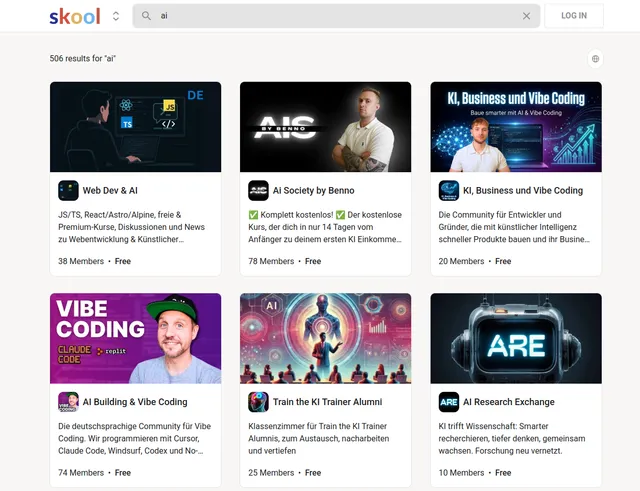
Example url 1: https://www.skool.com/discovery?p=2&q=ai&lang=German
Example url 2: https://www.skool.com/discovery?c=f08071afbd9746b6adb83522451cd280&p=3
Example url 3: https://www.skool.com/discovery?q=market&lang=english
Example Screenshot of profile list page:
Input Format
The scraper accepts a JSON configuration that allows precise control over the data extraction process. The input structure supports both URL-based extraction and filter-based searching.
Scrape with URLs:
The urls parameter: Add the URLs of the profile list pages you want to scrape from Skool.com. You can paste URLs one by one, or use the Bulk edit section to add a prepared list. Navigate to Skool's discovery section, apply your desired filters (keywords, language, etc.), then copy the resulting URL.
The ignore_url_failures parameter: If set to true, the scraper will continue running even if some URLs fail to load after the maximum number of retries. This ensures one problematic URL doesn't stop your entire scraping job.
When you provide a list of URLs for scraping, all options in the "Scrape with search filters" section will be disabled. The system will only collect data from the URLs you specified.
Scrape with Search Filters:
The keyword parameter: Enter the search keyword to find communities. This could be topic-related terms like "AI", "fitness", "marketing", "entrepreneurship", "coding", or any niche you're researching. The scraper will automatically search for communities matching this keyword.
The language parameter: Filter communities by language (e.g., "English", "German", "Spanish", "French"). This enables targeted research of communities in specific languages, valuable for international market analysis or multilingual community research.
The page parameter: Specify the page number to scrape from search results. This enables systematic pagination through community listings, allowing you to start from any page position and extract data progressively.
When using search filters for scraping, you need to leave the urls field empty in the "Scrape with URLs" configuration.
General Options:
The max_items_per_url parameter: Limit the number of community profiles per URL or search query you want to scrape. The default value is 20, providing a manageable batch size while allowing for comprehensive data collection.
The max_retries_per_url parameter: Limit the number of retries for each URL or search query if the scrape encounters errors or the page fails to load. The default value is 2, providing a balance between thoroughness and efficiency.
Output Format
The scraper returns structured community profile data with each field providing specific insights:
-
ID: Unique community identifier within Skool.com. Critical for tracking specific communities over time, building databases, preventing duplicates, and creating direct links to communities.
-
Name: Community name or title. Essential for identifying communities, understanding positioning, analyzing naming conventions, and recognizing brand presence.
-
Metadata: Additional community information including member counts, pricing, category, description snippets, and other relevant attributes. Provides comprehensive context about community size, type, monetization strategy, and positioning. Critical for segmentation and detailed analysis.
-
Created At: Timestamp when the community was created on Skool. Enables analysis of community age, identification of established vs. new communities, tracking platform growth trends, and understanding community lifecycle patterns.
-
Updated At: Timestamp of last community update or modification. Indicates active vs. dormant communities, reveals maintenance patterns, and helps identify engaged community owners versus abandoned projects.
-
Public: Boolean indicating if the community is publicly visible or private. Distinguishes open communities from exclusive/private groups, important for understanding accessibility and community strategy.
Each field serves specific purposes in community research, competitive analysis, creator outreach, and market intelligence gathering within the online community and education space.
Example Output Structure:
Usage Guide
Option 1: Scraping with URLs
To effectively use the Skool.com scraper with URLs, start by navigating to Skool's discovery page and applying your desired filters through their interface. Use keyword searches, language filters, or category selections to find the communities you're interested in, then copy the complete URL from your browser's address bar.
Configure your JSON input with the collected URLs. Set appropriate values for max_items_per_url to control how many community profiles you extract from each search results page. Enable ignore_url_failures if you're scraping multiple URLs and want to ensure completion even if some URLs encounter issues.
Best practices for URL-based scraping:
- Test URLs individually before batch processing to ensure they return expected results
- Organize URLs by topic, language, or research category for structured analysis
- Keep backup copies of working URLs as Skool's URL structure may evolve
- Monitor extraction progress for any access issues or blocked requests
- Verify URLs are still accessible before large extraction runs
Common troubleshooting steps:
- Verify URL format matches current Skool.com structure
- Check if search parameters in URL are still supported
- Adjust retry settings if experiencing intermittent failures
- Ensure URLs contain complete query parameters
Option 2: Scraping with Search Filters
Setting Up Search Criteria
Instead of manually creating URLs, use search filters to automatically discover communities. This method is ideal for systematic community research across topics, languages, or niches.
Step 1: Define Search Keyword
Enter a keyword parameter relevant to your research:
- Industry niches: "real estate", "e-commerce", "dropshipping", "consulting"
- Skills & education: "coding", "design", "writing", "public speaking"
- Health & wellness: "fitness", "nutrition", "yoga", "meditation"
- Business topics: "marketing", "sales", "entrepreneurship", "leadership"
- Technology: "AI", "blockchain", "web3", "software development"
- Creative fields: "photography", "music production", "content creation"
Step 2: Filter by Language
Use the language parameter to target specific linguistic markets:
- English-speaking markets: "English"
- European markets: "German", "French", "Spanish", "Italian"
- Global expansion: "Portuguese", "Japanese", "Korean"
- This enables multilingual market research and international community analysis
Step 3: Configure Pagination
Use the page parameter to control systematic extraction:
- Set to
1to start from the beginning of search results - Use incremental pages (2, 3, 4) for comprehensive coverage
- Resume interrupted scrapes by setting page to last position
- Plan page intervals based on
max_items_per_urlsetting
Step 4: Set Extraction Limits
Configure max_items_per_url based on your research scope:
- Start with 20 profiles for initial testing
- Increase for comprehensive market analysis
- Balance data volume against processing time and resources
Best Practices for Filter-Based Scraping
Keyword Strategy:
- Start with broad keywords to understand market landscape
- Narrow to specific niches for detailed analysis
- Test keywords on Skool.com first to verify they return results
- Use industry-standard terminology for best results
- Consider variations and related terms for comprehensive coverage
Language-Based Research:
- Research one language at a time for organized data collection
- Compare community characteristics across different languages
- Identify language-specific trends and opportunities
- Build multilingual community databases for international insights
Pagination Best Practices:
- Track page numbers systematically to avoid gaps
- Adjust
max_items_per_urlbased on communities per page - Handle end-of-results gracefully when pages exceed available data
- Use consistent page increments for complete coverage
Data Validation:
- Verify extracted communities match search criteria
- Check for duplicate communities across different pages
- Ensure metadata fields are populated correctly
- Cross-reference sample outputs with actual Skool.com listings
Common Issue Resolution
Keyword Matching Problems:
- Verify keyword spelling and formatting
- Test keywords directly on Skool.com first
- Try alternative or broader terms if searches return no results
- Consider related keywords in your niche
Language Filter Issues:
- Use exact language names as they appear on Skool.com
- Verify language is correctly capitalized (e.g., "English" not "english")
- Check if Skool.com supports the specified language filter
- Test language filters manually on the platform first
Pagination Challenges:
- Track page values to avoid skipping results
- Monitor for end of available results
- Adjust retry settings for pages that fail to load
- Verify page parameter format matches platform requirements
Advanced Research Techniques
Niche Market Analysis:
- Create comprehensive keyword lists for each niche
- Compare community sizes across different topics
- Identify emerging vs. established niches
- Track niche growth through temporal analysis
Competitive Intelligence:
- Research communities in your specific market
- Analyze competitor community strategies
- Compare pricing models and member counts
- Identify gaps in community offerings
Multilingual Market Research:
- Run parallel searches across multiple languages
- Compare community characteristics by language
- Identify language-specific market opportunities
- Build international community databases
Trend Identification:
- Track creation dates to identify growing topics
- Analyze update patterns for active niches
- Monitor public vs. private community ratios
- Identify seasonal community trends
Proxy Configuration
While the current configuration doesn't include proxy settings, for large-scale scraping or to avoid potential rate limiting, consider:
- Using residential proxies for natural browsing patterns
- Rotating IP addresses for high-volume extraction
- Implementing delays between requests
- Monitoring for access restrictions
Benefits and Applications
The Skool.com Profile Search Scraper delivers significant value for understanding the rapidly growing online community landscape and identifying market opportunities.
Primary Applications:
Competitive Community Research: Analyze competitor communities in your niche, compare member counts and engagement indicators, understand pricing strategies across similar communities, identify successful community positioning, and track competitor community growth over time.
Market Opportunity Identification: Discover underserved niches with few communities, identify trending topics with growing community counts, analyze market saturation by topic and language, find gaps between demand and community supply, and spot emerging educational markets.
Creator Outreach and Partnerships: Build databases of community creators for collaboration, identify communities aligned with your products or services, find partnership opportunities in complementary niches, locate influential community leaders for marketing, and discover affiliate or sponsorship opportunities.
Educational Market Research: Analyze trends in online education and community learning, compare paid vs. free community models, track adoption of community-based learning, identify successful educational niches, and understand pricing dynamics across categories.
International Expansion Research: Compare community landscapes across different languages, identify markets with high community density vs. sparse coverage, analyze cultural differences in community types, discover international growth opportunities, and build multilingual market intelligence.
Product Development Insights: Understand what topics attract community formation, identify common community features and structures, analyze successful community metadata patterns, discover underserved member needs, and validate product ideas through community analysis.
The scraper provides competitive advantages through:
- Dual extraction methods (URLs and filters) for research flexibility
- Language filtering enabling multilingual market analysis
- Temporal data revealing community lifecycle and trends
- Public/private indicators showing market accessibility
- Metadata extraction providing comprehensive community context
- Systematic pagination for complete market coverage
The structured output integrates seamlessly with analytical tools, CRM systems, market research platforms, and business intelligence dashboards, enabling immediate activation for strategic planning, partnership development, and market entry decisions.
Conclusion
The Skool.com Profile Search Scraper transforms manual community research into efficient automated data collection. By providing structured access to Skool's growing community ecosystem through both URL-based and filter-based extraction methods, it empowers businesses and creators to make data-driven decisions about community strategy, market entry, and partnership opportunities.
Whether you're researching competitive communities, analyzing educational market trends, identifying partnership opportunities, or building comprehensive community databases, this scraper provides the systematic extraction capabilities needed to accelerate your market intelligence gathering.
Ready to unlock insights from Skool's community ecosystem? Start extracting comprehensive community profile data today and transform your understanding of the online community and education landscape.
Your feedback
We are always working to improve Actors' performance. So, if you have any technical feedback about Skool Profile Listing Scraper or simply found a bug, please create an issue on the Actor's Issues tab in Apify Console.


