

Booking.com Reviews Scraper – Hotel Guest Reviews API
Pricing
from $0.50 / 1,000 results
Booking.com Reviews Scraper – Hotel Guest Reviews API
Scrape Booking.com hotel reviews by URL: score, liked and disliked text in separate fields, review language, guest country, traveller type, room, stay dates and the hotel's reply. Optional English translation and topic counts. No login or API key. Export CSV, Excel, JSON or call it as an API.
Pricing
from $0.50 / 1,000 results
Rating
0.0
(0)
Developer

Epic Scrapers
Maintained by CommunityActor stats
1
Bookmarked
1
Total users
1
Monthly active users
13 days ago
Last modified
Categories
Features
Share
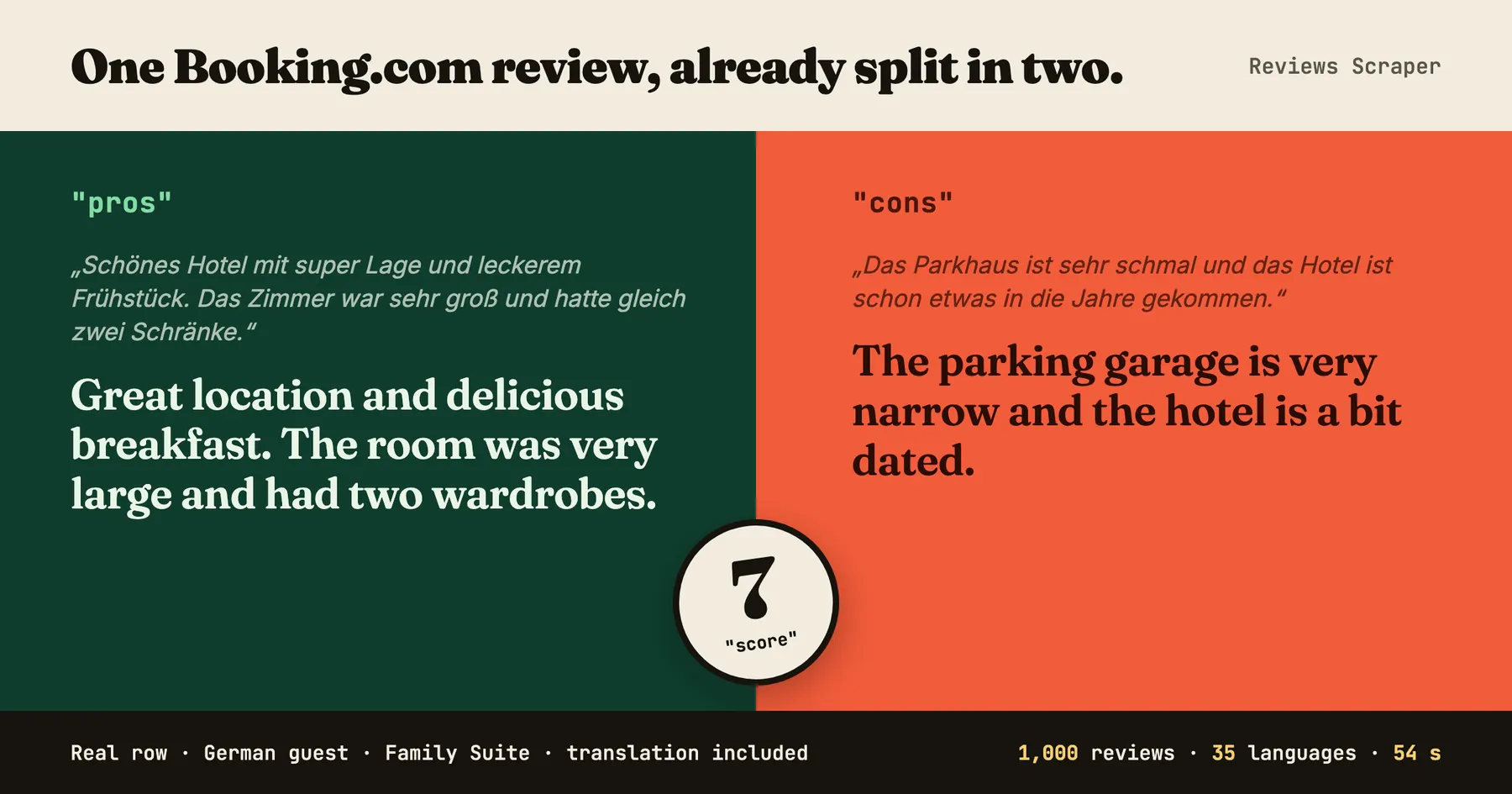
Booking.com Reviews Scraper and API: every guest review, in every language, with pros and cons in separate fields
Booking.com has no public reviews API. Its partner APIs need an approved affiliate or connectivity account, and they are built for selling rooms, not for reading what guests wrote. This Actor is the practical alternative: give it hotel URLs and it returns every guest review as one clean JSON row, newest first, through the Apify API, a schedule, or a CSV/Excel download.
It reads the same JSON API the Booking.com mobile app uses, so there is no browser, no HTML parsing and no login. A run of 1,000 reviews finishes in under a minute.
- Liked and disliked text are separate fields. Booking.com asks guests two questions. You get
prosandconsas two columns, so complaint analysis needs no text splitting and no LLM call. - Every language, not only English. In the newest 1,000 reviews of one Berlin hotel we found 35 languages; only 14% were in English. Turn on translation to add an English (or German, French, Spanish…) version next to the original.
- Every score from 1 to 10. Reviews come newest first with no relevance filter, so the 1s and 5s are there next to the 10s.
- The stay behind the review. Room name and ID, check-in and check-out, nights, traveller type, trip purpose and guest country.
- The hotel's reply, with its date, to measure response rate and response time.
- Guest photos as full-size image URLs.
- Pay per review. No subscription, no Booking.com account, no API key, no proxy setup.
Who uses it: hotel groups and reputation managers, revenue and competitive-intelligence teams, review-monitoring and hospitality SaaS products, data teams building sentiment models, and AI agents that need guest feedback as structured data.
Scope: reviews only. It does not search for hotels or return prices and availability.
What one run tells you
We ran it on Riu Plaza Berlin (12,121 reviews on Booking.com) and took the newest 1,000. Everything below comes straight from the output fields, with a group-by and nothing else.
| Question | Fields used | Answer from the run |
|---|---|---|
| Which room gets the best scores? | roomName, score | Family Suite 9.05 (167 reviews) vs Deluxe Twin Room 8.53 (499) |
| How many guests are unhappy? | score | 57 reviews scored 6 or lower, 8 of them a 1 |
| Does the hotel answer? | hotelierResponse | 313 of 1,000 reviews have a reply; 35 of the 57 low scores |
| Where do guests come from? | countryCode, language | 54 countries, 35 languages, 45% of reviews in German |
| Who stays? | reviewerType | 341 couples, 333 solo travellers, 247 families, 79 groups |
| How many wrote a complaint? | cons | 368 of 1,000 reviews have text in cons |
What can you do with Booking.com review data?
| Goal | How |
|---|---|
| Hotel reputation management | Schedule a daily run and alert on new reviews with a low score or an empty hotelierResponse. |
| Hotel competitor analysis | Run your hotel and five competitors together, then compare score, cons themes and reply rate per hotelId. |
| Track the review score over time | Average score per month from date. Booking.com's headline score moves slowly; your own average shows a change early. |
| Find recurring complaints | Group cons by roomName, travelPurpose or reviewerType. The text is already separated from the praise. |
| Sentiment analysis and NLP datasets | pros is labelled positive text and cons is labelled negative text, written by the same guest about the same stay. |
| Read foreign-language reviews | Turn on includeTranslations and read translation.pros and translation.cons. |
| Feed an AI agent or RAG pipeline | Call the Actor as a tool (see For AI agents) and pass the rows to your model. |
| Topic counts without any text mining | Turn on includeTopics for Booking.com's own counts: Breakfast 1,937, Location 1,857, Parking 907… |
Quick start
- Click Try for free and sign in to Apify.
- Paste one or more Booking.com hotel page URLs into Hotel URLs, for example
https://www.booking.com/hotel/de/riu-plaza-berlin.html. - Set Reviews per hotel. The default of
20is good for a first look. - Click Start, then open the Output tab and export to JSON, CSV, Excel, XML or HTML.
Use it as a Booking.com reviews API
Every Actor on Apify is an HTTP API. One request starts a run and returns the reviews as JSON:
Python, with the Apify client:
Add ?format=csv to the dataset URL for a spreadsheet, or connect the Actor to Google Sheets, Make, Zapier, n8n or a webhook from the Integrations tab.
How it compares with the official Booking.com APIs
| What you need | This Actor | Booking.com partner APIs |
|---|---|---|
| Access | Any Apify account, free plan included | Approved affiliate or connectivity partner only |
| Reviews of any hotel | Yes, by URL or hotel ID | Limited to what your partner agreement covers |
| Liked and disliked text | Separate pros and cons fields | Depends on the API and your access |
| Hotel replies, room, stay dates | Included in every row | Depends on the API and your access |
| Setup time | Minutes | Application and review process |
For AI agents
Actor ID: epicscrapers/booking-reviews-scraper. It is available as a tool through the Apify MCP server (https://mcp.apify.com?tools=epicscrapers/booking-reviews-scraper), so Claude, Cursor and other MCP clients can fetch Booking.com reviews without custom code.
Minimal input:
Key output fields (rows where recordType is "review"):
| Field | Meaning |
|---|---|
score | Guest score, 1 to 10 |
title, pros, cons | Review text in the guest's language; any of them can be null |
language, countryCode | Review language and guest country |
date, checkin, checkout, nightsStayed | When they wrote it and when they stayed |
roomName, reviewerType, travelPurpose | Stay context |
hotelierResponse | The hotel's reply, or null |
translation.pros, translation.cons | Present only with includeTranslations: true |
hotelId, hotelUrl, reviewId | Keys for joining and deduplicating |
Cost is one result per row, so maxReviews × number of hotels is the upper bound of a run. Invalid URLs produce a row with recordType: "error" instead of failing the run.
Monitor reviews with scheduled runs
Reputation work is about what changed since yesterday. Save your input as a task, then run it on a schedule.
- Set your input and click Save as a new task.
- In Apify Console open Schedules, click Create new, pick a frequency and add the task. See Schedules.
- In the task's Integrations tab, send each run to Google Sheets, Slack, a webhook or your own database.
| Use case | Frequency | Cron expression |
|---|---|---|
| New review alerts | Daily | 0 6 * * * |
| Weekly reputation report | Monday | 0 6 * * 1 |
| Competitor benchmark | Monthly | 0 6 1 * * |
| Peak season watch | Twice a day | 0 6,18 * * * |
Reviews come newest first, so a small maxReviews (for example 50 per hotel per day) is enough for monitoring and keeps the cost low. Compare runs with these keys:
- New reviews:
reviewIdvalues that were not in the previous run. - Unanswered reviews: rows where
hotelierResponseisnull. - Score trend: average
scoreperhotelIdper month ofdate. - Volume:
totalReviewsfrom thehotelReviewMetadatarow whenincludeTopicsis on.
Input reference
| Field | Type | Default | Effect |
|---|---|---|---|
urls | Array of strings | Empty | Booking.com hotel page URLs (booking.com/hotel/...). Any language version of the page works. |
hotelIds | Array of strings | Empty | Numeric Booking.com hotel IDs, instead of or together with URLs. Provide at least one URL or ID. |
maxReviews | Integer | 20 | Newest reviews saved per hotel. Minimum 1, no upper limit. |
includeTranslations | Boolean | false | Adds a translation object to reviews written in another language. One extra request per review, so the run is slower. |
translationLanguage | String | Empty | Target language such as en, de, fr, es, it, nl, pt. Empty means the language of language. |
includeTopics | Boolean | false | Saves one extra hotelReviewMetadata row per hotel with total review count and topic counts. |
language | String | "en-us" | Locale sent to Booking.com. It does not filter reviews: you always get every language. |
rowsPerPage | Integer | 25 | Reviews requested per API call, 1 to 100. Use 100 for large runs. |
proxyConfiguration | Object | Empty | Optional. The Actor works without a proxy; for very large runs Apify Proxy spreads the load, with one sticky session per hotel. |
A hotel that appears twice, for example once as a URL and once as an ID, is scraped once.
Output
Results go to the run's default dataset. Every row has a recordType: review, hotelReviewMetadata or error.
A real review row, with translation turned on (the hotel's reply is shortened here):
With includeTopics, each hotel also gets one row before its reviews:
If a URL can't be resolved or a hotel fails, you get a row with recordType: "error", the hotelUrl or hotelId, and an error message. The other hotels continue.
Notes on fields
scoreis the guest's score on Booking.com's 1 to 10 scale.prosandconsarenullwhen the guest left that box empty. Many guests give a score and a title only.titleis the guest's own title, or Booking.com's label for the score (such as "Pleasant") when they wrote none.dateis the review time as Booking.com returns it, without a time zone.hotelierResponseDateis an ISO timestamp in UTC.languageis the review's language code, such asde,en-gborpt-br.translationappears only on reviews that have text, are written in another language than the target, and for which Booking.com has a machine translation. In our test that was about 6 in 10 foreign-language reviews.photosholds the guest's own photos.roomPhotoUrlis the hotel's photo of the room.timeOfYearcounts in the metadata row are often0; Booking.com sends the labels without counts for many hotels.reviewIdandhotelIdare strings.hotelUrlisnullwhen you supplied only a hotel ID.
FAQ
Is there an official Booking.com reviews API?
Not a public one. Booking.com's APIs are for approved affiliate and connectivity partners. This Actor gives you the public guest reviews of any hotel as JSON, with an Apify account as the only requirement.
How many reviews can I get per hotel?
As many as the hotel has. Set maxReviews high and the Actor pages through them, newest first, until it reaches your limit or the end. Turn on includeTopics to see totalReviews first.
How fast is it?
1,000 reviews of one hotel took 54 seconds in our test with rowsPerPage at 100. Translation adds about half a second per foreign-language review.
Why did I get fewer reviews than I asked for?
The hotel has fewer reviews than your limit. Duplicates are removed before saving.
Can I get only reviews in one language, or only low scores?
The Actor returns all of them, newest first. Filter the output on language or score; both are plain fields, so this is one line in a spreadsheet, SQL or pandas.
Which URLs work?
Hotel page URLs such as https://www.booking.com/hotel/de/riu-plaza-berlin.html, including language versions like .de.html and URLs with search parameters. Apartments, hostels and other property types on booking.com/hotel/... work the same way. Use hotelIds when you already have the IDs.
Can I scrape many hotels in one run?
Yes. Add as many URLs and IDs as you like; they are processed one after another and a failing hotel does not stop the others.
Do I need a proxy, a Booking.com account or an API key?
No. The Actor needs none of them. A proxy is optional for very large runs.
Can I show these reviews on my website?
The data is yours to process, but showing guest reviews publicly has legal and contractual limits. Check Booking.com's terms and the rights of the reviewers first.
Is it legal to scrape Booking.com reviews?
The Actor collects publicly visible reviews. They include reviewer first names and countries, which can be personal data. You are responsible for how you use them, including Booking.com's terms and laws such as GDPR.
Cost
Pay per event, with no subscription. Prices depend on your Apify plan.
| Event | Free | Bronze | Silver | Gold and above | Charged when |
|---|---|---|---|---|---|
| Actor start | $0.005 | $0.005 | $0.001 | $0.001 | Once per run, per GB of run memory. |
| Result (dataset item) | $0.005 | $0.0015 | $0.0012 | $0.0005 | Each row saved to the dataset. |
1,000 reviews cost $0.50 on Gold, $1.20 on Silver, $1.50 on Bronze and $5 on the Free plan. hotelReviewMetadata and error rows count as results too. The Pricing tab always shows the current prices. Set a maximum cost per run and the run stops when it is reached.
Support
Report problems or request features in the Issues tab. Include the run ID, the input and what you expected.
Related Actors
- Agoda Reviews Scraper: guest reviews from Agoda.
- Airbnb Reviews Scraper: guest reviews from Airbnb.
- Agoda Listing Scraper: Agoda hotel listings and prices.
- Airbnb Scraper: Airbnb listings and prices.
This Actor is not affiliated with or endorsed by Booking.com. "Booking.com" is a trademark of Booking.com B.V.


