

Booking.com Scraper: Hotel Prices, Ratings, Deals & Alerts
Pricing
from $1.40 / 1,000 hotel price delivereds
Booking.com Scraper: Hotel Prices, Ratings, Deals & Alerts
Booking.com scraper & hotel price API: hotels of any city for your dates with price per night, review score and count, stars, free cancellation, breakfast, distance to centre, deals. Price calendars over many dates, cheapest and best-value hotel per city, price-drop alerts.
Pricing
from $1.40 / 1,000 hotel price delivereds
Rating
0.0
(0)
Developer

EuroScrape
Maintained by CommunityActor stats
0
Bookmarked
2
Total users
1
Monthly active users
14 hours ago
Last modified
Categories
Share
Every hotel of a city for your dates, as rows: price per night and total, guest score and number of reviews, stars, free cancellation, breakfast, distance to the centre, deals. Give it one or several cities and a check-in date, or thirty check-in dates for a price calendar, and get back what Booking.com shows a traveller, in the currency you choose, with a free summary per destination: median price, cheapest hotel, best value, price drops since yesterday.
- 🏨 Any destination: cities, districts, lakes or landmarks, as typed on Booking.com, in 40+ languages.
- 📅 Price calendars: the same search for 7, 30 or 90 check-in dates in a row, or the same weekday every week.
- 🧾 Rate conditions: free cancellation, breakfast included, rooms left at this price, taxes included or not, the room offered.
- 📊 Free summary per destination and date: median, lowest and highest price per night, median score, share of free cancellation, median price by stars, cheapest and best-value hotel.
- 🔔 Price-drop alerts: name a monitor and schedule the Actor; each run compares with the previous one and sends drops to Telegram, Discord, Slack or a webhook.
✨ Why this Actor
| 💶 Prices as numbers | Per night and for the stay, before and after a shown discount, with the currency and whether taxes are included. |
| 🎯 Filters that match the site | Review score, stars, property type, free cancellation, breakfast, price range: the same filters as Booking.com, applied by the site, so the counts are the site's counts. |
| 🧭 Best value, not just cheapest | The summary names the cheapest hotel and the best-value one (score 8 or more, at least 50 reviews, lowest price). |
| 🔁 Monitoring built in | A monitor name turns any search into a daily watch: changeType, previous price and change in % on every row. |
| 💸 Pay per hotel | $0.002 per hotel and stay delivered. Summaries and the first baseline of a monitor are free. |
🎯 Use cases
- Travellers and travel agents: the cheapest week to go, the hotels under a budget with free cancellation, an alert when a price drops.
- Hotels and revenue managers: the competitive set of a city for the next 30 days, median price by stars, who discounts and by how much.
- Rental investors and analysts: median prices and occupancy signals (rooms left) for a district, dates and seasons.
- Media and research: price levels of European cities for the same dates, in one currency.
🚀 Examples
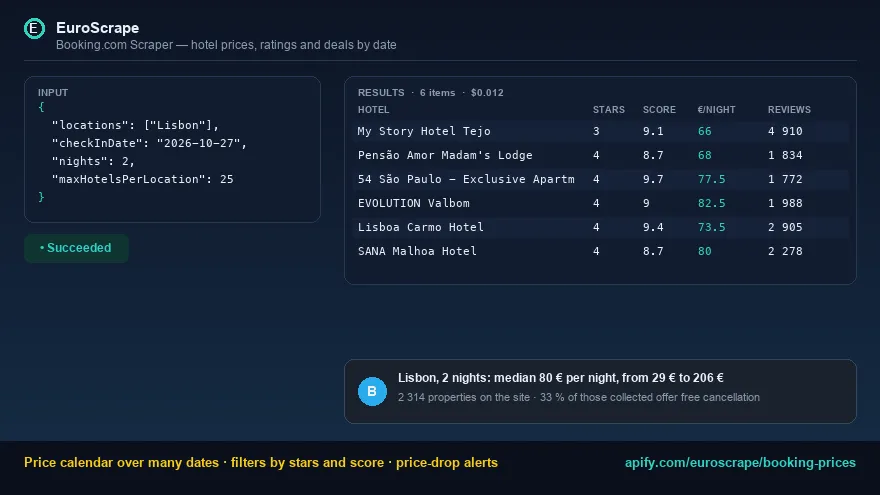
Lisbon, two nights in two weeks, 50 hotels, prices in euros:
Price calendar: Paris, every day of November, 4-star hotels rated 8 or more, free cancellation:
Daily watch of three cities with price-drop alerts on Telegram:
📦 Output
One row per hotel and stay (type: "hotel") and one free destinationSummary row per location and date. Two ready-made views, Hotels and Destination summary; exports to JSON, CSV or Excel.
A hotel (real data, Lisbon, two nights):
The destination summary:
🧮 How the numbers are computed
- Prices are read as Booking.com shows them to a visitor for your dates, guests and rooms, in the currency you choose (
selected_currency), with Booking's own discount when there is one.pricePerNightis the stay price divided by the nights. - Summary medians use every hotel collected for that location and date (set
maxHotelsPerLocationto 100 or more for a market view, and leavesortByon Booking's default rather thanprice_asc, which would bias the medians). - Best value: among hotels with a score of 8 or more and at least 50 reviews, the lowest price per night.
- Monitoring compares the price per night of each hotel with the previous run of the same monitor name, location, check-in date and stay length.
💰 Pricing
| Event | Price |
|---|---|
| Hotel price delivered (one hotel, one stay) | $2 / 1,000 |
| Run start | $0.003 |
| Destination summaries, monitor baseline | free |
A city for 30 check-in dates with 25 hotels each costs about $1.50. Apify subscribers pay less: −10% (Starter), −20% (Scale), −30% (Business). Set a maximum cost per run in the run options and the Actor stops cleanly when it is reached.
❓ FAQ
Is the price the final price? It is the price Booking.com shows in the results for your search, taxes included when Booking says so (taxesIncluded). Some destinations add city taxes at the property; Booking shows that on the hotel page, not in the results.
Why fewer hotels than propertiesOnSite? maxHotelsPerLocation caps what is collected (25 per page, up to 1,000); the site's total is kept in the summary.
What does status: "blocked" mean? Booking.com sometimes answers a bot challenge instead of results. The Actor retries through other IPs, then residential ones; if every attempt is challenged, the search is reported as blocked and nothing is charged for it. Run again later or with a residential proxy group.
Can I watch one hotel rather than a city? Search its district with maxHotelsPerLocation large enough and filter the dataset on hotelSlug; a hotel-page mode is on the roadmap.
Is this personal data? No: hotels are businesses, and nothing about guests or reviewers is collected.
🔌 API, AI agents and integrations
- API: one call runs the Actor and returns the results,
POST https://api.apify.com/v2/acts/euroscrape~booking-prices/run-sync-get-dataset-items(see the API tab for Python, JavaScript and cURL). - AI agents (MCP): add
https://mcp.apify.com?tools=euroscrape/booking-pricesto Claude, Cursor, VS Code or any MCP client, and the Actor becomes a tool your agent can call. - No-code automation: start runs and pass the results on with Apify's integrations for n8n, Make and Zapier, or with a webhook when a run ends.
- Exports: every result set downloads as JSON, CSV, Excel or XML, and can be sent to Google Sheets.
⭐ Your feedback
Found a bug or missing a field? Open an issue on the Actor's Issues tab. A short review on the Apify Store helps other users find this Actor.
🔗 More from EuroScrape
- Google Hotels Scraper (Google Travel): Prices on Booking Sites: hotel prices for any destination and dates with the price on every booking site, rate parity and price calendars.
- Google Flights Scraper: Cheapest Dates, Prices & Price History: flight prices for any route and dates, cheapest day to fly and price-drop alerts.
- Ryanair Low Fare Finder: Cheapest Days, Anywhere & Alerts: the cheapest day of the month on a route, every destination under a price cap.
- AutoScout24 Scraper: Used Cars in 8 Countries, Deals & Alerts: used cars across eight countries with the market price of similar cars.
- App Store Reviews Scraper + Google Play Reviews (All Countries): newest reviews of any app in 58 countries, with a summary per country and version.


