

Booking.com Scraper - Hotels, Reviews, Prices & Availability
Pricing
from $0.002 / hotel
Booking.com Scraper - Hotels, Reviews, Prices & Availability
Scrape Booking.com hotels for any destination or hotel: guest reviews (incl. rating-only), live prices, room rates, availability and occupancy, plus a forward availability calendar. Search a city or country, or paste hotel links. Structured JSON/CSV, no code, no login.
Pricing
from $0.002 / hotel
Rating
5.0
(4)
Developer

Factden
Maintained by CommunityActor stats
5
Bookmarked
42
Total users
11
Monthly active users
25 days ago
Last modified
Categories
Share
Scrape Booking.com hotels at scale — guest reviews (including rating-only), live prices, per-room rates, availability & occupancy (rooms left, sold-out), and a forward availability calendar. Search a whole city or country, or paste hotel links, and get clean JSON, CSV or Excel — no code, no login, no Booking.com account.
▶ Watch the walkthrough: https://www.youtube.com/watch?v=mxaye6x1E8U
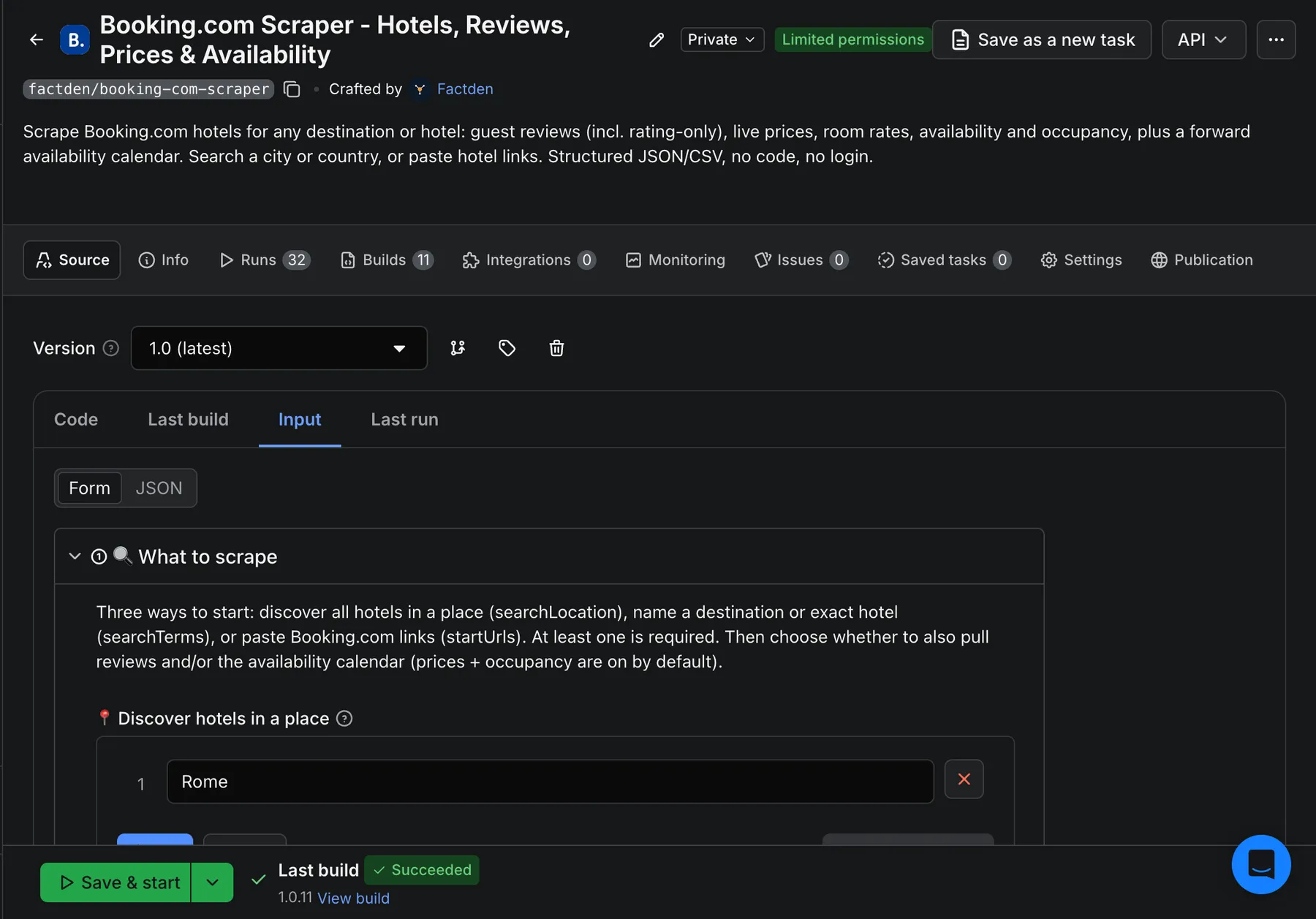
What does Booking.com Scraper do?
Booking.com Scraper turns any Booking.com destination or hotel into structured data. Give it a place (Rome, Bali, Germany) to discover every hotel there, an exact hotel name, or Booking.com links, and it returns one clean row per hotel plus separate datasets for reviews and availability. It runs on the Apify platform, so you get API access, scheduling, proxy rotation, storage, and integrations (Make, Zapier, n8n, Google Sheets) out of the box.
Four things it extracts, each toggle-able:
- Prices & occupancy (on by default) — gross / net / per-night price, per-room rates, rooms left, sold-out rooms, scarcity ("We have 2 left").
- Guest reviews — score, positive/negative text, reviewer country, traveller type, stay date, room type, and the hotel's reply. Includes rating-only reviews (a score with no text).
- Availability calendar — a forward day-by-day calendar of price and availability.
- Discovery — expand a city/region/country into all of its hotels.
What data can I extract from Booking.com?
The actor writes to four datasets so each record type stays clean and tabular:
| Dataset | One row per | Key fields |
|---|---|---|
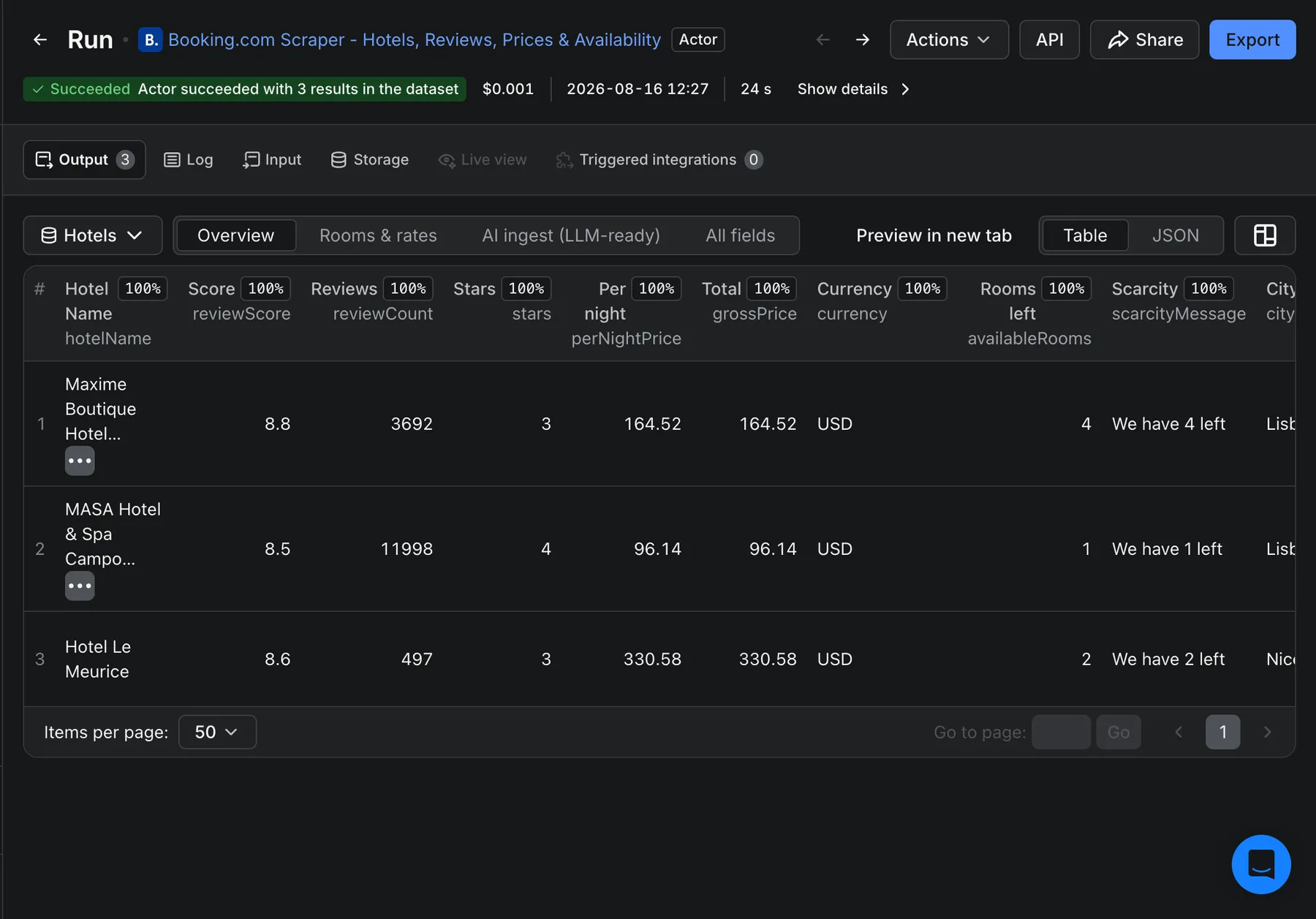
| Hotels (default) | hotel | hotelId, hotelName, stars, reviewScore, reviewCount, perNightPrice, grossPrice, netPrice, currency, availableRooms, scarcityMessage, rooms[], city, country, latitude, longitude, url, markdownContent |
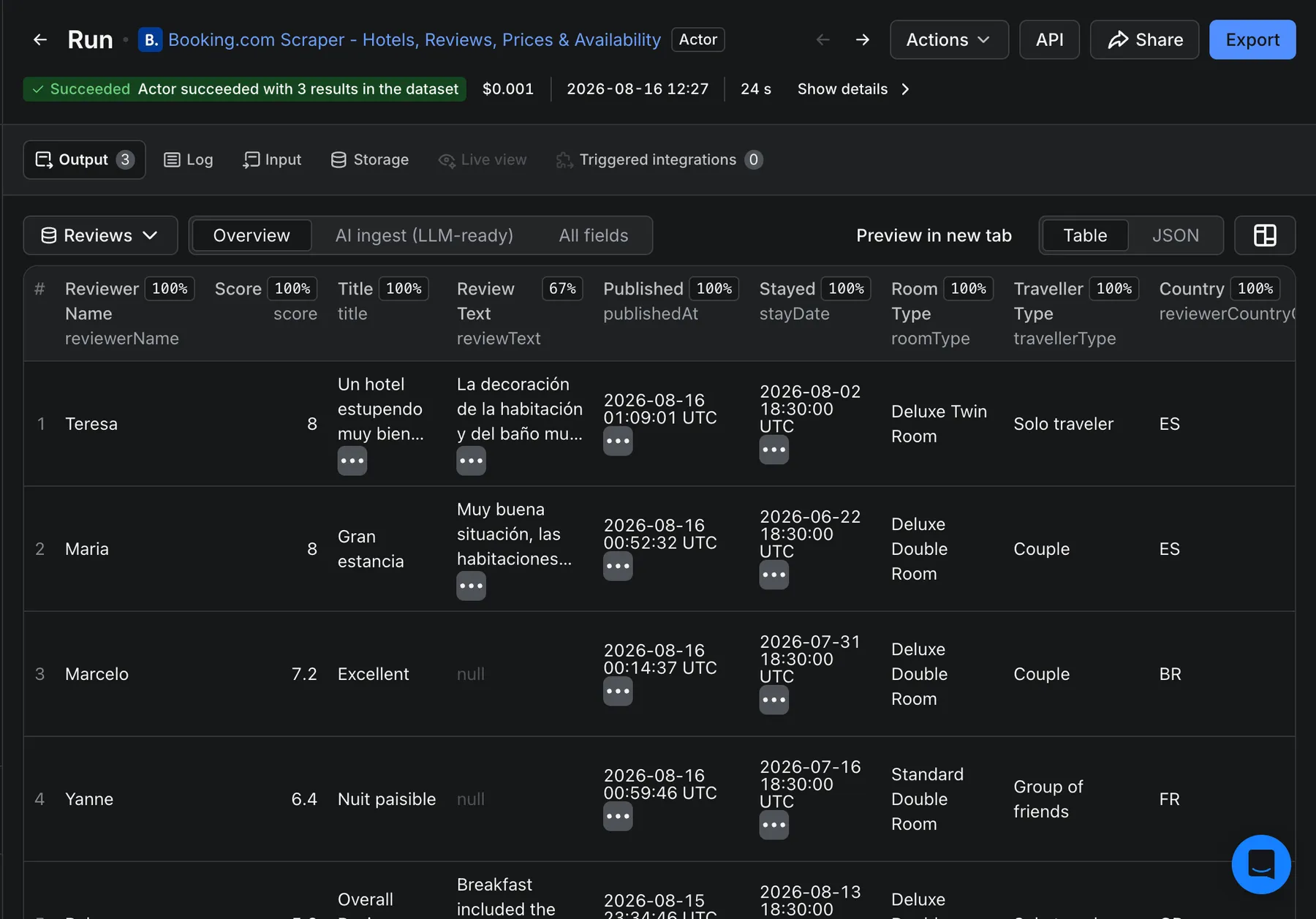
| Reviews | guest review | score (0-10), title, reviewText, textPositive, textNegative, reviewerName, reviewerCountryCode, travellerType, roomType, stayDate, stayNights, publishedAt, hotelierResponse, isRatingOnly |
| Calendar | day | date, available, minPrice, currency, lengthOfStay |
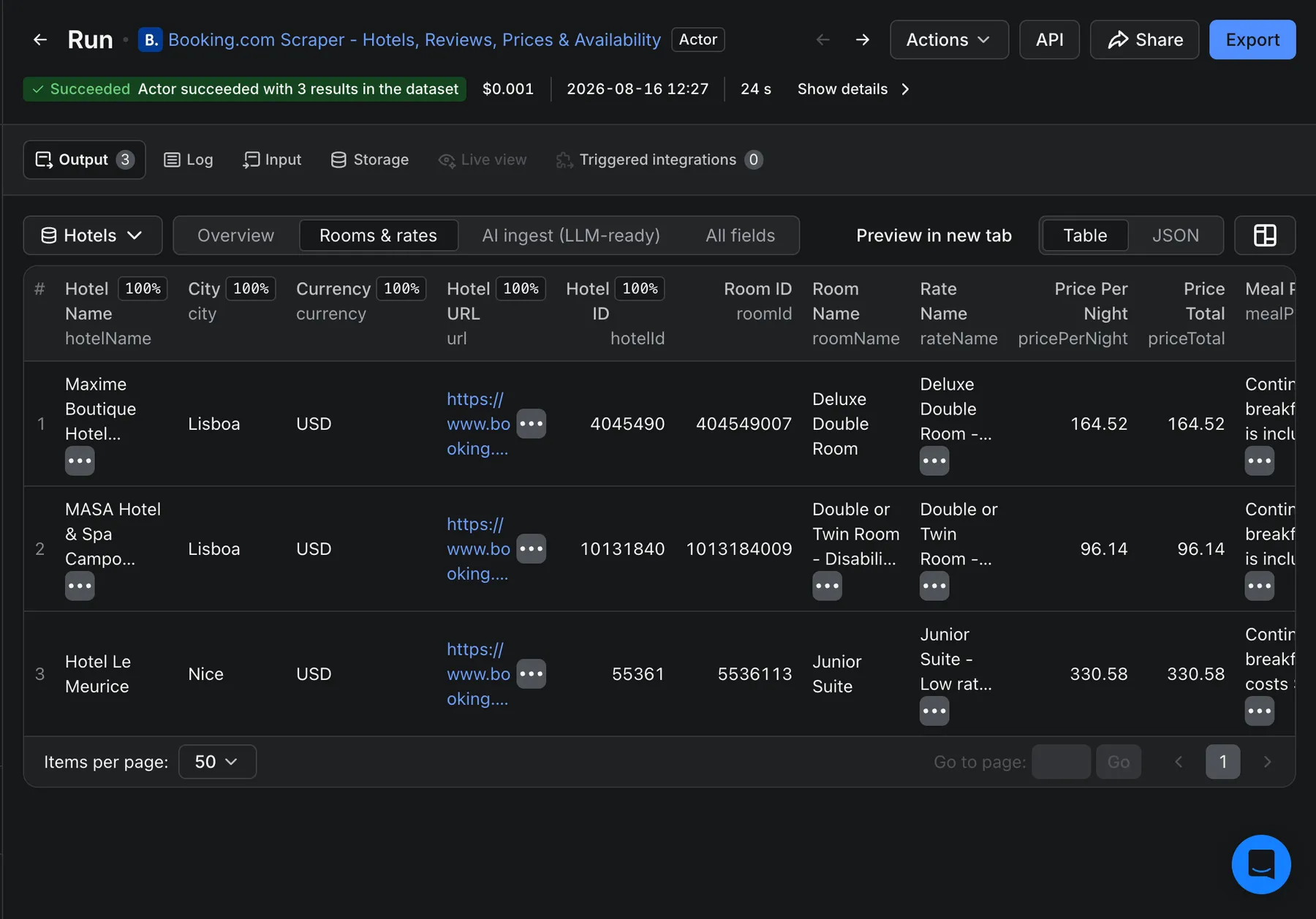
| Rooms & rates (a view of Hotels) | bookable rate | roomName, rateName, pricePerNight, priceTotal, mealPlan, breakfastIncluded, refundable, freeCancellationUntil, maxOccupancy, roomSurfaceM2 |
What makes this different?
- All four in one actor. Most Booking.com tools do reviews or prices or discovery. This one does discovery + prices + occupancy + reviews + calendar in a single run.
- Search a place, get every hotel. The
searchLocationfield expands a city/region/country into all its hotels — you don't need to paste URLs. - Complete reviews, including rating-only. No 500-review cap; it returns every written review plus the score-only ones other scrapers drop.
- Per-room rate matrix. A "Rooms & rates" view unwinds every bookable rate with its price, meal plan and cancellation terms.
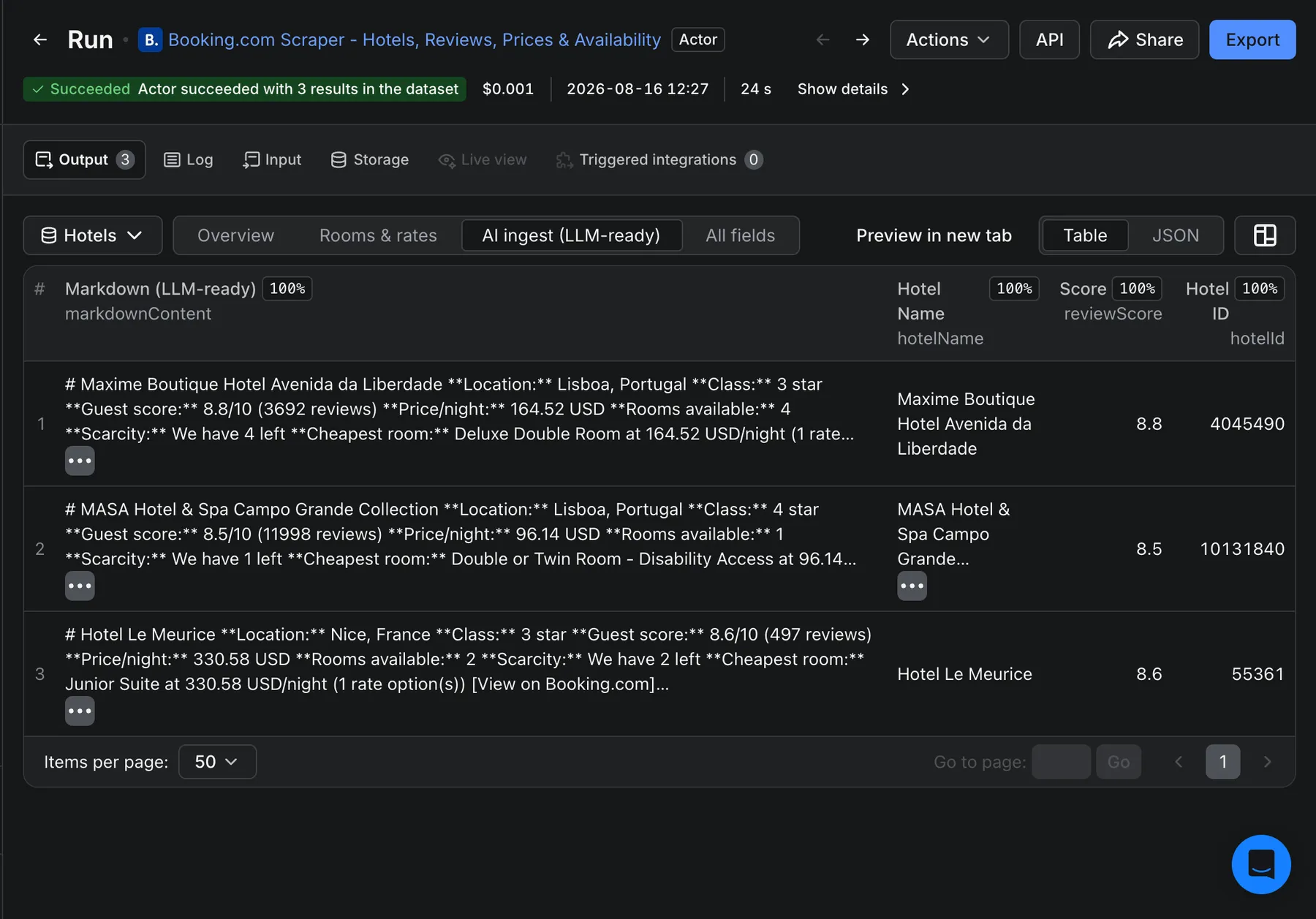
- LLM-ready. Every hotel and review carries a
markdownContentblock for RAG / vector-DB ingestion.
How to scrape Booking.com step by step
- Click Try for free and open the input form.
- Enter a place in Discover hotels in a place (e.g.
Rome), or an exact hotel name in searchTerms, or paste Booking.com links in startUrls. - Choose what to pull: prices & occupancy (on by default), reviews, and/or the availability calendar.
- (Optional) set check-in/out dates, guests, currency, language, and Min rating / price filters.
- Click Save & start. When it finishes, Export the Hotels, Reviews and Calendar datasets as JSON, CSV, or Excel — or pull them from the API.
Booking.com API vs this scraper
Booking.com has no public data API for hotels, prices or reviews — its Connectivity/Demand APIs are for accredited partners managing their own inventory, not for market research. This scraper gives any user structured Booking.com data with no partner accreditation, no keys, and no per-call contract: search-by-place discovery, prices, occupancy, reviews and a calendar, delivered as JSON/CSV.
Who is it for?
Revenue managers and hotels (rate parity, comp-set pricing), OTAs and travel startups (catalog + availability), market researchers and analysts (guest sentiment, occupancy signals), and AI teams building travel assistants that need real hotel data.
Common use cases
Rate shopping & comp-set pricing
Track a competitor set's per-night prices and per-room rates over time by scheduling daily runs on a fixed hotel list or a city.
Full-market discovery
Point searchLocation at a city or country to build a complete hotel catalog with scores, stars, geo and lead prices.
Guest-sentiment datasets
Pull every review (with text, score, traveller type, stay date and the hotel's reply) into a dataset for NLP or a RAG knowledge base.
Availability & occupancy monitoring
Use the availability calendar and availableRooms / scarcityMessage to watch demand and sell-out patterns across dates.
Input
Provide at least one of these three (combine freely):
| Field | What it does |
|---|---|
searchLocation | A city / region / country per line (Rome, Bali, Germany) → discovers every hotel there. |
searchTerms | A destination or hotel name → a city's hotels, or that one hotel. Name matching works best with a clean, distinctive name; for one exact hotel every time, use a startUrls link instead. |
startUrls | Booking.com hotel or search URLs (plain list or [{"url": "..."}] objects). Resolved by page slug (a stale dest_id in the URL is ignored). The most reliable way to target one exact hotel. |
Data toggles: includePrices (default on — price breakdown + per-room rates + occupancy), includeReviews, includeAvailabilityCalendar. Stay: checkInDate, checkOutDate, adults, children, childrenAges, rooms. Discovery filters: maxResults, minGuestRating, minPrice, maxPrice. Reviews: maxReviews, reviewsSort, reviewLanguages. Market: currency (25 options) and language (20 options). Plus proxyConfiguration.
Output
Hotels (default dataset) — one flat row per hotel:
Reviews dataset — one row per guest review (rating-only reviews included, flagged isRatingOnly):
Calendar dataset — one row per forward day: { "date": "2026-08-17", "available": true, "minPrice": 331, "currency": "USD" }.
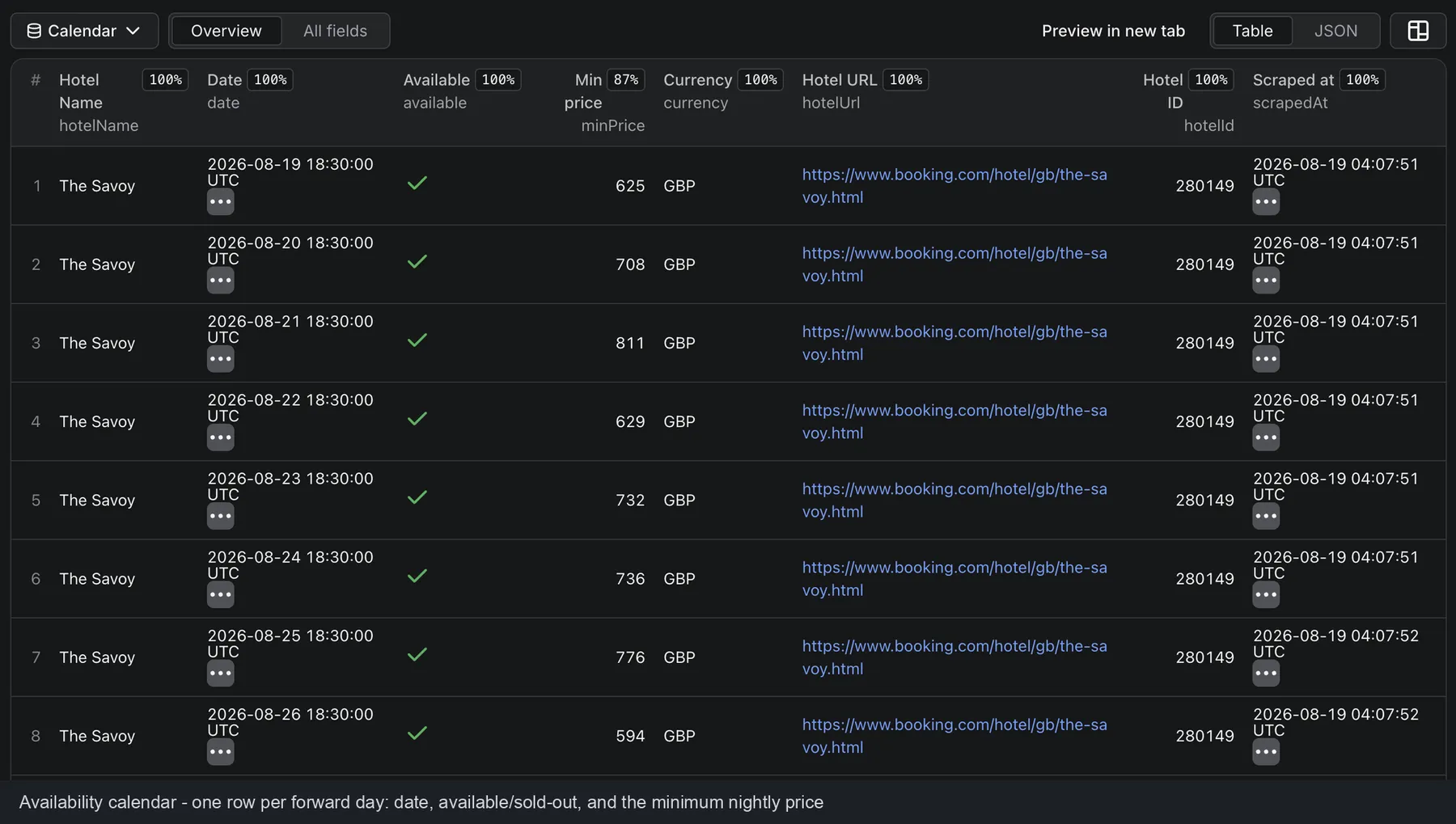
You can download every dataset as JSON, CSV, Excel, HTML or XML, or read it from the Apify API.
How much does it cost to scrape Booking.com?
Pay-per-result, no start fee. You are charged only for what you pull:
| Event | Price / 1,000 |
|---|---|
| Hotel returned | $3.00 |
| Prices & availability (per priced hotel) | $5.00 |
| Review returned | $1.00 |
| Availability-calendar day | $0.50 |
A typical "50 hotels with prices + 20 reviews each" run costs well under a dollar. Turn off reviews or the calendar to pay only for what you need. New Apify accounts get free monthly usage credit to start.
Run it on a schedule
Use Apify Schedules to run daily/weekly for price tracking or fresh reviews, and wire the dataset into Make, Zapier, n8n, Google Sheets, or a webhook so new data flows straight into your stack.
AI agents & RAG
Every hotel and review row includes a self-contained markdownContent block — drop it straight into a vector DB or an LLM prompt with no reshaping. The actor is also discoverable by AI agents through the Apify MCP server.
Data & compliance
The actor collects publicly available information from Booking.com. Review text may contain personal data (reviewer names) — if you store it, process it in line with GDPR/CCPA and your own legal basis. Use the data responsibly and respect Booking.com's Terms.
Other travel & review scrapers by FactDen
- Zomato Restaurant Reviews Scraper - Zomato restaurant reviews & owner responses, plus restaurant leads (phone, address, GPS) by city & cuisine
- Traveloka Hotel & Activity Reviews Scraper - Traveloka hotel & Xperience activity reviews: 1-10 ratings, category sub-scores, owner replies & English translation
- Google Hotels Scraper — hotel prices, OTA rate ladder and reviews from Google Hotels.
- Expedia Hotel Reviews Scraper — reviews and ratings from Expedia.
- Hotels.com Reviews Scraper — reviews from Hotels.com.
- Ctrip / Trip.com Reviews Scraper — reviews from Trip.com / Ctrip.
- Agoda Hotel Reviews Scraper — reviews from Agoda.
- TripAdvisor Hotel Reviews — reviews and ratings from TripAdvisor.
- MakeMyTrip & Goibibo Reviews Scraper — hotel reviews & details from India's largest OTAs.
- Airbnb Data Scraper — Airbnb listings, prices, availability, occupancy and reviews.
FAQ
Does Booking.com have a reviews or prices API?
Not for the public. Booking.com's partner APIs require accreditation and are for managing your own listings. This scraper is the practical way to get Booking.com hotel, price and review data as structured JSON/CSV.
Can I discover all hotels in a city instead of pasting URLs?
Yes — put the city, region or country in Discover hotels in a place (searchLocation) and the actor returns every hotel there, paginated and de-duplicated.
Can I get all reviews for a hotel, including ones with no text?
Yes. There's no 500-review cap, and rating-only reviews (a score with no written text) are included and flagged isRatingOnly.
Can I get prices for specific dates?
Yes — set checkInDate / checkOutDate (and guests/rooms). For a multi-day view of price and availability, turn on the availability calendar.
Which currencies and languages are supported?
25 currencies (USD, EUR, GBP, INR, JPY, MYR, VND, PHP, TRY, and more) and 20 display languages.
Can I use it with the Apify API?
Yes — start runs and read datasets via the Apify API or the JS/Python clients.
Can I use it through an MCP server?
Yes — the actor is available through the Apify MCP server, so AI agents can call it directly.
Can I integrate it with Make, Zapier, n8n or Google Sheets?
Yes — through Apify's native integrations and webhooks.
Is it legal to scrape Booking.com?
Scraping publicly available data is generally lawful, but you are responsible for how you use it. Follow Booking.com's Terms and applicable data-protection law, especially for any personal data in reviews.
Support
Found an issue or need a field the actor doesn't return yet? Open an issue on the Issues tab — we actively maintain this actor and take feature requests.
⭐ If this actor saves you time, a rating or bookmark on the Apify Store really helps.
Changelog
- 2026-08-16 — Added
searchLocation(discover all hotels in a place), 25 currencies / 20 languages, per-room rates & "Rooms & rates" view,stayDate/stayNightson reviews, Min/Max price discovery filters, and sorted availability calendar. - 2026-08-13 — Initial release: discovery + prices + occupancy + reviews + availability calendar.


