

Expedia Reviews Scraper ✈️ Hotel Ratings, Text & Sentiment
Pricing
from $0.002 / review
Expedia Reviews Scraper ✈️ Hotel Ratings, Text & Sentiment
Scrape Expedia hotel reviews at scale - guest ratings, full review text, reviewer, review date, guest photos & hotel owner responses, plus LLM-ready markdown. Also accepts Hotels.com, Travelocity, Orbitz, Wotif, CheapTickets & ebookers URLs. Filter by date & rating; export JSON/CSV.

Expedia Reviews Scraper
Scrape Expedia hotel reviews at scale - guest ratings, full review text, category sub-ratings, stay dates, traveler type, language, and hotel owner responses - plus a per-review LLM-ready markdown block. Paste one or more Expedia hotel URLs and export clean JSON, CSV, Excel, or via API. No login, no Expedia API key.
One actor, all seven Expedia Group sites - Expedia, Hotels.com, Travelocity, Orbitz, Wotif, CheapTickets & ebookers. Paste any of their hotel URLs and get the same fields, same output schema. A single actor replaces seven separate scrapers.
Runs on the Apify platform, so you get scheduling, a REST API, webhooks & integrations, proxy rotation, and run monitoring out of the box - plus incremental / since-date runs so you only pull what's new.
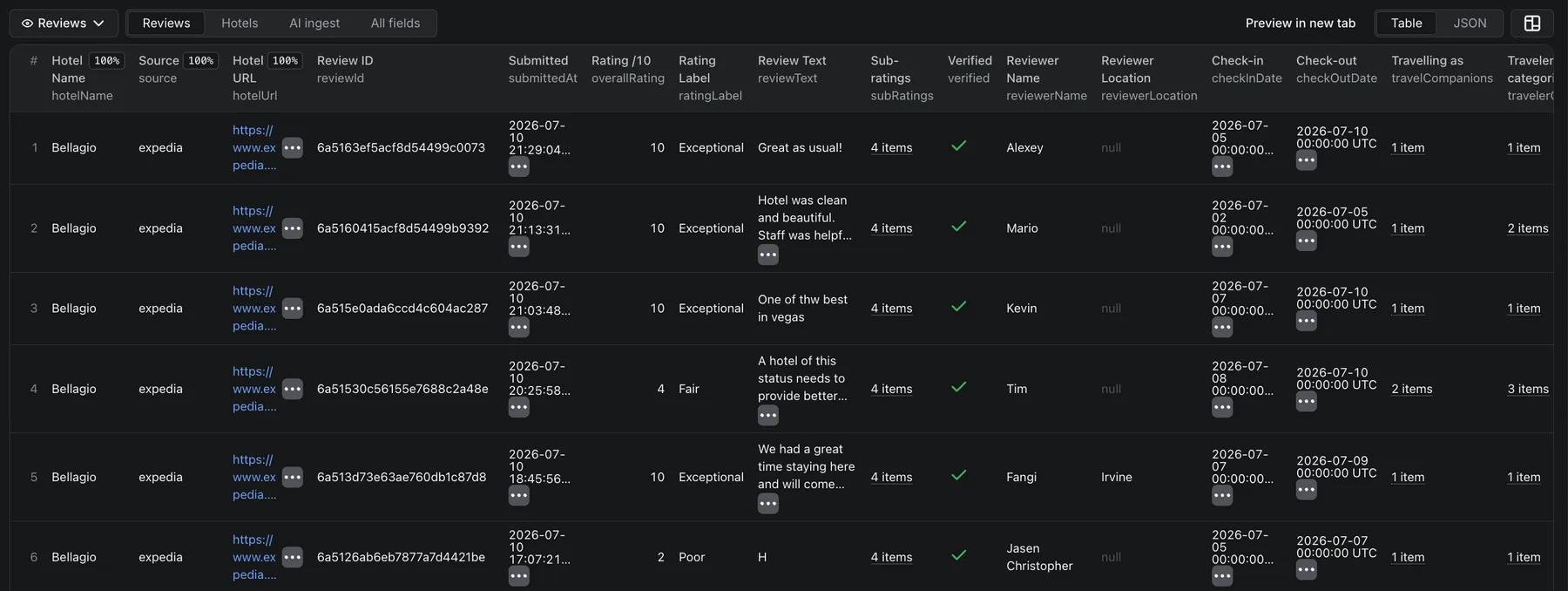
Supported sites - all 7 Expedia Group brands in one actor
This actor covers every Expedia Group hotel brand from one input. They share Expedia's backend, so the same property resolves across brands and the output schema is identical no matter which brand URL you paste:
| Brand | Example hotel URL to paste |
|---|---|
| Expedia | https://www.expedia.com/Las-Vegas-Hotels-Bellagio.h140596.Hotel-Information |
| Hotels.com | https://www.hotels.com/ho119566/ |
| Travelocity | https://www.travelocity.com/...h140596.Hotel-Information |
| Orbitz | https://www.orbitz.com/...h140596.Hotel-Information |
| Wotif | https://www.wotif.com/...h140596.Hotel-Information |
| CheapTickets | https://www.cheaptickets.com/...h140596.Hotel-Information |
| ebookers | https://www.ebookers.com/...h140596.Hotel-Information |
Hotels.com /ho<id>/ links are resolved automatically to the global property, and every Expedia Group brand
(Hotels.com, Travelocity, Orbitz, Wotif, CheapTickets, ebookers) works in the same run. Each property returns its
full unified review pool.
What does Expedia Reviews Scraper do?
It extracts the public guest reviews for any Expedia Group hotel you point it at, and returns a clean, structured record per review - the overall /10 rating and label, the written review text, the reviewer name, the review date, guest photos, sentiment highlights, and any hotel owner / management response - plus a per-review LLM-ready markdown block. Alongside the reviews it returns a hotel aggregate: the overall score, total review count, and the property's category sub-scores (cleanliness, service, location, and so on).
Why use Expedia Reviews Scraper?
- Reputation & sentiment analysis - track guest sentiment for your own or competitor hotels over time; every review carries the rating, the full text, and any owner response.
- Competitor benchmarking - pull the overall score, category sub-scores and review volume per property to see exactly where a competitor wins or loses.
- Market research - analyze what guests praise or complain about across a whole market or brand.
- AI / RAG pipelines - every review ships with a self-contained
markdownContentblock ready for vector-DB ingestion, so you can build a hotel-reviews chatbot or summarizer without any post-processing. - Hospitality tooling - power owner-response tracking, guest-experience dashboards, or review-response SLAs.
How to use Expedia Reviews Scraper
- Open a hotel's page on Expedia (or any of the six other brands above) and copy the URL - it contains a
.h<number>.segment, e.g..../Las-Vegas-Hotels-Bellagio.h140596.Hotel-Information. - Paste one or more such URLs (any Expedia Group site) or bare property IDs into Hotel URLs.
- (Optional) Set Max reviews per hotel, a date range, a rating range, a sort order, or Review sources.
- Click Start, then download the results as JSON, CSV, Excel, or pull them from the API.
Prefer to search instead of pasting URLs? Switch Mode to 🔍 Discover: type a hotel name or brand
into Keywords to search (e.g. Hilton) and, optionally, a City or country to scope it (e.g. Belgium),
and the actor returns the matching properties - no URL needed. Take the property IDs it returns and run them in
Reviews mode to pull their reviews.
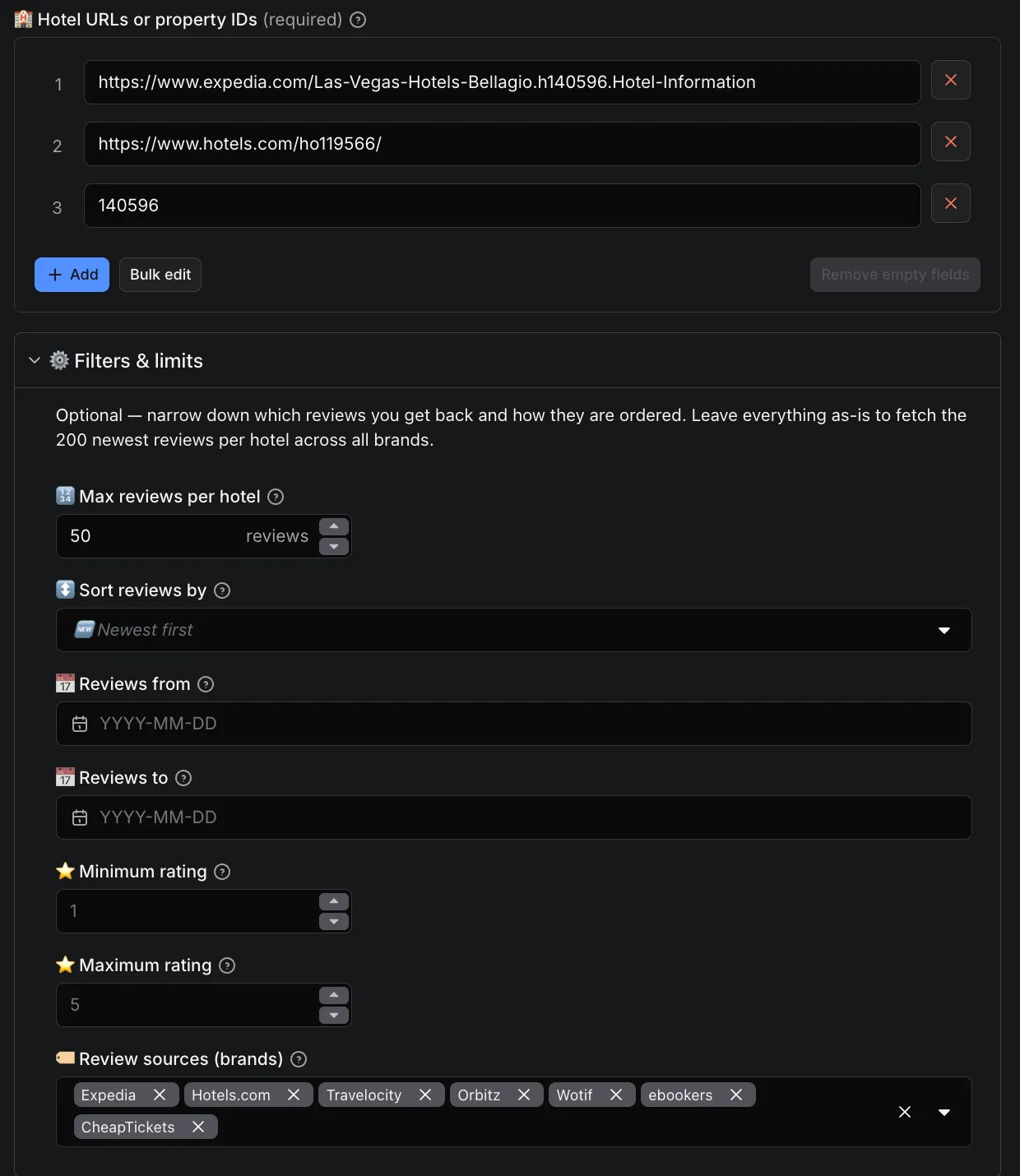
Input
| Field | Description |
|---|---|
Mode (mode) | reviews (default) to scrape reviews from the URLs/IDs below, or discover to search for properties by keyword + location. |
Hotel URLs or property IDs (hotelUrls) | Reviews mode. Hotel-page URLs from any of the 7 brands (each with a .h<id>. segment), Hotels.com /ho<id>/ URLs, or bare property IDs (140596). One per line. |
Max reviews per hotel (maxReviewsPerHotel) | Cap per hotel (default 200). |
Sort reviews by (sortBy) | newest (default), oldest, highestRating, lowestRating. Reviews are fetched newest-first; highest/lowest reorder the retrieved set. |
Reviews from (fromDate) | Keep only reviews on or after this YYYY-MM-DD date - ideal for incremental / since-date monitoring. |
Min / Max rating (minRating / maxRating) | Keep only reviews within a 1-5 rating range (input scale is 1-5). |
Keywords to search (searchKeywords) | Discover mode. Hotel, brand or venue names, one per line (e.g. Hilton, W Barcelona). Type the full word; a fragment like Hil will not match (trailing partials like Hilton Gard are fine). |
City or country (searchLocation) | Discover mode. Scope the keywords to a place - a city (Brussels) or country (Belgium), so Hilton + Belgium returns only Belgian Hiltons. Use a place name, not an ISO code. |
Max places per keyword (maxPlaces) | Discover mode. Cap how many matching properties to return per keyword (default 20). |
Discovery detail (discoveryDepth) | Discover mode. quick (name, city, country, coordinates, id) or full (adds aggregate rating, review count and category sub-ratings). |
Proxy (proxyConfiguration) | Datacenter is enough; use residential for very large runs. |
Example input
This example mixes an Expedia URL, a bare property ID, and Hotels.com, Travelocity and Orbitz URLs -
five different hotels across four brands - to show that any Expedia Group input is accepted. When you pass a bare
ID, hotelName comes back null (the name is read from a URL's descriptor slug, which an ID doesn't have).
Discover mode - search by keyword + location instead of pasting URLs:
This returns the matching properties (id, name, city, country, coordinates - plus rating & review count in
full detail) as the run's output (and mirrored to the Hotels dataset). Feed the property IDs it
returns back into Reviews mode to pull each property's reviews.
Output
The actor writes to two datasets:
- Reviews (the default dataset) - one row per guest review, with the hotel context
(
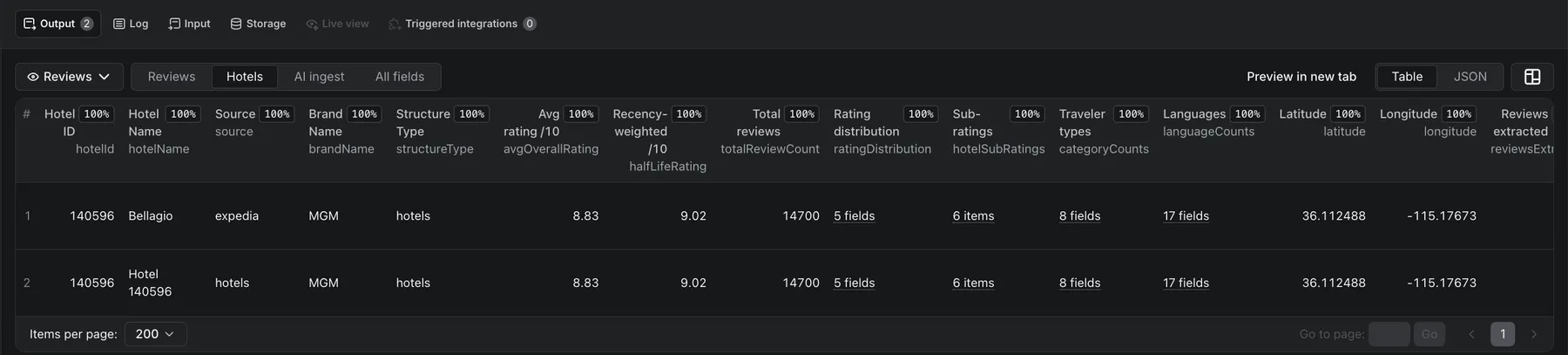
hotelId/hotelName/hotelUrl/source) merged onto every row. - Hotels - one row per hotel with the aggregate: overall score, total review count, the property's category sub-scores, and how many reviews were extracted.
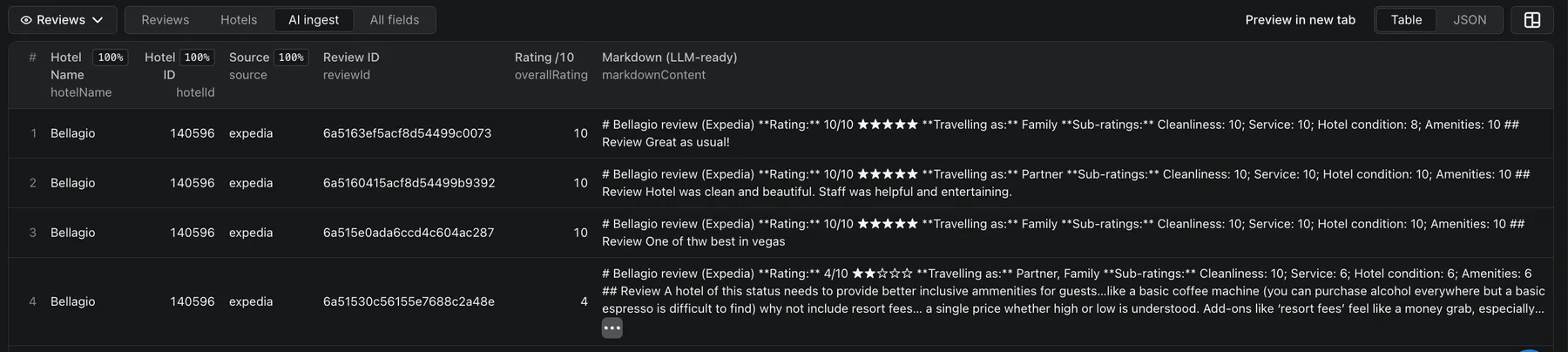
The Output tab shows the Reviews dataset by default, plus an AI ingest view (the LLM-ready
markdownContent column) and the Hotels dataset. You can download any of them in JSON, HTML, CSV, or
Excel, or fetch them from the API (the reviews dataset also exposes ?view=aiIngest).
Hotels dataset - one row per hotel with the full aggregate:
AI ingest view - the self-contained, LLM-ready markdown for each review:
Here is a real review row from a run on The Taj Mahal Palace (Mumbai):
...and the matching hotel row from the Hotels dataset:
Ratings are on the /10 scale to match Expedia's public display. Some secondary fields (subRatings,
reviewerLocation, checkInDate/checkOutDate, travelCompanions/travelerCategories, roomTypeId,
brandType, and the hotel-level geo / rating distribution) are no longer provided by Expedia and come back
null or empty; they stay in the schema so existing integrations keep working. See the Changelog.
Data fields
Reviews dataset - one row per review. Every row also carries the hotel context hotelId, hotelName,
hotelUrl and source so it stands alone.
| Field | Description |
|---|---|
overallRating, ratingLabel | Per-review score (/10) + label ("Excellent", "Good"…). |
reviewText, reviewerName | Full written review + reviewer display name. |
submittedAt | Review date (YYYY-MM-DD). |
reviewPhotos, imagesCount | Guest photo URLs and count (where the review has photos). |
ownerResponse | Hotel owner / management reply {text, date, responder} (where present). |
verified, language, helpfulVotes | Verified-review flag, review language, helpful-vote count. |
markdownContent | Self-contained LLM-ready markdown block for RAG / vector-DB ingestion. |
subRatings, reviewerLocation, checkInDate, checkOutDate, travelCompanions, travelerCategories, roomTypeId, brandType | Kept in the schema for compatibility but no longer provided by Expedia (null/empty). See the Changelog. |
Hotels dataset - one row per hotel.
| Field | Description |
|---|---|
hotelId, hotelName, hotelUrl, source | Property id (from the URL), name (from the URL slug), source URL, Expedia Group brand. |
brandName, structureType, latitude, longitude | Hotel chain, property type, coordinates. |
avgOverallRating, halfLifeRating | Average and recency-weighted rating (/10). |
totalReviewCount, ratingDistribution | Total reviews available and their source 1-5 star breakdown. |
hotelSubRatings, categoryCounts, languageCounts | Aggregate category scores (/10), traveler-type counts, per-language counts. |
reviewsExtracted, extractedAt | How many reviews this run pulled, and when. |
Run it via the API
Run the actor programmatically and get the reviews back in one call:
The response is the default (reviews) dataset - one row per review. Append ?view=aiIngest for the LLM-ready
markdown columns. The run's Hotels dataset (per-hotel aggregate) is available from the run's list of
datasets in the Console or via the API.
Integrations & export
Download as JSON, CSV, Excel, or XML, or push results straight into Google Sheets, Make, Zapier, n8n, a webhook, or your own app via the Apify API. AI agents can call this actor through the Apify MCP server, so assistants like Claude, ChatGPT and LangChain can pull Expedia reviews on demand. Schedule the actor to run hourly or daily for continuous, incremental review monitoring.
How much does it cost to scrape Expedia reviews?
This actor uses pay-per-event pricing - you pay per review you actually get, plus a small $0.005 per-run start fee (less on higher plans):
| Plan | Price per 1,000 reviews |
|---|---|
| Free | $2.50 |
| Bronze | $2.30 |
| Silver | $2.15 |
| Gold+ | $2.00 |
Examples: 500 reviews ≈ $1.25 (Free) · 5,000 reviews ≈ $12.50 (Free) / $10.00 (Gold). Lower Max reviews per hotel to cap spend, and your first runs are covered by Apify's free tier.
Discover mode bills per property returned, at the same per-item price as a review (the table above:
$2.50 per 1,000 on Free, down to $2.00 on Gold+). There is no separate event and no extra charge - a discovered
property is simply one delivered item. You pay only for the properties Discover actually returns; a search that
matches nothing adds no per-item charge. Use quick detail for a cheap list, then scrape reviews only for the properties
you want.
Tips & advanced options
- Reviews are fetched newest-first, so a tight From date plus a low Max reviews per hotel is the cheapest way to monitor only what's new (schedule it daily for incremental review tracking).
- Feed many hotels in one run - the actor deduplicates repeated URLs automatically.
- For very large properties (thousands of reviews) the hotel's reviews may be split across a few dataset items to keep each item a manageable size; the Hotels view still summarizes each property in one row.
- Use Review sources to compare the same hotel's reviews across Expedia vs Hotels.com vs Travelocity.
Related FactDen scrapers
Building a review-intelligence pipeline? Pair this with other FactDen actors on the Apify Store:
- Zomato Restaurant Reviews Scraper - Zomato restaurant reviews & owner responses, plus restaurant leads (phone, address, GPS) by city & cuisine
- Traveloka Hotel & Activity Reviews Scraper - Traveloka hotel & Xperience activity reviews: 1-10 ratings, category sub-scores, owner replies & English translation
- Qunar Hotel Reviews Scraper - the only Apify actor for Qunar (去哪儿): per-review sub-scores, sentiment, owner replies and LLM-ready markdown
- Booking.com Scraper - hotels, live prices, per-room rates, availability & occupancy, and guest reviews across a whole city or one hotel
- MCA India Company & Director Data Scraper - India MCA company master data + directors' personal email & phone, by CIN, DIN, name, or industry & state
- Airbnb Data Scraper - Airbnb listings, prices, availability, occupancy, ADR/RevPAR & reviews; a pay-per-use AirDNA alternative.
- G2 Reviews Scraper - B2B software reviews, ratings & battlecards.
- Indeed Jobs Scraper - job listings & company data.
- Trip.com & Ctrip Reviews Scraper - hotel reviews across Trip.com / Ctrip.
- Google Hotels Scraper - live hotel prices, the OTA rate ladder & guest reviews from Google Hotels.
- Hotels.com Reviews Scraper - hotel ratings,
- MakeMyTrip & Goibibo Reviews Scraper — MakeMyTrip + Goibibo hotel reviews & details (India's largest OTAs). review text & sentiment.
- TripAdvisor Hotel Reviews API - all TripAdvisor reviews for hotels, restaurants & attractions, plus official subratings & the AI review summary.
- Agoda Hotel Reviews Scraper - Agoda hotel reviews at scale: scores, review text, traveler type & owner responses, in 33 languages.
FAQ, disclaimers & support
- Which sites does it support? All seven Expedia Group brands - Expedia, Hotels.com, Travelocity,
Orbitz, Wotif, CheapTickets and ebookers. Paste any brand's hotel URL directly (Hotels.com
/ho<id>/URLs are resolved automatically). Use Review sources to pick which brands' reviews to return. - Is scraping Expedia reviews legal? This actor collects only publicly available review content and does not touch private or account data. You are responsible for complying with Expedia's Terms of Service and applicable laws (including data-protection rules like GDPR) when using the data. See Apify's guide, is web scraping legal?, for background.
- Do I need an Expedia account or API key? No.
- Can I use it via the Apify API or an MCP server? Yes - run it through the Apify REST API (see the example above) or connect it to an AI agent via the Apify MCP server, so assistants like Claude or ChatGPT can fetch Expedia reviews on demand.
- How many reviews can I get per hotel? As many as the hotel has - set Max reviews per hotel to cap it;
totalReviewCounttells you how many exist in total. - How fresh is the data? Reviews are fetched live and newest-first, so you always get the latest ones first.
- Can I get reviews in other languages? Yes - reviews are returned in their original language with a
languagecode and anisMachineTranslatedflag; the hotel aggregate includes per-language counts. - A hotel returned fewer reviews than expected. Your date/rating/source filters, or Max reviews per
hotel, may be limiting the result;
totalReviewCountshows how many exist in total. - Can I schedule it or get only new reviews? Yes - schedule the actor and set a From date to pull only reviews since your last run.
- Found a bug or need a field we don't return? Open the Issues tab on this actor's Apify page.
Changelog
- 2026-10 - Rebuilt on Expedia's current API after Expedia retired the old reviews backend (runs had
been returning 0 reviews). Reviews flow again, now including hotel owner / management responses and
guest photos. Changes: the
reviewSourcesbrand filter and thetoDateinput were removed (usefromDatefor since-date pulls; each property returns one unified pool). A few secondary fields are no longer provided by Expedia and come back null/empty: per-reviewsubRatings,reviewerLocation,checkInDate/checkOutDate,travelCompanions/travelerCategories,roomTypeId,brandType, and the hotel-level geo + rating distribution. Review dates are now day precision. All fields stay in the schema, so existing integrations keep working. - 2026-08 - New 🔍 Discover mode: search by keyword (hotel or brand name) plus an optional city or country and get the matching properties, no URL needed. Reviews mode is unchanged; Discover is billed per property returned.
- 2026-07 - Output split into dedicated Reviews and Hotels datasets (previously a single dataset with views), matching the other FactDen review scrapers.
- Initial release - All 7 Expedia Group brands in one actor; per-review LLM-ready markdown; incremental since-date runs; JSON/CSV/Excel export and full REST API.
⭐ Find this useful? Bookmark the actor and leave a review on its Apify Store page - it helps other travelers and hotel teams find it, and tells us which features to build next.


![Expedia.com & Hotel.com [$2.5💰] Reviews/Ratings/Sentiment A. avatar](https://images.apifyusercontent.com/S3jQnQO1Qq7Evmm8G6HhWSwePurMx4mbNBaxjT2ShAg/rs:fill:76:76/cb:1/aHR0cHM6Ly9hcGlmeS1pbWFnZS11cGxvYWRzLXByb2QuczMudXMtZWFzdC0xLmFtYXpvbmF3cy5jb20vbmduOHZSRVNUa3NleVdFNnAtYWN0b3ItNkkxaEJLTk1nQk5IZVl4dUwtOXNoSm5hbnd2Ni1leC5wbmc.webp)


