

Trip.com & Ctrip Reviews Scraper - Tripcom Hotels 携程
Pricing
from $2.50 / 1,000 reviews
Trip.com & Ctrip Reviews Scraper - Tripcom Hotels 携程
Scrape Trip.com & Ctrip (携程) hotel reviews - guest reviews, star ratings, sub-ratings, review text, travel type, owner responses and reviewer data, with LLM-ready markdown. Structured JSON/CSV for analytics, AI and market research. No API, no login.

Trip.com & Ctrip (携程) Hotel Reviews Scraper (June 2026)
Extract hotel reviews from both Trip.com (international) and hotels.ctrip.com / 携程 (China) in a single run - no login, no proxy setup, no code required.
$4 per 1,000 reviews · New Apify users get ~1,250 reviews free with the $5 platform credit.
Contents: What's different · Who it's for · Use cases · Step by step · Input · Output · Pricing · Schedule · AI agents & RAG · GDPR · FAQ · Changelog · Support
What's different
Two things no other Apify actor for Trip.com or Ctrip does today:
- Both brands in one run. Add
Trip.comURLs andhotels.ctrip.comURLs together — the actor returns each hotel's full review set (Chinese-language reviews come through for Ctrip properties, andreviewer.ipLocationshows the reviewer's region/country where Trip.com exposes it). Duplicate URLs are deduplicated silently. - LLM-ready
markdownContentper review. Each review row carries a self-contained markdown block - rating, travel type, body, translation, and the hotel's response - ready to embed straight into a vector DB. No reformatting, no glue code.
Plus:
- Every review the page shows, whatever the source — Trip.com's own reviews plus the aggregated Expedia + Hotels.com reviews Trip.com displays, so hotels that lean on partner reviews return their full set, not a handful.
- Hotel-level sub-ratings (Cleanliness, Location, Service, Facilities) on the Hotels summary row.
- Owner/management responses with response date.
- Ratings on Trip.com's 10-point scale, matching the website exactly.
- Reviewer credibility tier and region of origin where Trip.com exposes it.
No-setup checklist:
- No login or account required
- Apify Proxy bundled (datacenter; switch to RESIDENTIAL via the Advanced section for heavy runs)
- No code required (form-based input in the Apify Console)
- Pay-per-event pricing - no subscription, no commitment
What does this scraper do?
You paste hotel URLs (Trip.com or hotels.ctrip.com — mix freely, up to 500 per run). The actor returns two structured datasets:
Reviews dataset — one row per guest review (Trip.com native + Expedia + Hotels.com), 32 data points per row:
- Core:
overallRating(10-point),ratingLabel,reviewText,travelType,checkInMonth,language - Reviewer:
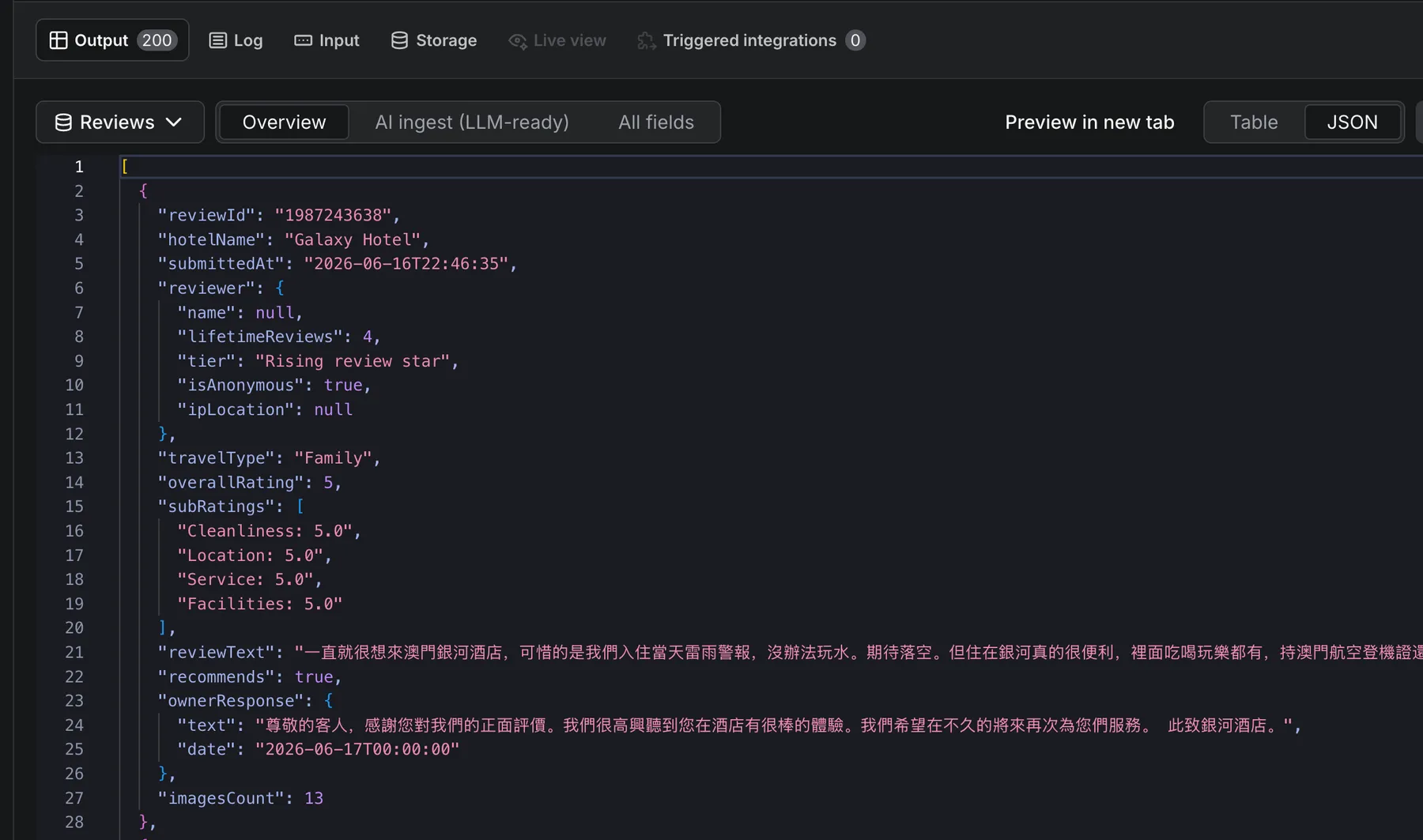
reviewer.name,reviewer.lifetimeReviews,reviewer.tier,reviewer.ipLocation(region/country where exposed) - Management response:
ownerResponse.text,ownerResponse.date - AI-ready:
markdownContent— self-contained per-review markdown block, direct vector-DB input - Hotel-level sub-ratings (Cleanliness / Location / Service / Facilities) live on the Hotels summary row
- Translation: English machine translation for Chinese-language reviews
Hotels dataset — one summary row per hotel:
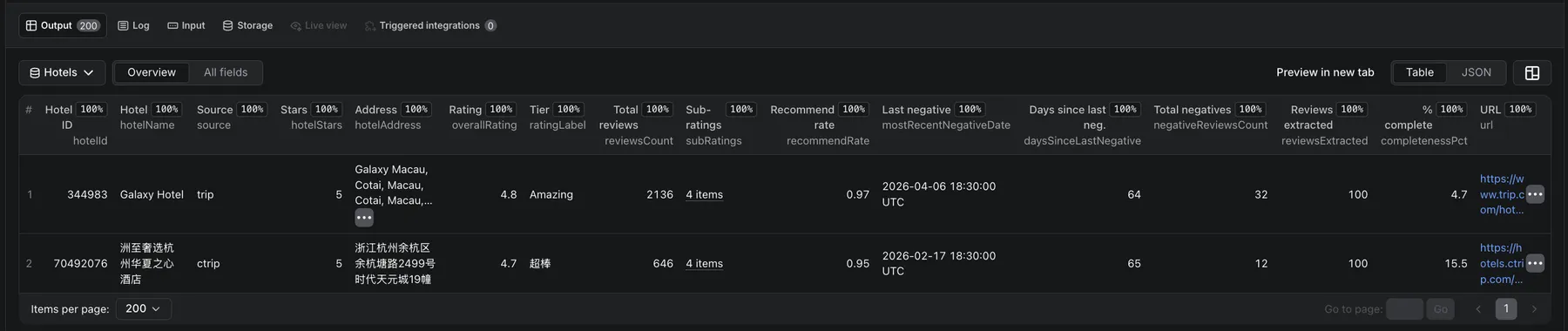
- Aggregate ratings, star classification, address, total and positive review counts
recommendationRate,daysSinceLastNegative,negativeReviewsCount— ORM signals
Both datasets are accessible via the Output-tab dropdown — see Output.
Why this scraper (vs the official API and other Apify scrapers)
Trip.com Group publishes no public reviews API for either Trip.com or Ctrip - scraping the public review pages is the only way to get this data at scale. Among the Apify actors that do, this is the only one that reads both locales in a single run and keeps the per-review depth most others drop:
| Capability | This actor | Other Apify Trip.com scrapers | Official API |
|---|---|---|---|
Trip.com (international) reviews | ✅ | ✅ (most) | ❌ none |
Ctrip (携程) Chinese reviews | ✅ same run | ❌ Trip.com-only | ❌ |
| Integrated partner reviews (Expedia + Hotels.com) the page shows | ✅ | ❌ (native only) | ❌ |
| Hotel-level sub-ratings (cleanliness / location / service / facilities) | ✅ | varies | ❌ |
| Hotel owner responses | ✅ | varies | ❌ |
| Reviewer region of origin where exposed | ✅ | ❌ | ❌ |
| Machine translation of Chinese reviews | ✅ | varies | ❌ |
LLM-ready markdownContent per review | ✅ | ❌ | ❌ |
| No login, proxy, or anti-bot setup | ✅ | ✅ | n/a |
| Pricing | $4 / 1,000 reviews (from $2.50 on Business) | varies | n/a |
The headline difference is Ctrip (携程) coverage: international tools see only the Trip.com guest pool, while this actor also reads the Chinese-domestic Ctrip corpus - same hotels, both audiences - so you can compare Chinese vs. international sentiment for one property in a single dataset.
Who this scraper is for
- Hotel revenue managers tracking competitor properties' rating trends and sub-rating breakdowns on
Trip.com. - OTA analysts comparing Chinese vs. international guest sentiment for the same property in one dataset.
- AI / RAG engineers ingesting hotel reviews into vector databases -
markdownContentis chunk-ready. - Hospitality researchers filtering by
travelType,language,reviewer.ipLocation(Ctriponly), and the sub-rating dimensions for ICP-scoped datasets. - Brand reputation teams monitoring
daysSinceLastNegative,negativeReviewsCount, andownerResponse.textacross a portfolio.
Common use cases
1. Daily sentiment monitoring for a hotel chain portfolio
Pair with the Schedule section to run nightly with fromDate set to yesterday.
2. Negative-review mining for a competitor analysis
Sort lowest-rating first and cap rating at 2 to surface only the painful reviews. ownerResponse.text shows how the hotel handles complaints.
3. Chinese-market intelligence with provincial geolocation
Ctrip-locale rows carry reviewer.ipLocation (e.g., "发布于浙江" - Posted from Zhejiang), enabling province-level Chinese guest segmentation.
4. Backfill a full review history for AI / RAG ingestion
The markdownContent field on each row is a self-contained chunk ready for direct embedding - see AI agents & RAG.
How to scrape Trip.com reviews - step by step
- Click Try for free on this actor's Apify Store page.
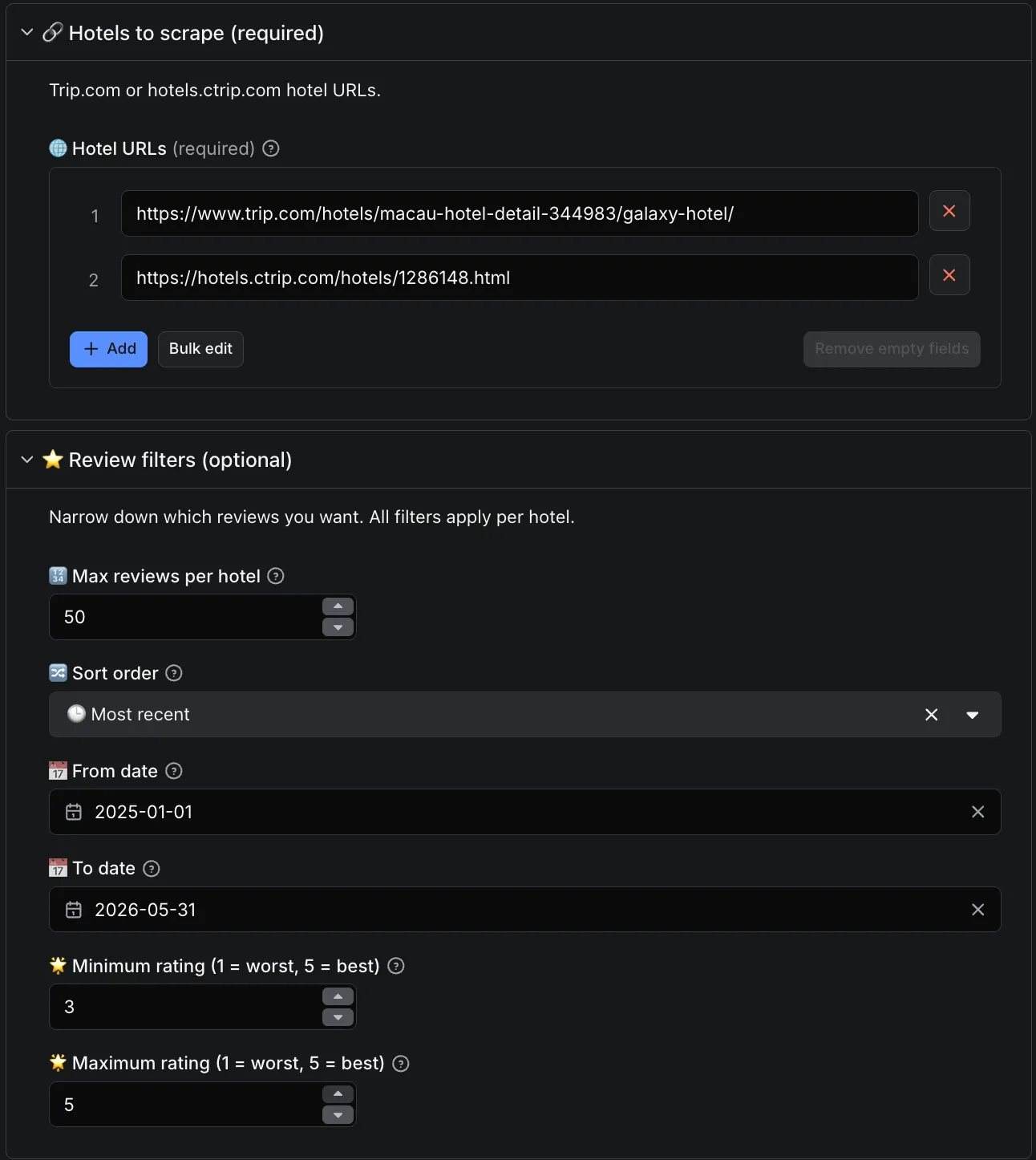
- Paste one or more
Trip.comorhotels.ctrip.comhotel URLs into Hotel URLs (mix freely; up to 500 per run). - Set
maxReviewsPerHotel,fromDate,minRating/maxRating, andsortByas needed. - Click Start. Results stream into the Output tab in real time.
- Switch the Output tab dropdown between Reviews and Hotels to inspect either dataset. Download as JSON, CSV, or Excel.
Trip.com caps accessible reviews around 1,000 per high-volume hotel; completenessPct on the Hotels dataset tracks how much you got of what's exposed. See Pricing below for per-event rates and tiered discount ladder.
Input
| Field | Type | Default | Description |
|---|---|---|---|
startUrls | array of URL | (prefilled) | Trip.com or hotels.ctrip.com hotel URLs. Mix freely. Max 500. |
maxReviewsPerHotel | integer | 200 | 1–5,000 |
sortBy | enum | mostRecent | mostRelevant / mostRecent / ratingHighToLow / ratingLowToHigh |
fromDate | date | - | YYYY-MM-DD; only reviews submitted on or after this date |
minRating | integer | 1 | 1–10 (Trip.com's 10-point scale) |
maxRating | integer | 5 | 1–10 (Trip.com's 10-point scale); the default 5 means no cap / all reviews (backward compatibility) |
proxyConfiguration | proxy | Apify Proxy (datacenter) | Override to Residential for heavy runs |
URL examples:
https://www.trip.com/hotels/macau-hotel-detail-344983/galaxy-hotel/https://hotels.ctrip.com/hotels/1286148.htmlhttps://hotels.ctrip.com/hotels/123456.html
Output
Two named alias datasets, accessible via the Output tab dropdown in the Apify Console:
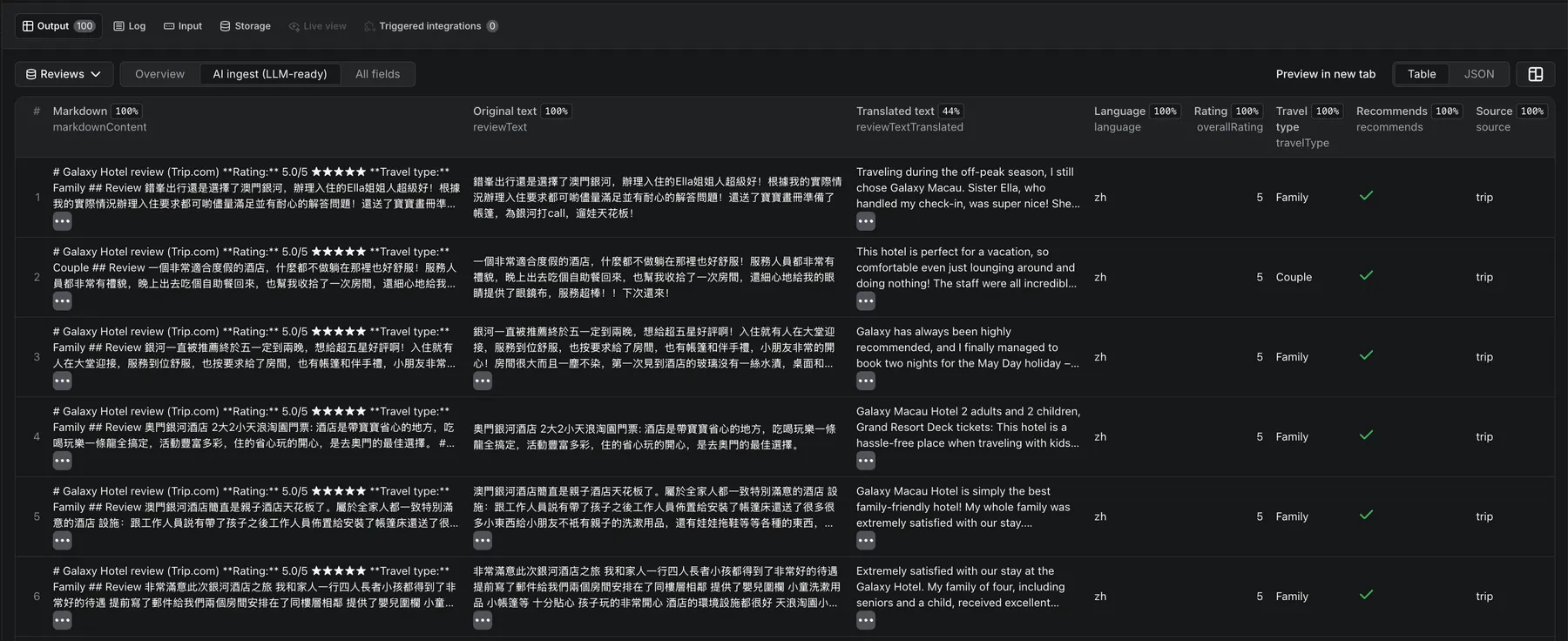
- Reviews - one row per review (32 data points). Two table views: Overview (11 columns most users want, including the clubbed
subRatingsarray) and AI ingest (8 LLM-ready columns includingmarkdownContent).
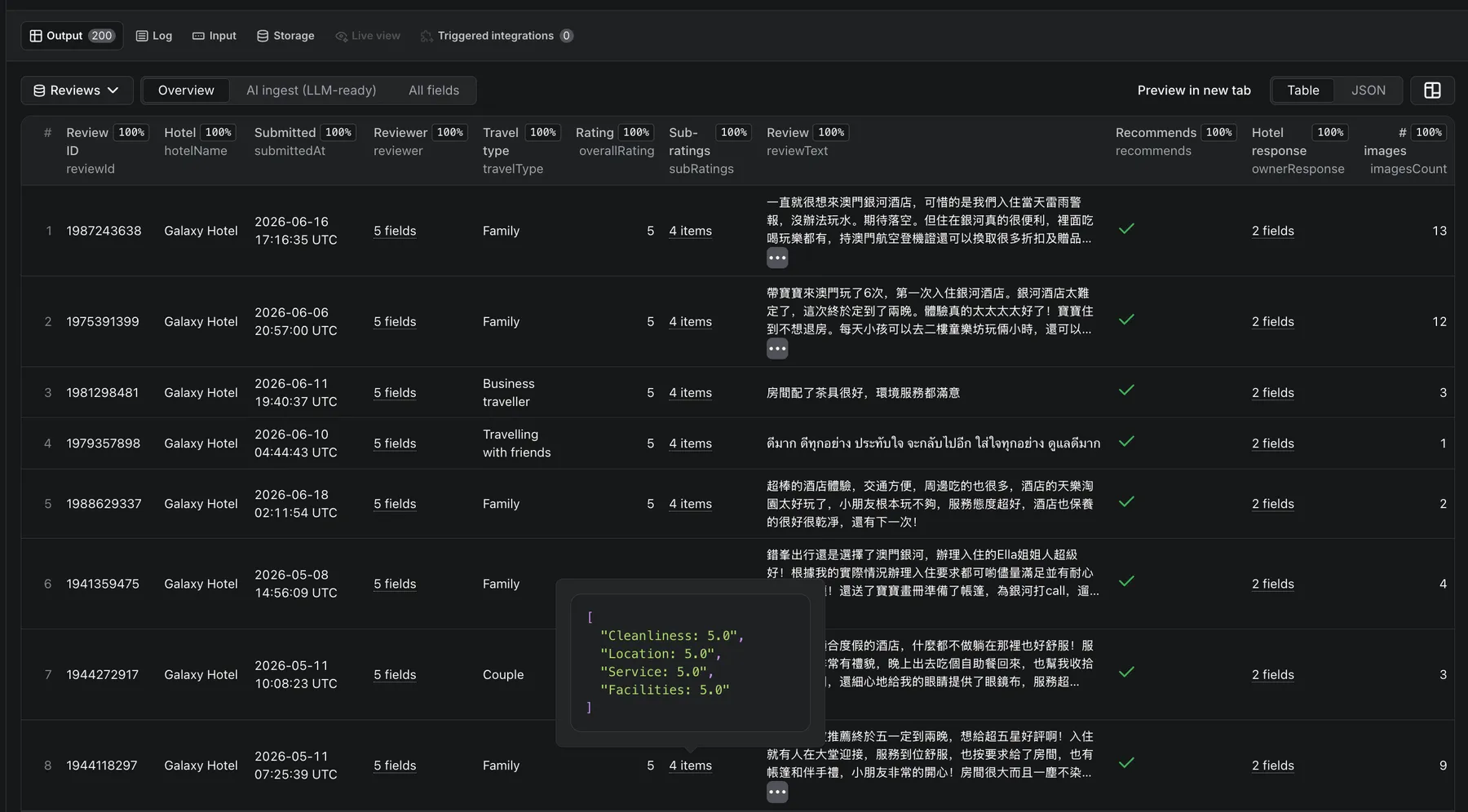
- Hotels - one summary row per hotel scraped (18 fields): aggregate ratings, sub-ratings, recommendation rate, days-since-last-negative, completeness percentage.
Sample review row
Sample hotel summary row
Timestamps: submittedAt, checkInMonth, and ownerResponse.date come from Trip.com in the hotel's local time zone with no offset - we preserve them as naive ISO strings rather than mislabeling them as UTC. extractedAt is our scrape time in UTC.
📊 Free sample dataset - browse 800 real reviews (4 hotels, Trip.com + Ctrip) before you run, no account needed: HuggingFace · Kaggle.
Pricing
Pay-per-event. No subscription, no minimum spend.
| Event | Rate |
|---|---|
apify-default-dataset-item | $0.004 per review row |
You are charged $0.004 per review row you receive. A small platform start fee of $0.005 per run also applies (less on higher plans).
Effective rate: $4 per 1,000 reviews. Tiered subscription discounts reduce this automatically — down to $2.50 per 1,000 on the Business plan (37.5% off).
Cost examples:
| Scope | Reviews | Cost |
|---|---|---|
| Quick validation (1 hotel, 50 reviews) | 50 | $0.20 |
| Single hotel full history | 200 | $0.80 |
| Competitor set (10 hotels × 100 reviews) | 1,000 | $4.00 |
| Deep pull (10 hotels × 500 reviews) | 5,000 | $20.00 |
Apify's $5 new-account credit covers ~1,250 reviews on day one — enough to validate end-to-end before any spend. Incremental daily runs (50–200 new reviews per hotel) typically cost a few cents each.
How to run this Trip.com reviews API on a schedule
For continuous monitoring, daily delta refreshes, or ORM dashboards:
- Open the Apify Schedules tab in your Console.
- Add a new schedule and select this actor.
- Set the cron expression (e.g.,
0 6 * * *for daily at 06:00 UTC). - In the schedule's input override, set
fromDateto a sliding window - for example, yesterday's date via Apify's{{NOW - 1.day | date('YYYY-MM-DD')}}template. - (Optional) Wire an Apify webhook on
ACTOR.RUN.SUCCEEDEDto push the dataset into Snowflake, BigQuery, S3, or your CRM.
With fromDate set to a sliding window, each run returns only the reviews posted since the previous sync - so incremental runs stay small and cheap. Pair it with sortBy: "mostRecent" to get the newest reviews first, and maxReviewsPerHotel to cap each run.
AI agents & RAG - using the data with LLMs
The markdownContent field on every review is a self-contained markdown block - title, rating, travel type, body, translation, and hotel response inlined. Designed for direct vector-DB ingestion and LLM context windows. Capped at 100 KB per row.
Use the standard Apify API or client libraries to run the actor and iterate the Reviews dataset - markdownContent is your ready-to-embed chunk.
Field glossary for AI agents
| Field | What it carries | Why an agent cares |
|---|---|---|
markdownContent | Per-review self-contained markdown chunk | RAG / vector DB ingestion |
subRatings | Dimension scores as a labeled array. Trip.com publishes these at the hotel level (see the Hotels dataset), e.g. ["Cleanliness: 9", "Amenities: 8.8", "Location: 9", "Service: 9"]; empty on individual review rows | Fine-grained sentiment retrieval |
travelType | Business / Family / Solo / Couple / Friends / Other | ICP filtering before embedding |
reviewer.ipLocation | Reviewer region/country of origin where Trip.com exposes it | Geographic segmentation |
ownerResponse.text | Hotel management reply | Reputation-management agents |
recommendRate (Hotels dataset) | 0–1 recommendation fraction | NPS-style hotel-level signal |
daysSinceLastNegative (Hotels dataset) | Days since the most recent ≤3-star review | Risk-scoring + alerting agents |
Data sources & GDPR
This actor extracts publicly visible review data from Trip.com and hotels.ctrip.com. The reviewer.name field may contain real first names where the reviewer chose to display them publicly on Trip.com; the reviewer.ipLocation field contains the reviewer's region/country of origin where Trip.com publishes it with the review. Anonymous reviewers are surfaced as reviewer.name: null + reviewer.isAnonymous: true. You are responsible for ensuring your downstream use of this data complies with GDPR, China's PIPL, and any other applicable data-protection regulations in your jurisdiction.
FAQ
How much does it cost to scrape 10,000 Trip.com reviews?
10,000 × $0.004 = $40.00, plus a $0.005 per-run start fee. New Apify accounts get a $5 credit that covers ~1,250 reviews at base tier — enough to validate the actor end-to-end before any spend. Tiered discounts reduce the per-row price automatically as your Apify plan scales.
Can I scrape multiple hotels in one run?
Yes. Paste up to 500 URLs in startUrls and mix Trip.com and hotels.ctrip.com URLs freely in the same run — the actor handles both locales concurrently. Duplicate URLs are silently dropped so you don't pay for the same hotel twice.
Does this work for Chinese-language (携程) reviews?
Yes. Paste any hotels.ctrip.com/hotels/{id}.html or hotels.ctrip.com/international/{id}.html URL and the actor returns the full Chinese guest-review feed. This includes reviewer.ipLocation (province-level origin, e.g. "Guangdong") which only appears on the Ctrip locale. Mix Trip.com and Ctrip URLs in the same run — the actor handles both in one pass.
How does this compare to other Trip.com scrapers on Apify?
Three things unique to this actor: (1) every review the page shows - Trip.com's own reviews plus the aggregated partner reviews (Expedia + Hotels.com) that Trip.com displays, not just native Trip.com rows, so smaller / non-Asia hotels return their full review set instead of a handful; (2) bilingual - both Trip.com and Ctrip (携程) in one run; (3) markdownContent chunks - self-contained per-review markdown ready for direct vector DB / RAG ingestion. Plus hotel-level sub-ratings (cleanliness / location / service / facilities), parsed star classification, and address from the detail page.
How fresh is the review data?
Real-time. Every run pulls fresh data from Trip.com and Ctrip directly — there is no caching layer between the upstream and your dataset. A review posted minutes ago will appear in the next run as soon as Trip.com's own indexing picks it up, typically within a few minutes.
Can I export hotel reviews to CSV or Excel?
Yes. The Output tab in Apify Console offers JSON, JSONL, CSV, Excel, and HTML downloads on both the Reviews and Hotels datasets. The Overview view is column-ordered for clean import into Google Sheets or Excel without reformatting. For large exports use the Apify API for direct dataset streaming.
Can I scrape incrementally instead of refetching everything?
Yes. Set fromDate to your last successful scrape date and the run returns only the reviews posted since then — much cheaper than a full re-scrape. Use sortBy: "mostRecent" to get the newest first. Each incremental run typically costs a few cents per hotel. See Schedule for cron + webhook wiring.
How many reviews can I get per hotel?
Trip.com caps publicly accessible reviews around 1,000 per high-volume property. The Hotels dataset's completenessPct field tells you what fraction of the publicly exposed reviews you actually retrieved. For incremental monitoring syncs this limit is irrelevant — you'll capture every new review posted since your last fromDate regardless.
Do I need a Trip.com account, API key, or proxy to use this scraper?
No. Only an Apify account (free) is required. No Trip.com login, no Ctrip account, no API key, and no proxy configuration — Apify's built-in datacenter proxy is bundled and handles all anti-bot requirements automatically. You can run your first hotel review extraction in under 30 seconds with zero infrastructure setup.
Is scraping Trip.com legal?
This actor extracts publicly visible data - no login is required, no rate-limit bypass is performed. Whether your downstream use is permissible depends on your jurisdiction's regulations (GDPR, PIPL, CCPA, etc.) and on Trip.com's Terms of Service for the data category you're collecting. Reviewing both is your responsibility before deploying at scale.
Related Actors
Pair Trip.com & Ctrip Reviews Scraper with our other FactDen actors on the Apify Store:
- Zomato Restaurant Reviews Scraper - Zomato restaurant reviews & owner responses, plus restaurant leads (phone, address, GPS) by city & cuisine
- Traveloka Hotel & Activity Reviews Scraper - Traveloka hotel & Xperience activity reviews: 1-10 ratings, category sub-scores, owner replies & English translation
- Qunar Hotel Reviews Scraper — the only Apify actor for Qunar (去哪儿): per-review sub-scores, sentiment, owner replies and LLM-ready markdown
- Booking.com Scraper — hotels, live prices, per-room rates, availability & occupancy, and guest reviews across a whole city or one hotel
- MCA India Company & Director Data Scraper — India MCA company master data + directors' personal email & phone, by CIN, DIN, name, or industry & state
- Airbnb Data Scraper — Airbnb listings, prices, availability, occupancy, ADR/RevPAR, and reviews; a pay-per-use AirDNA alternative
- G2 Reviews Scraper — B2B SaaS competitive intelligence and battlecard data
- Indeed Jobs Scraper — job listings, salaries, and company profiles across 60+ countries
- Expedia Reviews Scraper — hotel reviews, ratings, and sentiment across Expedia Group brands
- Hotels.com Reviews Scraper — hotel ratings, review text, and sentiment from Hotels.com listings
- Google Hotels Scraper — live hotel prices, OTA rate ladder, per-room rates & guest reviews from Google Hotels
- MakeMyTrip & Goibibo Reviews Scraper — MakeMyTrip + Goibibo hotel reviews & details (India's largest OTAs)
- Agoda Hotel Reviews Scraper - Agoda hotel reviews at scale: scores, review text, traveler type & owner responses, in 33 languages
Changelog
v1.4 - Full review coverage incl. Expedia + Hotels.com (2026-08-21)
The scraper now returns every review Trip.com displays for a property, not just Trip.com's own
reviews: it reads the site's integrated feed, which includes the aggregated Expedia + Hotels.com
reviews Trip.com shows. Hotels that lean on partner reviews (common for smaller / non-Asia properties)
now return their full set instead of a handful. Ratings are now reported on Trip.com's 10-point scale
(matching the website), so minRating / maxRating now operate on the 1–10 scale. For backward
compatibility, maxRating: 5 (the classic "no cap" value) is treated as no cap, so existing inputs keep
returning all reviews. Per-review sub-ratings are no longer
published by the source (they exist only at the hotel level now), so the per-review subRatings column
was removed from the Reviews view; the field is retained (empty) and hotel-level sub-ratings remain on the
Hotels summary row. Reviewer origin now reports the region/country where Trip.com exposes it.
v1.3 - Reliable date filtering (2026-08-21)
Fixed fromDate returning zero reviews when combined with sortBy: "mostRecent". Trip.com's review sort is not a
strict newest-first order, so the old date cut-off could stop on the first out-of-window review and miss qualifying
reviews that appeared later. The date and rating filters are now applied to every review independently of the sort,
so incremental (fromDate) runs return exactly the reviews posted since your last sync. Also corrected the internal
sort mapping so each sortBy option returns the order its label promises, and removed the unused toDate input.
v1.2 - Room column in the default view (2026-06-29)
The roomName field (the room type the guest booked, e.g. "City King Room") was always scraped and present in
the JSON, CSV, and API exports, but hidden from the default Overview table. It now shows as a Room column in the
Overview view of both datasets, and is included in the per-review markdownContent block for LLM ingest. No schema
or field changes - existing consumers are unaffected.
v1.1 - Cleaner output shape (2026-06-20)
Grouped related fields for tidier JSON and CSV exports (same data, fewer top-level columns): the four sub-ratings are now a single labeled subRatings array (e.g. ["Cleanliness: 4.9", "Location: 4.7", ...], one cell in CSV); reviewer attributes are clubbed under a reviewer object (name, lifetimeReviews, tier, isAnonymous, ipLocation); and the hotel reply is clubbed under an ownerResponse object (text, date). overallRating, ratingLabel, and all review-count fields stay flat. Breaking change for consumers that referenced the old flat field names.
v1.0 - Public launch (2026-06-08)
Initial public release. Bilingual Trip.com + Ctrip review extraction, 32-field reviews + 21-field hotels schema, LLM-ready markdownContent, pay-per-event pricing with tiered discounts.
Support & maintenance
⭐ Found this useful? Leaving a quick review on this page helps other travel-data teams discover the actor - and tells us what to build next. Thank you!
Actively maintained. Bug reports and feature requests are typically triaged within 1–2 business days.
- Apify Issues tab - primary support channel; we get notified instantly and other users can upvote your report. Please include the run ID, one example URL, and what you expected vs what you saw.
- Email - support@factden.com for billing or support questions.
Looking for a software-product review scraper? See our sibling actor G2 Reviews Scraper for B2B SaaS competitive intelligence.
Hiring or running labor-market research? Try our Indeed Jobs Scraper for job listings, salaries, and company profiles across 60+ countries.
Built by factden on the Apify platform. Try the Trip.com & Ctrip Reviews Scraper free with Apify's $5 monthly credit - covers ~1,250 reviews on first run.


