
Zomato Restaurant Reviews Scraper
Pricing
from $2.00 / 1,000 reviews
Zomato Restaurant Reviews Scraper
Scrape Zomato restaurant reviews at scale - ratings, full review text, reviewer, owner responses, plus a per-restaurant lead record (phone, address, geo, cuisines, cost, rating). Paste restaurant URLs, city/locality listing URLs, or IDs. Filter by rating/date; export JSON/CSV.
Pricing
from $2.00 / 1,000 reviews
Rating
5.0
(3)
Developer

Factden
Maintained by CommunityActor stats
4
Bookmarked
9
Total users
2
Monthly active users
a month ago
Last modified
Categories
Share
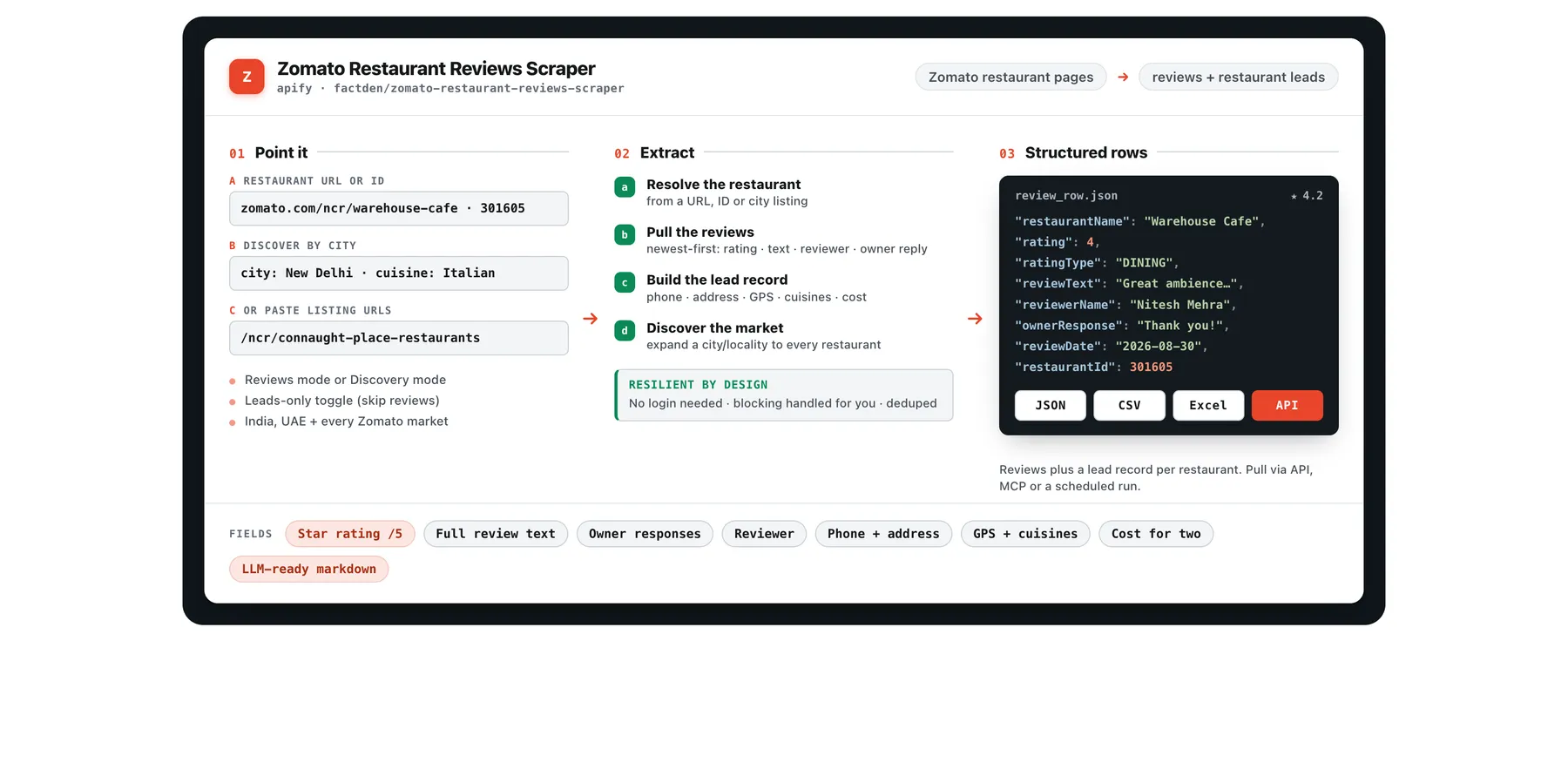
Scrape Zomato restaurant reviews at scale - star ratings (/5), full review text, reviewer details and owner responses - plus a per-restaurant lead record (phone number, full address, GPS coordinates, cuisines, cost for two, aggregate rating). Pick a mode: Reviews (paste restaurant page URLs or bare IDs to get every review + a lead record for each) or Discovery (paste a city/locality listing URL to pull a lead record for every restaurant in that area). Every review also ships as an LLM-ready markdown block. No login, no Zomato API key.
Runs on Apify: scheduling, REST API, proxy rotation, monitoring, and one-click export to JSON, CSV, Excel or HTML.
What does Zomato Restaurant Reviews Scraper do?
Choose a mode and give it the matching input:
- Reviews mode - paste any Zomato restaurant URL or a bare restaurant ID. Returns every review plus a lead record for each restaurant.
- Discovery mode - pick a city (and optional cuisine) from the dropdowns, or paste a city/locality listing URL. Returns a lead record for every restaurant in that area (name, phone, address, geo, cuisines, cost, rating). Discovery is leads-only and does not scrape reviews - feed the restaurants it finds into Reviews mode when you want their reviews.
Output datasets:
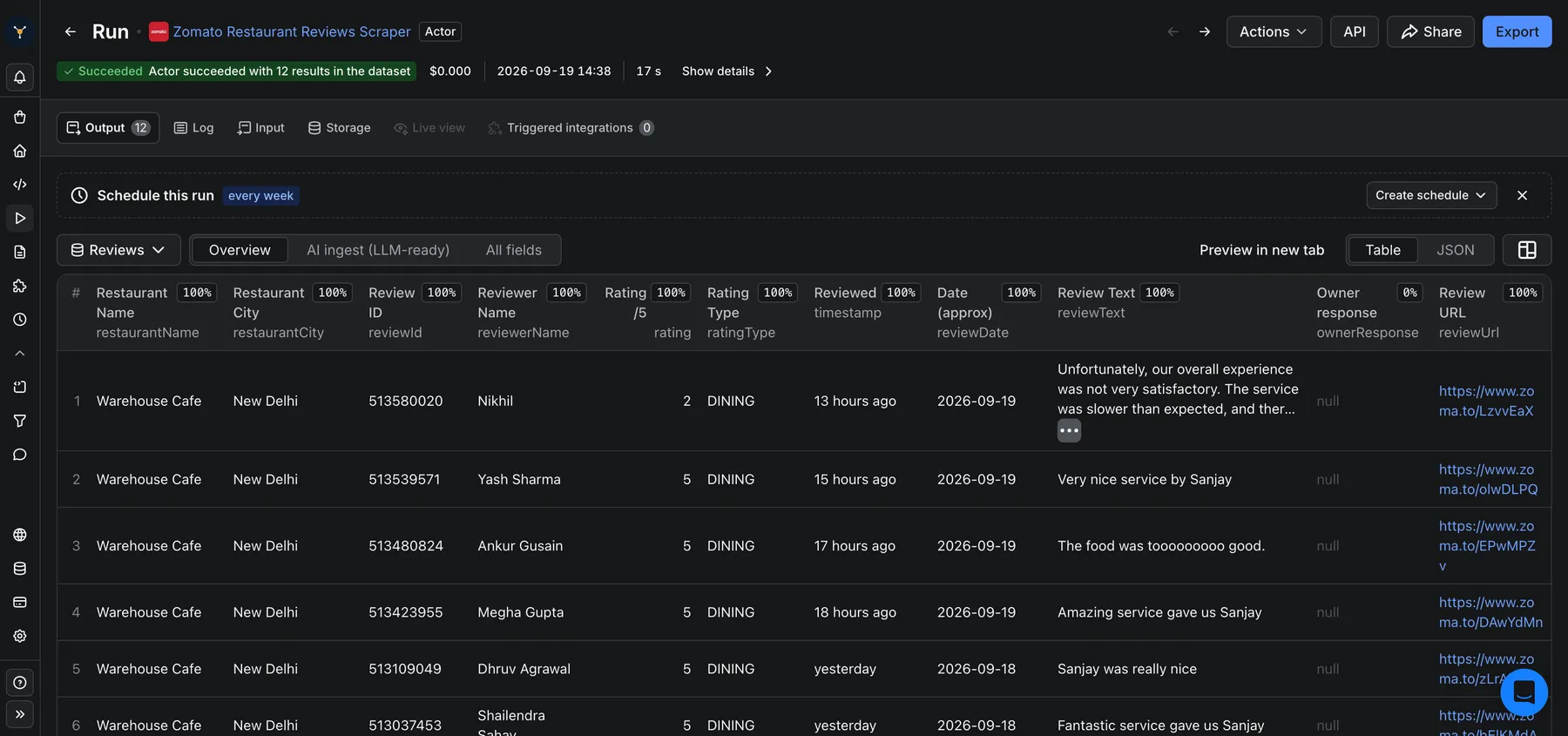
- Reviews (Reviews mode) - one row per review: rating (/5), full text, reviewer name & profile, the restaurant's owner response, a short permalink, and an approximate date.
- Restaurant leads (both modes) - one record per restaurant: name, phone number(s), full address, latitude/longitude, cuisines, cost for two, aggregate rating, total review count and timings.
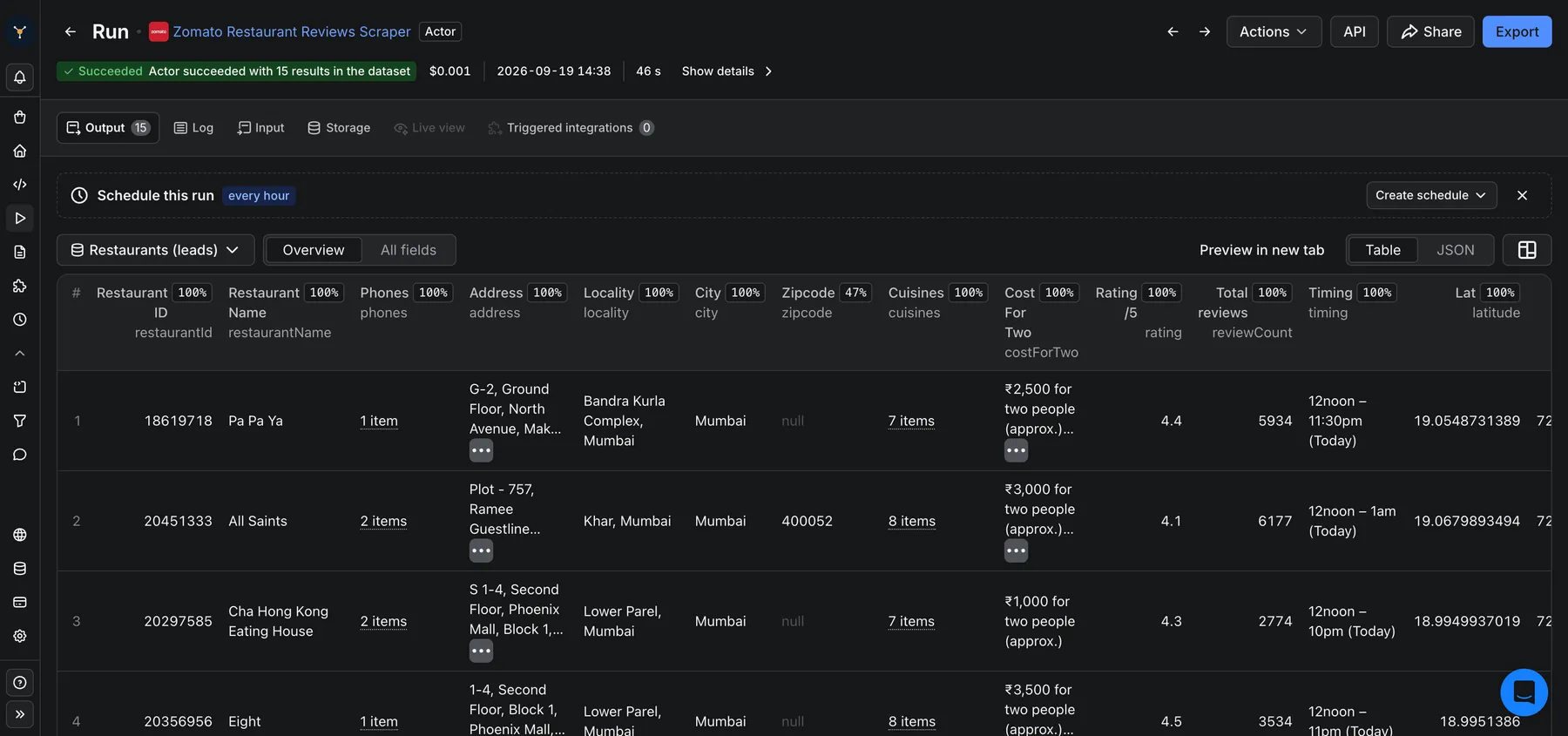
It works across India, UAE and every other market Zomato covers, and can discover every restaurant in a locality (up to 200 per listing URL) as a ready-to-import lead list.
Why scrape Zomato reviews?
- Reputation & sentiment analysis - track ratings, complaints and owner responses across your outlets or your competitors.
- Restaurant lead lists & market mapping - phone, address and GPS for every restaurant in a city or cuisine, ready for CRM import.
- AI / RAG pipelines - every review ships as a self-contained markdown block for embeddings and LLM ingestion.
- Competitive & location intelligence - cost-for-two, cuisines and rating distribution per locality.
How to scrape Zomato restaurant reviews
- Pick a Mode. For Reviews, paste restaurant URLs
(
https://www.zomato.com/ncr/warehouse-cafe-connaught-place-new-delhi) or bare IDs like301605into Restaurant URLs or IDs. For Discovery, pick a City (and optionally a Cuisine) from the dropdowns, or paste your own locality listing URL (https://www.zomato.com/ncr/connaught-place-restaurants) into City / locality listing URLs (advanced), and set Max restaurants per listing. - In Reviews mode, set Max reviews per restaurant and any optional rating or date filter (or turn Scrape reviews off for a leads-only pass over your pasted URLs). In Discovery mode these are ignored - it always returns one lead per restaurant, no reviews.
- Click Start, then download the results as JSON, CSV or Excel - or pull them from the Apify API.
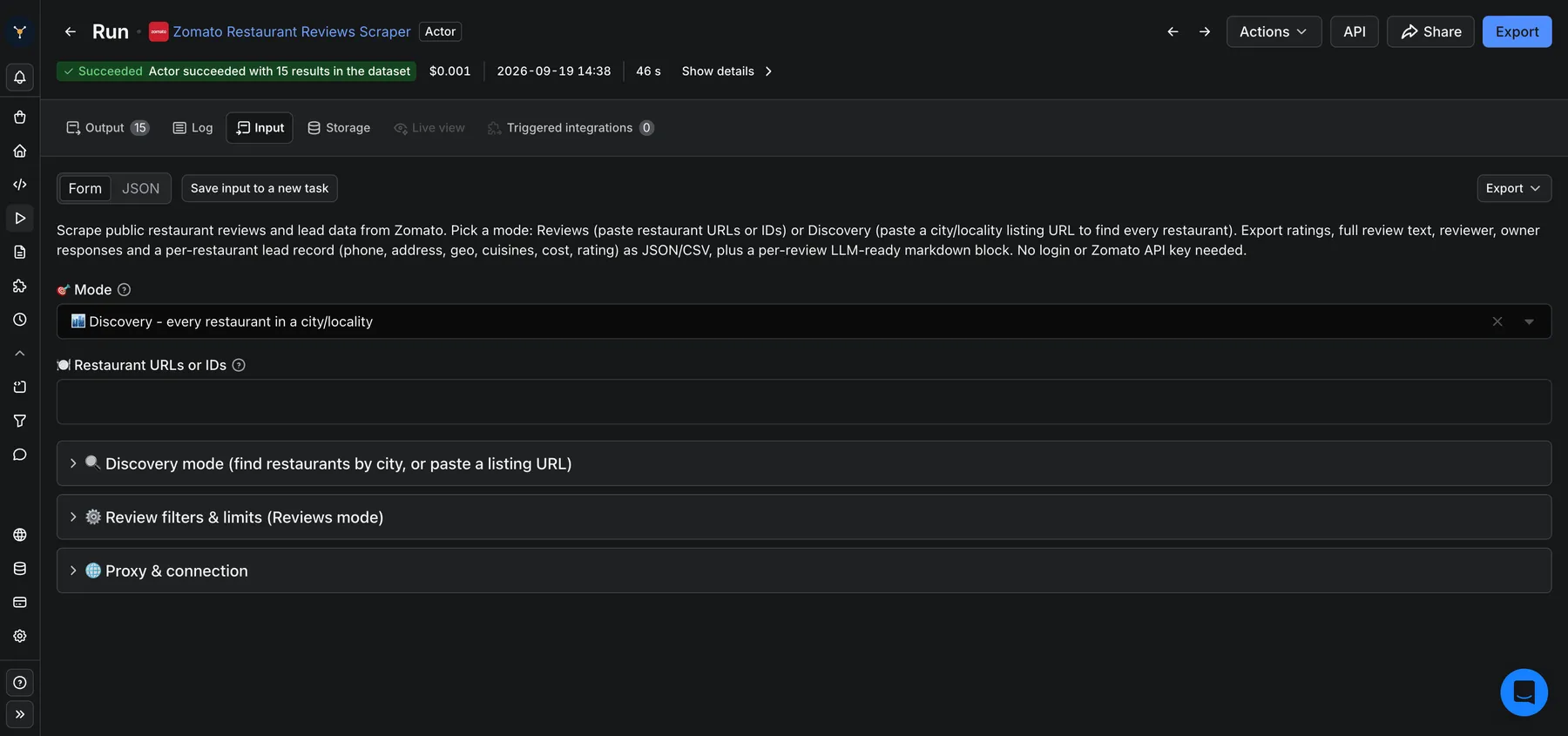
Input
| Field | Description |
|---|---|
mode | reviews (default) or discovery. Picks which inputs below are used. |
startUrls | Reviews mode. Restaurant page URLs or bare restaurant IDs. |
city | Discovery mode. Pick a city; the actor builds and paginates its Zomato restaurants listing. |
cuisine | Discovery mode. Optional: narrow the city search to one cuisine. |
listingUrls | Discovery mode (advanced). Your own city/locality/collection listing URLs (used with or instead of city). |
maxRestaurants | Discovery mode: how many restaurants to expand and scrape per listing (the actor paginates the listing to reach this many, up to 200). |
maxReviews | Max reviews per restaurant (newest-first). Note: Zomato only exposes about the 25 newest reviews per restaurant to logged-out access, so runs return up to ~25 regardless of a higher value. Defaults to 25. |
includeReviews | Reviews mode: turn off for a leads-only run (no reviews, no review charges). Discovery is always leads-only. |
sortBy | Output order: newest / oldest / highest / lowest rating. |
fromDate | Keep only reviews on or after this day (approximate; stops early once older reviews are reached). |
minRating / maxRating | Keep reviews within a 1-5 rating range. |
proxyConfiguration | Proxy settings. Defaults to Apify Residential for reliable access; switch to datacenter to cut cost if you prefer. |
Output
The default dataset holds the run's main results: in Reviews mode, one row per review (also mirrored to the reviews dataset); in Discovery mode, one restaurant lead per restaurant (also mirrored to the restaurants dataset). In Reviews mode the per-restaurant lead record is in the restaurants dataset. Download in JSON, HTML, CSV or Excel, or via the API.
Restaurant lead record:
Data fields
| Field | Description |
|---|---|
rating / ratingType | Review rating (1-5) and the experience it is for (DINING / DELIVERY). |
reviewText | Full review body. |
timestamp / reviewDate | Relative timestamp as shown + an approximate ISO date. |
reviewerName / reviewerProfileUrl | Reviewer identity. |
ownerResponse | Restaurant/management reply {text, author}. |
commentCount | Number of comments on the review. |
phones / address / latitude / longitude / zipcode | Restaurant contact + location (leads). |
cuisines / costForTwo / rating / reviewCount / timing | Restaurant profile (leads). |
markdownContent | LLM-ready per-review markdown block. |
How much does it cost to scrape Zomato?
This actor uses pay-per-event pricing: a small start fee per run, plus a charge per review delivered and per restaurant lead record. On the Free plan it is $0.005 start + $0.005 per review + $0.005 per lead; per-event rates drop on higher Apify plans (as low as $0.002 each). You are never charged for a review that is filtered out or a lead that could not be fetched. Turn Scrape reviews off for a cheaper, leads-only run. See the Pricing tab for current rates. On the Apify Free plan you get monthly usage credits to try it at no cost.
Tips
- Discovery mode: set Mode to Discovery, pick a City (and optional Cuisine), or paste a
locality URL (e.g.
.../ncr/connaught-place-restaurants), and set Max restaurants to pull an entire area's restaurant leads (name/phone/address/geo/cuisine/cost/rating), up to 200 per listing. Discovery does not scrape reviews - feed the restaurants it finds into Reviews mode for that. - Cheap leads run: set Scrape reviews off to collect only phone/address/geo/cuisine/cost per restaurant.
- Recent reviews only: use Reviews from to stop early once older reviews are reached (faster + cheaper).
- Schedule the actor to track new reviews over time.
FAQ
- Do I need a Zomato account or API key? No.
- Can it scrape a whole city? Yes - in Discovery mode pick a City (and optional Cuisine), or paste a listing URL. It returns a lead for every restaurant (up to 200 per listing; use several cuisines or localities to cover more). For their reviews, run those restaurants through Reviews mode.
- How many reviews can I get per restaurant? Zomato only serves about the 25 newest reviews per restaurant to public (logged-out) access - page 6 onward requires a Zomato login. So a Reviews-mode run returns up to ~25 newest reviews each, even if you set a higher Max reviews. Restaurant leads (phone/address/geo/cuisines/cost/rating) and Discovery are not affected by this limit.
- Is there a restaurant email? No - Zomato does not publish restaurant emails; phone, address and GPS are the available contact fields.
- Are review dates exact? Zomato shows relative timestamps ("6 months ago"), so
reviewDateis an approximation computed at scrape time; the exact string is kept intimestamp. - Can I call it from an AI agent / MCP? Yes - it is a standard Apify actor with a typed input schema, so agents and the Apify MCP server can run it directly.
- Is scraping Zomato legal? This tool collects only publicly available data. You are responsible for how you use it and for complying with Zomato's terms and applicable law.
🤖 For AI agents & LLM apps
Scrapes Zomato reviews (rating, text, reviewer, owner response) and a per-restaurant lead record (phone, address, GPS, cuisines, cost) via the Apify API or an MCP server. Minimal call:
Key fields: restaurantName, rating, ratingType, reviewText, reviewerName, ownerResponse, reviewDate, phones, address, latitude/longitude, cuisines, costForTwo. Every review also ships as an LLM-ready markdownContent field.
Behaviors an agent should know:
modeisreviews(paste restaurant URLs or IDs) ordiscovery(setcity+ optionalcuisine, orlistingUrls). Discovery is leads-only.- Zomato serves about the 25 newest reviews per restaurant to logged-out access, so a Reviews run returns up to ~25 each.
- Billing is one event per review and per restaurant lead, plus a $0.005 actor start.
Related FactDen actors
- Google Hotels Scraper
- Agoda Hotel Reviews Scraper
- TripAdvisor Reviews Scraper
- Expedia Hotel Reviews Scraper
- G2 Reviews Scraper
Support
Questions, a missing field, or a bug? Open the Issues tab on this actor's page - we read every one. If this actor helps your work, a ⭐ review on the Apify Store means a lot 🙏
Changelog
- 2026-08-30 - Initial release: reviews + per-restaurant leads + city/locality discovery, multi-event pricing, LLM-ready markdown, JSON/CSV/Excel export.
Common searches: zomato scraper · scrape zomato · zomato reviews scraper · zomato api · zomato restaurant data · zomato leads · scrape zomato reviews · zomato data extraction · restaurant leads india


