

Google Search Autocomplete Scraper
Pricing
from $2.99 / 1,000 results
Google Search Autocomplete Scraper
Google Search Autocomplete Scraper — Extract Google autocomplete suggestions for search queries, keywords, and topics. Discover related searches, long-tail keywords, and popular search phrases for SEO research, content planning, keyword discovery, and search trend analysis.
Pricing
from $2.99 / 1,000 results
Rating
0.0
(0)
Developer

Fast Data API
Maintained by CommunityActor stats
0
Bookmarked
2
Total users
0
Monthly active users
5 days ago
Last modified
Categories
Share
Google Search Autocomplete Scraper — Localized Keyword Suggestions
Google Search Autocomplete Scraper queries Google's live search-suggestion box for a list of seed keywords and returns one JSON row per query, with every suggestion Google returned as numbered fields. Suggestions localize to 77 languages and 205 countries, and an optional a-to-z sweep widens each seed into dozens of variants. Every response is structured JSON — ready to pass directly to an LLM, index into a vector store, or feed an SEO keyword-research pipeline. No Google account or login is needed. Start with one keyword, then scale to a list.
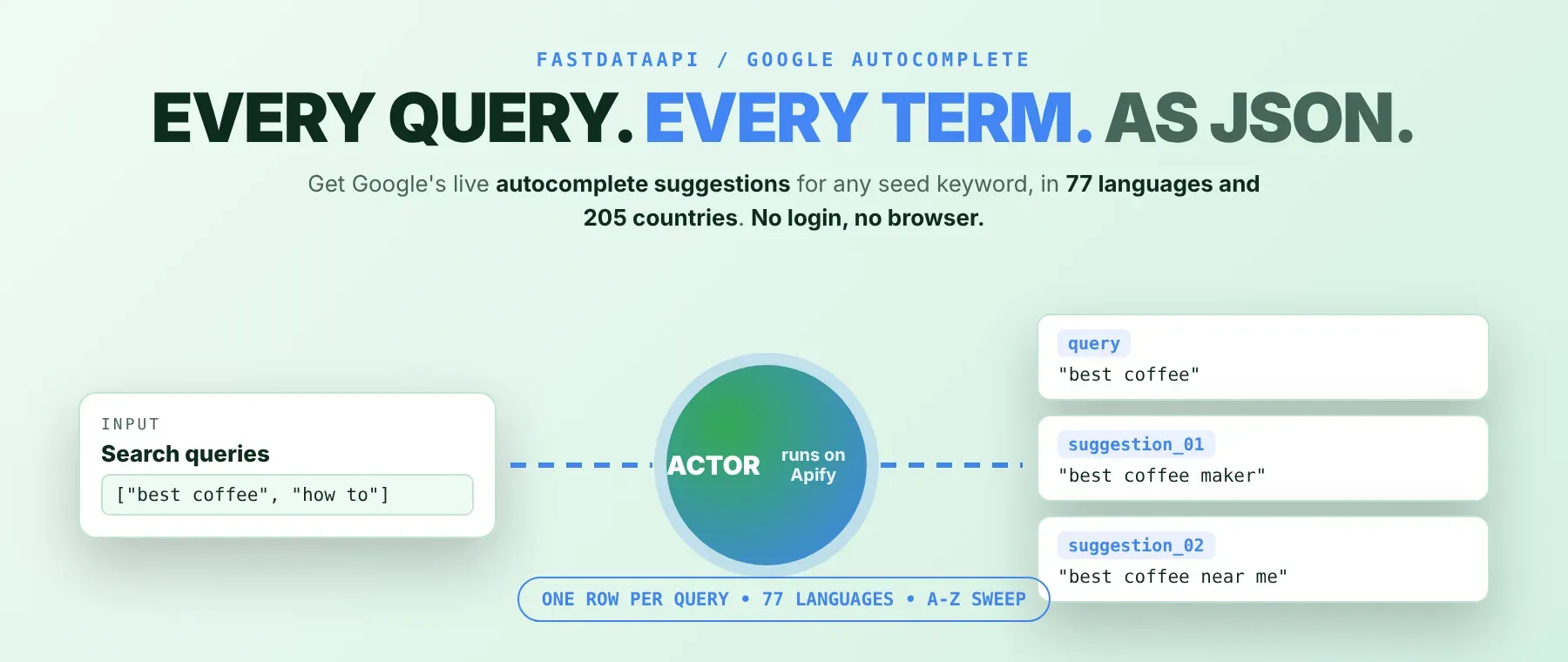
What data can I extract with Google Search Autocomplete Scraper?
Using this Google autocomplete scraper, you will be able to extract the following Google search suggestion data:
| 🔎 Query | 📝 Suggestion 1 | 📝 Suggestion 2 | 📝 Suggestion 3 |
|---|
Each row keeps going as suggestion_04, suggestion_05, and so on — one numbered field for every suggestion Google actually returned for that query, never a fixed count.
How to use Google Search Autocomplete Scraper
SEO keyword researchers, content teams, and AI agent builders use this Google keyword suggestions tool the same way: give it one or more seed keywords and get Google's own autocomplete suggestions back in one run, one JSON row per query.
Copy to your AI assistant:
Google Search Autocomplete Scraper MCP Server: use these Actors from ChatGPT, Claude or Cursor
Point your AI assistant at Apify's MCP server and it can find and call Google Search Autocomplete Scraper on its own — no glue code, no scraping logic in your prompts.
Step by step
- Create a free Apify account.
- Open Google Search Autocomplete Scraper in the Apify Store (or find it already added in your Apify Console).
- Enter one or more keywords or phrases.
- Click Start (or send your API request).
- Download or stream your results in JSON, CSV or Excel.
How to scale Google Search Autocomplete Scraper to bulk
The queries field accepts an array, so the most common way to scale is to list every seed keyword you track in one run — results stream into the same table as each query finishes. For broader coverage per seed, turn on usePrefix and/or useSuffix to sweep a-z variants automatically. Keep in mind this multiplies rows fast: one seed becomes up to 53 query rows with both flags on, and each row is its own billed result, so multiply (seeds) × (1, 27, or 53) before enabling both flags on a long list. For a recurring keyword-research refresh, schedule the same input on a daily or weekly Apify schedule instead of triggering runs manually.
✨ Features
Google Search Autocomplete Scraper fetches clean, structured autocomplete suggestions straight from Google's own suggestion box ⚡ for one or many seed keywords at once — a bulk Google autocomplete scraper that returns the same data as structured JSON. It's ideal for SEO keyword research, content-calendar building, multi-market comparison, and feeding an AI keyword-expansion pipeline.
It extracts, per query:
- Query – the seed keyword, or the expanded a-z variant, that produced this row
- Suggestions – every autocomplete suggestion Google returned for that query, numbered in Google's own order
⚡ Defaults to one query per seed keyword, so a run only grows as large as you choose when you turn on the a-z expansion options.
Use cases 💡
- SEO researcher — expand a seed list with
usePrefix/useSuffixto surface long-tail keyword variants. - Content strategist — re-run the same seeds monthly to track how Google's suggested phrasing shifts.
- Market analyst — compare
language/countrypairs on identical seeds to see how intent differs by market. - AI agent builder — feed the numbered suggestion fields into a content-brief generator as few-shot context.
Building an AI agent? Connect Google Search Autocomplete Scraper over MCP and let it call the actor on its own.
Why choose this actor?
- 77 languages and 205 countries and territories, one Actor. Pick any
language/countrypair and the Actor maps it to Google's own locale codes — no mapping table to maintain yourself. - One seed, up to 53 variants. Turning on
usePrefixanduseSuffixtogether sweeps every letter before and after a keyword automatically, instead of writing 52 separate queries by hand. - Nothing held back until the end. Rows land in the dataset as each query resolves, so the results table fills while the run is still going.
⬇️ Input
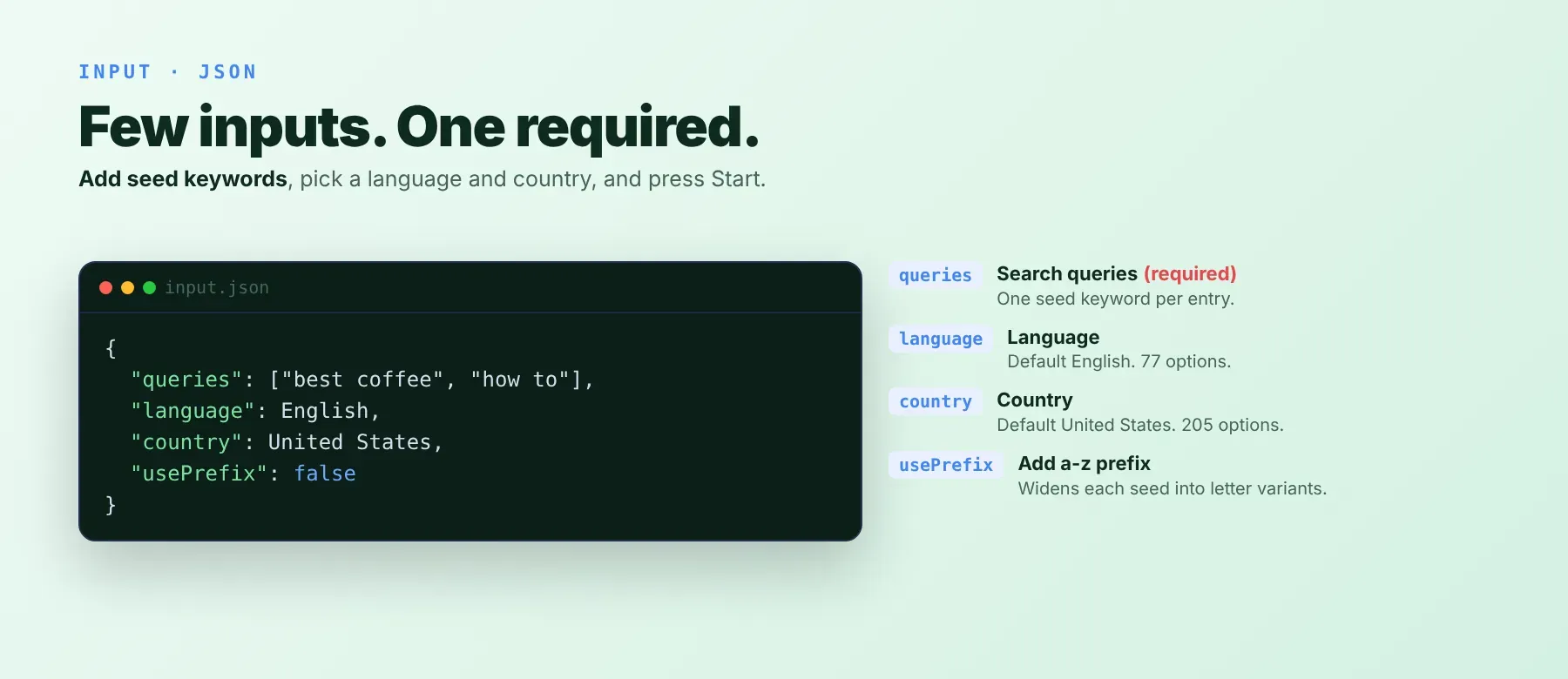
Google Search Autocomplete Scraper accepts a list of seed keywords — queries is the only required field.
| Parameter | Required | Type | Description | Example Value |
|---|---|---|---|---|
queries | Yes | array of strings | Enter keywords or phrases — one per line. Add multiple for bulk scraping. | ["how to lose weight", "best laptops 2024", "healthy breakfast ideas"] |
language | No (default "English") | string (77-value enum) | Language of the suggestions. | "English" |
country | No (default "United States") | string (205-value enum) | Target country for location-specific suggestions. | "United States" |
usePrefix | No (default false) | boolean | Add a-z before each keyword (e.g. a apple, b apple) for more results. | true |
useSuffix | No (default false) | boolean | Add a-z after each keyword (e.g. apple a, apple b) for more results. | true |
proxyConfiguration | No | object | Optional: use proxies for higher volume or to avoid blocks. | {"useApifyProxy": true} |
Free plan limits
Free plan: up to 20 suggestion rows per run (all keywords together) and 200 per month; paid plans have no limit.
Example input
Common pitfall: turning on both usePrefix and useSuffix on a long queries list is the fastest way to run up billed rows without realizing it — one seed keyword becomes up to 53 query rows, each its own billed result, whether or not it returns any suggestions.
⬆️ Output
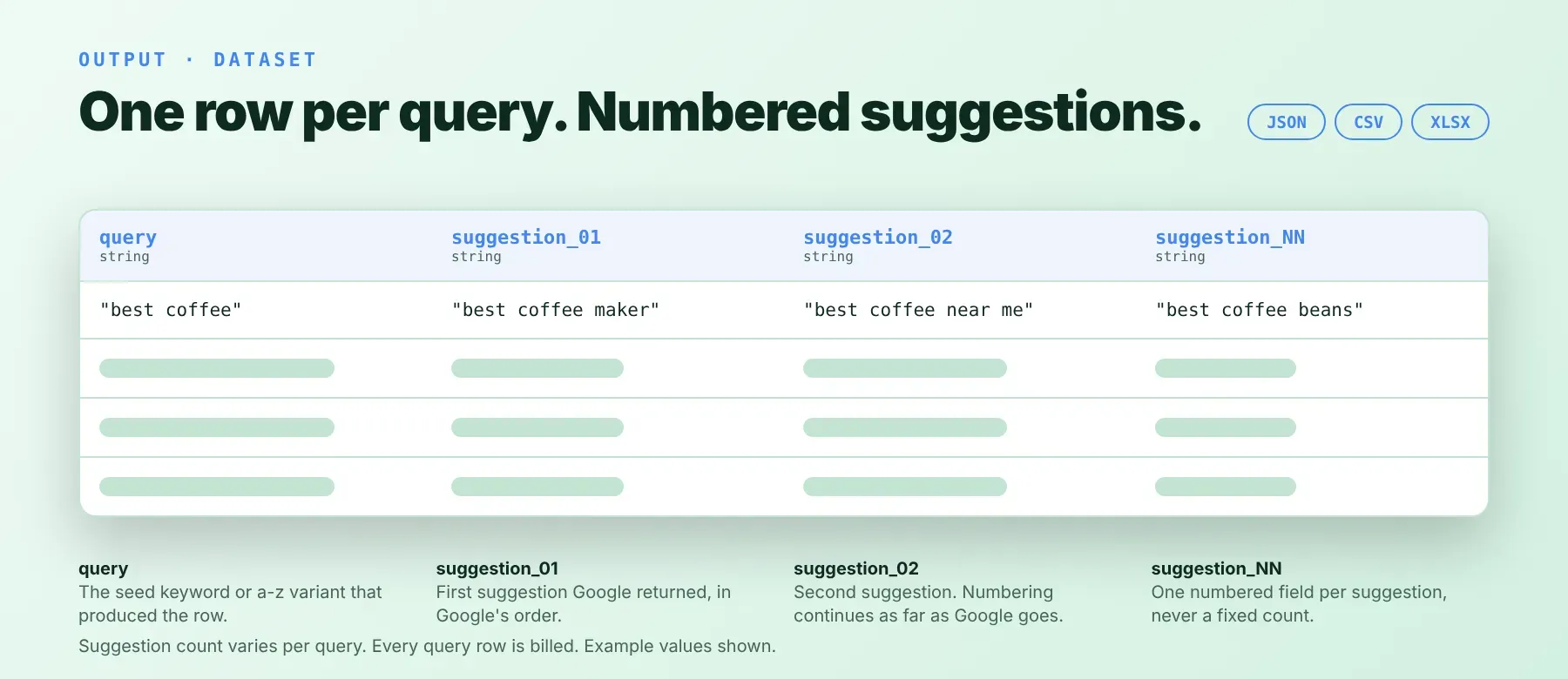
Each run writes one typed, normalized JSON row per query — the base seed, or an expanded a-z variant — streamed into the dataset as each query finishes. Export formats: JSON (default), CSV, or Excel.
Example output
A query with fewer suggestions simply has fewer suggestion_NN keys — there is no suggestion_09 key on this row, not a blank or null one. A query with zero suggestions still writes a row with only the query field, and that row is still a billed result.
How does it work?
Google Search Autocomplete Scraper gets public Google autocomplete data without needing a Google account — some call this a Google search autocomplete API, a Google autocomplete API, or a Google suggest scraper, since it does the same job. It reads the same suggestion-box data any visitor sees while typing into Google's search bar — plain HTTP requests, no browser. When Google starts blocking a connection, requests escalate automatically: direct first, then a datacenter proxy, then a residential proxy, retrying a few times once it reaches the residential tier and sticking with whatever keeps working. Suggestions are mapped to the language and country you choose using Google's own locale codes, covering 77 languages and 205 countries and territories. The output schema — one query field plus numbered suggestion fields — stays stable even if Google changes how its suggestion box behaves, so your integration doesn't need to change when that happens.
How do you integrate Google Search Autocomplete Scraper into your stack?
Google Search Autocomplete Scraper works with what you already use: a REST API from any language, MCP for AI agents, and no-code automation tools.
MCP integration for AI agents
This registers Apify's MCP server as a tool your agent can call directly, instead of writing scraping logic into your prompts. Once added, the agent finds Google Search Autocomplete Scraper on its own through the server's search, add and call-actor tools, so there is no actor ID to hardcode. The same server exposes every other Apify Actor you add, so this one setup step covers this scraper and anything else you connect later. Compatible with Claude Code, Cursor, and Windsurf.
No-code tools (n8n, Make, LangChain)
In n8n, add the Apify node, select Run Actor, and choose Google Search Autocomplete Scraper from your added Actors, passing your queries list (plus optional language, country and expansion flags) as the run input. In Make, use the Apify app's "Run an Actor" module the same way, then "Get Dataset Items" to pull the rows into the rest of your scenario. LangChain integrates through the langchain-apify package, wrapping this Actor as a callable tool once you've added it to your account.
Is it legal to scrape Google Autocomplete suggestions?
Yes, reading Google's autocomplete suggestions is generally permitted. Google Search Autocomplete Scraper returns only publicly available data — the same suggestions any anonymous visitor sees while typing into the public Google search box; no login, account, or paywall is bypassed to see them. Suggestion strings are not personal data about an individual — they are Google's own generated text tied to a search query, not a person's record. Scraping public data is generally permissible, but storing and using it must comply with local data-protection law (GDPR, CCPA). Consult legal counsel if your use case involves bulk storage or commercial resale of extracted suggestion data.
Frequently asked questions
What fields does Google Search Autocomplete Scraper return?
Every row carries the query plus as many numbered suggestion fields as Google returned for it — suggestion_01 through suggestion_NN, in Google's own order. See the data fields section above. This makes it useful both as a standalone Google autocomplete data extractor and as one stage of a larger SEO keyword research scraper stack.
Does Google Search Autocomplete Scraper require a Google account or login?
No. Only public autocomplete data is extracted. No credentials needed.
What happens if a query returns zero suggestions?
The row is still written, with only the query field and no suggestion_NN keys at all — and it is still a billed result. This is common on a-z sweep variants, since not every letter combination has suggestions in Google's index.
Can I scrape multiple keywords at once?
Yes. Pass an array of seed keywords in queries and the Actor processes every one in the same run, streaming rows into the same table as each query finishes.
Does Google Search Autocomplete Scraper work with Claude, ChatGPT, and other AI agent tools?
Yes — Google Search Autocomplete Scraper is available as a tool through Apify's MCP server. Run claude mcp add --transport http apify "https://mcp.apify.com?tools=fastdataapi/google-search-autocomplete-scraper" to register it in Claude Code, Cursor, or Windsurf. Any agent that can call an HTTP endpoint can use the REST API directly.
Does Google Search Autocomplete Scraper return data in a format LLMs can use directly?
Yes. Output is typed, normalized JSON with stable field names: query plus numbered suggestion fields — no HTML, no selectors, no parsing step needed before passing it into an LLM context window or vector store.
What happens when Google changes its layout or updates its anti-bot system?
Google Search Autocomplete Scraper is maintained. When Google changes its suggestion box or detection, the Actor is updated — your calls keep returning the same query and numbered-suggestion JSON schema with no changes on your end. No specific fix turnaround time is promised.
Can I use Google Search Autocomplete Scraper without managing proxies or browser infrastructure?
Yes. By default it connects directly with no proxy, and automatically escalates to a datacenter proxy and then a residential proxy on its own if Google starts blocking requests. You send one run request and get structured JSON back — no proxy accounts and no browser setup to maintain.
Which Google Search Autocomplete Scraper fields work best for AI training data and RAG indexing?
For RAG indexing: the numbered suggestion fields are ready-made long-tail phrases you can collect into a list and drop straight into a prompt as retrieval candidates. For training data: query and each suggestion_NN are plain strings — typed primitives with no normalization needed.
Your feedback
Found a bug or missing a field? We want to know. Leave feedback or report an issue directly from the Actor's page in Apify Console, or open an issue on the Actor's issue tracker if one is linked there — it helps keep this scraper maintained and accurate.


