

Best Damn Google Autocomplete Scraper
Pricing
$3.00 / 1,000 seed keyword querieds
Best Damn Google Autocomplete Scraper
Pull every Google Autocomplete suggestion for your seed keywords: A-Z, question and preposition expansions in any country and language. Keyword research without the guesswork: pay per seed keyword, and failures are free.
Pricing
$3.00 / 1,000 seed keyword querieds
Rating
0.0
(0)
Developer

Joshua Smith
Maintained by CommunityActor stats
0
Bookmarked
17
Total users
16
Monthly active users
a month ago
Last modified
Categories
Share
This Google Autocomplete scraper collects Google keyword suggestions for any list of seed keywords, in any country and language. Type best crm for into Google and you see ten to fifteen phrases that real people search for; this Actor fetches those phrases for hundreds of seeds at once, expands them with a-z, question, preposition and number modifiers, and hands you a clean, deduplicated keyword list as JSON, CSV or Excel.
It is built for SEO specialists, content marketers and product researchers who need long-tail keyword ideas and question-style queries without paying for a keyword-tool subscription. You pay a flat price per seed keyword, and keywords that could not be queried are reported free of charge.
Features
- Find long-tail keyword ideas from Google autocomplete suggestions
- Scrape Google search suggestions for a list of keywords in bulk
- Get "People Also Ask" style questions with who, what, why, how and other question prefixes
- Expand a seed keyword with every letter a to z to discover hidden suggestions
- Collect keyword suggestions by country and language (gl and hl parameters)
- Export Google autocomplete keywords to CSV, Excel or Google Sheets
- Build topic clusters by re-querying each suggestion one level deeper
- Track how autocomplete suggestions for a brand or product change over time
What can you do with Best Damn Google Autocomplete Scraper?
- Long-tail keyword research: turn one head term into hundreds of specific phrases (
best crm for real estate agents,best crm for nonprofits, ...). - Question mining: prefix your topic with who / what / when / where / why / how / can / is / are / does / will to find the questions people actually type, ready for FAQ pages and blog outlines.
- Content planning: use depth 2 to follow each suggestion one step further and build topic clusters around a pillar page.
- Local and international SEO: run the same seeds for
gl=de,gl=in,gl=brand the matching language to see how demand differs by market.
How it works
For every seed keyword the Actor calls Google's public autocomplete endpoint (the same one the search box uses), parses the JSON reply and stores each suggestion together with its position and Google's relevance score. Enabled expansions send additional queries (<keyword> a ... <keyword> z, how <keyword>, <keyword> vs, <keyword> 2, ...), and depth 2 re-queries every suggestion found at depth 1 once. Results are deduplicated per seed keyword.
Requests are sent with low concurrency and small random delays to stay polite. Suggestions change by country, language and time, so two runs are not guaranteed to be identical; rare phrases may return few or no suggestions. No search result pages are scraped and no personal data is collected.
How to use it
- Open the Actor and enter your seed keywords in Seed keywords, one per line. Partial phrases (
best crm for,how to start a podcast) work best. - Set Country and Language for the market you are researching (defaults:
us/en). - Optionally enable Expand with a-z, question words, prepositions or numbers, and set Depth to
2for a deeper crawl. - Click Start. Suggestions appear in the Output tab as each keyword finishes.
- Download the dataset as JSON, CSV, Excel or XML, or connect it to Google Sheets, Airtable, Zapier or Make.
Output
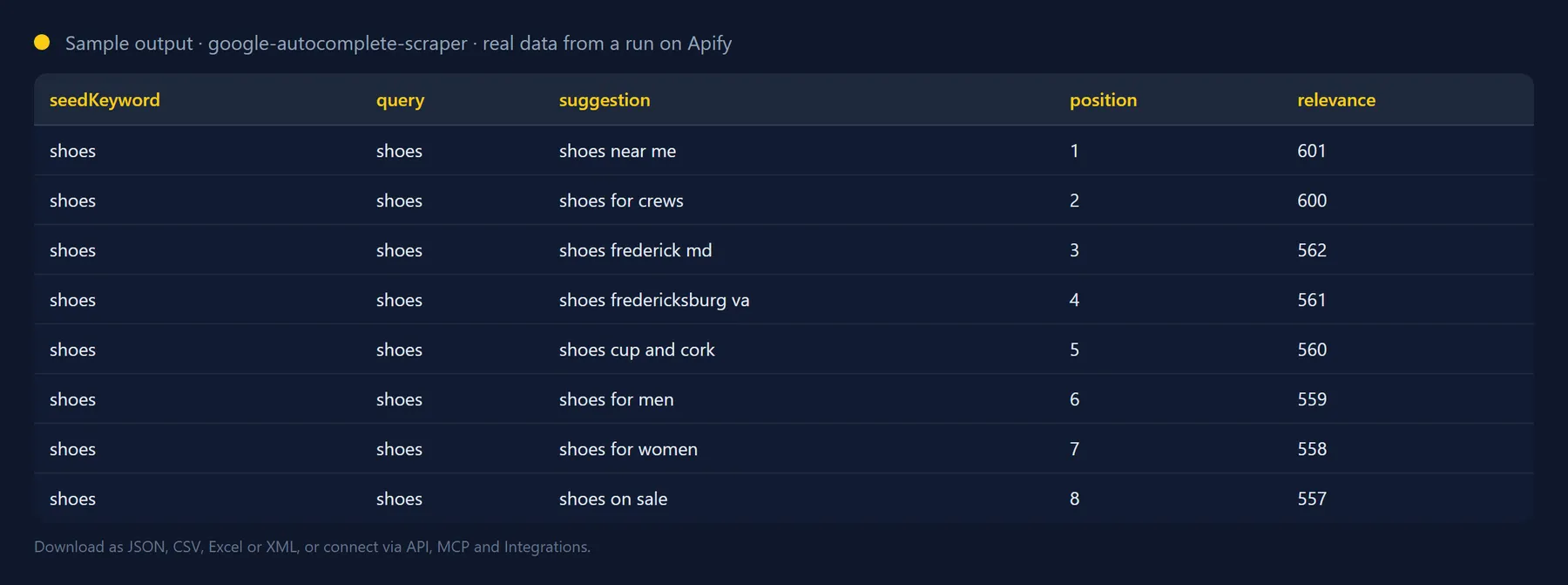
One record per unique suggestion:
Requests that fail are recorded too, so nothing silently disappears:
The run also stores a SUMMARY record in the key-value store with keywordsRequested, keywordsCharged, suggestionsFound, failures and requestsMade.
| Field | Description |
|---|---|
seedKeyword | The keyword from your input that this suggestion belongs to. |
query | The exact query sent to Google (seed plus modifier, or a depth-1 suggestion when modifierType is depth2). |
suggestion | The autocomplete suggestion text. |
position | 1-based position of the suggestion in Google's reply for that query. |
relevance | Google's relevance score for the suggestion (higher is more popular); may be null. |
suggestType | Google's suggestion type, usually QUERY. |
modifierType | none, alphabet, question, preposition, number or depth2. |
modifier | The letter, word or digit that was added, or the re-queried suggestion for depth2. |
country, language | The gl and hl values used. |
errorType | For failures: rate-limited, blocked, timeout, network, http-error or other. |
Use it from the API, Python, JavaScript or an AI agent
Run the Actor and get every suggestion back in one HTTP call:
Python, with the apify-client package:
JavaScript, with the apify-client package:
Use it from Claude, Cursor, ChatGPT or any MCP client
The Actor is exposed as a tool by the Apify MCP server, so an AI agent can call it by name. Add this to your MCP client configuration (Claude Desktop, Claude Code, Cursor, VS Code, Windsurf and others):
Then ask, for example: "Get Google autocomplete suggestions for "best crm for" in the US with josh99smith/google-autocomplete-scraper." The agent fills in the input, runs the Actor and reads the dataset back; you pay the same per-result price as in the Console.
The Actor can also be scheduled, or connected to Zapier, Make, n8n and Google Sheets in the Integrations tab.
Pricing: how much does it cost to scrape Google Autocomplete suggestions?
You pay a flat price per seed keyword (shown next to the Start button). The price covers every expansion and depth-2 request for that keyword, however many suggestions it produces; 15 suggestions or 1,000 cost the same. A keyword whose requests fail because of rate limiting or a network error is not charged and is reported with an errorType instead. Keywords that legitimately return zero suggestions are charged, because the queries did run.
There is no charge for Actor start-up, and the Actor stops automatically when it reaches the maximum cost you set for a run, so a large keyword list never produces a surprise bill.
How it compares (September 2026). Other autocomplete Actors bill per suggestion ($0.0005 to $0.001 each) or per expansion query plus a $0.005 start fee. This Actor bills a flat $0.003 per seed keyword no matter how many expansions or suggestions it produces. A seed keyword with alphabet, question and preposition expansions at depth 2 returned 1,000 unique suggestions from 188 requests in our test: $0.003 here, $0.50 to $1.00 on a per-suggestion price.
Tips
- Expansions multiply requests. Each seed keyword sends 1 request by default; a-z adds 26, question words 11, prepositions 8 and numbers 10 (all four together: 56 requests per keyword). Depth 2 adds one request per suggestion found at depth 1. The price per keyword stays the same, but runs take longer.
- Use the cap.
maxSuggestionsPerKeywordstops sending requests for a keyword as soon as the limit is hit, which keeps depth-2 runs fast. In testing,best crm forwith a-z + prepositions + depth 2 produced 1,000 unique suggestions from 188 requests in about 35 seconds. - Question mining works best with a topic, not a full question. Seed
start a podcastrather thanhow to start a podcast. - Schedule it to track how suggestions for your brand change week over week.
FAQ
Are these the same suggestions I see in the Google search box?
Yes, they come from the same public autocomplete endpoint, using the client=chrome mode, which returns up to 15 suggestions plus relevance scores. Suggestions are personalised in a signed-in browser, so what you see may differ slightly from the unpersonalised results the Actor collects.
Does Google Autocomplete give search volume?
No. Google Autocomplete does not expose volumes. The relevance score is Google's own ranking signal for the suggestion list and is useful for ordering, not for estimating traffic.
How many keywords can I scrape and what about rate limits?
There is no fixed cap on the keyword list; the run stops cleanly when it reaches the maximum cost you set. Google tolerates a few requests per second from one IP, so keep Max concurrency at the default (3) and enable Apify Proxy in the Advanced section if you see rate-limited failures on big runs (proxy traffic is billed separately by Apify). Seed keywords are processed one after another, and the run pauses for 10 seconds when Google throttles it and stops after 3 consecutive keywords fail completely.
Is it legal to scrape Google Autocomplete suggestions?
The Actor reads a public, unauthenticated endpoint at a low request rate, stores only the suggestion text Google publishes, and collects no personal data. You are responsible for using the results in compliance with the laws and terms that apply to you.
Will the output fields change between runs?
No. Output fields are stable: existing fields are never renamed or removed without a major version bump announced in the changelog, and new fields are only ever added. You can build integrations on the schema without checking it after every run.
Integrate Best Damn Google Autocomplete Scraper and automate your workflow
Best Damn Google Autocomplete Scraper plugs into the tools you already use through Apify integrations, so results can flow on without anyone downloading a file. Ready-made connectors include:
You can also attach webhooks to trigger your own endpoint whenever a run succeeds, fails or times out. For example, append fresh keyword ideas to a Google Sheet, or send a Slack digest when a research run finishes.
Related Actors by the same developer
- Best Damn Tech Stack Detector: what a website is built with.
- Best Damn Website Screenshot API: full-page screenshots and PDFs of any URL.
- Best Damn App Reviews Scraper: App Store and Google Play reviews.
- Best Damn PageSpeed Insights Audit: Core Web Vitals via Google's API.
- Best Damn Remote Jobs Aggregator: remote job listings.
- Best Damn PDF Text Extractor: text and metadata from PDFs.
- Best Damn Sitemap URL Extractor: all URLs from XML sitemaps.
- Best Damn RSS to JSON Converter: feeds as JSON.
- Best Damn YouTube Comments Scraper: comments and replies from YouTube videos and channels.
- Best Damn YouTube Scraper: videos, channels, playlists and search results with statistics.
Support and feedback
Found a problem or need another modifier set (for example comparison words in your language)? Open a ticket in the Issues tab of this Actor. The source code is available under the MIT licence.
The full source code is on GitHub: josh99smith/google-autocomplete-scraper. Stars and pull requests are welcome.


