

Substack Newsletter Scraper — Subscribers, Authors & Prices
Pricing
Pay per event
Substack Newsletter Scraper — Subscribers, Authors & Prices
$0.90 per 1,000 newsletters, no login: Substack newsletters by category with subscriber counts, paid readers, monthly price, author, and X profile when the author links one. Filter by size, language, keywords. CSV, Excel or JSON. Runs daily, weekly or monthly with Apify, n8n, Make or Zapier.
Pricing
Pay per event
Rating
0.0
(0)
Developer

FERMAJA
Maintained by CommunityActor stats
0
Bookmarked
2
Total users
1
Monthly active users
5 days ago
Last modified
Categories
Features
Share
Substack Newsletter Scraper: subscribers, paid plans, prices and authors
Turn Substack's category rankings into a ready-to-use list of newsletters: name, website, subscriber count, paid readers, monthly and yearly price, author, bio and X profile. No login, $0.90 per 1,000 newsletters.
- 📰 Newsletters: name, URL, domain, subscribe link, description, category and rank in Substack's list
- 📈 Audience size: subscriber count as a number (
subscribers) plus Substack's own text ("Over 270,000 subscribers") - 💰 Business signals: paid plan yes/no, paid readers ("Thousands of paid subscribers"), monthly and yearly price, bestseller tier
- 👤 Author: name, handle, Substack profile, bio and X (Twitter) profile when the newsletter links one
- 🔎 Filters: category, top or top paid list, min and max subscribers, paid plan only, keywords, language
Try it now: the prefilled input returns the top 20 Technology newsletters in about 2 seconds.
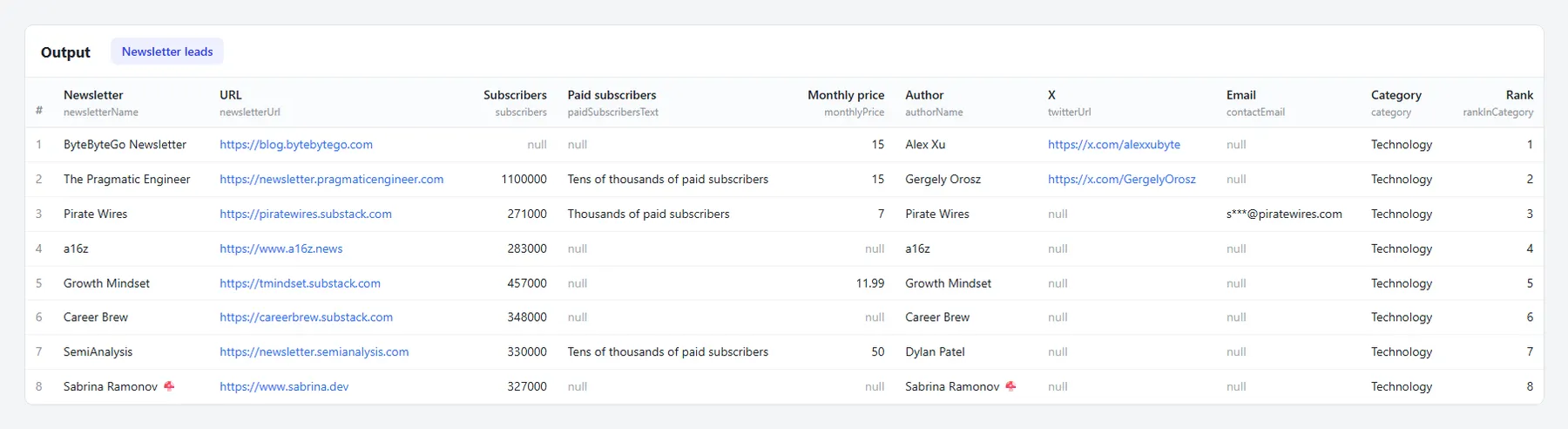 This is how your results look: the Newsletter leads view of the Output tab, with real rows from a run on 12 November 2026 (the prefilled input: Technology category). Emails are masked in this image only; your results show them in full.
✨ Why people pick it
- ✅ Numbers you can sort and filter:
subscribersis a real number, not just "Thousands", so "between 10,000 and 50,000" is one filter - ✅ One flat row per newsletter: stable column names map straight into Google Sheets, Airtable, HubSpot or n8n
- ✅ Type it your way:
Technology,tech & AI,food & drink,TecnologíaorWirtschaft, a Substack category or leaderboard URL, orall - ✅ No login, no cookies: public Substack listings only
- ✅ Cheap at scale: measured 1,000 newsletters in 165 seconds, $0.90 on the Free plan
👥 Who uses it
| Who | What they do with it |
|---|---|
| 📣 Brands and agencies buying newsletter ads | Shortlist mid-size newsletters in their niche, with audience size and price, then pitch the author |
| 🎙️ PR and podcast bookers | Find writers with a big audience and an X profile to invite as guests |
| 🧑💻 SaaS and creator-tool founders | Find paid newsletters (they run a business) as early customers or partners |
| 📊 Analysts and writers | Map a category: who leads, how big they are and what they charge |
⚙️ How it works
- Pick one or more categories and the list: top newsletters or top paid newsletters.
- The Actor reads Substack's public category rankings (up to about 525 newsletters per category and list).
- It applies your filters and saves one flat row per newsletter, in Substack's ranking order.
💡 Tip: to look for business emails, send newsletters on their own domain to Website Email & Contact Scraper with the newsletterUrl column (see the n8n recipe below). Substack itself rarely shows an email, so contactEmail is usually empty.
📥 Input recipes
Mid-size tech newsletters for a sponsorship test
Top paid finance and business newsletters
English AI newsletters across every category
📤 Example output
A complete real row from a run on 2026-11-12 (default Technology category). Every field is shown, in the order you get it:
In our 1,000-newsletter test (Technology + Business): subscribers was filled for 92% of rows, a price for 58%, paid-reader text for 29%, an X profile for 21%, the author name for 100%.
🧰 Ready-made tasks
Find them under Tasks on this page: open one, press Start, and change the category to your own niche any time.
- Tech newsletters for sponsorships: Technology newsletters with 10,000+ subscribers, with size and price.
- Top paid finance newsletters: Substack's top paid Finance newsletters with prices and paid-reader counts.
- Mid-size health and wellness newsletters: English Health & Wellness newsletters up to 50,000 subscribers.
🔗 Use it in n8n
Install the official Apify node (n8n Cloud: search Apify in the nodes panel; self-hosted: install @apify/n8n-nodes-apify under Settings > Community Nodes) and add your Apify API token as the credential. Use the operation Run an Actor and get dataset with this Actor.
1. Every Monday: a sponsorship shortlist in Google Sheets
Schedule Trigger (weekly) → Apify Run an Actor and get dataset → Filter (monthlyPrice is not empty) → Google Sheets Append or update row (match on newsletterUrl)
Map newsletterName, newsletterUrl, subscribers, paidSubscribersText, monthlyPrice, authorName, twitterUrl.
2. Young paid newsletters into your CRM
Schedule Trigger (monthly) → Apify Run an Actor and get dataset → Filter (newsletterAgeYears < 1) → HubSpot Create or update company → Slack Send message
Map newsletterName, domain, subscribers, monthlyPrice, authorName, authorProfileUrl.
3. Look for business emails with a second Actor
Apify node 1 (this Actor) → Apify node 2 Run an Actor and get dataset with fermaja/website-contact-scraper and this input in Expression mode:
The second Actor returns any emails, phones and social profiles it finds on each newsletter website (best on newsletters with their own domain).
⏰ Run it on autopilot: daily, weekly or monthly
Without any workflow tool: save your input as a task, open Schedules in Apify Console, pick daily, weekly or monthly, and add an email, Slack or Google Sheets export on the task's Integrations tab.
With n8n, Make or Zapier: trigger the run on a schedule and send the rows wherever you work.
Popular rhythms:
- Weekly on your niche, to see who is climbing Substack's rankings
- Monthly on the paid list, to track prices and paid-reader tiers
- Quarterly on
allcategories for a full market map
💵 Pricing
Pay per newsletter saved.
| Your Apify plan | Price per newsletter | Per 1,000 newsletters |
|---|---|---|
| Free | $0.0009 | $0.90 |
| Starter (Bronze) | $0.0008 | $0.80 |
| Scale (Silver) | $0.0007 | $0.70 |
| Business (Gold) and up | $0.00065 | $0.65 |
Plus a start fee of $0.005 per run. Example: 1,000 newsletters on the Free plan = $0.90 + $0.005 = $0.905.
Just testing or comparing scrapers? You're very welcome. The prefilled run (20 newsletters) takes about 2 seconds and costs about $0.02. Apify's free plan includes $5 of credit every month, enough for about 5,500 newsletters.
❓ FAQ
Is this legal? It reads public listings that Substack shows to every visitor. You are responsible for using the data in line with the laws that apply to you (for example GDPR and anti-spam rules for outreach).
Why is subscribers empty for some newsletters? Substack hides the count for some publications. In our test 92% of rows had it.
How many newsletters can I get? Substack lists up to about 525 newsletters per category and list. Use several categories, both lists (all and paid) or all categories for more.
Why did my API call return HTTP 400? Numbers must be numbers ("minSubscribers": 10000, not "10k").
Found a bug or need a field? Open an issue on the Issues tab of this page with your input (or run ID). Issues are checked every day; bug fixes ship as a new build and are listed under What's new below.
Do I need a proxy? No. If Substack ever rate-limits you, enable Apify Proxy in the input and the run uses it after repeated rate limits.
⚠️ Limits
- Only newsletters that appear in Substack's public category rankings, not every newsletter on Substack.
- Subscriber counts are Substack's own rounded figures; paid readers are ranges ("Thousands of paid subscribers"), given as a lower bound in
paidSubscribersMin. maxResults0 means all matching newsletters, up to 20,000.
🆕 What's new
-
🔤 1.0.10 (18 November 2026): plural keywords match the singular too (
foundersfinds "founder",podcastsfinds "podcast": 12 → 35 of 100 Business newsletters in our test),#AIworks likeAI; languages typed in their own language work (Italiano,Português,Nederlands,Portuguese (Brazil)); a Substack leaderboard link (substack.com/leaderboard/technology/paid) works as a category and reads the paid list; the status message now shows up to 3 notes instead of 1. -
🆓 1.0.9 (16 November 2026): List
freekeeps only newsletters without a paid plan; keywords typed with curly quotes (Lenny’s Newsletter) now match; when nothing matches, the status message names the filter that ruled everything out (for example the largest subscriber count scanned, or the languages the lists really contain). -
🌍 1.0.7 (14 November 2026): category names in other languages work (
Tecnología,Wirtschaft,Politik,Gesundheit), and so do mixed phrases liketech & AIorAI and startups. A newsletter link typed as a category now tells you to use Keywords instead. -
💬 12 November 2026: FAQ now explains how to report a bug or ask for a field (Issues tab, checked every day).
-
🛠️ 11 November 2026: when you pick several categories, "Max newsletters" is now shared between them (2 categories and 6 newsletters = 3 from each); short keywords like AI or VC match whole words only (no more "explain" for AI); when "Max subscribers" is below every newsletter in Substack's top lists, the status message tells you the smallest subscriber count it saw.
-
🚀 1.0 (November 2026): first release. Categories by name, top and top paid lists, subscriber, paid-plan, keyword and language filters, prices and author profiles.
🧩 Related Actors
- Website Email & Contact Scraper: emails, phones and social profiles from any list of websites
- Product Hunt Scraper: new launches with makers and company emails
- Y Combinator Scraper: YC startups with founders, LinkedIn and hiring status


