

Website Email & Contact Scraper — Pay Only for Hits
Pricing
from $1.80 / 1,000 website with contacts
Website Email & Contact Scraper — Pay Only for Hits
Turn any list of websites into ready-to-use leads: emails, phones, LinkedIn, Instagram and 9 more social profiles, plus address. Pay only for sites with contacts. Schedule it daily, weekly or monthly in Apify, n8n, Make or Zapier and pay only for new or changed contacts.
Pricing
from $1.80 / 1,000 website with contacts
Rating
0.0
(0)
Developer

Fermaja
Maintained by CommunityActor stats
0
Bookmarked
2
Total users
1
Monthly active users
a day ago
Last modified
Categories
Share
Website Email & Contact Scraper: pay only for hits
Website Email & Contact Scraper turns a list of company websites into a ready-to-use lead list. You pay only for websites where contacts are found:
- 📧 Emails: the best address first (info@, contact@, hello@, sales@ on the company's own domain), each one labelled same-domain, free-provider or other
- 📞 Phone numbers: validated, in E.164 (
+18557388741) and international format (+1 855 738 8741), with their country - 🌐 11 social networks: LinkedIn, Facebook, Instagram, X, YouTube, TikTok, Pinterest, GitHub, Threads, Telegram and WhatsApp, in clean columns
- 🏢 The company: name, address and contact page, read from the site's structured data
Export as CSV, Excel, JSON or HTML, send it to Google Sheets, HubSpot, Make, Zapier or n8n, or call it from the API. No login, no browser.
Try it now: leave the form as it is and click Start. 5 websites are scanned in about 7 seconds.
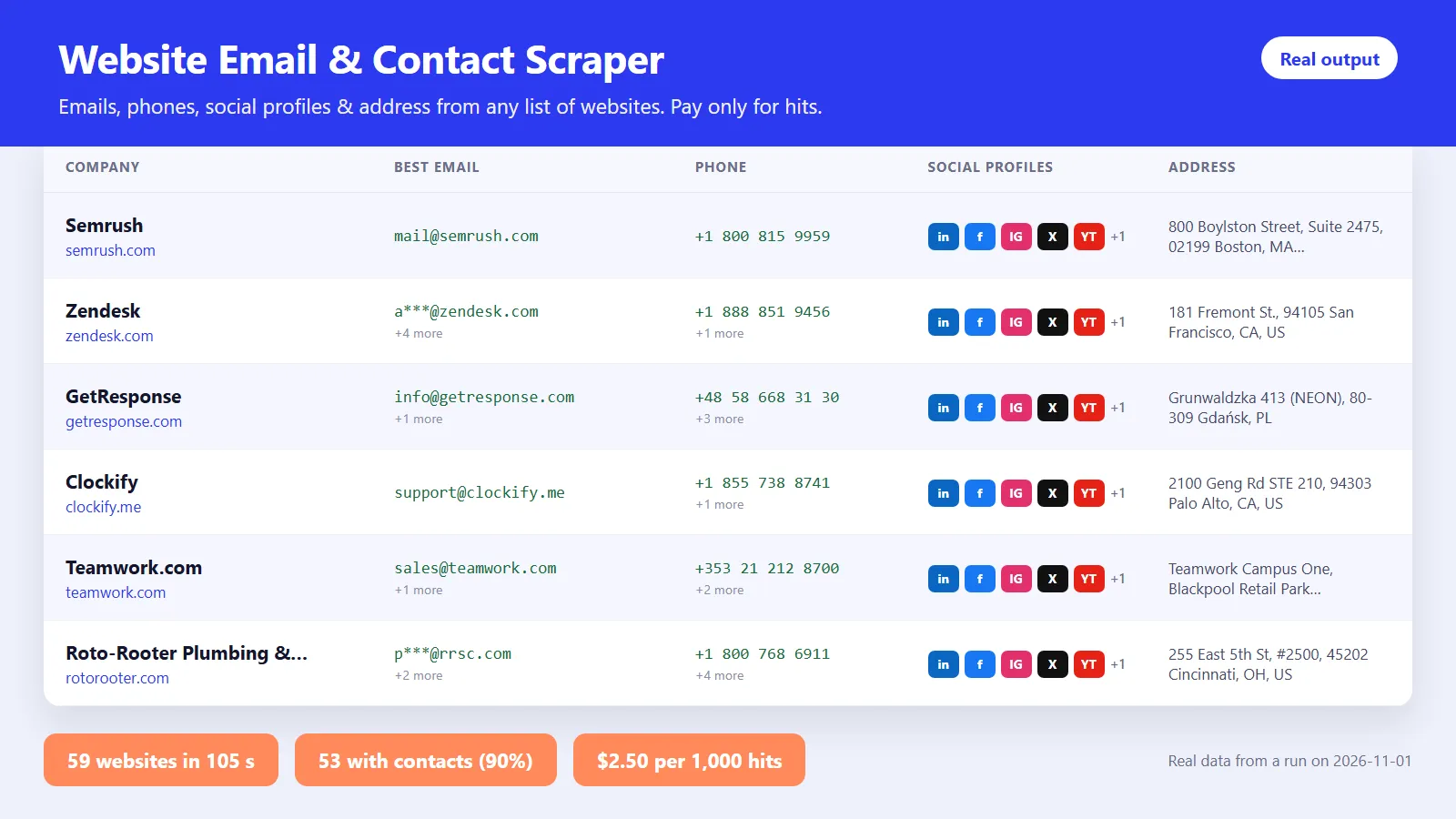
Real results from our test run: 59 company websites scanned in 12 seconds, 53 of them (90%) with contacts: 43 emails, 100 phone numbers and 308 social profiles.
✨ Why people pick it
- 💸 Pay only for hits. Websites that are down, blocked or have no contacts are listed for free with the reason, so your list stays complete and your bill stays honest.
- ✅ The right email on top. Company-domain role addresses are ranked first, so you know which one to use.
- ✅ Clean social profiles. Share buttons and post links are filtered out; you get the company profile.
- ✅ Dialer-ready phones. Every number is validated and formatted for your CRM.
- 🔁 Re-check the same list for (almost) free. Turn on Only new or changed contacts for daily, weekly or monthly runs: you pay only for websites that are new or show a new email, phone, profile or address.
Who uses it
| You are… | You use it to… |
|---|---|
| 🎯 Sales & lead-gen teams | Enrich a list of target accounts with emails, phones and LinkedIn pages in minutes |
| 🏪 Agencies | Build prospect lists of local businesses (plumbers, dentists, restaurants) and reach them on the channel they actually use |
| 📊 Data & growth teams | Enrich the output of other scrapers (Google Maps, directories, Product Hunt) by importing the dataset straight in |
| 🤖 Automation builders | Add a contact-enrichment step to n8n, Make or Zapier workflows |
How it works
- Add websites. Paste domains or URLs (
acme.com,https://www.acme.com/contact), or import a dataset from another Actor. - It visits each site like a careful visitor. The homepage, then the best contact, imprint, about and team pages (5 pages per site by default). It respects robots.txt.
- It extracts and cleans every contact: ranks emails, validates phones, keeps only real company profiles.
- You get one clean row per website, ready to export or sync.
💡 Automate it: save your input as a Task with Only new or changed contacts on and add a monthly Schedule. Your CRM stays fresh, and you only pay for what changed.
Ready-made inputs
1. ⚡ A quick list of domains
2. 🔗 Enrich leads from another Actor (for example a Google Maps or directory scrape that has a website column)
3. 🔁 Weekly re-check that charges only for what's new (the first run charges as usual, later runs only for new or changed websites)
4. 🏪 Large local-business list in one country (reads local phone formats like (212) 555-0123)
Example result
One row per website. This is a real row from our test run, shortened:
📋 The dataset has four ready-made views: Leads (one clean row per company), All contacts (every email, phone and profile), New & changed (what's new since your last run) and Status & errors.
With Only new or changed contacts on, every charged row also tells you what's new:
changeStatus is new (first time this monitor sees the website), changed (new contact details) or unchanged (free; listed without contact details only when Also list websites without contacts is on).
🔗 Use it in n8n
Built for lead-generation workflows. Install the official Apify node in n8n (search "Apify" in the nodes panel; on self-hosted n8n install @apify/n8n-nodes-apify under Settings > Community Nodes), add your Apify API token, and you're ready.
Workflow 1: 📊 enrich a Google Sheet of companies
- Google Sheets: read the rows that have a
websitecolumn. - Aggregate: combine the
websitefield into one list, so the Actor runs once for the whole sheet instead of once per row. - Apify → Run an Actor and get dataset: Actor
fermaja/website-contact-scraper, custom input:
- Filter: keep rows where
primaryEmailis not empty (orprimaryPhone, for cold calling). - HubSpot, Pipedrive, Instantly, Lemlist or Google Sheets: map
companyName,primaryEmail,primaryPhone,linkedinandaddress.
Workflow 2: 🔗 chain it after another scraper. Run a Google Maps or directory scraper first, then pass its dataset straight in, with no copying:
Workflow 3: 🔁 weekly, hands-free, pay only for what's new. Save your input as a task in Apify with "onlyNewContacts": true, a monitorId such as "crm-weekly" and "includeSitesWithoutContacts": false. Then use Schedule Trigger → Apify: Run task and get dataset → your CRM: every week the dataset holds only websites that are new or have a new email, phone or profile, so you update just those records (newEmails, newPhones, newSocialProfiles). Or let Apify run the schedule and start your workflow with the On new Apify event trigger when the run succeeds.
💡 Two n8n tips. Set the custom input field to Expression mode, otherwise n8n sends the text {{ $json.defaultDatasetId }} instead of the ID (the run then stops and tells you so, at no result cost). And websites must be a JSON list (["a.com","b.com"]); JSON.stringify(...) of an aggregated column gives you exactly that.
Every row has the same flat fields (one row per website, no nesting needed), so n8n maps them directly. Rows without contacts are free, so filtering them out costs you nothing.
⏰ Run it on autopilot: daily, weekly or monthly
Contact details change: people leave, new numbers appear, companies add a LinkedIn page. Set it once and keep your lead list fresh.
- 🗓️ Without any workflow tool: in Apify Console, save your input as a task, open Schedules → Create new, choose daily, weekly or monthly (or any cron such as
0 8 * * 1for Mondays at 08:00) and add the task. In the task's Integrations tab, send each run's results to Google Sheets, Slack, email or a webhook. - ⚙️ Inside your workflow: run it from n8n, Make or Zapier on any schedule, right after the step that finds new companies (see the n8n section above).
Turn on Only new or changed contacts for every scheduled run. The scraper remembers what it found (in a key-value store in your own account, one memory per Monitor name), so a repeat run charges only for websites that are new to the list or show a new email, phone, social profile or address. Websites with nothing new are free. Contacts that disappear are not charged either.
Popular rhythms: weekly for new leads from a Google Maps or directory scrape, monthly to re-check your whole CRM for new emails and phone numbers. Use one monitor name per list, e.g. dentists-nyc and crm-monthly.
💵 Pricing
You pay per website with contacts: a site where at least one email, phone number or social profile was found. Everything else is free.
| Your Apify plan | Price per website with contacts | Per 1,000 hits |
|---|---|---|
| 🆓 Free | $0.0025 | $2.50 |
| 🥉 Starter (Bronze) | $0.0022 | $2.20 |
| 🥈 Scale (Silver) | $0.0020 | $2.00 |
| 🥇 Business (Gold) and up | $0.0018 | $1.80 |
Plus a tiny start fee of $0.001 per run (at the default 512 MB memory).
Example: you scan 1,000 websites and 700 have contacts. You pay 700 × $0.0025 = $1.75. The 300 websites without contacts cost nothing. Scrapers that charge per page visited typically cost $6–10 for the same 1,000 websites, whether contacts are found or not.
🔁 Monthly re-check example: you track 1,000 websites with Only new or changed contacts on. The first run charges the 700 websites with contacts ($1.75). Next month, 40 websites show a new email or phone and 15 new websites were added to the list: you pay 55 × $0.0025 = $0.14, not $1.75 again.
🙌 Just testing or comparing scrapers? You're very welcome. Click Start with the prefilled input: 5 websites, about 7 seconds, around one cent. Apify's free plan includes $5 of credit every month, which covers about 2,000 websites with contacts, so you can try it on your own list before you commit to anything.
🛡️ Set Maximum cost per run in the run options to cap your spend; the scraper stops cleanly when it is reached.
❓ FAQ
Is it legal to scrape contact details?
This Actor only reads information that companies publish on their own public websites, such as contact pages and imprints. Laws like GDPR and CAN-SPAM still apply to how you use the data, especially personal emails (like jane@company.com). Use it for legitimate B2B outreach and check the rules in your country.
Some websites show "blocked". What can I do? A few sites refuse automated visits from cloud servers. Turn on Proxy → Apify Proxy in the input: it is used only for websites that refuse a direct visit. Blocked websites are never charged.
Why did a website return no email? Many companies publish only a contact form, or show emails only after JavaScript runs. The scraper reads each page's HTML (fast and cheap) and does not solve captchas or reveal emails hidden by email-protection scripts. You still get phones and social profiles when they exist, and you pay nothing if nothing is found.
Can I scan more pages per website? Yes. Raise Pages per website (up to 30) for large company sites with team directories. The price per website does not change.
Can I run it every day, week or month? Yes. Save your input as a task with Only new or changed contacts on, add a schedule, and connect the results to Google Sheets, HubSpot, Make, Zapier, n8n or a webhook. You pay only for websites with something new.
What counts as "changed"? A website is charged again when it shows a contact detail the monitor has never seen on it: a new email, phone number, social profile or a different address. Cosmetic differences (upper/lower case, www, trailing slashes) don't count, and neither do contacts that disappear.
⚠️ Limits
- Pages are read without a browser, so contacts that appear only after JavaScript runs may be missed.
- Phone numbers written in local format on .com sites need a country. It is detected from the site's address data and language, or you can set Default country.
- Social networks and marketplaces (facebook.com, amazon.com…) are skipped as inputs because they are not company websites.
🆕 What's new
- 🧹 1.1.9 (November 2026): friendlier input. Out-of-range numbers (for example 50 pages per website) are adjusted to the supported range with a note in the status message, instead of the run being rejected. An n8n expression sent as plain text in Dataset ID now ends with a clear fix-it message.
- 🔁 1.1 (November 2026): Only new or changed contacts mode for scheduled runs, with
changeStatus,newEmails,newPhones,newSocialProfilesandaddressChangedcolumns and a New & changed view. - 🚀 1.0 (November 2026): first release. 11 social networks, validated phone numbers, email ranking, dataset import, robots.txt support and pay-per-hit pricing.
🧩 Related Actors
- 💼 Company Jobs Scraper: find companies that are hiring right now, then get their contacts here.
- 🚀 Product Hunt Scraper: find new startups and their makers, then enrich their websites here.
- ⭐ Google Play Reviews Scraper: learn what users love and hate about any Android app.
Questions or a website that should work but doesn't? Open an issue on the Actor page and we usually reply within a day.


