
TikTok Email Scraper: Creator Emails from Bio & Link in Bio
Pricing
Pay per event
TikTok Email Scraper: Creator Emails from Bio & Link in Bio
$1.40 per 1,000 creators with email. Paste TikTok usernames or links and get public business emails from the bio and link-in-bio page, plus followers, likes, website and Instagram/YouTube. No login. Chain it in n8n, Make or Zapier and run it daily, weekly or monthly.
Pricing
Pay per event
Rating
0.0
(0)
Developer
FERMAJA
Maintained by CommunityActor stats
0
Bookmarked
2
Total users
1
Monthly active users
2 days ago
Last modified
Categories
Features
Share
Paste TikTok usernames or links and get each creator's public business email, found in the bio or on the link-in-bio page (Linktree, Beacons, Stan, their own website), plus followers, likes, videos, website, Instagram and YouTube, all in one flat row. You pay only for creators with an email: $1.40 per 1,000. Creators without one are free.
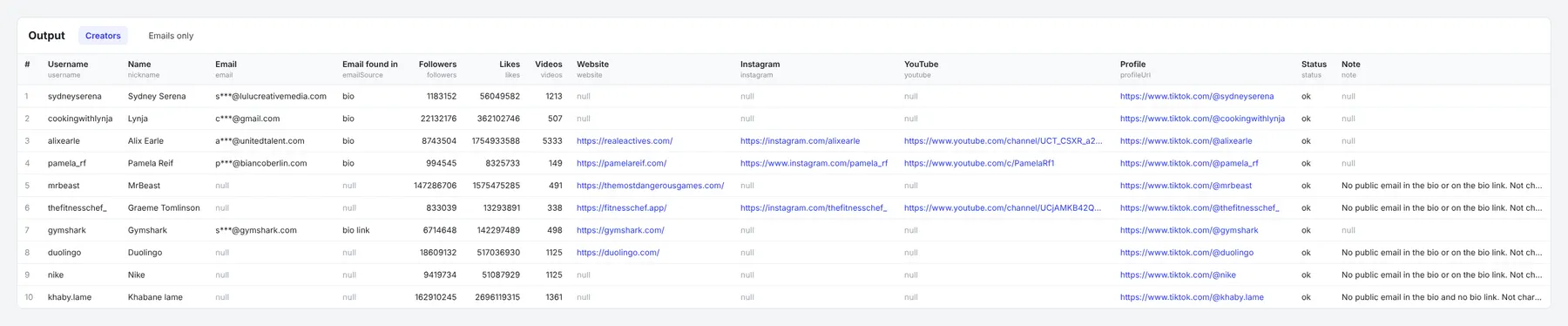
This is how your results look: the Creators view of the Output tab, with real rows from a run on 20 November 2026 (the prefilled input: 10 creators; 5 had a public email, the other 5 are free rows). Emails are masked in this image only; your results show them in full.
Try it now: the prefilled input checks 10 creators in about 5 seconds and finds 5 emails, for about $0.012.
✨ What you get
- Business email (
email,emails) from the bio, including "name [at] brand [dot] com" spellings, and from the bio link page.emailSourcesays where it was found:bio,bio linkorbio + bio link. - Audience numbers for sorting and filtering:
followers,following,likes,videos,verified. - Where else to reach them:
website,instagram,youtube,twitter,linkedin,facebook, read from the bio link. - Brand signals:
businessAccount,businessCategory(e.g. "Sports, Fitness & Outdoors"),language,accountCreatedAt. - One flat row per creator with fixed column names, ready for Google Sheets, a CRM or n8n without any mapping work.
- Fair billing: no email, not found, private or mistyped entries are saved as free rows with a
notesaying why.
How many creators publish an email: in our tests on 20 November 2026, 14 of 38 well-known creators (37%) had one, and 5 of 10 in the prefill. 4 of those 14 were found only on the bio link page.
👥 Who uses it
- Influencer marketers and agencies: turn a list of creators from a TikTok search or hashtag scrape into an outreach list with emails and follower counts.
- Brands and DTC founders: find the management or business contact of creators in your niche before a campaign.
- Lead-gen and n8n builders: chain it after any TikTok scraper and send only creators with an email to Instantly, Lemlist, HubSpot or a sheet.
⚙️ How it works
- You give it usernames, profile links or video links, or a dataset from another Actor.
- For each creator it reads the public profile page (no login, no cookies) and searches the bio for an email.
- If the bio has a link, it opens that page (and the site's contact page when it is the creator's own website) to find an email and social links. Then it saves one row per creator.
🧪 Ready-made inputs
Check a pasted list (any format)
Micro-influencers only, emails only
Chain from another Actor's dataset
Leave datasetField empty and the Actor finds the column itself (it looks for authorMeta.profileUrl, authorMeta.name, username, uniqueId, profileUrl).
🎛️ Input options
| Field | What it does |
|---|---|
profiles | Usernames (@name or name), profile links, video links (the uploader is checked) or vm.tiktok.com short links. One per line, or several in one line separated by commas or semicolons. |
datasetId | Dataset ID from an earlier run (n8n: {{ $json.defaultDatasetId }}). |
datasetField | Column with usernames or links in that dataset; dots read nested fields. |
followBioLink | Also search the bio link page for an email and socials (default on). |
onlyWithEmail | Save only creators with an email (default off). |
minFollowers / maxFollowers | Skip creators outside this range (free). |
maxProfiles | Stop after this many profiles (empty = all, up to 5,000 per run). |
proxyConfiguration | Not needed for most runs. |
🗂️ Ready-made tasks
- TikTok influencer email list: business emails, followers and socials for 8 well-known creators (8 of 8 had an email in our test).
- TikTok micro-influencer emails only: creators under 2 million followers who publish an email.
- TikTok link-in-bio contacts and websites: emails, websites and socials read from Linktree, Beacons or the creator's own site.
📄 Example result
One complete row from the prefill run on 20 November 2026 (email masked here only):
status is ok, not-found (deleted, banned or mistyped account), blocked (TikTok did not return the profile; run it again), invalid-input (an email, hashtag page or other website was pasted) or error. Every row has the same columns.
🔗 Use it in n8n
Install the official Apify node (n8n Cloud: search "Apify" in the nodes panel; self-hosted: install @apify/n8n-nodes-apify under Settings > Community Nodes) and add your Apify API token as the credential.
1. TikTok search -> creator emails -> outreach
Schedule Trigger (every Monday) -> Apify "Run an Actor and get dataset" with your TikTok search or hashtag scraper -> Apify "Run an Actor and get dataset" with this Actor and the custom input below -> Filter (hasEmail is true) -> Instantly or Lemlist "Add lead" with email, nickname, followers, profileUrl.
Put the custom input in Expression mode, otherwise n8n sends the text {{ $json.defaultDatasetId }} and the run stops with a fix-it message.
2. Enrich a sheet of creators
Google Sheets (rows with a tiktok column) -> Aggregate (field tiktok) -> Apify "Run an Actor and get dataset" with {"profiles": "{{ $json.tiktok }}"} -> Google Sheets "Update row" (match on username) with email, followers, likes, instagram, website.
3. No email on TikTok? Try their website
Apify "Run an Actor and get dataset" (this Actor) -> Filter (hasEmail is false and website is not empty) -> Apify "Run an Actor and get dataset" with Website Contact Scraper and {"websites": "{{ $json.website }}"} -> HubSpot "Create or update contact".
Fields to map: email, emails, username, nickname, profileUrl, followers, likes, videos, website, instagram, youtube, businessCategory.
⏰ Run it on autopilot: daily, weekly or monthly
Save your input as a task, then add an Apify schedule (Console > Schedules) to re-check your creator list every week, or trigger it from n8n, Make or Zapier when new creators land in your sheet. Followers and emails change, so a monthly refresh keeps your list current.
💵 Pricing: pay only for creators with an email
| Your Apify plan | Price per creator with email | Per 1,000 |
|---|---|---|
| Free | $0.0014 | $1.40 |
| Starter (Bronze) | $0.00123 | $1.23 |
| Scale (Silver) | $0.00112 | $1.12 |
| Business (Gold) and up | $0.00101 | $1.01 |
Plus $0.005 per run start (one start per GB of memory; the default 256 MB pays one). Creators without an email, not found, blocked and invalid rows are free.
Worked example: you check 1,000 creators and about 370 have an email (our test rate): 370 x $0.0014 + $0.005 = $0.52 on the Free plan.
Just testing or comparing scrapers? You're very welcome. The prefilled input runs in about 5 seconds and costs about $0.012 (5 emails + the start fee). Apify's free plan includes $5 of credit every month, enough for about 3,500 creators with an email at this price.
❓ FAQ
Found a bug or need a field? Open an issue on the Issues tab with the input you used. We read it every day, and each fix is dated in What's new below.
Does it need a TikTok login or cookies? No. It reads public profile pages only.
Can it search TikTok by keyword or hashtag? No, it checks the creators you give it. Find creators with any TikTok search, hashtag or comments scraper and pass its dataset in datasetId.
Why does a creator I know has an email show none? Many creators show their email only in the TikTok app's "Email" button, which needs a login, so it is not public on the web. We only return emails written in the bio or on the bio link page.
Is it legal? It collects only data creators publish on their public profile for business contact. You are responsible for using it under the laws that apply to you (for example GDPR and anti-spam rules for outreach).
Do I need a proxy? Usually not. If many rows come back blocked, turn on Apify Proxy under Advanced and run those again.
⚠️ Limits
- Up to 5,000 profiles per run; about 4 profiles per second.
- The bio link is followed once (plus one contact page on the creator's own site); emails hidden behind forms, pop-ups or logins are not found.
- Private accounts still show their bio and counts; they are treated like other profiles.
🆕 What's new
- 2026-11-21 (1.0.7): profile links typed without https (
tiktok.com/@nike,www.tiktok.com/@nike?lang=en) are read as profiles (before: "link to another website", free row). Several usernames typed in one line without @ get a note on how to list them. - 2026-11-20 (1.0): first release: public email from the bio and the bio link (Linktree, Beacons, Stan, own website), follower filters, dataset chaining for n8n and plan discounts.
🧩 Related Actors
- YouTube Channel Email Scraper: business emails of YouTube creators.
- Website Contact Scraper: emails, phones and socials from any website.
- Telegram Channel Scraper: posts and admin contacts of public Telegram channels.


