
Google Ads Transparency Scraper: Competitor Ads Library
Pricing
from $1.20 / 1,000 ads
Google Ads Transparency Scraper: Competitor Ads Library
Spy on competitors' Google ads: every ad of any advertiser or domain from the Google Ads Transparency Center, with text, image and video previews, first and last shown dates, countries and variations. Filter by country, format and date; alerts for new ads only. Pay per ad.
Pricing
from $1.20 / 1,000 ads
Rating
0.0
(0)
Developer

Fernando Guiraud
Maintained by CommunityActor stats
0
Bookmarked
1
Total users
0
Monthly active users
13 days ago
Last modified
Security
Limited permissionsShare
What does Google Ads Transparency Scraper do?
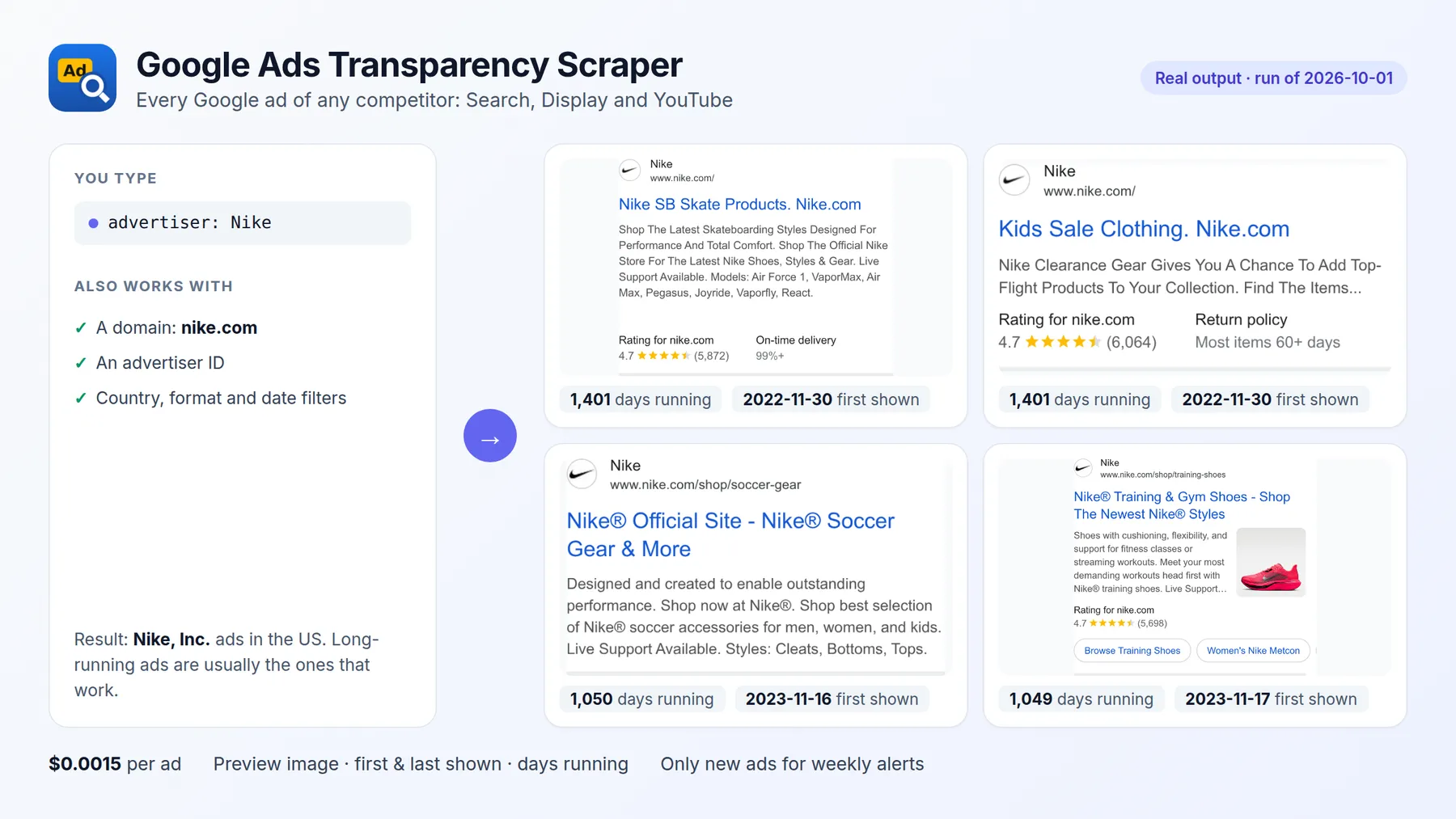
Google Ads Transparency Scraper gets every Google ad of any advertiser or website from the Google Ads Transparency Center: text ads (Google Search), image ads (Display) and video ads (YouTube), with the preview image, first and last date shown, how long each ad has been running, and optionally the countries where it ran and all its variations.
Search by advertiser name ("Nike"), advertiser ID or domain ("nike.com"), and filter by country, platform (Google Search, YouTube, Play, Maps, Shopping), ad format and date range. Turn on Only new ads and schedule it weekly to get alerts when a competitor launches new ads.
It runs on the Apify platform, so you also get an API, scheduling, integrations (Google Sheets, Make, Zapier, n8n, Slack) and access for AI agents through the Apify MCP server.
| This Actor | Most-used Google Ads Transparency Actor in Apify Store (public Store data, checked 2026-10-03) | |
|---|---|---|
| Price per 1,000 ads | $1.50 | $2.00 |
| Per 1,000 ads with countries and variations | $2.50 | $5.00 |
| Platform filter (Search, YouTube, Shopping, Maps, Play) | Yes | Yes |
| Only ads that are new since the last run | Yes | Yes |
Independent tool, not affiliated with or endorsed by the platforms it reads. Google and Google Ads Transparency Center are trademarks of Google LLC; they are named only to describe the public data this Actor collects. It only accesses publicly available content.
Why use it?
- 🕵️ Competitor ad research: see every ad a competitor runs on Google Search, Display and YouTube, and which ones have been running the longest (long-running ads are usually the ones that work).
- 🔔 Competitor ad monitoring: schedule a weekly run with Only new ads and receive only the ads launched since last week.
- ✍️ Ad copy and creative inspiration: collect hundreds of real ads in your niche in minutes, with preview images.
- 🌍 Market entry: see which advertisers run ads in a country and what they show there.
- 🛡️ Brand protection: search your own domain to find resellers and affiliates advertising with your brand.
- 🤖 AI agents and dashboards: one clean JSON record per ad, ready for spreadsheets, BI tools and LLMs.
How to scrape the Google Ads Transparency Center
- Click Try for free.
- Enter advertiser names (e.g.
Nike), advertiser IDs or links, and/or domains (e.g.adidas.com). - Optionally choose a country (
US,GB,DE...), a platform (YouTube, Google Search, Play, Maps, Shopping), an ad format and a date range. - Click Start. 100 ads take a few seconds.
- Download the results as JSON, CSV or Excel: the Ads view shows the preview image of each ad.
Input
| Field | Description | Default |
|---|---|---|
advertisers | Advertiser names, IDs (AR...) or Ads Transparency Center links | - |
domains | Websites whose ads you want (nike.com) | - |
region | 2-letter country code (US, GB, MX...) or empty for anywhere | anywhere |
adFormat | all, text, image or video | all |
platform | all, search, youtube, play, maps or shopping | all |
dateFrom, dateTo | Only ads shown in this period (YYYY-MM-DD) | - |
maxAdsPerSearch | Maximum ads per advertiser or domain | 100 |
includeDetails | Countries where each ad ran and all its variations | false |
onlyNewAds | Scheduled runs: only ads not returned by previous runs | false |
advertiserMatch | best (the matching advertiser with the most ads for your filters) or all | best |
Output
One record per ad. You can download the dataset in various formats such as JSON, HTML, CSV, or Excel.
Data fields
| Field | Description |
|---|---|
advertiserName, advertiserId | Verified advertiser |
creativeId, adUrl | The ad and its page on the Ads Transparency Center |
format | text (Google Search), image (Display) or video (YouTube) |
imageUrl | Archived preview image (text and most image ads); previewUrl for rich and video ads |
firstShown, lastShown, daysRunning | When the ad started and last ran, and for how many days |
regionsShown | With includeDetails: countries where the ad ran and the last date it was shown there |
variations, variationPreviews | With includeDetails: how many versions of the ad exist, with their previews |
searchedBy | The advertiser or domain search that found the ad |
platform | The platform filter used (all, search, youtube, play, maps, shopping) |
How much does it cost to scrape Google ads?
| Event | Price |
|---|---|
| Run start (per GB of memory, default 256 MB) | $0.001 |
| Ad scraped | $0.0015 |
| Ad details (optional: countries and variations) | $0.001 |
100 ads cost $0.15; 1,000 ads cost $1.50. Failed searches are never billed, and with Only new ads you only pay for ads you have not received before. Set Max cost per run and the Actor stops cleanly at that limit.
Use it with AI agents (MCP)
Add https://mcp.apify.com?tools=fguiraud/google-ads-transparency-scraper to Claude, Cursor or any MCP client and ask:
- "What Google ads is Nike running in the US right now? Which have been running the longest?"
- "Show me the YouTube ads of hubspot.com from the last 30 days."
- "Compare the number of active Google ads of Notion and ClickUp in Germany."
Smallest useful input for an agent: {"advertisers": ["Notion"], "region": "US", "maxAdsPerSearch": 20}.
Agent-friendly input: common field names such as url, urls, startUrls, query or keywords are accepted, and an empty input runs a small sample from the input form (with a note in the results) instead of failing.
Tips
- Sort by
daysRunning: ads that have been running for months are usually the advertiser's best performers. - A name like "Nike" matches several advertisers (local subsidiaries, unrelated companies). The default picks the one with the most ads for your country, format and dates; use the advertiser ID or link from the Ads Transparency Center to be exact, or
advertiserMatch: allto include every match. - For big brands with one account per country, domain search (
puma.com) is often the most complete option. It also finds resellers and affiliates: great for brand protection, noisier for competitor research. - Ads are returned most recently shown first, so a small
maxAdsPerSearchgives you the ads running now. - Long runs are safe: if the platform restarts the run, ads already returned are skipped and never charged twice.
FAQ and limitations
- Text of text ads: Google archives Search ads as images, so the headline and description are in
imageUrl, not as separate text fields. - Platform filter: it uses Google's own platform labels.
youtubealso includes search (text) ads that appeared in YouTube search results; combine it withadFormat: videoto get only video ads. A mobile game, for example, has most of its ads on YouTube and Play and none on Maps. - Spend and impressions are only published by Google for political ads in some regions, and are not part of this Actor.
- Is it legal? The Actor reads public data that Google publishes in the Ads Transparency Center for transparency purposes. It does not collect personal data.
- Found a problem or need a feature? Open an issue on the Issues tab. Replies within 48 hours.
- Did it save you time? A short review on the Reviews tab helps other people find this Actor.
Related tools
- Google Trends Scraper: is interest in a competitor's product growing, and where?
- Google News Scraper + Full Article Text: the news about a brand or market, with the full article as Markdown.


