

Google Trends Scraper: Interest, Related Queries & Trending
Pricing
from $1.60 / 1,000 search terms
Google Trends Scraper: Interest, Related Queries & Trending
Google Trends data and API for any keyword: search interest over time, interest by country, region or city, related and rising queries, comparisons of up to 5 terms and today's trending searches by country. Export to CSV or JSON, with retries so runs don't fail on rate limits. Pay per term.
Pricing
from $1.60 / 1,000 search terms
Rating
0.0
(0)
Developer

Fernando Guiraud
Maintained by CommunityActor stats
0
Bookmarked
2
Total users
2
Monthly active users
an hour ago
Last modified
Security
Limited permissionsShare
What does Google Trends Scraper do?
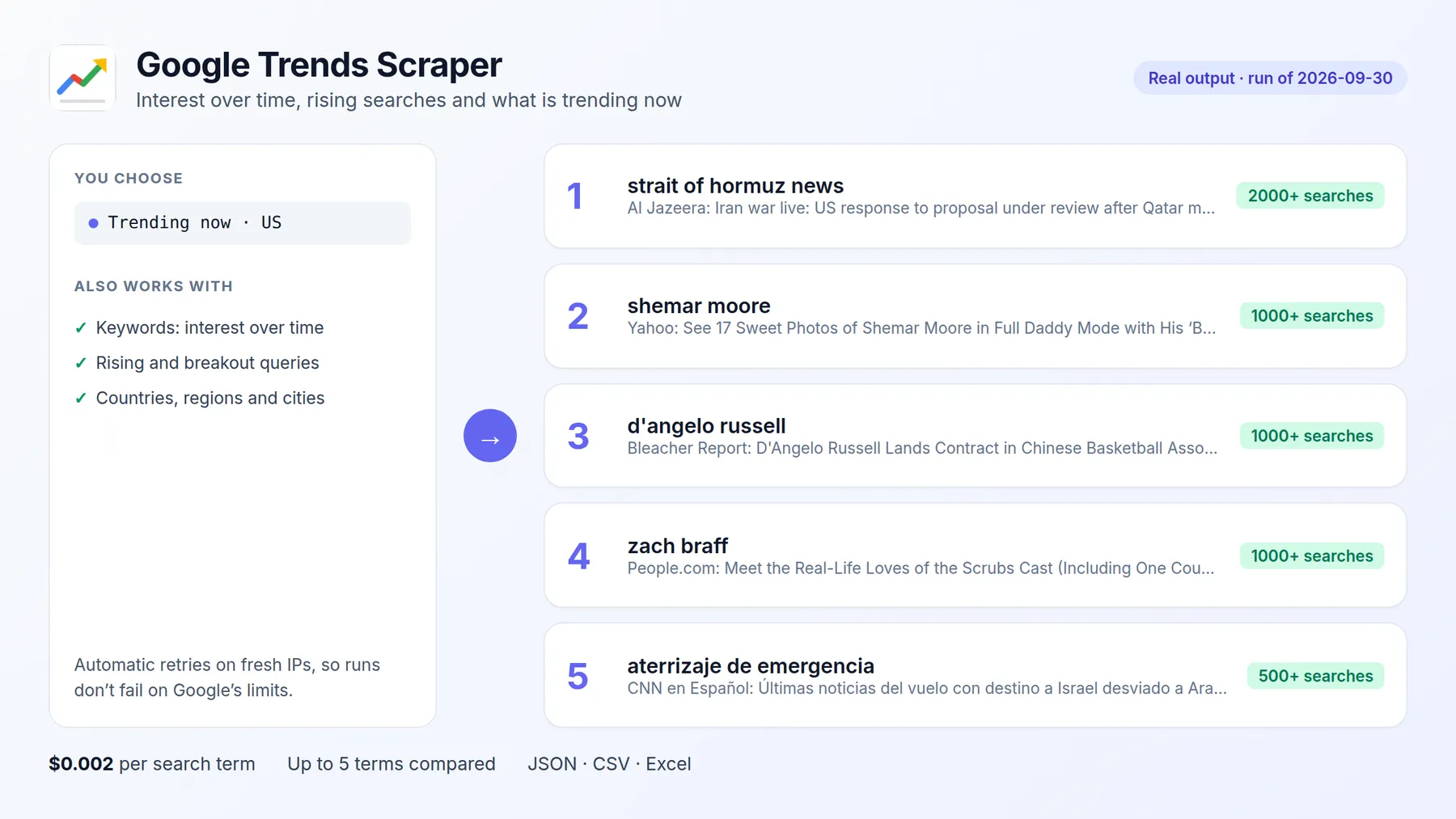
Google Trends Scraper gets Google Trends data for any keywords through an API: interest over time, interest by country, region, city or US metro area, related queries (top and rising / breakout), plus comparisons of up to 5 terms on the same 0-100 scale and a plain-language trend summary for each term (rising, falling or stable, peak date and % change). It also returns Trending now: today's trending searches in any country, with approximate search volume and related news.
Google limits how fast Trends can be queried, which is why many Trends tools fail part of the time. This Actor retries automatically on fresh sessions and IPs, so your runs don't fail on those limits, and you pay only for terms that return data.
It runs on the Apify platform, so you also get an API, scheduling (e.g. weekly trend reports), integrations (Google Sheets, Make, Zapier, n8n, Slack) and access for AI agents through the Apify MCP server.
| This Actor | Most-used Google Trends Actor in Apify Store (public Store data, checked 2026-10-03) | |
|---|---|---|
| Runs that succeeded in the last 30 days | 100% (7 runs, new Actor) | 60% (21,525 runs) |
| Platform usage (compute, proxies) | Included in the price | Billed on top of the price |
| Trending now (today's searches by country) | Yes, same Actor | Not in that Actor |
| Only the rising searches that are new since the last run | Yes (monitorRising) | No |
Independent tool, not affiliated with or endorsed by the platforms it reads. Google and Google Trends are trademarks of Google LLC; they are named only to describe the public data this Actor collects. It only accesses publicly available content.
Why use it?
- 📈 Market and product research: is demand for "air fryer" or "heat pump" growing, and where?
- 🔍 SEO and content planning: rising and breakout related queries show new topics before keyword tools do.
- 🆚 Brand and competitor tracking: compare up to 5 brands in one query and schedule it weekly.
- 🗺️ Regional targeting: find the states, regions or cities where a term is most popular.
- 📰 Newsjacking and social media: Trending now lists what people are searching today, with the news behind each trend.
- 🔔 Weekly alerts: schedule it with Monitor new rising searches and get only the rising searches that appeared since last week.
- 🤖 AI agents and dashboards: clean JSON with a ready-made trend summary, one record per query, ready for charts, BI tools and LLMs.
How to get Google Trends data
- Click Try for free.
- Enter your search terms, one query per line. To compare terms, put up to 5 on one line separated by commas:
chatgpt, gemini, claude. You can also paste a Google Trends link you already use. - Choose the countries (e.g.
US,GB, orworldwide) and the time range. - Click Start. Each query takes a few seconds.
- Download the results as JSON, CSV or Excel, or open the Interest over time view (one row per date) for charts.
Input
| Field | Description | Default |
|---|---|---|
searchTerms | One query per line; up to 5 comma-separated terms are compared. Google Trends links and topic IDs (/m/...) also work | required (or trendingNow) |
geo | Country or region codes (US, DE, US-CA) or worldwide; each query runs once per geo | worldwide |
timeframe | Past hour, 4 hours, day, 7 days, 30 days, 90 days, 12 months, 5 years, or 2004-present | past 12 months |
customTimeRange | Exact dates, e.g. 2024-01-01 2024-06-30 | - |
outputs | interestOverTime, interestByRegion, relatedQueries, relatedTopics (often empty, see FAQ) | first three |
searchProperty | web, images, news, shopping (Google Shopping) or youtube | web |
trendingNow | Countries for today's trending searches | - |
monitorRising | Scheduled runs: list only rising searches that are new since the previous run | false |
regionResolution | auto, COUNTRY, REGION, CITY or DMA | auto |
includeLowVolumeRegions | Also return low-volume regions and cities (recommended with CITY) | false |
category | Google Trends category ID (0 = all) | 0 |
Output
One record per query and geo. You can download the dataset in various formats such as JSON, HTML, CSV, or Excel.
Trending now rows look like this:
Data fields
| Field | Description |
|---|---|
interestOverTime | Interest per date on a 0-100 scale (100 = peak popularity in the period). isPartial marks the current, incomplete period |
averages | Average interest of each term over the period |
summary | Per term: latest, average, peak, peakDate, changePercent (last fifth of the period vs first fifth) and trend: rising (≥ +20%), falling (≤ -20%) or stable |
newRising | With monitorRising: rising searches not seen in previous runs |
interestByRegion | Interest per country, region, city or DMA (0-100, relative to the top location) |
relatedQueries | top: most popular related searches; rising: fastest growing, with growthPercent; Breakout means more than +5000% |
exploreUrl | The same query on trends.google.com |
rank, query, approxTraffic, news | Trending now: position, search, approximate searches and news articles |
How much does Google Trends scraping cost?
| Event | Price |
|---|---|
| Run start (per GB of memory, default 512 MB) | $0.001 |
| Search term analyzed (one term in one geo, all selected outputs) | $0.002 |
| Trending now list (one country) | $0.002 |
A comparison of 3 terms in 2 countries is 6 terms: $0.012. 1,000 terms cost $2. Failed queries are never billed. Set Max cost per run and the Actor stops cleanly at that limit.
Use it with AI agents (MCP)
Add https://mcp.apify.com?tools=fguiraud/google-trends-scraper to Claude, Cursor or any MCP client and ask:
- "Is interest in heat pumps growing in Germany? Show me the last 5 years."
- "Compare ChatGPT, Gemini and Claude in the US over the last 90 days and list rising related searches."
- "What is trending in the UK today?"
Smallest useful input for an agent: {"searchTerms": ["heat pump"], "geo": ["DE"], "outputs": ["interestOverTime"]}.
Agent-friendly input: common field names such as url, urls, startUrls, query or keywords are accepted, and an empty input runs a small sample from the input form (with a note in the results) instead of failing.
Tips
- Values are relative, not absolute search counts. 100 is the peak of the period for the terms compared together, so only compare numbers from the same query.
- Choose only the outputs you need: each one is a separate request to Google, so fewer outputs are faster.
- For many terms, keep Proxy on and raise Parallel queries: each worker uses its own IP.
- Long runs are safe: if the platform restarts the run, finished queries are skipped and never charged twice.
- Schedule a weekly run to build your own trend history over time, and turn on Monitor new rising searches to be alerted only about what is new.
- The current, incomplete period (
isPartial) is left out ofsummary, so a half-finished week never looks like a drop.
Related tools
- Found a rising search and want to know why? Google News Scraper + Full Article Text returns the news behind it, with the real article URL and the full text as Markdown, in any country and language.
- Researching a competitor? Google Ads Transparency Scraper returns every Google Search, Display and YouTube ad of any advertiser or domain, with previews, dates and countries.
FAQ and limitations
- "Not enough search volume": Google returns no data for rare terms in small countries or short periods. The result has
status: "no-data"and anote, and it is not billed. - Few or no cities? Google hides low-volume cities. Turn on Include low search volume regions for city-level detail.
- Related topics: Google currently returns this list empty for most queries, so it is off by default. You can still request it with
relatedTopics; you are not charged extra for it. - Is it legal? The Actor reads public, aggregated Google Trends data, the same data shown on trends.google.com. It does not collect personal data.
- Found a problem or need a feature? Open an issue on the Issues tab. Replies within 48 hours.
- Did it save you time? A short review on the Reviews tab helps other people find this Actor.


