

Website Contact Scraper: Company Emails, Phones & Social Links
Pricing
from $2.40 / 1,000 website with contacts
Website Contact Scraper: Company Emails, Phones & Social Links
Company contact details from any list of websites: role emails (info@, sales@, support@), phones, address, contact page and LinkedIn, Facebook, Instagram, X and YouTube profiles. One row per company. No personal emails. Pay only for sites with contacts.
Pricing
from $2.40 / 1,000 website with contacts
Rating
0.0
(0)
Developer

Fernando Guiraud
Maintained by CommunityActor stats
0
Bookmarked
2
Total users
1
Monthly active users
12 days ago
Last modified
Categories
Share
What does Website Contact Scraper do?
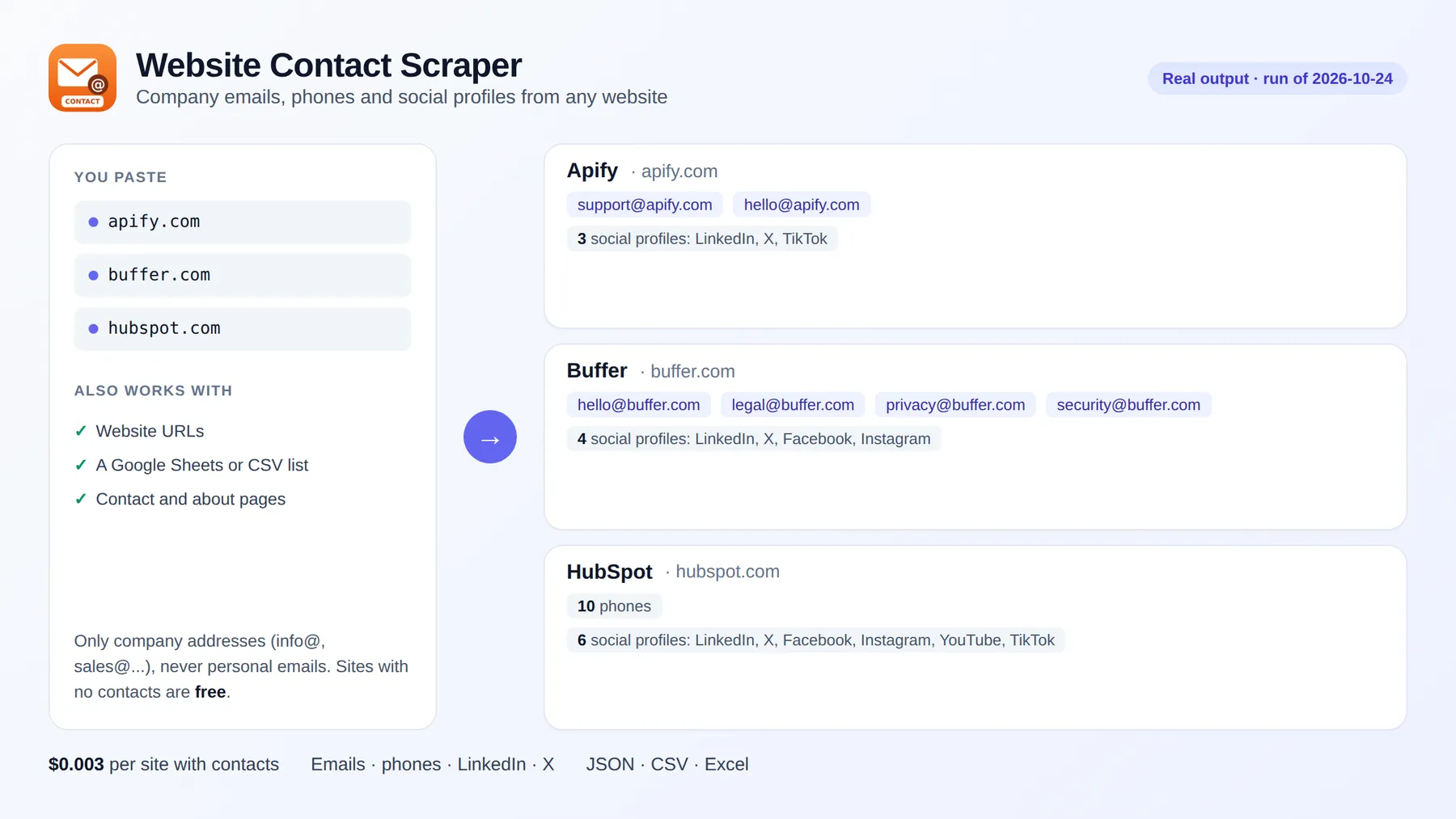
Website Contact Scraper reads a list of company websites and returns one row per company with its business contact details: role emails (info@, sales@, support@, hello@, press@…), phone numbers, postal address, contact page and LinkedIn, Facebook, Instagram, X, YouTube and TikTok company profiles.
Paste domains, URLs or a Google Sheets link and download the result as Excel, CSV or JSON. For each site it reads the home page plus up to two contact, about or legal pages. You pay only for websites where contacts are found; sites with nothing published, or that cannot be reached, are free.
It runs on the Apify platform, so you also get an API, scheduling, integrations (Google Sheets, Make, Zapier, n8n, HubSpot via webhooks) and access for AI agents through the Apify MCP server.
Business contacts only, by design. Emails that name a person (jane.doe@company.com) are never collected, and phones are taken only from what the company marks up as a phone number. The output is company data, ready for B2B prospecting without building a list of individuals.
Why use it?
- 🎯 B2B prospecting: turn a list of company domains into emails, phones and LinkedIn pages for your CRM.
- 🧹 CRM enrichment: fill in missing phones, addresses and social profiles for accounts you already have.
- 🔗 Social profile discovery: find the official LinkedIn, Instagram or X account of every company in a list.
- 🤝 Partner and supplier research: get the right inbox (sales@, partners@, press@) instead of a generic web form.
How to get company emails and phone numbers from websites
- Click Try for free.
- Paste company websites in Websites (
apify.com,https://www.mailchimp.com/…), one per line, or a link to a TXT/CSV file or Google Sheet in Website list URL. - Click Start. A real run with 12 websites took 8 seconds.
- Download the table as Excel, CSV or JSON, or send it to Google Sheets or your CRM.
Input
| Field | Description | Default |
|---|---|---|
domains | Company websites or URLs on them | - |
domainsFromUrl | Link to a TXT, CSV or Google Sheet with one website per row | - |
maxConcurrency | Websites checked at the same time | 10 |
failOnError | Mark the run as failed if a website cannot be reached | false |
Output
One row per website. Real result (October 2026):
In the same run, 8 of 12 software companies had contacts: for example HubSpot returned 10 office phone numbers, Buffer 4 role emails (hello@, legal@, privacy@, security@) and Mailchimp its support phone numbers. The other 4 build their pages with JavaScript and were not charged.
| Field | Description |
|---|---|
status | ok (contacts found, charged), no-contacts (nothing published, free) or error (site not reachable, free) |
companyName | Company name from the site's structured data |
emails | Role emails published on the site |
phones | Phone numbers, digits only, with + when international |
address | Postal address from the site's structured data |
contactPageUrl | The site's contact page |
linkedin, facebook, instagram, x, youtube, tiktok | Company profiles linked from the site |
pagesChecked | Pages read on the site |
How much does it cost?
| Event | Price |
|---|---|
| Website with contacts | $0.003 |
| Run start (per GB of memory, default 512 MB) | $0.001 |
1,000 websites cost at most about $3, less when some have no contacts. Websites without contacts and websites that cannot be reached are not charged. Higher Apify plans pay less per website (SILVER −10%, GOLD −20%).
Use it with AI agents (MCP)
Add https://mcp.apify.com?tools=fguiraud/website-contact-scraper to Claude, Cursor or any MCP client and ask: "Find the sales email and LinkedIn page of these 20 companies."
FAQ and limitations
- Why are some websites empty? Sites that build their pages with JavaScript, or that block automated visitors, show no contacts to a plain HTTP request. They come back as
no-contactsand are not charged. - Why no personal emails? On purpose: an address that names a person is personal data under privacy laws such as the GDPR. This Actor collects only role addresses that a company publishes for contact.
- Is it legal? It reads public company pages. You are responsible for how you use the contacts: follow anti-spam rules (CAN-SPAM, GDPR, CASL) when you write to them.
- Need more about each company? Tech Stack Detector & WHOIS, SSL Checker adds technologies, DNS, hosting and SSL; Bulk WHOIS Domain Lookup adds domain age and expiry.
- Found a problem or need a feature? Open an issue on the Issues tab. Replies within 48 hours.
- Did it save you time? A short review on the Reviews tab helps other people find this Actor.


![Website Email & Social Media Scraper [Fast Lead Gen] avatar](https://images.apifyusercontent.com/11olqVuuWLpoNS5XMPlHW1gKNh25bdQv6wUUvwO_g1o/rs:fill:76:76/cb:1/aHR0cHM6Ly9hcGlmeS1pbWFnZS11cGxvYWRzLXByb2QuczMudXMtZWFzdC0xLmFtYXpvbmF3cy5jb20vQ0UzdXRQY05XdzNMYjAyS3AtYWN0b3ItZW9lWklvNjhOYzV6eDNxdkgtUGY1TW5kcGNNby1hcGlmeV9zY3JhcGVyX2ljb25fMTc4NTA2ODQyNzQ5OC5qcGc.webp)


