
Google Play Store Scraper — Android Reviews & Data
Pricing
from $1.30 / 1,000 app details fetcheds
Google Play Store Scraper — Android Reviews & Data
Fast, reliable Google Play scraper: app details + deep-paginated customer reviews as structured JSON. Monitored daily. No login.
Pricing
from $1.30 / 1,000 app details fetcheds
Rating
0.0
(0)
Developer

Freshactors
Maintained by CommunityActor stats
0
Bookmarked
10
Total users
2
Monthly active users
8 days ago
Last modified
Categories
Share
Google Play Store Scraper — Android App Reviews, Details & Search
Scrape Google Play Store and Android app data — app details, customer reviews & ratings, ratings histogram, and keyword search — as clean structured JSON, with no API key, no proxy setup, no monthly fee, and no per-run start fee. All three modes in one actor, fast HTTP, pay-per-use.
✅ Last verified working: 2026-10-15. Monitored by an automated daily canary. When Google changes its page structure, we patch fast and log it in the changelog — so your data pipeline doesn't silently break.
Why this Google Play scraper
Most Google Play scrapers go stale and break. You'll see the same complaints across the Store: "crashes on a dead app," "returns nothing," "only 30 results," "stopped working weeks ago." When the data feeding your dashboard or model silently dies, you find out from your boss, not your logs.
This one is built to stay working:
- 🛡️ Doesn't crash on bad input. Each app is fetched in its own try/catch. A dead, removed, or 404 package is skipped and logged, never a run-killer — that's the exact failure mode that breaks the popular incumbent actor.
- 🔄 Rate-limit resistant. The reviews engine detects Google's throttle/block responses (missing RPC marker) and retries with exponential backoff + jitter and datacenter IP rotation, instead of quietly returning zero rows.
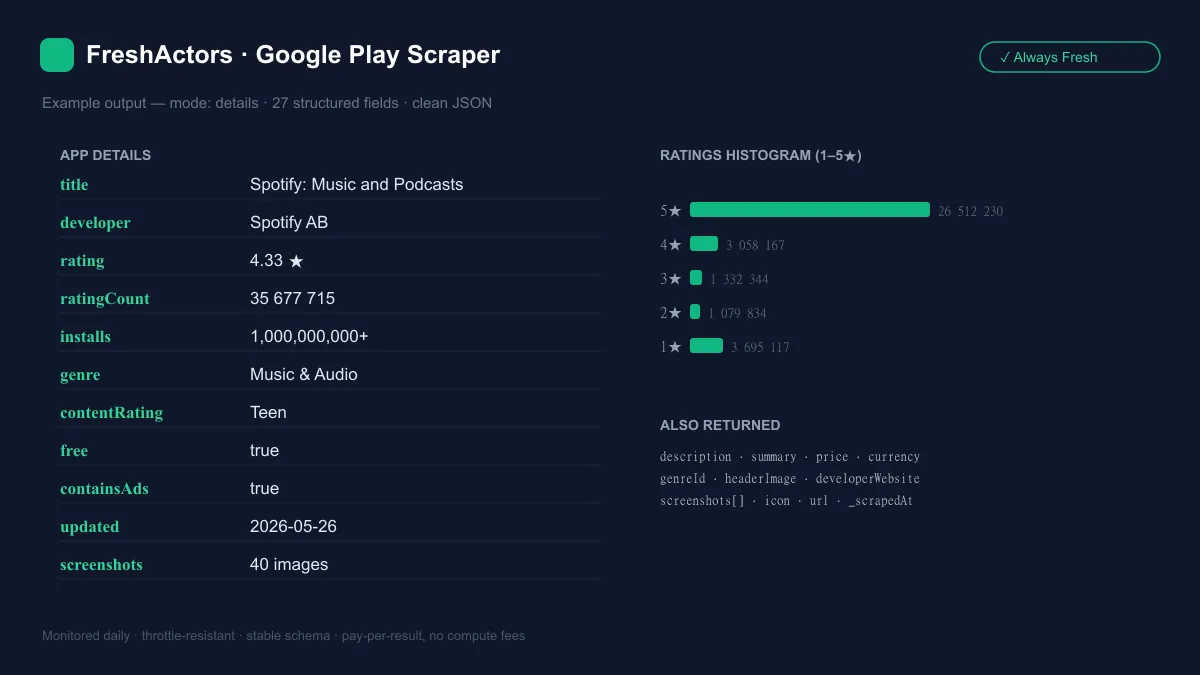
- 📦 Comprehensive details — 25+ fields including the full 1–5★ ratings histogram, exact rating, description, screenshots, genre, price, currency, content rating, and "contains ads" — not just title + rating.
- 🔢 Deep, token-paginated reviews — up to 4,000 per app, de-duplicated, with developer replies and reply dates.
- 🧱 Stable output schema (
_schemaVersionon every record). If Google reshapes a positional array upstream, the affected field degrades tonull— your job keeps running. - 🔬 A daily canary runs
details+reviewsagainst a live app and writes a pass/fail status. The "last verified working" date above is real, not decorative. - 🎯 Three modes, one actor — no start fee. Details, reviews, and keyword search all run from one actor (most Play Store scrapers do reviews only), pay-per-result with no per-run start fee.
What data you get
Three modes, one actor:
| Mode | What it returns |
|---|---|
details | Full app metadata for each package name you supply. |
reviews | Paginated customer reviews for each package name (with developer replies). |
search | Searches the Play Store by keyword, then returns full details for every matching app (tagged with the search term). |
details / search output fields:
| Field | Type | Description |
|---|---|---|
appId | string | Package name, e.g. com.spotify.music. |
title | string | App name. |
developer | string | Developer / publisher name. |
developerWebsite | string | Developer site, if listed. |
summary | string | Short tagline. |
description | string | Full store description. |
rating | number | Exact average rating (e.g. 4.33). |
ratingCount | number | Total number of ratings. |
ratingHistogram | object | {1,2,3,4,5} star counts. |
installs | string | Install bucket, e.g. 1,000,000,000+. |
price / free / currency | number / bool / string | Price, free flag, currency code. |
genre / genreId | string | Category name + ID. |
contentRating | string | e.g. Teen, Everyone. |
containsAds | boolean | Whether the app contains ads. |
updated | string | Last-updated timestamp (ISO). |
icon / headerImage / screenshots[] | string / array | Media URLs. |
url | string | Canonical Play Store URL. |
_searchTerm | string | (search mode only) the keyword that surfaced this app. |
reviews output fields: reviewId, userName, userImage, rating, body, thumbsUp, date, appVersion, developerResponse, developerResponseDate, reviewUrl, plus appId and country. Reviews are returned newest-first.
Every record also carries _type, _schemaVersion, _source, and _scrapedAt.
Use cases
- App Store Optimization (ASO) & competitor analysis — track ratings, install buckets, descriptions, and the ratings histogram across rival apps over time. The kind of "Google Play app data API" coverage ASO tools sell, at pay-per-use cost.
- Review monitoring & support triage — pull new Google Play reviews (and your developer replies) on a schedule, route negative ones to Slack, and watch sentiment per app version.
- Sentiment / ML training datasets — collect clean review text + ratings +
appVersionat scale for fine-tuning or classification. No HTML parsing on your side. - Market & category research — run
searchmode on keywords like "budget tracker" or "habit app" to map a niche: who ranks, their ratings, pricing, and whether they're ad-supported.
Input
| Field | Type | Notes |
|---|---|---|
mode | string | details, reviews, or search. Default details. A mismatched mode is handled — see FAQ. |
appIds | string[] | Package names, e.g. com.spotify.music (the id= part of the URL). For details + reviews. |
searchTerms | string[] | Keywords to search the Play Store. For search mode. |
maxSearchResults | int | Apps returned per keyword, 1–100. Default 30. |
country | string | Two-letter storefront code (us, gb, de, …). Default us. |
lang | string | Two-letter language code (en, de, es, …). Default en. |
maxReviewsPerApp | int | Reviews cap per app, 1–4000. Default 200. |
reviewsSort | string | newest (reviews are returned newest-first — the only order Google's public reviews API supports). |
Example — details
Example — reviews
Example — search
Output sample
A single details record (abridged):
A single reviews record:
Use with AI agents (MCP)
This scraper is callable as a tool by AI agents via the Apify MCP server — so assistants like Claude, Cursor, and VS Code can run it and use the structured results mid-conversation, with no glue code.
Simplest path: in a recent Claude Desktop, add the hosted server https://mcp.apify.com under Settings → Connectors and authorize with OAuth. For any config-file client:
Then ask in plain language, e.g. "Fetch the Google Play details and ratings histogram for Spotify (com.spotify.music), plus its latest reviews." — the agent calls freshactors/google-play-scraper with the right input and reads back the JSON. Full setup: Apify MCP docs.
No Apify account? x402-enabled AI agents can also run this actor autonomously and pay per use via the x402 payment protocol — no signup, subscription, or API token required.
Pricing
Volume discounts — applied automatically. Running at scale on a paid Apify plan? The app-details price drops with your plan tier — up to 35% off at Gold and more on Platinum/Diamond, with no start fee and nothing to apply for. Free and Bronze keep the standard price shown below.
Pay-per-event — no subscription, no platform rental. You're charged only for data actually returned:
| Event | Price (USD) |
|---|---|
| App details fetched (per app) | $0.002 |
| Review fetched (per review) | $0.0001 |
search mode charges the per-app details event for each matching app it returns.
How much do 100 results cost?
- 100 app details → 100 × $0.002 = $0.20.
- 100 reviews (one popular app) → 100 × $0.0001 = $0.01.
- A 1,000-review pull → 1,000 × $0.0001 = $0.10.
- A
searchrun returning 20 apps for a keyword → 20 × $0.002 = $0.04.
So a competitor-tracking job covering 50 apps' details plus 200 reviews each costs roughly 50 × $0.002 + 50 × 200 × $0.0001 = $0.10 + $1.00 = $1.10 per run.
FAQ
Is scraping Google Play legal? This actor collects public store data — app listings and publicly visible reviews — with no login and no personal account access. Public-data scraping is broadly permitted, but you are responsible for how you use the output. Use it responsibly and in line with applicable terms and laws; don't republish personal data.
Do I need an API key? No. Google Play has no official public data API for this. You provide package names or search terms and get JSON back — no key, no OAuth, no proxy account to manage.
Should I pass a URL or a package name? Use the package name — the id= part of the app URL. For https://play.google.com/store/apps/details?id=com.spotify.music, the appId is com.spotify.music.
Why are there fewer reviews than the rating count? Google's displayed number is total ratings; only a fraction of users write a review. This actor returns the written reviews, which is why a 35M-rating app yields far fewer review rows.
How many reviews can I get per app? Up to 4,000 via maxReviewsPerApp, paginated and de-duplicated. Reviews are returned newest-first (the only order Google's public reviews API supports).
Which countries and languages are supported? Any — set country (e.g. us, gb, de) and lang (e.g. en, de, es). Ratings, descriptions, and reviews are returned for that storefront.
Can I search Google Play by keyword? Yes — use search mode with searchTerms. It returns full details for each matching app, tagged with the _searchTerm that surfaced it, capped by maxSearchResults (1–100).
Does it return the ratings histogram? Yes — details includes ratingHistogram with per-star (1–5) counts, plus the exact average rating and total ratingCount.
What happens if an app is removed or doesn't exist? It's skipped and logged, and the run continues. One bad package never kills the whole job.
Can I just type the app's name instead of the package name? Yes — put the name in appIds (e.g. Spotify Music). It is matched to the top Google Play search result, and the run status names the package it picked. Name lookups are never charged.
How often is it updated and maintained? A daily automated canary verifies details and reviews against a live app. When Google changes its page structure, we patch quickly and record it in the changelog below — that's the whole point of FreshActors.
What if the mode I picked doesn't match what I entered?
The run follows the data you actually supplied instead of failing — and says exactly what it did in the run status message and the RUN_SUMMARY record (modeNote). details with only searchTerms runs a search; search with only appIds runs details; reviews with only searchTerms pulls the reviews of the top search result for each term (e.g. "spotify") and names the app it picked. If you fill in both, the mode you chose runs and the unused field is named, never silently dropped. This matters most for API and AI-agent (MCP) calls, where mode is easy to leave at its default.
Other FreshActors tools
| FreshActors actor | What it scrapes |
|---|---|
| App Store Scraper | Apple App Store — app details, search, reviews |
| Microsoft Store Scraper | Microsoft Store — app details, rating windows, search, reviews |
| VS Code Marketplace Scraper | VS Code extensions — install/trending stats, search, reviews |
| Shopify App Store Scraper | Shopify App Store — app details, reviews, discovery |
| Redfin Scraper | Redfin — US real-estate listings |
| Greenhouse & Lever Jobs Scraper | Greenhouse + Lever — normalized job postings |
| Workable Jobs Scraper | Workable — normalized job postings, full descriptions |
| SmartRecruiters Jobs Scraper | SmartRecruiters — normalized job postings, full descriptions |
| Recruitee Jobs Scraper | Recruitee — normalized job postings + salary |
| Teamtailor Jobs Scraper | Teamtailor — normalized job postings, full descriptions |
| Personio Jobs Scraper | Personio — normalized job postings, departments + seniority |
Reliability
Staying fresh is the product. An automated daily canary runs real details and reviews requests against a live app and records a pass/fail status; the "Last verified working" date at the top reflects that check. Every output record carries a _schemaVersion, and parsers access Google's positional data defensively, so an upstream reshape degrades one field to null rather than crashing your run. Fixes are shipped fast and recorded in the changelog below. Found a problem? Open an issue on the Issues tab — it's answered quickly.
Changelog
- 2026-10-15 — Type an app's name where an id goes — it just works. An app name in
appIds(e.g. "Spotify Music") is matched to the top Google Play search result and named in the run status — one such entry used to reject the whole run. A non-Play URL is skipped and named. - 2026-10-12 — Requests now rotate across proxy IPs as intended. A misconfigured proxy setting had sent every request from a single IP; rotation makes large pulls far less likely to hit Google's rate limits.
- 2026-10-12 — Runs finish within your timeout, and say exactly what is missing. A run now knows its own timeout and stops making requests shortly before it, so it ends with the data it already collected and a clear “Stopped early” note — instead of being killed as TIMED-OUT, which looked like a failure even though your data was there. If the source stops answering partway through a multi-page pull, that item is now listed as INCOMPLETE in the status message and
RUN_SUMMARY(it used to end with a plain “Done”). And when a run fails because the source was rate-limiting or not responding, the message now says so first, instead of suggesting your input was wrong. - 2026-10-08 — No more hung runs. Every request now has a 30-second deadline: if the source accepts a connection but never answers, that request is retried like any other network error instead of stalling the run until its timeout (and billing compute for the wait). No change to output fields or pricing.
- 2026-09-28 — The mode follows what you enter. A run whose
modedidn't match its input (most oftensearchTermswithmodeleft at the defaultdetails— typical of API and AI-agent calls) used to fail with "details mode requires …". It now runs what you supplied and states it in the status message andRUN_SUMMARY.modeNote;reviewsby search term is new (top result per term, never charged for the lookup). - 2026-09-23 — Paste the Play Store URL and it just works. A
play.google.com/store/apps/details?id=…URL in App IDs now resolves to its package name — previously the whole input was rejected as invalid. Apify{ "url": "…" }objects are accepted too. - 2026-08-03 — Volume discounts added: app details now scale down with your Apify plan tier — about 35% off at Gold and 60% off at Diamond, applied automatically with nothing to apply for. Free and Bronze pay exactly what they did before — no price went up, and the per-review price is unchanged.
- 2026-08-03 — Honest-failure fix: if none of the requested apps could be fetched, the run now fails loudly and names them, instead of reporting success with zero results (a wrong answer stated confidently). Partial runs are unaffected — they keep every delivered record and list exactly what was unreachable in the run summary, so you can re-run just that slice. No change to pricing, output schema, or the behaviour of runs that return data.
- 2026-07-08 — Freshness pass: re-verified working across every mode via the daily monitoring battery; documented x402 support (AI agents can run this actor pay-per-use with no Apify account). No change to scraping behavior, output, or pricing.
- 2026-06-10 — First-run polish: the one-click default example now fetches three popular apps (Spotify, WhatsApp, Instagram) instead of one, so your first run shows the full 27-field output across multiple apps. Still ~3 seconds and under a cent.
- 2026-06-06 — Fixed deep review pagination: reviews were silently capped at ~40 per app regardless of
maxReviewsPerApp(the pagination token was placed in the wrong slot of the request, so page 2 came back empty). Token-paginated reviews up to 4,000/app now work as documented. Also madereviewsSorthonest: Google's public reviews API only supports newest order, somostHelpful/rating(which silently returned nothing) were removed. - 2026-06-04 — Reviews:
developerResponseDatenow populated for developer replies (was always null — corrected an off-by-one in the reply tuple index). Details/search: de-duplicated repeatedscreenshotsURLs. Added reply-mapping + screenshot tests. - 2026-06-01 — v1.0 launch. App details, customer reviews (deep pagination), and keyword search. Throttle-aware reviews engine, defensive positional parsing, daily canary monitoring.
Legal note. This actor scrapes public Google Play pages only: app listings and publicly visible reviews. No login, no personal account data, no circumvention of access controls. You are responsible for complying with applicable terms and laws and for how you use and store the data, including any personal data contained in reviews.


