

Google Maps Rank Tracker (Geo-Grid Heatmap)
Pricing
$10.00 / 1,000 grid point checkeds
Google Maps Rank Tracker (Geo-Grid Heatmap)
Google Maps rank tracker for local SEO. Enter a business and a keyword to see its rank at every point of a 3x3 to 9x9 geo-grid, with the top 3 competitors per point, average rank, % in the map pack and a heatmap PNG. Pay per point, no subscription.
Pricing
$10.00 / 1,000 grid point checkeds
Rating
0.0
(0)
Developer

Jamie Fitzgerald
Maintained by CommunityActor stats
0
Bookmarked
2
Total users
1
Monthly active users
17 hours ago
Last modified
Categories
Share
A business can rank #2 on Google Maps at its own front door and not show up at all two miles away, where most of its customers are. Checking from one spot hides that. This Google Maps rank tracker checks the rank at every point of a grid across the service area and draws it as a heatmap, so you can see where the business actually shows up and who beats it everywhere else.
Give it a business, one or more keywords and a grid from 3x3 to 9x9. You get the rank at each point, the top 3 businesses there, a summary and a PNG heatmap. It does the same job as Local Falcon or BrightLocal grids, but you pay $0.01 per point checked. No subscription, no credits that expire.
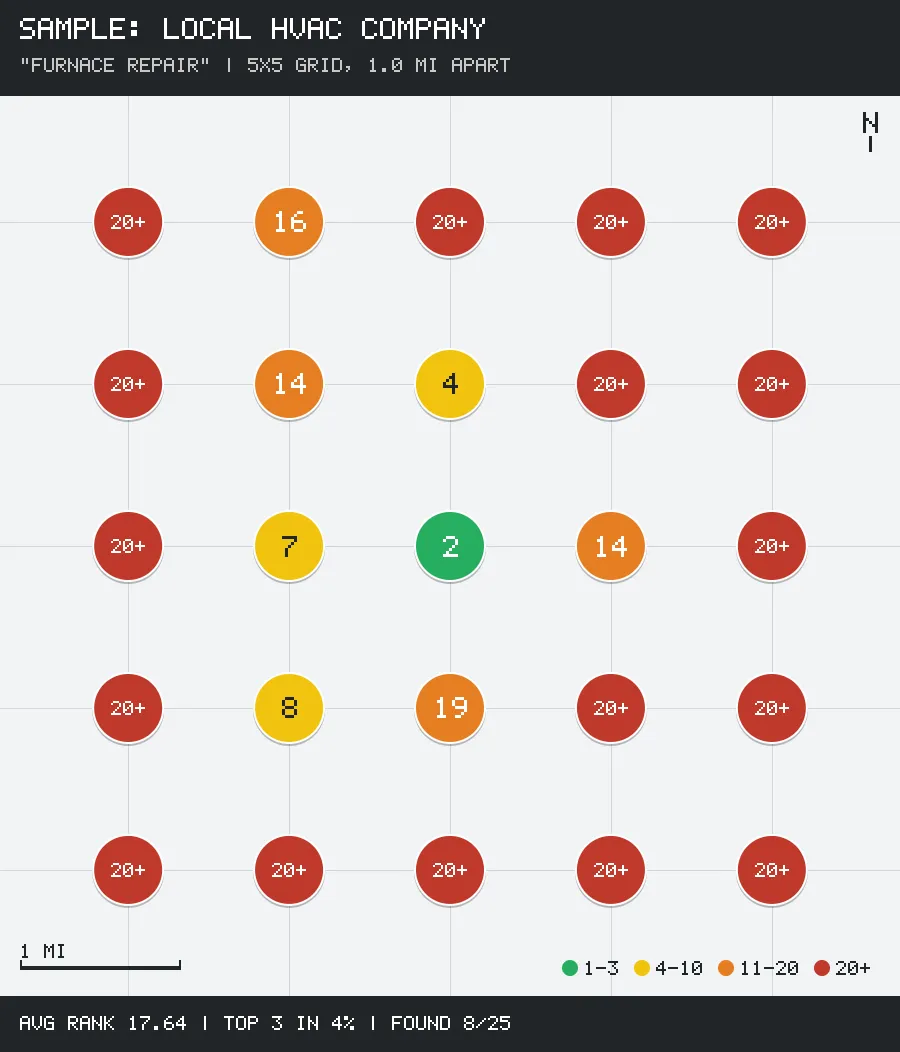
Sample: an HVAC company, "furnace repair", 5x5 grid, 1 mile apart. It ranks #2 at its own address but isn't in the top 20 at 17 of 25 points.
How to use the Google Maps rank tracker
- Type the business name as it shows on Google Maps, with the town (e.g. "Joe's Plumbing Austin TX").
- Add one or more keywords customers search for (e.g. "plumber", "water heater repair").
- Pick a grid size. 3x3 costs $0.09 per keyword, 5x5 costs $0.25.
- Run it. The heatmap and summary are in the Storage tab (key-value store), and the rank at every point is in the dataset.
Run it with no input and it does a small 3x3 demo grid so you can see the output first.
What you get
- Rank at every grid point (1-20, or up to 60), or
nullif the business isn't in the results there. - The top 3 businesses at each point, with name, place ID, rating and review count.
- Summary per keyword:
- average rank (not found counts as 21)
- average rank where found
- % of points in the top 3 (map pack) and top 10
- points found
- Top 10 competitors across the grid, ranked by how many points they hold in the top 3.
- A heatmap image (PNG) you can drop into a report, a client pitch or an email, plus an HTML report with the image and tables.
- Multiple keywords in one run. Each keyword gets its own grid, summary and heatmap.
Who uses a geo-grid rank tracker
- Local SEO agencies running Local Falcon-style audits and monthly client reports.
- Business owners checking whether they show up in the neighbourhoods they actually serve.
- Lead generation: run a grid on a prospect and send them the heatmap.
Input
| Field | What it does |
|---|---|
businessName | Name as shown on Google Maps, ideally with the town, e.g. "Brewer Heating & Air Conditioning West Chester PA". |
placeId | Optional. Google place ID (ChIJ...). The most exact way to match the business. |
keywords | What customers type into Maps, e.g. "hvac repair". One grid per keyword. |
lat, lng or address | Optional grid centre. Defaults to the business's pin. |
gridSize | 3 to 9 points per side: 3 = 9 points, 5 = 25, 7 = 49, 9 = 81. |
spacing or radius | Distance between points, or from the centre to the edge. Default is 1 mile. |
distanceUnit | mi or km. |
maxRank | How many results to check per point: 20 (default), 40 or 60. |
viewportMeters | How zoomed-in the simulated Maps search is at each point. Default 3000. |
Example:
Output
The dataset has one row per keyword per grid point:
Row 0 is the north edge and column 0 is the west edge. Rows may arrive out of order, so sort by row and col.
The key-value store holds:
SUMMARY: summary and competitor list for every keyword.HEATMAP-<keyword>.png: heatmap image.HEATMAP-<keyword>.html: report with the image, the competitor table and every point.
Pricing
$0.01 per grid point checked. One keyword at one point is one charge. Platform usage is included.
| Grid | Points | Cost per keyword |
|---|---|---|
| 3x3 | 9 | $0.09 |
| 5x5 | 25 | $0.25 |
| 7x7 | 49 | $0.49 |
| 9x9 | 81 | $0.81 |
Set a maximum cost per run in Apify and the actor stops cleanly when it hits it.
How accurate is geo-grid rank tracking?
- It's a simulated search, not a real phone. At each point the actor runs a Google Maps search with the map centred there. This is the same approach Local Falcon and similar tools use. It is not a GPS reading from a real device, and Google personalises results by search history, device and exact location. Real customers can see somewhat different results.
- Expect about ±2 positions of noise. Running the same grid twice, or from a different server, moved ranks by 1-2 places at some points in our tests. Look at the pattern across the grid, not at one number.
- Results change over time. Google reshuffles local results often. Re-run on a schedule to track trends.
- Ads are not flagged. Results appear to be organic listings, but sponsored pins aren't marked separately.
- Name matching is strict. If the business isn't found, give its
placeId. With only a name, the actor uses the top Google Maps match near the centre and logs which business it picked. - Plain background. The heatmap draws the grid on a plain background with a scale bar and a north marker, not on a street map.
Tips
- Start with a 5x5 grid at 0.5-1 mile spacing for a town, or 2-3 miles for a metro service area.
- Track the 2-3 keywords that actually bring in calls, and re-run weekly or monthly with an Apify schedule.
- The competitor list shows who to study: their categories, review counts and how close they are to each point.
About the author
I'm Jamie FitzGerald. I write Python and JavaScript, and most of my public projects are machine-learning models for markets, like LSTM models that predict SPY's next-day move.
Code and other projects: github.com/jfitz001
If a business won't match, a grid looks wrong, or you want a feature, open an issue on the Issues tab. I read them.
FAQ
Do I need a Google API key? No.
Does it work outside the US? Yes. Set country (Google gl code, e.g. gb) and language (hl, e.g. en).
Can I scan a service-area business with no public address? Yes. Give its name or place ID and a centre with lat/lng or address.


