

Zillow Leads Scraper: Agents, Price & Tax History, FSBO
Pricing
from $0.54 / 1,000 enriched-rows
Zillow Leads Scraper: Agents, Price & Tax History, FSBO
Zillow listings enriched with agent/broker contact info, full price-history timeline, 20yr+ tax history, foreclosure/distress flags, FSBO signals, schools, and resoFacts (heating/cooling/basement/construction) at scale. Pay-per-event pricing.
Pricing
from $0.54 / 1,000 enriched-rows
Rating
0.0
(0)
Developer

matata_cK
Maintained by CommunityActor stats
0
Bookmarked
1
Total users
0
Monthly active users
2 months ago
Last modified
Categories
Share
Zillow Leads & Property Data
Zillow listings with lead-gen fields most Zillow actors leave out: listing
agent name, phone, license and brokerage, event-level price history and
tax history reaching back up to 27 years per parcel (64% of our current
enriched cache carries 20-plus years; county coverage varies),
pre-foreclosure and foreclosure flags, FSBO signals, schools, and the full
resoFacts set. 232 fields per row, from $0.50 per 1,000 rows, pay-per-event.
Every enriched row also self-reports its own depth (tax_history_years,
price_history_events, schools_count), so you can filter by it in any
spreadsheet instead of taking the marketing on faith. Catalog metros return in seconds from
cache; live collection is paced to stay under Zillow's anti-bot radar.
Dedup is built in, so repeat orders never charge you twice for the same
listing.
Quickstart
- Create a free Apify account. The Free plan includes $5 of monthly credit, enough for roughly 5,500 enriched rows here.
- Run the 60-second sample:
{"mode": "catalog", "minListings": 25}. Fully enriched cached rows, about $0.02 total. - Point a real order at your area: pick a
metrofrom the dropdown, or paste a lat/lng bounding box intoboundsfor a precise custom area. - Download CSV/Excel/JSON from the dataset tab, or pull rows through the API, client libraries, or an MCP-connected agent.
Use cases
- Wholesalers and disposition teams: distressed-seller leads. Rows carry foreclosure type, filing and auction dates, past-due amounts, loan amounts, bank-owned and auction flags across any metro bounding box.
- Loan officers and title/escrow business development: every agent-listed row carries the listing agent's phone, license number and brokerage. In our current cache, 96.1% of enriched agent-listed rows include a direct agent phone and 99.9% include a brokerage, so a metro order doubles as a call list built from active listings.
- Investors, iBuyers and AVM analysts: event-level price history per property (date, event, price, source, price per sqft) for comp and flip-margin modeling.
- Tax-lien buyers, insurers, holding-cost analysts: year-by-year
assessed value and tax paid per parcel, keyed by parcel number and
county; long-held parcels reach back to the late 1990s. Sort candidates
by the shipped
tax_history_yearscolumn when depth matters. - AI and proptech builders: 232 typed fields with a published dataset schema, callable as an MCP tool by Claude, Cursor or any MCP client. Fire-poll-fetch pattern documented below for long-running orders.
- Market researchers and relocation services: metro snapshots that
genuinely include suburbs. A Phoenix order returns Scottsdale, Tempe
and Glendale rows too; your run's
ORDER_SUMMARYlists the exact cities included.
Output example
Real rows from a live catalog run, trimmed for display. Every row carries
detail_url, so you can verify any row against its live Zillow page.
Usage examples
Python (apify-client, pip install apify-client):
JavaScript (npm install apify-client):
Both snippets wait for completion automatically; a catalog order returns in seconds. Full worked workflows, including a dedup-against-previous-export notebook: kmatata/zillow-leads-property-data.
Pricing
| You want | Mode | Typical cost |
|---|---|---|
| 25-row instant sample (fully enriched) | catalog, minListings: 25 | ~$0.02 |
| One-metro snapshot, 1,000 enriched rows | catalog | ~$0.90 |
| Custom county, 1,000 bare rows | custom_search, depth: listings | ~$0.50 |
| Full custom metro, 1,000 enriched rows | custom_search, enriched depth | ~$0.90 |
| Daily new-listings feed, 200 enriched | recent_activity | ~$0.18 |
Billing is per event: actor-start once per run ($0.00001), then
listing-row at $0.0005 ($0.50 per 1,000) or $0.90 per 1,000), whichever depth you actually received. No subscription
and no minimum spend. Apify subscription plans stack automatic per-tier
discounts on top (Bronze, Silver, Gold — up to ~40% off), applied at run
time.enriched-row at $0.0009
(
Configuration
Every order needs exactly one mode. The Console form shows all modes'
fields at once (Apify can't hide fields conditionally), so use this table
to know which section applies to you. Your run's key-value store gets an
ORDER_SUMMARY record stating exactly which inputs were applied, the exact
bounding box your metro or bounds resolved to (resolved_bounds), and, once
rows arrive, which cities were included.
| Mode | Required | Optional | Ignored |
|---|---|---|---|
catalog | nothing | metro scopes the snapshot | bounds, depth, source |
custom_search | bounds OR metro | depth, minListings, minEnriched | source |
recent_activity | nothing (source defaults to agent) | source, minEnriched | bounds, metro, depth |
- Catalog: instant snapshot from our pre-seeded metros (currently New
York City, Los Angeles, Chicago, Houston and Phoenix, around 1,000
listings each). Returns in seconds because it never waits on live
collection. Scoping it to one
metroonly filters the cache; it never triggers collection. - Custom search: a named
metro(no lat/lng math) or aboundsobject for a precise area the metro list doesn't cover. Inbounds, north/south are latitude, east/west are longitude, and north/east must be numerically larger than south/west; a swapped box is rejected with an explanatory error rather than returning nothing. This catches a whole urbanized area including suburbs, not just the named city. It is also the only mode with the cheaperdepth: listingsoption. - Recent activity: Zillow's own sitemap feed of newest and changed
listings nationwide, no bounds needed. Price and status changes bump a
listing's position even if it has been on market for months, so daily
runs plus dedup give you a genuine change feed.
source: ownerreturns FSBO listings where the owner posts their own contact;source: agentis the bulk of inventory. Always fully enriched, because the feed itself carries nothing beyond a listing URL.
Minimums are floors, not targets
minListings (default 1000) floors the total row count and minEnriched
(default 500) floors how many of those rows are fully enriched. You may
receive more than the minimum in one delivery (KV transport ships in
roughly 100-row chunks); you receive less only if timeoutSecs (default
7200) runs out first, in which case you get a partial dataset. Set both
lower (10 to 50) for a quick test before committing to a full order. Note
that for live-collection modes a low timeoutSecs is raised to the 7200s
default (disclosed in ORDER_SUMMARY): cutting the wait just cuts how much
of your order completes.
minEnriched is forced to 0 internally for custom_search with
depth: listings, since bare orders never enrich anything by design.
Bare vs enriched schema
A depth: listings row contains ONLY non-null fields from this whitelist,
never agent contact, history or resoFacts, even when we already hold that
listing fully enriched (we strip it back down so you never pay the listings
rate for enriched-rate data):
| Group | Fields |
|---|---|
| Identity / link | zpid, mls_id, detail_url |
| Price / status | price, status_type, status_text |
| Size / type | bedrooms, bathrooms, living_area, home_type, lot_area_value, lot_area_unit |
| Location | address_street, address_city, address_state, address_zipcode, latitude, longitude |
| Timing | year_built, days_on_zillow |
| Open house | has_open_house, open_house_start, open_house_end |
| Occupancy / ownership | is_non_owner_occupied, is_zillow_owned, country |
| Listing-type flags | is_fsba, is_fsbo, is_bank_owned, is_coming_soon, is_for_auction, is_foreclosure, is_new_home, is_open_house, is_pending |
Enriched rows (the default in every mode) add everything from the use-case list above: agent/broker contact block, foreclosure detail, complete price-history and tax-history timelines, assigned plus nearby schools, HOA fees, mortgage figures, and the resoFacts long tail. Individual fields Zillow didn't return for a specific listing are omitted rather than sent as null.
Why enrichment takes time
Bare listings come straight off search results and arrive fast. Enrichment fetches each listing's detail page, and Zillow runs PerimeterX plus AWS WAF in front of those pages, so we pace requests with jittered timing, warmup ramping and adaptive backoff instead of hammering and risking the whole collection session. Expect a default-sized order (1,000 listings, 500 enriched) to take roughly 90 to 190 real minutes when it needs live collection; cache-satisfiable orders return in seconds regardless. If a run ever looks slow mid-order, that pacing is why, not a stall. If collection is briefly interrupted, your order queues and resumes automatically.
Example inputs
Paste any block into the Input JSON tab (toggle above the input form).
Quick test:
Instant catalog sample:
Catalog scoped to one metro:
Full metro order by name:
Bare listings for a precise area:
Daily change feed:
FSBO only:
Repeat order with dedup:
FAQ
How much does 1,000 Zillow listings with agent contact cost?
About $0.90: 1,000 enriched rows at $0.0009 each, plus a $0.00001 start fee. Bare listings at the same size cost about $0.50.
Does this give me the owner's phone number?
Only on FSBO listings, where the owner posts their own contact; run
mode: recent_activity with source: owner for those. On agent-listed
homes you get the listing agent's phone, license and brokerage instead,
which is what 96% of our enriched agent-listed rows carry.
Is scraping Zillow legal? Public listing data has been collected within the bounds set by hiQ v. LinkedIn, but terms-of-service, copyright and privacy obligations still apply downstream. We ship only public listing fields, no raw HTML and no gated data, and compliant outreach (TCPA/CAN-SPAM) remains your responsibility.
Why is enrichment slower than other Zillow scrapers?
Because we refuse to burn sessions. Detail pages sit behind PerimeterX and AWS WAF, so we pace collection to keep the session alive rather than bursting and getting blocked. See "Why enrichment takes time" above.
How is this different from other Zillow actors on the store?
Depth and pricing. Most ship search-card fields only; this actor adds the agent contact block, event-level price history, 20-plus years of tax history, foreclosure detail and schools as standard enriched fields, at $0.90 per 1,000 enriched rows. For breadth-only needs, the related actors below may serve you fine.
Can AI agents call this?
Yes. It works through Apify's actors-mcp-server (local stdio or hosted at mcp.apify.com). The input schema is written self-documenting for agents, and the published dataset schema (232 typed fields) lets an agent know the result shape up front. See the MCP section below.
How do I avoid paying twice on repeat orders?
Copy the DEDUP_UPDATE record from your previous run's key-value store
into dedupZpids/dedupMlsIds. Already-shipped zpids and MLS IDs are
never re-shipped or re-charged. Re-listings get a new zpid but keep their
MLS ID, which is why both fields exist.
My run finished SUCCEEDED with zero rows. What happened?
Usually rejected input, such as a malformed bounds box. Check the run's
Key-value store tab (not Dataset): a rejected order writes a STATUS key
there containing the reason. We don't fail the run outright because the
collection service itself worked.
Related actors
Related Apify actors for narrower jobs:
- maxcopell/zillow-scraper: broad Zillow search results at scale
- maxcopell/zillow-detail-scraper: deep details for one listing at a time
- tri_angle/redfin-search: Redfin cross-checking
- jonn/us-realestate-multisource: multi-source US real estate deduplicated
- crawlerbros/zillow-foreclosure-scraper: foreclosure-only searches
Integrations: connect through Make, Zapier, n8n, Google Sheets, webhooks, or the Apify API and client libraries (JavaScript, Python, CLI).
Support
Issues and feature requests: github.com/kmatata/zillow-leads-property-data/issues. For anything order-specific, check the run's key-value store first (see the zero-rows question above), then reach out through the Apify Store page. Custom extraction needs beyond the current input schema are welcome there too.
Dedup details
Every delivery that returns at least one row writes a DEDUP_UPDATE key
to that run's key-value store: the union of what you told us you had plus
everything just shipped. Copy its two arrays into dedupZpids and
dedupMlsIds on your next order. The record lives in the key-value store
rather than the dataset deliberately, so it never appears as a stray
non-listing row when you iterate items programmatically.
Use from an AI agent (MCP)
This Actor is callable as a tool via Apify's actors-mcp-server. Two connection modes:
- Local stdio (
npx @apify/actors-mcp-server): exposes any Actor your API token can run. Filter to just this Actor with--tools germane_binoculars/zillow-leads-property-data. - Hosted remote (
https://mcp.apify.com): discovers Actors from the Apify Store, with output-schema inference that the local path lacks.
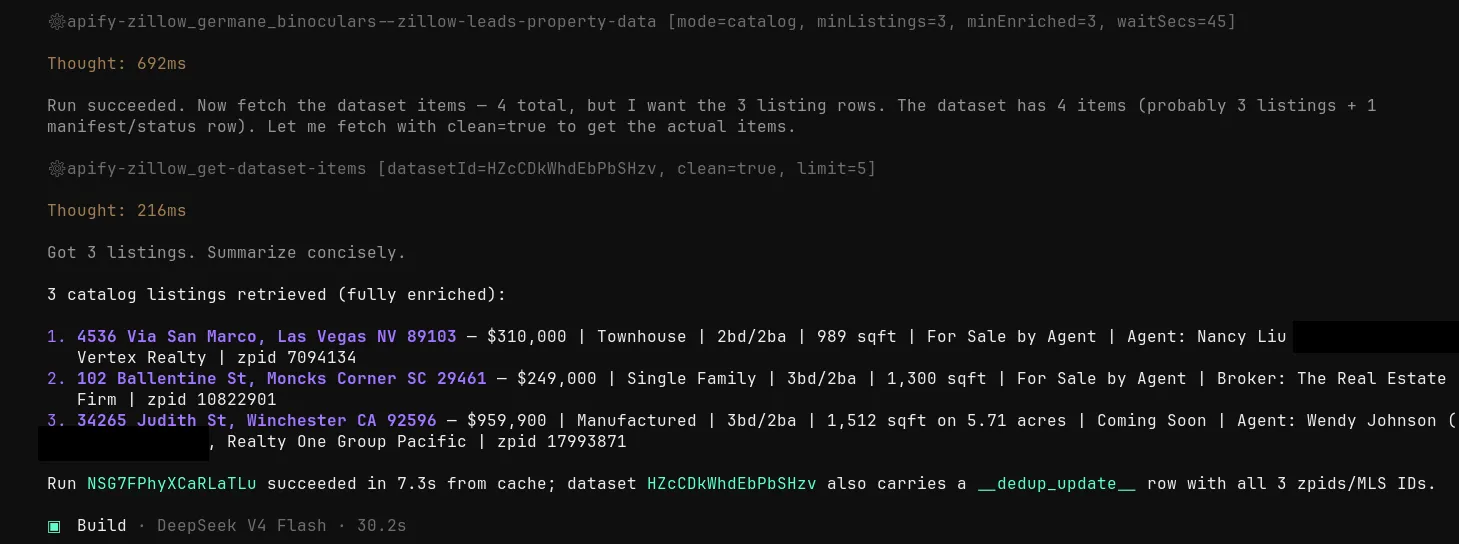
The input fields are written self-documenting for agents: each description states when the field applies and how its value is interpreted, so an LLM can construct a valid call without reading this README. Catalog mode is the fastest smoke test: cached rows in seconds, no bounds, no polling. Here is an AI agent doing exactly that through Apify's MCP server: one tool call, three enriched listings summarized back with agent contacts (phone numbers redacted here):
Long-running orders: fire, poll, fetch
Live-collect orders take real wall-clock time, so the natural agent flow has three steps:
- Fire: call the Actor tool with your input and a generous
timeoutSecs. The tool blocks up to 45 seconds (its ownwaitSecscap, separate from yourtimeoutSecs), then returns a status line like "RUNNING for 40s. 2 results so far" plus anextSteptelling you how to poll. That is not an error; the run is collecting. - Poll: follow
nextStepwithget-actor-run(waitSecs: 30) repeatedly until status readsSUCCEEDED, orTIMED-OUTwith partial results. - Fetch: call
get-dataset-itemswith the returneddatasetId.
Set timeoutSecs comfortably above the worst case for your order size;
see "Minimums are floors" and "Why enrichment takes time" for what to
expect.


