Google Lens Search: Reverse Image Finder & OCR
Pricing
from $5.24 / 1,000 search executeds
Google Lens Search: Reverse Image Finder & OCR
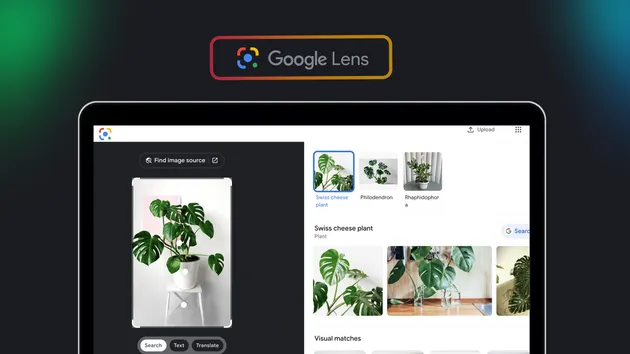
Reverse image search via Google Lens. Get visual matches, exact matches, AI image descriptions, related links, and OCR text with bounding boxes for up to 10 images per run. OCR-only mode is fast and needs no proxy; visual modes run on a residential proxy and retry automatically.
Pricing
from $5.24 / 1,000 search executeds
Rating
0.0
(0)
Developer

GetAScraper
Maintained by CommunityActor stats
0
Bookmarked
75
Total users
25
Monthly active users
13 hours
Issues response
3 hours ago
Last modified
Categories
Share
🖼️ Google Lens Search: Reverse Image Finder & OCR
| Part of the Reverse Image Search & Brand-Protection Monitoring suite. Three ways to trace an image: search Google Lens, search Yandex, or watch for new copies over time. | ||
| REVERSE IMAGE SEARCH & BRAND-PROTECTION MONITORING • Find matches, verify duplicates, and get alerted the moment a new one appears | ||
 Google Lens Visual Search Google Lens Visual Search➤ You are here |
 Yandex Reverse Image Scraper Yandex Reverse Image ScraperBatch reverse image search across Yandex Images |
 Reverse Image Search Monitor Reverse Image Search MonitorDiscovers matches and alerts on new copies over time |
| Turn public image URLs into useful visual-search records. Read visible text, discover source pages, or save a Lens result after a browser review. |
| 🔤 OCR by default Read text, lines, coordinates, and status. | 🌐 Web discovery Find matching pages, images, labels, and entities. | 🧭 Review handoff Keep a complete Lens result link after review. | 📦 Small batches Process up to ten unique public images. |
🎯 Who uses it?
Use reverse image search when you need to understand an image, not just download it.
- Product teams trace catalog photos and find pages that reuse an image.
- Brand researchers check where a logo, product, or campaign image appears.
- Marketplaces read labels and connect a picture with related listings.
- Photographers and editors locate source pages and other versions of an image.
- Analysts turn image evidence into a searchable, repeatable dataset.
🧭 Choose a search mode
| Mode | Best for | What you receive |
|---|---|---|
| OCR only (default) | Fast, repeatable text extraction | Text, lines, paragraphs, coordinates, language, and text_detected or no_text_detected status |
| Google Cloud Web Detection | Finding pages and images connected to a picture | Matching pages, full and partial image matches, similar images, entities, and labels |
| Manual Lens results URL | A Lens result you completed in a browser | The source image, a validated results URL, and a clear review instruction |
| Direct Lens | Reverse image search with Google Lens results | Visual matches, exact matches, an AI description of the image, and related links. Runs through the default Apify proxy, which is preselected. |
Switch Search Mode to a visual option (All results, Visual matches, or Exact matches) to use Direct Lens. When Google briefly refuses a search, the Actor retries automatically with a fresh connection. If it still cannot get verified results, the image is reported as a failed attempt, not as an empty match record. An image without readable text is a valid OCR result with no_text_detected status.
🪄 How it works
| STEP 1 Add an image Paste one URL or a batch of up to ten. | STEP 2 Choose the outcome Start with OCR, web discovery, or a reviewed Lens URL. | STEP 3 Use the records Open focused views for text, matches, links, and status. |
🧾 Input
| Field | Type | Required | Description |
|---|---|---|---|
imageUrl | URL | At least one source | One public JPEG, PNG, or WebP image URL. |
imageUrls | array of URLs | No | Up to ten unique public image URLs for a batch. |
searchType | enum | No | ocr_only by default, or all, visual_matches, or exact_matches. |
visualBackend | enum | No | direct_lens, google_cloud_web_detection, or manual_lens_url. |
googleCloudVisionApiKey | secret | Web Detection only | Your Google Cloud key for Web Detection. You manage the account and allowance. |
manualLensUrl | URL | Manual mode only | The complete HTTPS Lens results URL copied after a browser review. |
includeAllTabs | boolean | No | In all mode, include both Visual matches and Exact matches tabs. |
includeOcr | boolean | No | Add OCR text to visual or Web Detection records. |
language | text | No | ISO 639-1 language code for localized results. |
countryCode | text | No | Country used for the visual search locale. |
maxResults | integer | No | Limit returned match records from 1 to 100. |
proxyConfiguration | object | Direct visual mode only | Connection for the live Direct Lens path. The default Apify proxy is preselected. |
📊 Dataset views
📋 Matches overview
See the image, selected mode, result source, summaries, match groups, review link, and processing time in one view.
🔎 Visual and exact matches
Focus on Web Detection details, visual matches, exact matches, and any OCR attached to the result.
🧱 Data table
| Field | Type | Description |
|---|---|---|
imageUrl | string | The public image URL submitted for this record. |
searchType | string | The result mode, such as ocr_only, web_detection, manual_lens, or a Lens match mode. |
visualBackend | string | The source used for visual results, when applicable. |
ocr | object | Detected text, language, lines, paragraphs, coordinates, and status. |
webDetection | object | Source-derived entities, matching pages, matching images, similar images, and labels. |
visualMatches | array | Pages and products that Google Lens identifies as visually related. |
exactMatches | array | Pages and images that closely match the submitted image. |
relatedLinks | array | Additional source links returned with a verified visual result. |
relatedSearches | array | Related search phrases returned with a verified visual result. |
tabs | array | Visual matches and Exact matches result-tab links. |
aiDescription | string | A source-derived description when the selected Lens result provides one. |
searchUrl | URL | A verified result URL or a manual browser handoff URL. |
manualInstructions | string | A short instruction for reviewing a manually supplied Lens URL. |
scrapedAt | timestamp | Time when the record was created. |
Example record
💰 Pricing
Pay per valid dataset record. Failed image attempts are not added to the chargeable dataset. Empty OCR is still a valid record because it clearly reports no_text_detected. There is no subscription, and an empty run is not charged.
⭐ Enjoying Google Lens Visual Search?
| ⭐ ⭐ ⭐ ⭐ ⭐ A clear image result can save your team from repetitive visual checks. A 5-star rating helps other research, catalog, and image teams find this Actor. Your feedback guides future improvements. |
| ★ Rate this Actor on Apify |
❓ FAQ
Can I run it without a key?
Yes. OCR only is the default and needs no key or proxy. Direct Lens needs no key and runs through the default Apify proxy. Web Detection is optional and uses your own Google Cloud key.
What happens when an image has no text?
The Actor returns a successful OCR record with status: "no_text_detected", an empty fullText, and empty text arrays. That is a valid result, not fabricated text.
How do I get visual matches?
Set Search Mode to All results or Visual matches and keep Direct Lens as the source. For Web Detection pages and entities, choose Google Cloud Web Detection and provide your own Google Cloud key. For a browser-completed Lens search, choose Manual Lens results URL and paste the complete results link.
Can I process multiple images?
Yes. Add up to ten unique public image URLs. Each successful image receives its own correlated dataset record.
What if Direct Lens cannot be verified?
The Actor keeps the failed image attempt out of the successful result dataset, so you are not charged for it. Try the run again, or use Web Detection or a Manual Lens results URL when you need a fallback.
🔗 Other actors
- Google Lens OCR API: Batch Image to Text with Bounding Boxes ↗ - Its OCR-only sibling, built for batch text extraction rather than visual search.
- Yandex Reverse Image Scraper: Яндекс Картинки ↗ - Find visually similar images, source pages, and other image sizes.
- Reverse Image Search Monitor: Discover, Verify & Track Matches ↗ - Discover candidate matches automatically and get alerted when a new one appears.
- Bulk Image Downloader: Website Crawl, ZIP and Image Dataset ↗ - Build an image dataset from public pages and direct URLs.
- Lenskart Scraper: Eyewear Prices, Specs & Variants ↗ - Compare product images, variants, prices, and availability in eyewear catalogs.