

YouTube Shopping Scraper & Creator Intelligence
Pricing
$5.00 / 1,000 shopping results
YouTube Shopping Scraper & Creator Intelligence
Scrape public YouTube Shopping product tags and analyze creators, products, brands, and placement changes.
Pricing
$5.00 / 1,000 shopping results
Rating
0.0
(0)
Developer

Koo 빙
Maintained by CommunityActor stats
0
Bookmarked
2
Total users
1
Monthly active users
11 days ago
Last modified
Categories
Share
Current release: 0.2.4-rc1
YouTube Shopping Scraper & Creator Intelligence extracts public product tags and turns them into auditable creator, product, brand, and placement-change intelligence. Start with a video, Short, channel, Store URL, handle, or search phrase—no external paid Actor or third-party data provider is required.
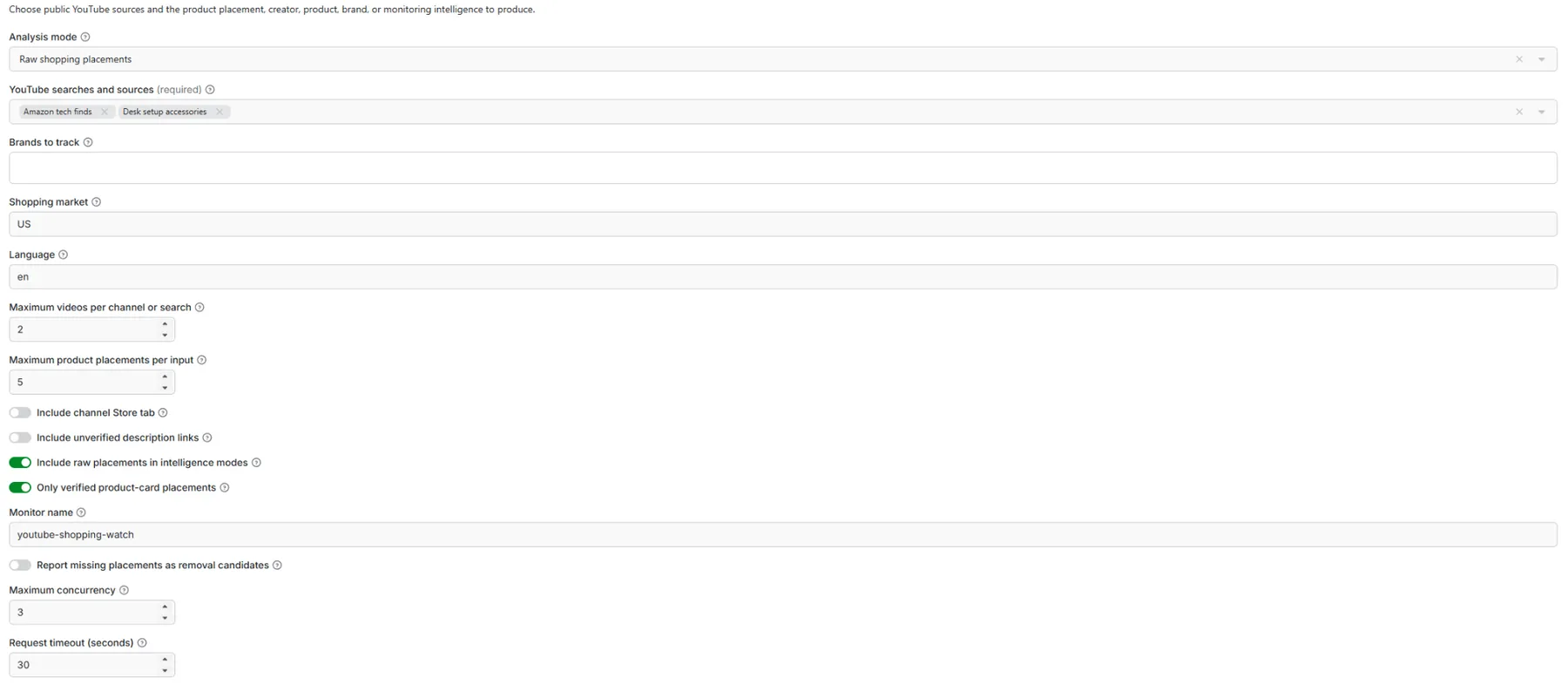
The fastest first run requires no channel research: select Raw shopping placements, start typing a product topic, choose a recommended search phrase or enter your own, keep the default limits, and click Start.
What does this YouTube Shopping scraper do?
- Extracts public product-card placements from videos, Shorts, channels, and Store surfaces
- Discovers candidate videos from plain-language YouTube searches—channel URLs are optional
- Provides a searchable, type-to-filter list of commerce-oriented query ideas while accepting custom terms
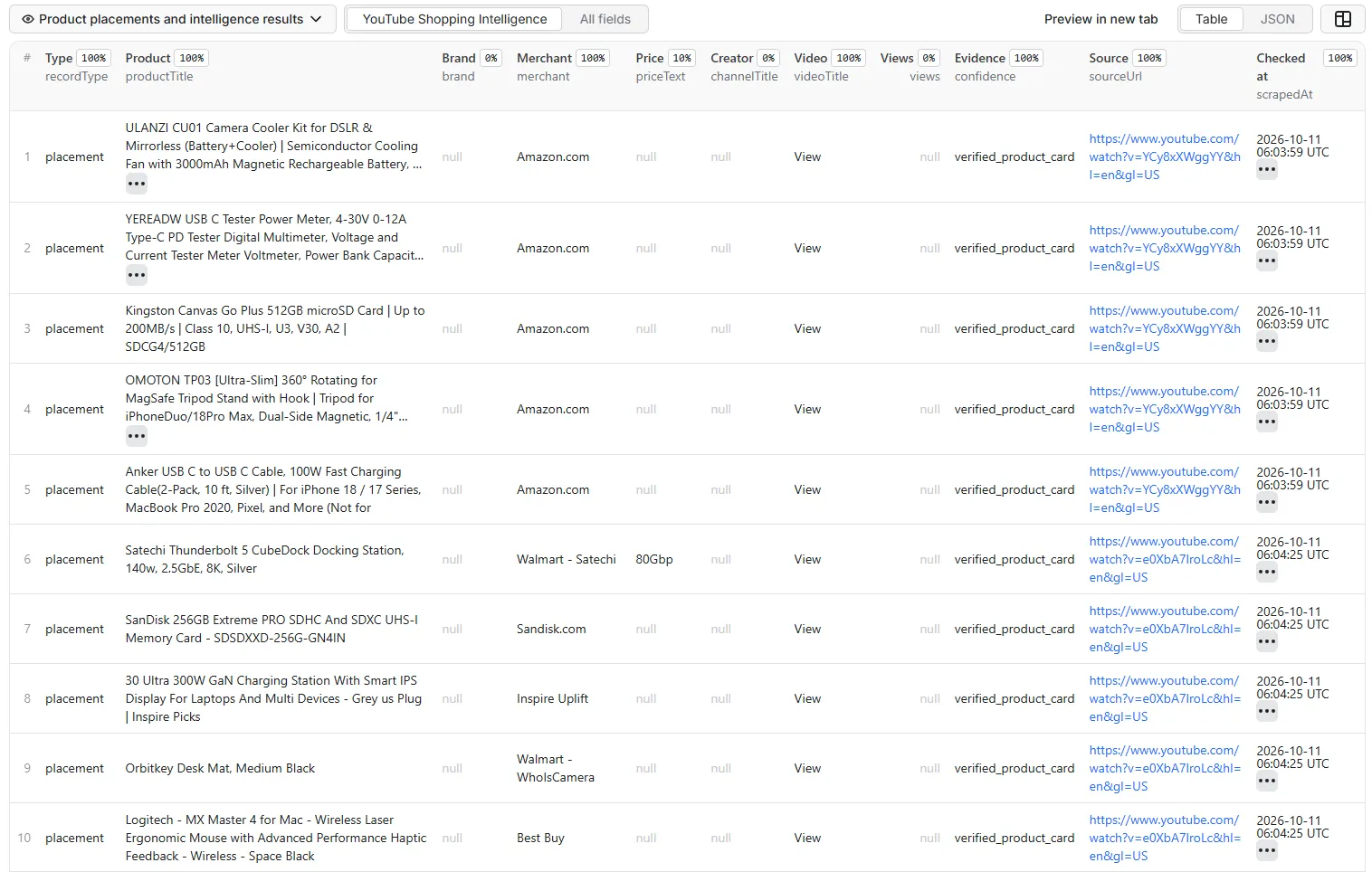
- Captures product title, merchant, price text, URL, image, creator, video, views, and evidence source when exposed
- Ranks creators by observed product breadth, placement depth, and public view context
- Groups products across creators and videos
- Measures observed brand or merchant share of voice
- Detects newly observed placements in scheduled monitoring runs
- Labels every record by evidence confidence
- Keeps missing values as
nullinstead of inventing clicks, sales, commissions, GMV, or ROI - Separates merchant destinations from thumbnails: image-CDN URLs are never emitted as
productUrl - Exports the resulting Apify Dataset as JSON, CSV, XLSX, XML, or other supported formats
Who is this Actor for?
| User | Typical question |
|---|---|
| Affiliate and commerce teams | Which creators publicly tag products in our category? |
| Brands and agencies | Which competing brands appear most often in the captured sample? |
| Creator-research teams | Which creators show repeated product-tagging activity? |
| Product researchers | Which products appear across several videos or creators? |
| Monitoring workflows | What new creator-product relationships appeared since the last run? |
Quick start in Apify Console
- Open the Actor and select Use Actor.
- Set Analysis mode to Raw shopping placements.
- In YouTube searches and sources, start typing to filter the recommended search ideas, select one or more suggestions, or enter a custom search phrase, video/Short URL, channel/Store URL, or
@handle. - Keep Only verified product-card placements enabled for the cleanest first result.
- Set Maximum videos per channel or search to
3for a low-cost test. - Click Start and open the Results table when the run finishes.
Use examples/readme-screenshot-keyword-discovery.json for the new search-first input screenshot. It selects two recommended topics and demonstrates that the Actor can discover videos without channel URLs. For the clearest result-table screenshot, use examples/readme-screenshot-product-results.json; it opens one previously verified shopping-enabled video and caps the Dataset at three rows. Public product cards can change over time, so confirm the live rows before capturing.
Screenshot-ready Store demo
The release package includes reproducible settings for the most useful Store images:
| Screenshot | Configuration | Capture |
|---|---|---|
| 1. Keyword discovery | examples/readme-screenshot-keyword-discovery.json | Searchable field with two selected topics; type tech before capture to show the filtered menu |
| 2. Compact product results | examples/readme-screenshot-product-results.json | Dataset table showing up to three verified placements, merchant, creator, video, views, and evidence |
| 3. Creator intelligence | examples/store-screenshot-creator-intelligence.json | Ranked creator summary followed by auditable placement rows |
| 4. Excel export | Export Screenshot 2 as XLSX | Spreadsheet with the same visible result columns |
The first screenshot should make the no-URL workflow obvious. Keep YouTube searches and sources, the selected keyword chips, Maximum videos per channel or search, Only verified product-card placements, and the Start button visible. Open the dropdown and type tech so the captured menu shows only matching recommendations. Do not include account information, API tokens, billing details, or unrelated browser tabs.
Copy-ready keyword-discovery screenshot input:
Copy-ready README screenshot input:
Before capturing, confirm the run returns verified placement rows and that productUrl is either a merchant destination or null, never an image-CDN URL. Recommended visible Dataset columns are productTitle, merchant, priceText, productUrl, channelTitle, videoTitle, views, and confidence.
Follow docs/STORE_SCREENSHOT_GUIDE.md for the exact capture order, filenames, crop guidance, and fallback inputs.
Search by keyword — no channel URL required
Verified product-placement results
Analysis modes
All five modes use the same normalized placement records. Choose Scrape YouTube now to collect fresh evidence, or choose Reuse an existing Raw Dataset to analyze a previous placements run without opening YouTube pages again.
| Mode | One output row represents | Primary fields | Best for |
|---|---|---|---|
placements | One observed product placement | Product, merchant, price, URL, creator, video, views, evidence | Building a reusable source Dataset |
creator_intelligence | One creator/channel | placementCount, uniqueProducts, uniqueVideos, view metrics, intelligenceScore | Creator discovery and ranking |
product_intelligence | One distinct product | uniqueCreators, uniqueVideos, placement and view metrics, intelligenceScore | Product diffusion research |
brand_share_of_voice | One observed brand or merchant | placementCount, placementSharePct, creator/product/video coverage | Competitive visibility analysis |
monitor | One added or missing-placement candidate | changeType, current or previous placement evidence | Repeated change detection |
intelligenceScore is a logarithmic 0–100 ranking of the captured sample: placement depth contributes 35%, related product/creator breadth 30%, and median public views 35%. It is not a sales, conversion, commission, GMV, or ROI estimate.
placementSharePct means the brand or merchant's placements divided by all placements in the selected Dataset. It is observed share of voice inside that sample—not market share.
For creator, product, and brand modes, Append raw rows to summary modes can add the source placement rows after the summaries for auditing. It is off by default because every appended row increases output volume and PPE charges. Monitor mode never appends raw rows, even if an older saved input contains that option.
Analyze one Raw Dataset in modes 2–5
Run the expensive discovery step once, then reuse exactly the same evidence in every analysis mode:
- Run
examples/test-01-raw-source.jsonin Raw shopping placements mode. - Open the successful run's Storage → Dataset page and copy the Dataset ID. A Console or API Dataset URL is also accepted.
- In each mode-specific JSON, replace
REPLACE_WITH_RAW_DATASET_IDwith that ID. - Run
test-02throughtest-05. These runs read Dataset rows and do not make YouTube or proxy requests.
| Test file | Expected validation |
|---|---|
examples/test-02-creator-from-dataset.json | One creator_summary per creator; counts reconcile to the Raw Dataset |
examples/test-03-product-from-dataset.json | One product_summary per distinct product identity |
examples/test-04-brand-from-dataset.json | Brand/merchant summaries whose placementSharePct totals approximately 100% |
examples/test-05-monitor-from-dataset.json | First run returns added; a second identical run with the same watchName returns zero changes |
Only placement rows are loaded. Summary rows accidentally present in a mixed Dataset are ignored. The Actor applies maxProductsPerInput as the maximum number of source placement rows loaded from an existing Dataset. The Dataset must be accessible to the account running the Actor.
Search without finding channel URLs first
You do not need to research channel addresses before running the Actor. Start typing a commercial topic in YouTube searches and sources—for example gaming, beauty, or desk—and the searchable dropdown narrows the recommended ideas. Select several suggestions or type a custom phrase such as budget gaming setup 2026.
The initial form now demonstrates keyword discovery with amazon tech finds instead of implying that a channel URL is mandatory.
Each plain-text value is sent to public YouTube search. The Actor opens up to maxVideosPerInput discovered videos for that phrase and extracts the verified Shopping product cards it can observe. Direct URLs and handles remain useful when you already know the exact creator or video.
Valid input examples:
| Format | Example | Behavior |
|---|---|---|
| Search phrase | amazon tech finds | Searches YouTube and inspects the bounded video results |
| Custom search phrase | budget creator camera setup | Searches the exact custom phrase |
| Video URL | https://www.youtube.com/watch?v=BkzbIEoukm8 | Inspects only that video |
| Shorts URL | https://www.youtube.com/shorts/VIDEO_ID | Inspects only that Short |
| Channel URL | https://www.youtube.com/@peachietech | Inspects the channel Store and bounded recent videos |
| Handle | @peachietech | Resolves and inspects the same channel surfaces |
The searchable dropdown is a discovery aid, not a restriction: custom values remain accepted. This Actor stores verified Shopping placements by default, so a searched video with no public product card does not produce a placement row.
Input reference
| Input | Description | Cost impact |
|---|---|---|
dataSource | Scrape YouTube now or reuse an existing Raw Dataset | Dataset reuse avoids YouTube/proxy requests |
sourceDatasetId | Dataset ID or Dataset URL from a Raw placement run | Required only for Dataset reuse |
queries | Searchable recommended ideas plus custom search phrases, video/Short URLs, channel/Store URLs, and handles | More inputs open more pages |
mode | Selects raw extraction or an intelligence view | Summary modes add processing, not extra discovery pages |
geo | Two-letter market code such as US or KR | Changes localized product availability |
language | YouTube page language such as en or ko | No direct cost impact |
maxVideosPerInput | Maximum videos opened per channel or search | Primary run-size control |
maxProductsPerInput | Maximum retained placements per YouTube input or loaded from a Dataset | Limits analysis and output volume |
includeChannelStore | Inspects the public channel Store surface | Adds at most one source page per channel |
includeDescriptionLinks | Adds commerce-looking description URLs as unverified leads | May increase output rows |
onlyVerifiedPlacements | Keeps only native product-card evidence | Recommended for production |
includeRawPlacements | Appends source rows to creator/product/brand summaries only | Increases stored and billed rows; off by default |
proxyConfiguration | Uses Apify Proxy when enabled | Proxy usage may affect platform cost |
YouTube localizes Shopping surfaces. The same video can expose different products—or no products—in different markets and viewer contexts.
Output example
Placement rows can include productId, imageUrl, channelId, channelUrl, videoId, publishedAt, and evidence metadata. Summary rows include transparent counts such as placementCount, uniqueCreators, uniqueProducts, uniqueVideos, medianViews, and intelligenceScore.
productUrl is returned only when the public product card exposes a non-image merchant destination. Thumbnail/CDN URLs remain in imageUrl; when no merchant destination is public, productUrl is null rather than a misleading image link. Brand and price also remain null unless they are explicitly exposed or match a user-supplied tracked brand.
The intelligenceScore ranks only the captured public sample. It is not a sales, conversion, or ROI prediction.
Download results to Excel
After a successful run:
- Open Results or the default Dataset.
- Select Export.
- Choose Excel (XLSX).
- Optionally select only the fields visible in the overview table.
- Download the file.
The same Dataset is available through the API in JSON, JSONL, CSV, XLSX, XML, RSS, and HTML formats supported by Apify.
Monitoring new YouTube Shopping placements
Use monitor mode with a stable watchName. The first run creates a baseline and returns current placements as added. Later runs return newly observed placements. The current placements may come from a fresh YouTube scrape or from sourceDatasetId.
Missing placements are not reported by default. A missing public card can mean localization, incomplete page coverage, or an experiment—not necessarily a confirmed removal. Enable emitRemovedCandidates only if your workflow can confirm missing items across repeated runs.
For recurring live monitoring, save the YouTube-source input as an Apify Task and schedule it. Keep the same watchName, queries, market, and coverage limits between runs. For deterministic testing, run examples/test-05-monitor-from-dataset.json twice with the same Raw Dataset and watchName.
How much does it cost?
Actual prices are shown in the Actor's Pricing tab and must be configured before Store publication. For compatibility with AutoPublisher v0.5.24's single-event PPE workflow, this Actor reports one measurable event:
shopping-result: one successfully stored placement, intelligence summary, or monitoring-change row
Estimate a run as:
successfully stored output rows × shopping-result price + platform/proxy usage
Reusing a Dataset still creates and charges the new summary or change rows, but it avoids repeating YouTube discovery and proxy traffic. Raw source rows are not charged again unless you explicitly append them in creator, product, or brand modes.
Start with one channel and maxVideosPerInput: 3. Use Apify's maximum-charge control when available. Failed inputs are written to FAILED_INPUTS and are not presented as successful extracted records.
AutoPublisher compatibility
This release can be imported directly into AutoPublisher v0.5.24 or later. The ZIP root contains:
product.manifest.jsonwith the stable product IDyoutube-shopping-scraper-intelligenceCHANGELOG.jsonwith release metadata matching0.2.4-rc1.actor/deployment schemas and Actor metadataREADME.md,tests/, Store assets, screenshot settings, and listing metadata
Upload the AutoPublisher-compatible ZIP, select 불러오기 및 검사, and confirm Artifact QA and Apify validation both show PASS before approving deployment. The manifest intentionally omits remote_id because the target Apify username and Actor ID are account-specific; connect the intended Actor in AutoPublisher before analytics sync and commerce validation.
The included Store icon uses a red video-and-shopping motif, blue analytics bars, and a clean white background. It is an independent design and does not reproduce the official YouTube or Google logo.
API example
Run the Actor through Apify Console, API, CLI, schedules, webhooks, or integrations. Read the default Dataset from the run output URL defined by the Actor's output schema.
Accuracy and evidence boundaries
This Actor processes public pages and public product-card evidence only. It does not access YouTube Studio, private affiliate dashboards, private campaign data, viewer identities, or account credentials.
Public data can support creator-product relationships, product-card evidence, public engagement context, and observed changes. It cannot prove clicks, orders, commissions, creator-attributed GMV, or campaign ROI. Those fields are never fabricated.
Description links are labelled unverified_commerce_link. Native public product cards are labelled verified_product_card.
Troubleshooting
Why did the Actor return zero products?
The creator may not have public tags on the inspected videos, the selected market may not expose them, or YouTube may serve a different layout. Try a direct shopping-enabled video, increase maxVideosPerInput gradually, set the correct geo, and enable Apify Proxy.
Why is a price or product ID missing?
YouTube does not expose every attribute on every product card. Missing public values remain null.
Why are results different between runs?
Products, prices, localization, creator tags, and YouTube page experiments can change. Use the source URL, timestamp, surface, and confidence fields to audit each observation.
Can this Actor calculate affiliate revenue?
No. Revenue and conversion data are private. Connect the public placement output with your own authorized first-party analytics if you need attribution.
Reliability and responsible use
- Three bounded request attempts with exponential backoff
- Configurable concurrency, timeout, page limits, result caps, and proxy
- Per-input partial success with
FAILED_INPUTSdiagnostics - Balanced JSON extraction instead of single-line regular expressions
- Deterministic deduplication and scoring
- No external paid Actor dependency
Use public data lawfully and respect applicable laws, platform terms, and third-party rights. Do not use the output to claim private sales attribution or target private individuals.
Release and support policy
Every code patch must update README.md, CHANGELOG.md, and release.json in the same release. Automated release-quality tests fail when these files or the documented modes drift out of sync.
Before publishing, follow docs/STORE_QUALITY_CHECKLIST_KO.md. It separates source-complete quality work from Console-only settings such as the actual shopping-result price, discounts, limited permissions, the Actor logo, and a published Task.
For reproducible bug reports, include the run ID, input with secrets removed, selected market, failed query, and the FAILED_INPUTS or OUTPUT record. Do not include private credentials.
Local development


![Tiktok Shop Product All Data Scraper [No Login Required] ✅ avatar](https://images.apifyusercontent.com/yZxKAPOXLUgUikt6wDfjyhLddZtlGSYZ1kebty-Sd98/rs:fill:76:76/cb:1/aHR0cHM6Ly9hcGlmeS1pbWFnZS11cGxvYWRzLXByb2QuczMudXMtZWFzdC0xLmFtYXpvbmF3cy5jb20vbWRDaHNOVUFhT0sxME1HRUUtYWN0b3ItdmdmYk9OSmxuWkRQQk1YMkEtVHd1bHNBaWtzUS10aWt0b2stYXBpZnktcHJvZHVjdC5wbmc.webp)


