

Website Tech Stack Detector — B2B Sales Intelligence
Pricing
Pay per usage
Website Tech Stack Detector — B2B Sales Intelligence
Scan company websites and reveal their full tech stack: CMS, CRM, analytics, payments, JS frameworks, and infrastructure. Prospect by technology — find every company running Salesforce, HubSpot, Stripe, WordPress, and 40+ tools.
Pricing
Pay per usage
Rating
0.0
(0)
Developer

GoCreative AI
Maintained by CommunityActor stats
0
Bookmarked
16
Total users
2
Monthly active users
2 months ago
Last modified
Categories
Share
🔍 Tech Stack Detector — Find Any Website's Technology
📊 Example output (real run)
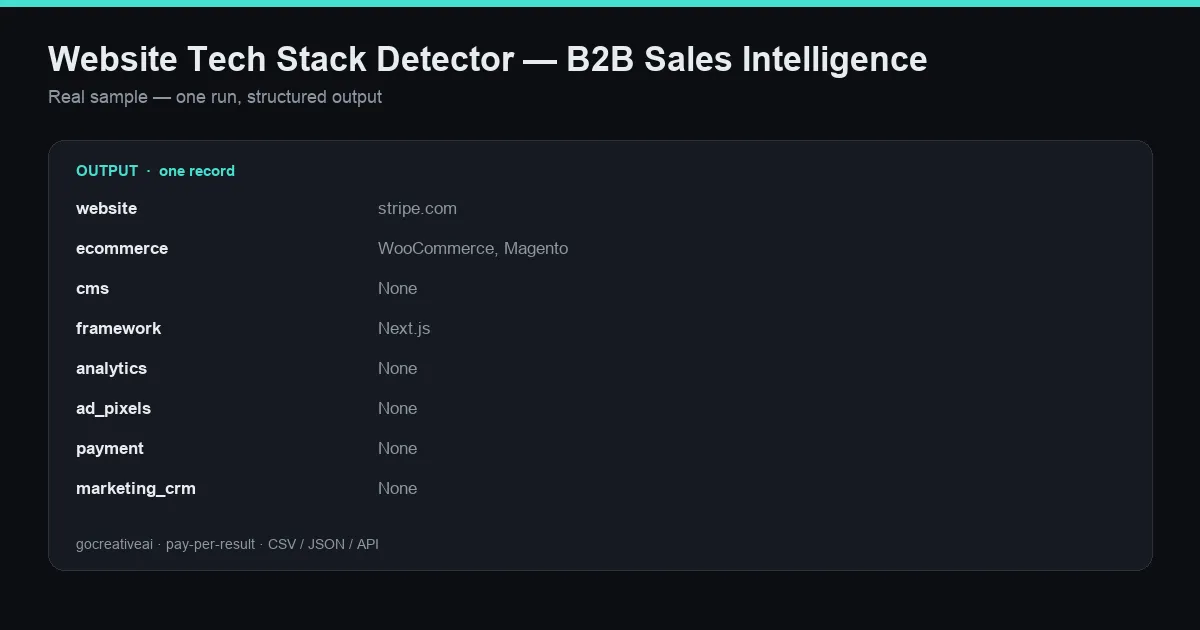
A real record from a live run — clean structured data, exported as CSV / JSON / Excel or via API.
Paste a list of websites and instantly see what each one is built with. This actor fetches every site and detects its full technology stack — e-commerce platform, CMS, JavaScript framework, analytics, ad pixels, payment processors, CRM/marketing tools, CDN/hosting, and key libraries. A fast, no-key BuiltWith / Wappalyzer alternative. You only pay per site analyzed.
tech stack lookup · what technology does a website use · builtwith alternative · wappalyzer · cms detector · shopify detector · website technology checker · sales intelligence · tech-stack lead targeting
What it detects
| Category | Examples |
|---|---|
| 🛒 E-commerce | Shopify, WooCommerce, Magento, BigCommerce |
| 📝 CMS | WordPress, Wix, Squarespace, Webflow, Ghost, Drupal |
| ⚛️ Framework | Next.js, React, Vue, Angular, Gatsby, Nuxt |
| 📊 Analytics | GA4, Google Tag Manager, Hotjar, Mixpanel, Segment, Plausible |
| 🎯 Ad pixels | Facebook Pixel, Google Ads, TikTok, LinkedIn, Pinterest, Snap |
| 💳 Payment | Stripe, PayPal, Square, Klarna, Afterpay, Shop Pay |
| 📣 Marketing / CRM | HubSpot, Klaviyo, Mailchimp, Intercom, Drift, Zendesk |
| ☁️ CDN / Hosting | Cloudflare, Vercel, Netlify, AWS, Fastly, WP Engine |
| 📚 Libraries | jQuery, Bootstrap, Tailwind, Font Awesome |
Export as CSV, JSON, or Excel, or grab the ready-made CSV from the key-value store.
Why use it
- ✅ Pay only per site analyzed — no subscription, no per-lookup credits to track
- ✅ No API key, no setup — paste URLs, hit run
- ✅ Fast & reliable — direct fetch + signature matching, works on any public site
- ✅ Pairs with lead-gen — feed a Maps or contact scraper's output to qualify leads by tech
How to use
- Open the Input tab.
- Paste websites or domains into
websites:
- Click Start. Results stream in as each site is analyzed.
💡 You can paste a Google Maps scraper's output directly — items with a
websitefield are read automatically.
Output example
Who it's for
- Sales & lead-gen — find every site on Shopify (or any platform) to pitch your product/agency
- Competitive research — see exactly what stack competitors run
- Agencies — qualify prospects by the tools they already use
- Recruiters & analysts — map technology adoption across a market
FAQ
Do I need an API key? No. Paste websites and run.
What if a site blocks the request? You're only charged when a site is successfully analyzed.
Can I feed it a Maps/contact scraper's results? Yes — items with a website field are picked up automatically.
How accurate is it? It matches well-known signatures in each site's HTML and response headers — high precision on the popular technologies above.


