

Company Website Finder - Name to Domain, Email & Socials
Pricing
from $3.00 / 1,000 company website founds
Company Website Finder - Name to Domain, Email & Socials
Turn a list of company names into official websites and domains, with a confidence score, plus emails, phones and LinkedIn/Facebook/Instagram links from the homepage. Enrich your CRM and lead lists. $3 per 1,000 companies found, not found = free.
Pricing
from $3.00 / 1,000 company website founds
Rating
0.0
(0)
Developer

Gosoul Data
Maintained by CommunityActor stats
0
Bookmarked
1
Total users
1
Monthly active users
an hour ago
Last modified
Categories
Features
Share
Company Website Finder - Company Name to Domain, Email & Socials
You have a list of company names (from a trade show, a CRM export, a directory, a spreadsheet, a LinkedIn search) but no websites? This Actor finds the official website and domain of each company, checks that the site is live, and grabs emails, phones and social links from the homepage.
It works in bulk (thousands of names per run), for companies in any country, and you only pay for the companies it actually finds.
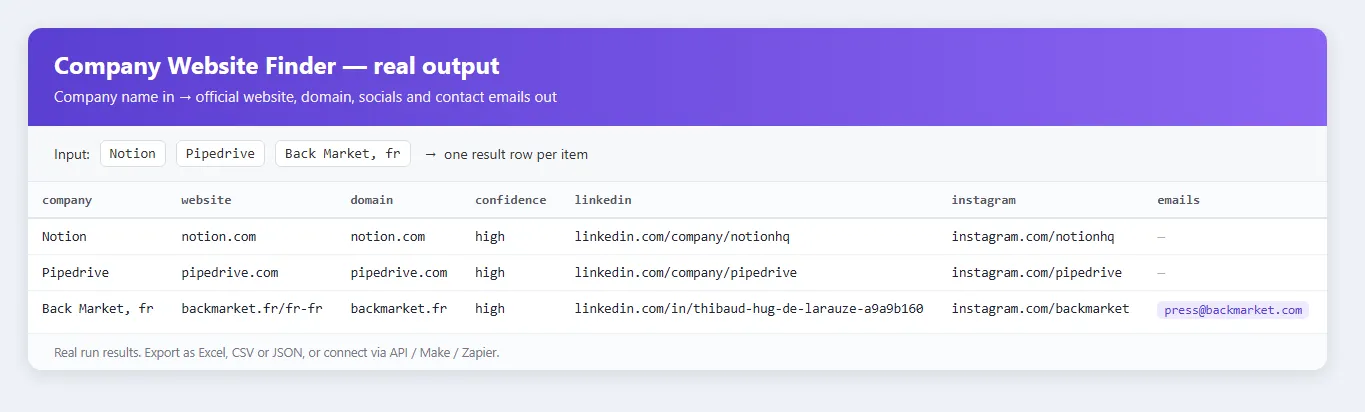
What you get
| Field | Example |
|---|---|
company | Back Market, fr |
found | true |
domain, website | backmarket.fr, https://www.backmarket.fr/fr-fr |
confidence | high / medium / low |
matchScore | 0.92 |
siteTitle | Homepage title (to double check) |
emails, phones | Contacts found on the homepage |
linkedin, facebook, instagram, twitter | Social profiles |
alternatives | Other candidate domains |
Export the results as Excel, CSV, JSON, XML or HTML, or get them through the API.
Why use this Actor
- Name in, domain out. No need to search Google by hand for each company.
- Live websites only. Every candidate domain is actually visited. Parked domains ("this domain is for sale") are rejected.
- Local websites first. Add a country (
Decathlon, fr) and the local site (decathlon.fr) wins over the international one. - Works with protected sites. Many big brands block robots (Cloudflare). The Actor still recognises them and returns the right domain instead of a look-alike.
- A confidence level for every result, so you know which rows to double check.
- Contacts included in the price: emails, phones, LinkedIn, Facebook, Instagram and X / Twitter from the homepage.
- Fair pricing: companies with no website found are free.
Tested accuracy
We test the Actor on a fixed list of 35 well-known companies from the US, UK, France and Germany (Notion, Stripe, Decathlon, Lush, Monzo, Zalando, Carrefour, Malt, Doctolib, Back Market...). The current version finds the right official domain for 35 out of 35, including sites that block robots and names that look like other brands (Lush vs Lusha, Malt vs Maltego).
Step-by-step tutorial
- Prepare your list. One company name per line. Copy a column from Excel or Google Sheets and paste it into the Company names field.
- Add a country when you can. Either per company (
Acme, de) or for the whole list with Default country (fr,de,uk,us...). It strongly improves results for companies that have one website per country. - Choose whether you want contacts. Also extract contacts is on by default and costs nothing extra.
- Click Start. A list of 1,000 companies usually takes a few minutes.
- Check the confidence column.
highrows can be used as is. Have a quick look atmediumandlowrows (comparesiteTitlewith the company name). - Export to Excel / CSV, or send the results automatically where you need them (see Integrations).
Input example
Output example
Use cases
- Lead enrichment. Company names only → domains → emails. Then use our Company Email Finder to search the contact, about and legal pages for more emails.
- CRM cleanup. Add missing websites to thousands of accounts in HubSpot, Salesforce or Pipedrive.
- Event and trade show lists. Exhibitor lists usually come with names only.
- Market research. Turn a list of competitors or suppliers into websites you can analyse, for example with our Website Technology Detector (CMS, Shopify, analytics...).
- Email finding tools need a domain. This is step 1 of most enrichment workflows.
- Investors and analysts. Map startups from a list of names to their websites and social profiles.
Integrations
Like every Apify Actor, it plugs into your tools without code:
- Google Sheets: export results to a sheet, or read names from one.
- Make, Zapier, n8n: trigger a run when new companies arrive, and push results to your CRM.
- API and SDKs (Python, JavaScript): start runs and fetch results from your own code.
- Webhooks: get notified when a run finishes.
- Schedules: enrich new companies every day or every week automatically.
- AI agents: use it from Claude, ChatGPT or Cursor through the Apify MCP server.
How it works
- Candidate domains come from a public company-domain lookup and smart guesses (
companyname.com,companyname.fr...). - Each candidate is visited. Parked domains are discarded. Sites that block robots are accepted only when the domain exactly matches the name and is confirmed (known company or professional email servers).
- Candidates are scored by comparing the company name with the domain, the registered company name and the homepage title. Exact names beat look-alikes, and the local website wins when you give a country.
- Contacts are extracted from the homepage of the winning site.
Tips for the best results
- Use the real brand name, not the full legal name:
Back Marketworks better thanJung SAS. - Add the country for international brands.
- Remove noise from names: emojis, "(HQ)", store numbers...
- For very small local businesses (a bakery, a plumber), add the city to the name:
Boulangerie Paul Lyon.
Pricing
$3 per 1,000 companies found. Companies with no website found are free. A test run on 20 companies costs a few cents.
FAQ
What does "confidence" mean?
high means the domain and title clearly match the name. medium is a probable match. low means "best guess": check it.
Why is siteTitle empty for some results?
The website blocks automated visitors, so the title cannot be read. The domain is still returned when it is confirmed.
Why are emails empty for many big companies? Large companies rarely publish an email on their homepage. Use our Company Email Finder, which also visits contact and legal pages.
Can I give the country only once?
Yes, with Default country. A country written after a name (Acme, de) overrides it for that line.
Does it work for companies outside Europe and the US? Yes, any country. Results are best for companies that have a public website.
Is it legal? The Actor only visits public websites and public company information, like a person would. You are responsible for how you use the data (GDPR, CAN-SPAM...).
Limits
- Very small local businesses without a website, or with very generic names, may not be found or may get
lowconfidence: check those manually. - Only the homepage is used for contacts.
Other Actors you may like
- Company Email Finder: find and guess professional emails of a company.
- Website Contact Scraper: emails, phones and social links from any website.
- Phone Number Validator: check, format and identify phone numbers.
- Website Technology Detector: the tech stack of any website.
- French Company Search: SIREN/SIRET, address and data of French companies.
Support
Open an issue in the Issues tab with examples of companies that were missed: we use them to improve the matching.


