

Company Email Finder - Find Emails from Company Name or Domain
Pricing
from $5.00 / 1,000 company with emails founds
Company Email Finder - Find Emails from Company Name or Domain
Find contact emails of any company from its name, domain or website URL. Crawls home, contact, about and legal pages, decodes hidden emails, sorts generic vs personal emails, guesses the email pattern and checks MX. $5 per 1,000 companies with emails, no email = free.
Pricing
from $5.00 / 1,000 company with emails founds
Rating
0.0
(0)
Developer

Gosoul Data
Maintained by CommunityActor stats
0
Bookmarked
2
Total users
1
Monthly active users
43 minutes ago
Last modified
Categories
Features
Share
Give a list of company names, domains or website URLs and get their contact emails. The Actor finds the official website (if you only have a name), visits the homepage plus the contact, about, legal / imprint and team pages, and returns clean, sorted emails, with the best contact address first.
You pay only for companies where at least one email is found.
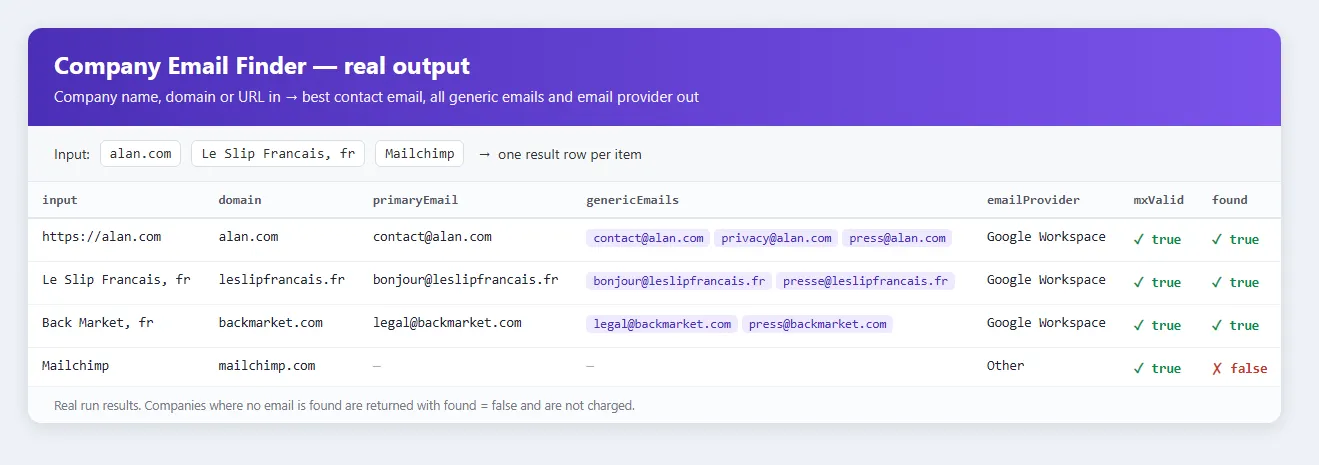
What you get
| Field | Example |
|---|---|
input | Le Slip Francais |
domain, website | leslipfrancais.fr, https://www.leslipfrancais.fr/ |
primaryEmail | bonjour@leslipfrancais.fr (best generic contact first) |
genericEmails | contact@, info@, sales@, press@... on the company domain |
personalEmails | guillaume@leslipfrancais.fr |
otherDomainEmails | Emails on other domains (Gmail of a small business...) |
emailDetails | Each email with type, same-domain flag and the pages where it was found |
emailPattern | Guessed format, e.g. {first}.{last}@company.com (when personal emails are found) |
mxValid, emailProvider | Does the domain receive email? Google Workspace, Microsoft 365, OVH, Zoho... |
domainConfidence | input (you gave the domain) or high / medium / low (found from the name) |
pagesVisited | Number of pages read on the website |
Why use this Actor
- Name, domain or URL: no need to find websites first. Mix all three in the same list.
- Visits the right pages: contact, about, team, legal notice / imprint (where European companies must publish an email), not only the homepage.
- Hidden emails decoded:
name [at] company [dot] com, HTML entities and Cloudflare-protected emails. - Clean results: placeholder emails (
john.doe@example.com,email@gmail.com), tracking IDs and emails of third-party tools (Shopify, Zendesk, Mailchimp...) are removed. - Best contact first:
contact@,hello@,info@,bonjour@... are ranked before legal or privacy addresses. - Email provider and MX check included: know if the domain uses Google Workspace or Microsoft 365, and if it can receive email at all.
- Fair pricing: no email found = free.
Step-by-step tutorial
- Paste your companies, one per line:
basecamp.com,https://alan.com, or justLe Slip Francais, fr. - Add a country after names (
Acme, de) or set Default country code: it helps find the local website. - Pages per website (default 8): more pages = more emails found, slightly slower.
- Other domains: keep Include emails on other domains on if you target small businesses (many use Gmail or Outlook addresses).
- Start the run and export to Excel / CSV, or send results to your CRM (see Integrations).
Input example
Output example
Use cases
- Lead generation: turn a list of target companies into contact emails.
- CRM enrichment: add a contact email to accounts that have only a name or a website.
- Partnerships, PR and influencer outreach to brands, agencies, shops and startups.
- Supplier and B2B sourcing: contact manufacturers or distributors from a directory.
- Email deliverability: check MX and the email provider before a campaign.
- Full enrichment pipeline: names → Company Website Finder → this Actor → Website Technology Detector.
Integrations
- Google Sheets: read companies from a sheet and write the emails back.
- Make, Zapier, n8n: enrich every new lead automatically and push it to HubSpot, Pipedrive, Salesforce, Airtable or Notion.
- API and SDKs (Python, JavaScript), webhooks and schedules.
- AI agents: call it from Claude, ChatGPT or Cursor with the Apify MCP server.
How it works
- Names are matched to their official website using a public company-domain lookup, smart domain guesses and a check of the homepage title. Look-alike brands are filtered out (Lush is not Lusha).
- The homepage and up to
maxPagesPerSitecontact-like pages are downloaded. - Emails are extracted, decoded, de-duplicated, classified (generic / personal / other domain) and sorted, best contact first.
- MX records are checked with public DNS to detect the email provider.
Tips for the best results
- Give the domain when you have it: it skips the website search and is 100% accurate.
- Small businesses publish emails much more often than large companies: expect higher hit rates on shops, agencies, restaurants, clinics and SMEs.
- European companies must publish a legal notice (mentions légales, Impressum) that often contains an email: the Actor reads it automatically.
- Raise Max pages per website to 12 or 15 for big websites with many sub-pages.
Pricing
$5 per 1,000 companies with at least one email found. Companies with no email, no website, a website that blocks robots, or an error are free.
FAQ
Why didn't I get an email for some big companies? Many large companies publish no email at all, only contact forms. Those rows are free.
Why do I see "website blocks automated access"? Some sites (Cloudflare and similar) refuse robots. The Actor still returns the right domain, but cannot read the pages, so the row is free.
Are personal emails guessed?
No. Only emails published on the website are returned. emailPattern is a hint deduced from the personal emails actually found.
Does it verify that emails exist (SMTP)? No. It checks that the domain can receive email (MX records). For full verification, run the results through an email verifier.
Can I use it for GDPR-compliant outreach? The Actor collects emails that companies chose to publish. You are responsible for your outreach: B2B prospecting in Europe must be relevant to the recipient and offer an easy opt-out; in the US, follow CAN-SPAM.
Limits
- Only emails published on the website are returned.
- Websites that block robots cannot be read (free).
- This Actor does not guess or verify personal mailboxes with SMTP.
Other Actors you may like
- Company Website Finder: company name in, official website out.
- Website Contact Scraper: emails, phones and social links from any website.
- Phone Number Validator: check, format and identify phone numbers.
- Website Technology Detector: the tech stack of any website.
- French Company Search: SIREN/SIRET, address and data of French companies.
Support
Open an issue in the Issues tab with examples of companies where emails were missed.


