

Website Screenshot – Full Page, Fast, Pay Only on Success
Pricing
from $3.50 / 1,000 screenshots
Website Screenshot – Full Page, Fast, Pay Only on Success
Website screenshots of the full page or just above the fold, as PNG, JPEG, WebP or PDF. Sticky headers frozen, cookie banners hidden, lazy images loaded. Monitors pages for visual and text changes. Captures every page of a site from its sitemap. Live screenshot API. Charged only on success.
Pricing
from $3.50 / 1,000 screenshots
Rating
0.0
(0)
Developer

Tit Slobodjanac
Maintained by CommunityActor stats
0
Bookmarked
3
Total users
2
Monthly active users
a month ago
Last modified
Categories
Share
Website Screenshot — full-page screenshot API, batch or live, $5 per 1,000
Take full-page website screenshots that capture the whole page, fast, and pay only for screenshots that actually come back. One URL or a thousand, or every page of a site from its sitemap. PNG, JPEG, WebP or PDF. Works as a batch run or as a live URL-in, image-out API.
Compared with the default screenshot actor
The most-used screenshot actor on this store has eleven open issues. Here is how this one answers each of them, with the numbers.
| What people report there | Here |
|---|---|
| "cost almost 4 cents per screenshot" | Half a cent. $5 per 1,000, platform usage included: about 8× cheaper. |
| "the result didn't work and it still used up my credits" | Failures are free. A page that does not render is written to the dataset with the reason and never charged. |
| "cookie popup banner cover website content" | Hidden by default (hideCookieBanners). Hidden, never accepted, so no consent is given on your behalf. |
| "won't take full-page screenshots even with scroll to bottom" | Scrolled first, then captured, so lazy-loaded images render. capturedHeight is read back out of the encoded image, so "full page" is measured, not promised. |
| "cannot set the height of the image" / "just the upper part" | fullPage: false for above the fold, maxPageHeight to cap, viewportHeight to size it. |
| "emojis don't show, they are boxes" | Emoji render in colour. Verified on an emoji-only page on 2026-09-03. |
| "API response comes back too quickly before dataset is stored" | The live endpoint returns the image bytes as the HTTP response. There is nothing to poll. |
| "alert on meaningless changes" (from change-monitor threads) | compareText reports which lines of text changed, next to the pixel diff, so a rotating banner does not look like a price change. |
| "Puppeteer never scales concurrency" | concurrency (1–10) runs that many pages at once inside one run; 100 URLs at concurrency: 5 take about the time of 20. |
| "Field input.waitUntil is required" | Nothing is required but the URL. Every other input has a default; waitUntil and waitForSelector are optional. |
Example output
Real, unedited captures from this Actor (click any image for the full-size original):
| news.ycombinator.com | apify.com | stripe.com |
|---|---|---|
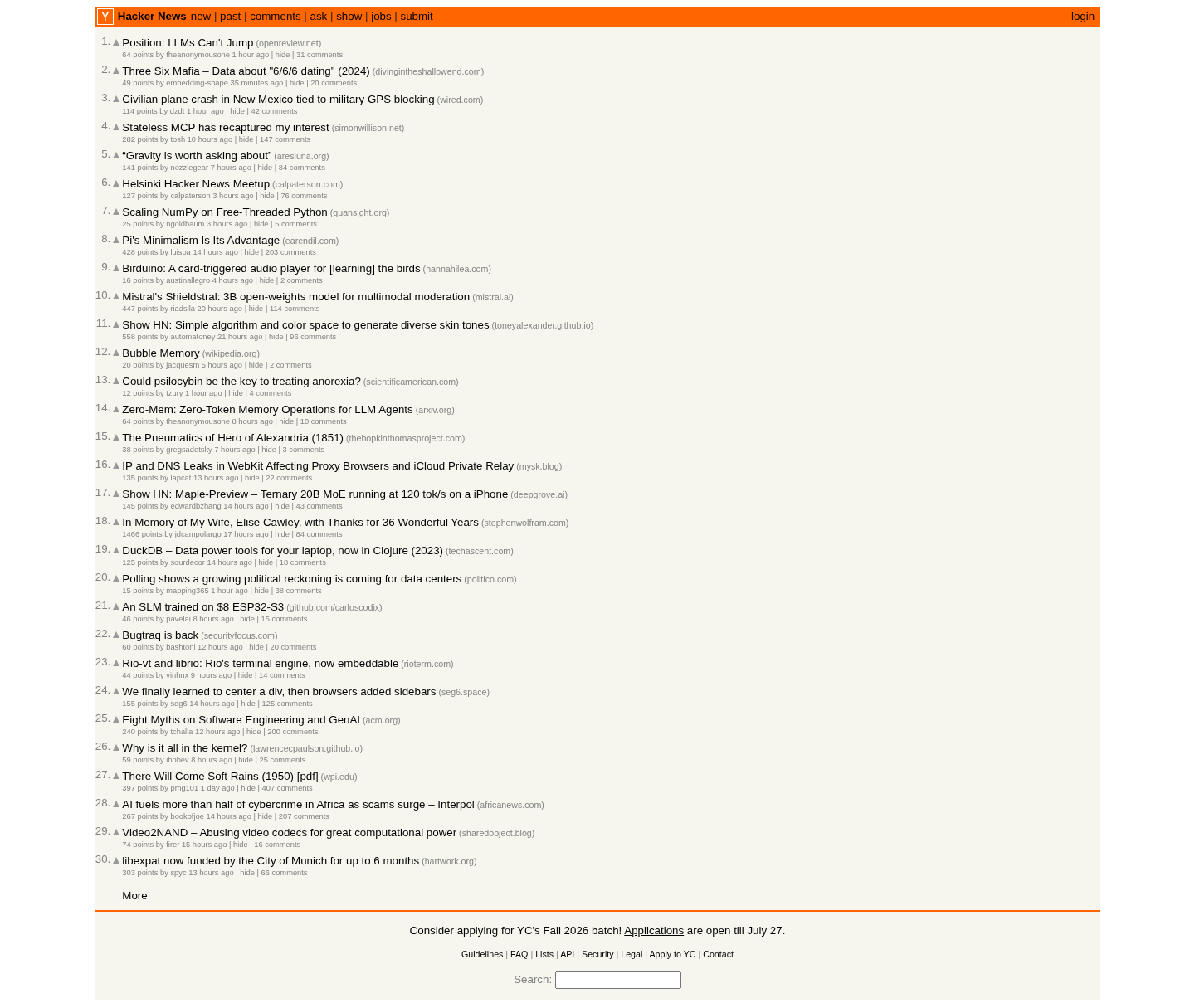 |  |  |
| 1,215 px · 1.6 s | 9,578 px · 3.8 s | 14,760 px · 9.2 s |
Every pixel of every page, edge to edge — including the lazy-loaded images near the bottom, and without the sticky header stamped down the image every 900 pixels.
Why this one
Most screenshot tools fail in the same four ways. This one is built around not doing that.
The full page really is the full page. Long pages are scrolled first so lazy-loaded images render, and sticky headers are pinned in place so your navigation bar isn't repeated down the capture. "Full page" that silently stops at the fold is the single most common complaint about screenshot tools, and it's the first thing this fixes.
It's quick, and the numbers below are real. Most pages finish in a couple of seconds. Very tall pages take longer, because time is dominated by encoding the image, and that scales with pixel count — so the honest range is seconds for ordinary pages, tens of seconds for the extremes. Measured on the Apify platform at default settings (re-measured 5 Aug 2026):
| Page | Page height | Captured | Time |
|---|---|---|---|
| news.ycombinator.com | 1,215 px | 1,215 px | 1.6 s |
| apify.com | 9,578 px | 9,578 px | 3.8 s |
| stripe.com | 14,760 px | 14,760 px | 9–27 s |
| en.wikipedia.org/wiki/Slovenia | 48,273 px | 20,000 px (capped) | 17.6 s |
Trackers, video and audio are skipped to save time. Images and web fonts are always loaded — blocking fonts would be faster still, but the screenshot would come back in fallback typefaces and no longer match the real page.
It fails fast, and failures are free. The per-page timeout (60 s by default) is a budget for the whole page, not for each internal step, so a slow page cannot quietly run several times longer than the limit you set. If a page won't render, the run moves on instead of hanging — and you are not charged for a screenshot that didn't happen. Every failed URL is written to the dataset with the reason.
Very long pages are capped, and the output says so. Encoding an unbounded capture of a 48,000 px article takes minutes, so captures stop at maxPageHeight (20,000 px by default, about 22 screens — set 0 to disable). Every record reports pageHeight, capturedHeight and clipped, read back from the encoded image itself, so you always know whether you got the whole page.
Cookie banners are out of the way. Common consent notices are hidden before capture. Note that they are hidden, never accepted — no consent is given on your behalf.
What people use it for
- Visual change monitoring & visual regression testing — schedule it, diff the images, catch layout breaks and unwanted changes
- Link previews, Open Graph images and social cards — turn any URL into a thumbnail
- Website archiving — save pages as PNG or convert a webpage to PDF for records, compliance or legal evidence
- Batch screenshots — capture hundreds of URLs in one run for audits, SEO reports or content inventories
- Design & competitor reference — full-page captures of landing pages at any viewport width
- QA across devices — retina (
deviceScaleFactor: 2), mobile and desktop viewport sizes - AI agents and RAG pipelines — give an LLM an accurate visual snapshot of any webpage
Input
| Option | Default | What it does |
|---|---|---|
urls | — | One or more URLs to capture |
sitemapUrls | [] | Sitemap URLs (indexes and .gz handled) or a bare site root; every page URL found is captured, up to maxUrlsFromSitemap (200) |
format | png | png, jpeg, webp or pdf |
fullPage | true | Whole scrollable page vs. just the viewport |
viewportWidth / viewportHeight | 1440 × 900 | Browser window size |
deviceScaleFactor | 1 | Set to 2 for retina-resolution output |
hideCookieBanners | true | Hide common consent notices |
freezeStickyElements | true | Stop fixed headers repeating down the image |
scrollToLoadLazyImages | true | Scroll first so lazy images load |
hideSelectors | [] | Extra CSS selectors to remove (chat widgets, popups) |
waitForSelector | — | Wait for a specific element before capturing |
waitUntil | load | domcontentloaded (fastest) → networkidle (slowest) |
delayMs | 0 | Extra pause for animations |
timeoutSecs | 60 | Hard budget for the whole page, not per step |
maxPageHeight | 20000 | Cap for extremely long pages; 0 for no limit except the renderer's own 16,384 device pixels |
compareText | false | With change detection: also diff the visible text and report addedText / removedText |
blockResources | true | Skip trackers, video and audio (images and fonts always load) |
concurrency | 4 | Pages captured in parallel |
proxyConfiguration | — | Optional, for geo-specific rendering |
Output
Images land in the key-value store. The dataset gets one row per URL:
With compareWithPrevious: true each row also carries changed, changePercent, compareMethod and previousImageUrl; with compareText: true it adds textChanged, textChangePercent, textLinesAdded, textLinesRemoved, addedText and removedText (see Detect changes below). A clipped capture says why in clipReason: maxPageHeight or renderer-limit.
capturedHeight is read back out of the encoded image rather than copied from what was requested, so clipped: false is a measurement, not a promise. timings breaks the duration down by phase, which makes a slow page diagnosable instead of mysterious.
Failures appear in the same dataset with "success": false and an error field, so a partial run is still useful.
Use it as a live screenshot API (URL in, image out)
The Actor runs in Standby mode: it stays warm and answers plain HTTP requests, so you get the image back synchronously — no run to start, no dataset to poll.
- Any input field works as a query parameter:
format=jpeg,fullPage=false,width=390(alias forviewportWidth),retina=true,colorScheme=dark,hideSelectors=.chat,.popup,timeoutSecs=30. - Add
json=1to get a JSON record with animageUrlinstead of the bytes. POST /with a JSON body (same fields as the batch input, singleurl) does the same.- Metadata comes back in headers:
X-Screenshot-Page-Height,X-Screenshot-Captured-Height,X-Screenshot-Clipped,X-Screenshot-Http-Status,X-Screenshot-Duration-Ms. - Failures return
422(page unreachable or HTTP 4xx),504(timeout) or500with a JSON error, and are not charged.429means the instance is busy; retry in a second.
Same price as batch: $5 per 1,000 images that come back.
Detect changes since the last capture (monitoring)
Set compareWithPrevious: true and schedule the run. Each URL is compared with its previous capture (kept in a key-value store named fast-screenshot-history in your account) and the row reports:
compareMethodispixels(sampled per-pixel diff, PNG),size(page height changed),hash(byte comparison only — JPEG/WebP/PDF or very large images) orfirst-capture.- Add
compareText: trueand the row also says what changed:addedTextandremovedTextare the lines of visible text that appeared or disappeared since the last capture (up to 40 each), withtextChangePercent. A rotating ad banner moves pixels but no text; a price change moves both. - Wire the
changedortextChangedflag into a Zapier/Make/Slack integration or a webhook and you have a change monitor for a set of pages at half a cent per check. No extra charge for either comparison.
Capture every page of a site
Pass sitemapUrls: ["https://example.com"] (or the sitemap URL itself). Sitemap indexes, nested sitemaps and gzip are handled, and the sitemap is discovered through robots.txt when you give a bare site root. Page URLs are added to urls, capped by maxUrlsFromSitemap (default 200). A sitemap that yields nothing fails the run before any capture, so it costs nothing.
Run it from code as a batch
Run it from code like any Apify Actor — from Node.js, Python, or plain HTTP.
Node.js (npm install apify-client):
Python (pip install apify-client):
Plain HTTP:
You can also schedule it in the Apify Console (e.g. daily captures for change monitoring) or wire it into Zapier/Make via the Apify integrations.
FAQ
How do I screenshot an entire webpage, not just the visible part?
Leave fullPage: true (the default). The page is scrolled first so lazy-loaded images actually render, sticky headers are frozen so they appear once, and the output row tells you the measured capturedHeight — so "full page" is verified, not assumed.
Can I screenshot multiple URLs at once?
Yes — pass any number of URLs in one run. They're captured in parallel (concurrency, default 4), and each URL gets its own dataset row, so one bad page never spoils the batch.
Can I convert a webpage to PDF?
Yes. Set "format": "pdf" and you get a PDF document of the page instead of an image.
Does it handle cookie banners and popups?
Common consent banners are hidden automatically (hideCookieBanners, default on) — hidden, never accepted, so no consent is given on your behalf. For site-specific widgets (chat bubbles, newsletter popups), pass their CSS selectors in hideSelectors.
What happens when a page fails to load?
The run doesn't hang and you don't pay. The per-page timeout bounds the whole capture, the failure is recorded in the dataset with the reason, and failed pages are never charged.
How much do 1,000 screenshots cost?
$5.00 — see pricing below. Failed pages are free, and platform compute is included in the price.
Can I get the screenshot back directly, without polling a run?
Yes — call the Standby endpoint (https://gratified-ashram--fast-screenshot.apify.actor/?url=…) and the image is the HTTP response. See Use it as a live screenshot API above.
Can I monitor a page for visual changes?
Yes. Turn on compareWithPrevious, schedule the run (hourly, daily…) and read the changed / changePercent fields. The previous image is kept for you, so you can look at both. Add compareText to get the changed lines of text as well.
Why did a very tall page stop at 16,384 pixels?
Chromium cannot produce a correct bitmap taller than 16,384 device pixels (8,192 CSS pixels at deviceScaleFactor: 2); rows past that limit come back wrong in every screenshot tool built on it. This Actor stops there and says so (clipReason: "renderer-limit") instead of shipping corrupt pixels.
Pricing
$5.00 per 1,000 screenshots — half a cent each, charged only for screenshots that actually come back. A URL that fails costs you nothing, and platform usage is included, so the price you see is the price you pay.
There is one exception worth stating plainly rather than hiding: starting a run costs $0.00001, one thousandth of a cent, which works out to a single cent per thousand runs. It exists because defining that event waives the first five seconds of container startup, and that saving is what keeps the per-screenshot price this low.
Found it useful? A short review on the Actor page helps other people find it, and tells me which use cases to build for next. If something didn't work, open an issue on the Issues tab — failures are the one thing this Actor is meant to never hide.


