
Google Maps Email Extractor - Enrich Maps Leads with Emails
Pricing
from $4.90 / 1,000 enriched business leads
Google Maps Email Extractor - Enrich Maps Leads with Emails
Google Maps email extractor for existing Maps leads: add same-domain emails, phones, social profiles, contact pages and tech stack to any Google Maps scraper dataset or CSV, with source-page evidence and a 0-100 lead score. Does not search Maps.
Pricing
from $4.90 / 1,000 enriched business leads
Rating
0.0
(0)
Developer

Group Oject
Maintained by CommunityActor stats
0
Bookmarked
2
Total users
1
Monthly active users
10 hours ago
Last modified
Categories
Share
Google Maps Email Extractor - Enrich Maps Leads with Emails & Socials
Already scraped businesses from Google Maps? Add their website emails, phone numbers, social profiles, contact pages, and tech stack - with the source page for every value and an explainable 0-100 lead score. Drop in an Apify dataset ID from any Google Maps scraper run, paste a JSON/CSV export, or just list websites. $7.00 per 1,000 enriched businesses.
This Actor enriches an existing business list. It does not search Google Maps. Run a Maps discovery scraper first (for example Apify's Google Maps Scraper), then pass its dataset ID here.
What can this Google Maps email extractor do?
- Read Google Maps datasets directly - pass one or more Apify dataset IDs (private datasets work with your token). Business name, category, address, city, country, phone, rating, review count, and Maps URL are mapped automatically and the full source row is kept in
originalRecord. - Import JSON, JSON Lines, or CSV exports from any Maps tool, or plain website URLs.
- Extract same-domain business emails - visible addresses,
mailto:links, and[at]/[dot]obfuscations; free-mail and unrelated domains are filtered out. - Extract phones and social profiles - LinkedIn, Facebook, Instagram, X/Twitter, YouTube, TikTok, Threads.
- Scan key pages - homepage plus contact, about, team, pricing, support, and demo pages (up to 20 per site).
- Detect technologies - WordPress, Shopify, Wix, Webflow, Squarespace, WooCommerce, GA4, GTM, Meta Pixel, HubSpot, Klaviyo, Stripe, Intercom, and more (29 signatures).
- Show evidence - every email, phone, social link, and technology comes with the
sourceUrlwhere it was found. - Explainable lead score -
leadScoreBreakdownlists each signal and its points. No AI guesswork. - Deduplicate businesses by place ID or website + name + address before billing.
What data can I extract?
| Field | Description |
|---|---|
businessName, businessCategory, address, city, country | From your Maps records |
rating, reviewsCount, mapsPhone, mapsUrl | From your Maps records |
emails[], phones[] | Found on the business website |
linkedinUrl, facebookUrl, instagramUrl, twitterUrl, youtubeUrl, tiktokUrl, socialLinks[] | Social profiles |
contactPageUrl, aboutPageUrl, pricingPageUrl | Key pages |
technologies[], cms, ecommercePlatform, tool lists by category, usesWordPress, usesShopify, ... | Tech stack |
leadScore, leadScoreBreakdown[] | 0-100 score and its signals |
evidence[] | field, value, sourceUrl for each extracted value |
originalRecord, sourceDatasetId, sourceIndex | Join keys back to your source data |
domain, finalUrl, title, metaDescription, matchedPages[], pageWarnings[] | Website context |
Key-value store: SUMMARY (leads selected, output, leads with email, failures), ERRORS, and UNENRICHED (records with no usable website or a failed fetch - not billed).
How much does it cost?
Pay-per-event: $0.007 per enriched business row ($7.00 per 1,000) plus a tiny Actor-start fee. Multiple contacts on one business do not add charges. Businesses with no website, duplicates, and failed websites are not billed - they go to UNENRICHED / ERRORS. A successfully processed website is billable even if it publishes no email. Use maxBusinesses and the run's maximum charge to cap spend. Check the Pricing tab for current rates.
How to get emails from Google Maps results
- Run a Google Maps scraper (for example "dentists in Austin") and copy the run's dataset ID.
- Paste it into Google Maps dataset IDs (add your API token only if the dataset is private). Clear the example URLs.
- Set
maxBusinessesand, optionally,maxPagesPerSite(default 4). - Click Start, then export to CSV/Excel or push to your CRM. Filter on
emails,leadScore, or technology flags.
Input example
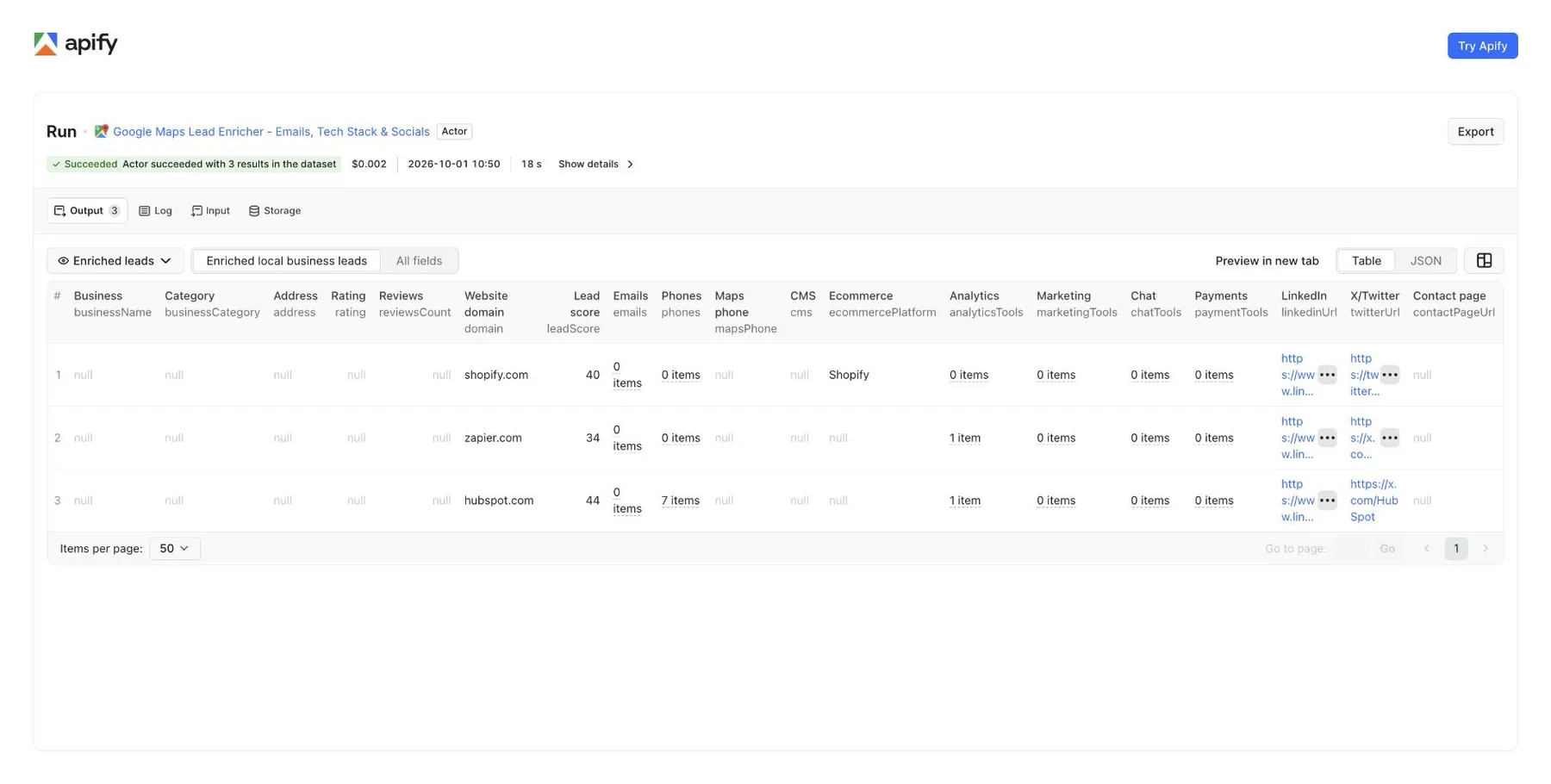
Output example
Illustrative example, not a real business.
How the lead score works
A fetched website starts at 10 points. A supplied name adds 5, a phone 8, a rating of at least 4.2 adds 4, and at least 25 reviews add 4. Each detected technology adds 4 (max 28). A same-domain email adds 18; LinkedIn, contact page, and pricing page add 8 each; ecommerce adds 10, CRM or marketing tools 10, chat 6, and ad tags 6. Capped at 100. It measures available signals, not buying intent.
Use cases
- Local lead generation - add emails to Maps lists of dentists, plumbers, restaurants, agencies, and more.
- Web design and SEO agencies - find local businesses on Wix or old WordPress, or without analytics.
- CRM enrichment - add contacts and social links to existing records via
originalRecordjoin keys. - Automations - trigger this Actor after a Google Maps scraper run in n8n, Make, Zapier, or Apify integrations.
Integrations and API
Use with AI agents (MCP)
Connect the Apify MCP server at https://mcp.apify.com?tools=groupoject/google-maps-lead-enricher in Claude Desktop, Cursor, VS Code or any MCP client, and your AI assistant can call this actor as a tool. Example prompt: "Take these Google Maps business URLs, find each business's email and social links, and give me a CSV."
FAQ
Does it scrape Google Maps itself? No. It enriches records you already have. Pair it with any Google Maps scraper.
Are emails verified? No. They are addresses published on the business website. Verify before large campaigns.
Does it find personal or employee emails? No. It only keeps addresses on the business's own website domain and does not guess or look up people.
Does it render JavaScript? No. It reads server-returned HTML. Contacts injected only by JavaScript or shown as images can be missed.
Is it legal? It reads public business websites. You are responsible for GDPR, CAN-SPAM, and other rules when storing or contacting businesses.
Related Actors
- Contact Details Scraper - the same contact and tech-stack extraction for plain domain lists, priced per website.
- Technical SEO Audit Crawler - audit a local business site before pitching SEO.


