

Contact Details Scraper - Emails, Phones & Tech Stack
Pricing
from $2.80 / 1,000 website profiles
Contact Details Scraper - Emails, Phones & Tech Stack
Contact details scraper for company websites: emails, phone numbers, LinkedIn and other social profiles, contact/about/pricing pages, and tech stack (Shopify, HubSpot, Stripe, GA4, Klaviyo...) with a 0-100 lead score. $4 per 1,000 websites, not per page.
Pricing
from $2.80 / 1,000 website profiles
Rating
0.0
(0)
Developer

Group Oject
Maintained by CommunityActor stats
0
Bookmarked
1
Total users
0
Monthly active users
9 hours ago
Last modified
Categories
Share
Give it a list of company websites and get back one lead-ready row per company: public emails, phone numbers, LinkedIn/X/Facebook/Instagram/YouTube/TikTok links, contact/about/pricing pages, the marketing and ecommerce tools the site uses, and a 0-100 lead score. Scans the homepage plus key pages (contact, about, team, pricing) in a single pass. $4.00 per 1,000 websites - one price per company, not per page.
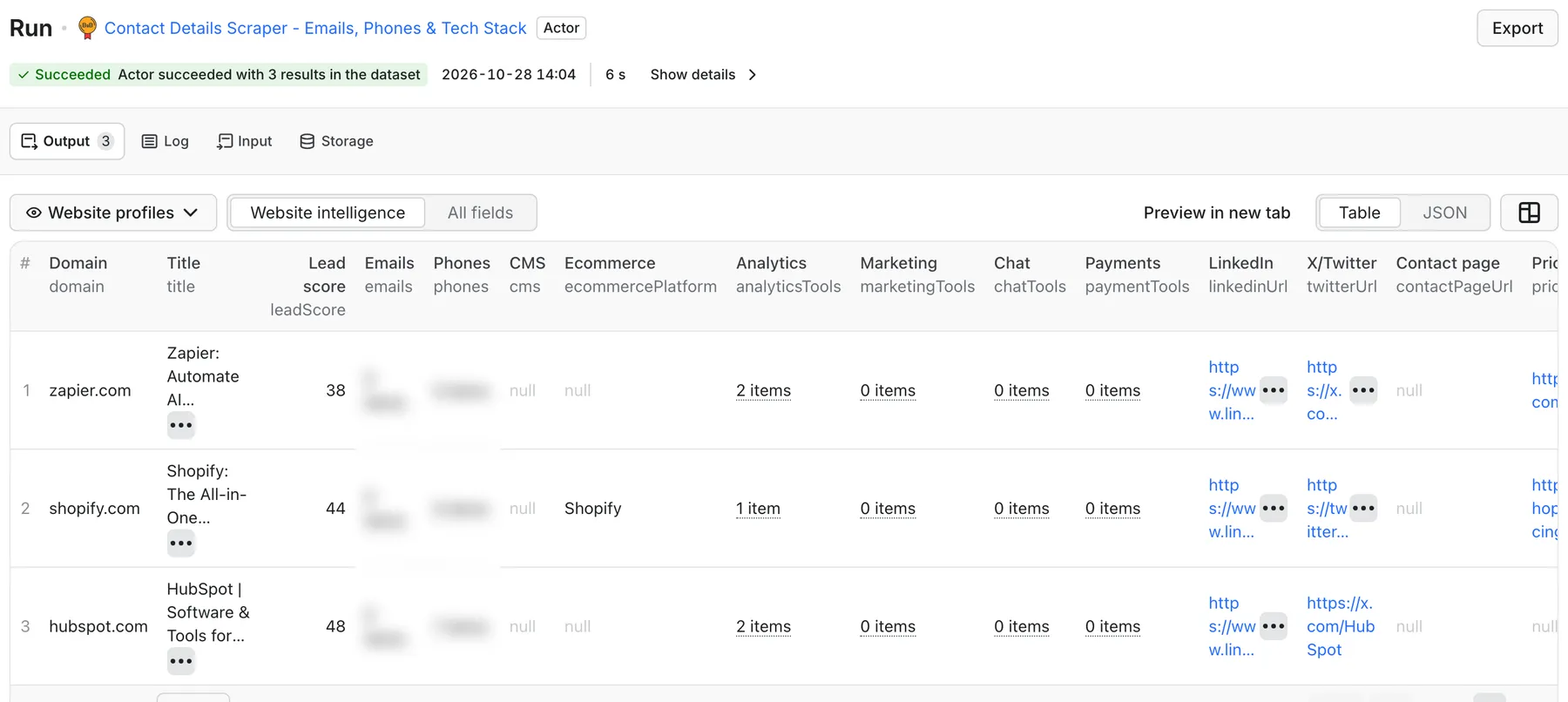
Real output from a default run of Contact Details Scraper in Apify Console.
What can this contact details scraper do?
- Extract emails - visible addresses,
mailto:links, and common obfuscations such asname [at] company [dot] com. - Extract phone numbers from page text and
tel:links. - Find social profiles - LinkedIn, X/Twitter, Facebook, Instagram, YouTube, TikTok.
- Find key pages - contact, about, and pricing page URLs; with
includeLinkedPageson, the Actor also scans high-value same-domain pages (contact, support, sales/demo, about, company, team, pricing) up tomaxPagesPerSite. - Detect the tech stack - 28 high-signal tools across CMS, ecommerce, analytics, ads, marketing automation, chat, CRM, payments, and hosting (list below).
- Score leads 0-100 so companies with the most usable contact and buying signals rise to the top.
- Bulk input - paste hundreds of domains one per line or comma-separated.
Technologies detected
| Category | Tools |
|---|---|
| CMS | WordPress, Webflow, Wix, Squarespace |
| Ecommerce | Shopify, WooCommerce, Magento, BigCommerce |
| Analytics | Google Tag Manager, Google Analytics 4, Hotjar |
| Ads | Meta Pixel, TikTok Pixel, LinkedIn Insight Tag |
| Marketing | Klaviyo, Mailchimp, Marketo, Segment |
| CRM | HubSpot, Salesforce Pardot |
| Chat / support | Intercom, Drift, Zendesk, Crisp |
| Payments | Stripe, PayPal |
| Hosting / CDN | Cloudflare, Vercel |
What data can I extract?
| Field | Description |
|---|---|
inputUrl, finalUrl, domain | The website checked |
title, metaDescription, h1 | What the company says it does |
emails[], phones[] | Public contact details |
socialLinks[], linkedinUrl, twitterUrl, facebookUrl, instagramUrl, youtubeUrl, tiktokUrl | Social profiles |
contactPageUrl, aboutPageUrl, pricingPageUrl | Key pages |
technologies[], cms, ecommercePlatform | Tech stack summary |
analyticsTools[], adTools[], marketingTools[], chatTools[], crmTools[], paymentTools[], hostingTools[] | Tech by category |
usesShopify, usesWordPress, usesHubSpot, usesStripe, usesKlaviyo, ... | Boolean filters for quick segmentation |
leadScore | 0-100 lead score |
matchedPages[] | Pages scanned for this company |
error, scrapedAt | Diagnostics |
SUMMARY and ERRORS records are saved in the key-value store.
How much does it cost?
Pay-per-event: $0.004 per website profile ($4.00 per 1,000 companies) plus a tiny Actor-start fee. The price is per company, even when several pages are scanned for that company. Check the Pricing tab for current rates.
How to extract contact details from websites
- Paste company websites or domains into Websites or Websites as text.
- Keep
includeLinkedPageson to scan contact/about/team/pricing pages (maxPagesPerSite, default 4). - Leave email, phone, and technology extraction on, or turn off what you don't need.
- Click Start. Sort by
leadScoreor filter on fields such asusesShopifyand export to CSV, Excel, or your CRM.
Input example
Output example
Illustrative example, not a real company.
Use cases
- Enrich a domain list before cold outreach or CRM import.
- Find companies using a tool - Shopify stores, HubSpot users, Stripe merchants, Intercom customers.
- Agency prospecting - spot sites with no analytics, no Meta Pixel, or an old CMS before pitching.
- Market research - tech adoption across a list of competitors or a vertical.
- Clean up scraped lists - add contacts to URLs from directories or other scrapers.
Integrations and API
Use the Apify API, webhooks, Make, Zapier, n8n, Google Sheets, HubSpot or other CRMs via integrations, or the Apify MCP server.
FAQ
Are the emails verified? No. They are addresses published on the website; run them through an email verifier before large campaigns.
Does it render JavaScript? No. It reads the HTML the server returns. Contact details injected only by JavaScript may be missed.
How many technologies does it detect? The 28 tools listed above. It is built for fast lead segmentation, not a full BuiltWith-style inventory.
Is it legal to scrape contact details? It only reads publicly available pages. You are responsible for complying with GDPR, CAN-SPAM, and other rules when you store or contact people.
Related Actors
- Google Maps Email Extractor - enrich Google Maps business datasets with emails, socials, and lead scores.
- Technical SEO Audit Crawler - audit a prospect's site before pitching SEO.


