
Insider Trading Tracker - SEC Form 4 Insider Buys & Sells
Pricing
from $1.90 / 1,000 trades
Insider Trading Tracker - SEC Form 4 Insider Buys & Sells
Insider trading tracker for SEC Form 4 filings: every insider buy and sell from EDGAR across the market, by ticker or by insider. Price, value, holdings change, 10b5-1 plan flag, derivatives, footnotes and cluster-buy signals. Schedule it for new-trade alerts.
Pricing
from $1.90 / 1,000 trades
Rating
0.0
(0)
Developer

Group Oject
Maintained by CommunityActor stats
0
Bookmarked
2
Total users
1
Monthly active users
4 hours ago
Last modified
Categories
Share
This insider trading tracker reads SEC Form 4 filings straight from EDGAR and turns every insider buy and sell into a clean row: who traded, which company, the transaction code in plain English, shares, price, dollar value, holdings before and after, and whether the trade was part of a 10b5-1 plan. Watch the whole market (like OpenInsider's latest-trades screen), a list of tickers, or specific insiders, and flag cluster buys automatically.
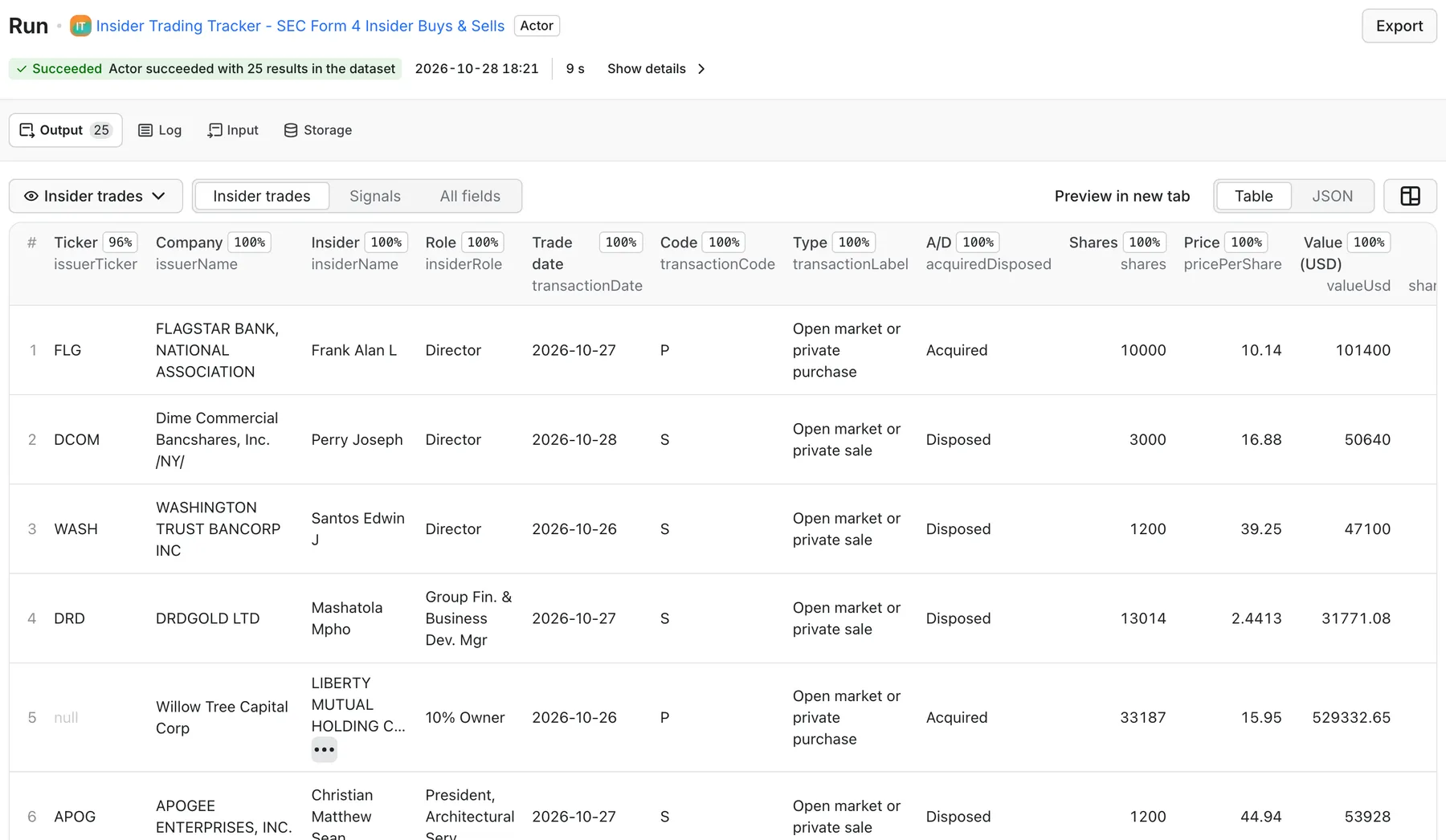
Real output from a default run of Insider Trading Tracker in Apify Console.
What can this insider trading tracker do?
- Three ways to track.
latestreads every Form 4 filed across the US market in your date range.tickersfollows the companies you name (AAPL, NVDA, BRK.B ...).insidersfollows people or funds by SEC CIK or by name ("Elon Musk", "Warren Buffett"). - One row per transaction, from Table I (common stock) and Table II (options, RSUs, warrants, convertibles, with exercise price, expiration and underlying shares). Every footnote attached to a row is included as text.
- Filter like a screener. Transaction codes with labels (P purchase, S sale, A grant, M exercise, F tax withholding, G gift ...), an "only open-market buys and sells" switch, minimum trade value, minimum shares, minimum % change in holdings, insider role (director, officer, 10% owner, other) and officer title words (CEO, CFO, President).
- Separate planned trades. Each row has
is10b5_1Plan, read from the row's footnotes and the filing's Rule 10b5-1 checkbox. Turn onexcludePlannedTradesto keep only discretionary trades. - Signals.
clusterBuy/clusterSell(N or more distinct insiders trading the same company within X days),isLargestBuyForIssuer,isLargeTrade, and tags such asc-suite-buy,director-buy,new-position,holdings-up-10pct-plusandsold-entire-position. - Amendments and other forms. Form 4/A is included by default with
isAmendmentand the original filing date. Form 5 (annual) and Form 3 (initial holdings) are optional. - Monitoring.
onlyNew+stateKeyremembers what earlier runs returned, so a scheduled run saves (and bills) only new trades. Cluster detection keeps a memory of recent buys across runs. - A summary for every run. The
SUMMARYrecord lists the top open-market buys and sells by value, cluster buys by company, the most-bought companies and counts by transaction code. It is not billed. - Plays by SEC's rules. Only official, public SEC EDGAR data. Requests carry a declared User-Agent and stay under 8 per second (SEC allows 10).
What data do you get?
| Field | Description |
|---|---|
issuerName, issuerTicker, issuerCik | Company whose shares were traded |
insiderName, insiderCik | The insider (reporting person) and their SEC CIK |
insiderRole, insiderRoles, officerTitle | "Chief Executive Officer, Director", role flags, title as filed |
isDirector, isOfficer, isTenPercentOwner, isOtherRole | Relationship to the company |
reportingOwners | All reporting persons on joint filings |
transactionDate, deemedExecutionDate | Trade date |
transactionCode, transactionLabel, transactionCategory | P / "Open market or private purchase" / open-market-buy |
acquiredDisposed | Acquired or Disposed |
shares, pricePerShare, valueUsd | Shares, price, shares × price |
sharesOwnedBefore, sharesOwnedAfter, ownershipChangePct, isNewPosition | Holdings before and after, % change |
directOrIndirect, natureOfOwnership | Direct, or Indirect "By trust", "By spouse" ... |
isDerivative, securityTitle, conversionOrExercisePrice, exerciseDate, expirationDate, underlyingSecurityTitle, underlyingShares | Table II details |
is10b5_1Plan, plan10b5_1Source, filing10b5_1Checkbox | Rule 10b5-1 plan flag and where it came from |
footnotes, remarks | Footnote text for the row and filing remarks |
formType, isAmendment, originalFilingDate | 4, 4/A, 5, 3 ... |
accessionNumber, filingDate, acceptedAt, periodOfReport | Filing identifiers and EDGAR acceptance time (US Eastern) |
filingUrl, xmlUrl | SEC filing index page and the raw Form 4 XML |
clusterBuy, clusterSell, clusterInsiderCount, isLargestBuyForIssuer, isLargeTrade, signals | Computed signals |
The dataset has two views: Insider trades (the overview table) and Signals.
How much does it cost?
Pay per result: $2.50 per 1,000 trades (one dataset row = one trade). There is no subscription, and you are never charged for errors, for filings that don't match your filters, or for the SUMMARY and ERRORS records. The run stops at the maximum charge you set.
On paid Apify plans the per-result price drops automatically (Bronze and above get volume discounts); the Pricing tab shows your exact rate.
- Daily market scan of open-market buys and sells. A typical trading day has a few hundred Form 4 filings and roughly 100–400 open-market P/S rows. One run with
mode: "latest",lastNDays: 1,openMarketOnly: truereturns those rows. - Watchlist monitor. 20 tickers checked every hour with
onlyNew: truereturns only the trades filed since the last run, often 0–30 rows a day. A run that finds nothing new saves no rows, so it has no per-result charge.
How to use it
- Open the actor and pick What to track: latest filings, tickers or insiders.
- Set the date range (Last N days, or Date from / Date to).
- Add filters: open-market only, transaction codes, minimum value, roles, 10b5-1 exclusion.
- Click Start. Rows appear in the dataset as Insider trades; open Signals for cluster buys, and the
SUMMARYrecord for top trades. - To get alerts, turn on Only new trades, give the monitor a State key and schedule the actor.
Input example
Track companies or people instead:
Output example
Synthetic example row (values invented for illustration):
Monitor new insider trades on a schedule
- Set Only new trades (
onlyNew: true) and a State key such asmy-watchlist. Each state key keeps its own memory in a named key-value store, so different watchlists don't interfere. - In Apify Console, open Schedules and run the actor every hour, or once a day after the market closes (most Form 4s are filed in the evening, US Eastern).
- Each run saves only trades it hasn't returned before. Filings it already read are skipped before download, so repeat runs are fast and you pay only for new rows.
- Send the new rows where you need them with Apify integrations: a webhook, Slack, e-mail, Google Sheets, Zapier, Make or n8n.
Example: alert on insider buying worth $250k+ by officers at your watchlist companies.
Use with the API
cURL
Python
JavaScript
Use with AI agents / MCP
Connect the Apify MCP server at https://mcp.apify.com?tools=groupoject/sec-insider-trading-tracker in Claude Desktop, Cursor, VS Code or any MCP client. Example prompt: "Which companies had cluster insider buying in the last 7 days, and who bought the most in dollars?" The flat JSON rows, plain-English transaction labels and the signals tags make the data easy for an agent to filter and summarize.
Use cases
- Insider buying alerts. Schedule
onlyNewruns for open-market purchases above a dollar threshold and send them to Slack or e-mail. - Investment research. Pull a year of trades for a ticker, compare discretionary buying with planned 10b5-1 sales, and spot cluster buys. Combine with price data in your own model.
- AI agents and newsletters. Feed the daily largest buys and cluster buys into an LLM summary or a market newsletter.
- Compliance and governance. Follow trades by named officers, directors and 10% owners, including amendments, gifts and indirect holdings.
Integrations
Use Apify integrations to send results to Make, Zapier, n8n, Google Sheets, Slack, e-mail or any webhook when a run finishes. Export the dataset as JSON, CSV, Excel or XML.
FAQ
Where does the data come from, and is it legal to use?
From SEC EDGAR, the US Securities and Exchange Commission's public filing system. Corporate insiders must report their trades on Form 4 within two business days, and the SEC publishes the filings for anyone to read. This actor downloads only those public filings, sends a declared User-Agent and keeps under SEC's fair-access limit of 10 requests per second. No login, no paid data feed.
How fresh is the data?
latest mode uses EDGAR's full-text search index, which lists filings minutes after EDGAR accepts them. Insiders have two business days after the trade to file, so transactionDate can be a day or two before filingDate. Most Form 4s are filed in the late afternoon and evening (US Eastern).
How are amendments handled?
A Form 4/A is returned as its own rows with isAmendment: true and originalFilingDate. It does not delete the original filing's rows; compare the two by insider, issuer and trade date. Drop amendments by removing "4/A" from Form types.
Why do my numbers differ from OpenInsider?
OpenInsider merges all transactions of one filing into a single line with an average price and shows only some transaction types by default. This actor returns every transaction line (several sales at different prices are several rows), includes derivative rows, amendments and all codes unless you filter them. It also uses EDGAR's own filing date. Use openMarketOnly and includeDerivative: false for the closest match.
How does the 10b5-1 flag work?
Since April 2023, Form 4 has a checkbox for trades made under a Rule 10b5-1 plan, and filers usually add a footnote such as "effected pursuant to a Rule 10b5-1 trading plan adopted on ...". A row is flagged when its own footnotes say so. When no footnote in the filing mentions a plan but the checkbox (or remarks) does, open-market P and S rows are flagged and plan10b5_1Source says checkbox or remarks.
Why did I get no rows?
Check the date range first: weekends and holidays have no filings (in latest mode with Last N days, the actor then uses the most recent filing day). Strict filters, such as P only above $1M with officers only, can match nothing on a quiet day. Unknown tickers and names are listed in the ERRORS record. Ticker mode only covers companies in SEC's ticker list; use the company's CIK otherwise.
Do I need a proxy or an SEC account?
No account is needed. SEC data is public. The actor uses Apify's datacenter proxy by default only to spread heavy scans over several IPs, and falls back to a direct connection if the proxy fails. If you run very large scans, add your e-mail in contactEmail so SEC can identify your traffic.
Is this investment advice?
No. This tool reports what insiders filed with the SEC. Insider purchases and sales have many reasons (taxes, diversification, planned sales, option expirations) and are not a recommendation to buy or sell anything.
Related actors
- Google News Scraper & Monitor - pull news about the companies where insiders are buying or selling.
- Google Trends Scraper - Interest, Rising Queries & Breakouts - check search interest for a company or ticker next to its insider activity.


