

YouTube Comments Scraper - No API Key, Videos & Shorts
Pricing
from $0.70 / 1,000 comments
YouTube Comments Scraper - No API Key, Videos & Shorts
YouTube comments scraper for videos and Shorts. Export comment text, authors, likes, reply counts, pinned/hearted/owner flags and direct comment links to CSV or JSON. Top or newest sort. No YouTube API key or quota. $1 per 1,000 comments.
Pricing
from $0.70 / 1,000 comments
Rating
0.0
(0)
Developer

Group Oject
Maintained by CommunityActor stats
0
Bookmarked
2
Total users
1
Monthly active users
8 hours ago
Last modified
Categories
Share
Export comments from any public YouTube video or Short to JSON, CSV or Excel. Get the comment text, author, likes, reply count, pinned and hearted flags, and a direct link to every comment. No YouTube Data API key, no quota, no login. $1 per 1,000 comments.
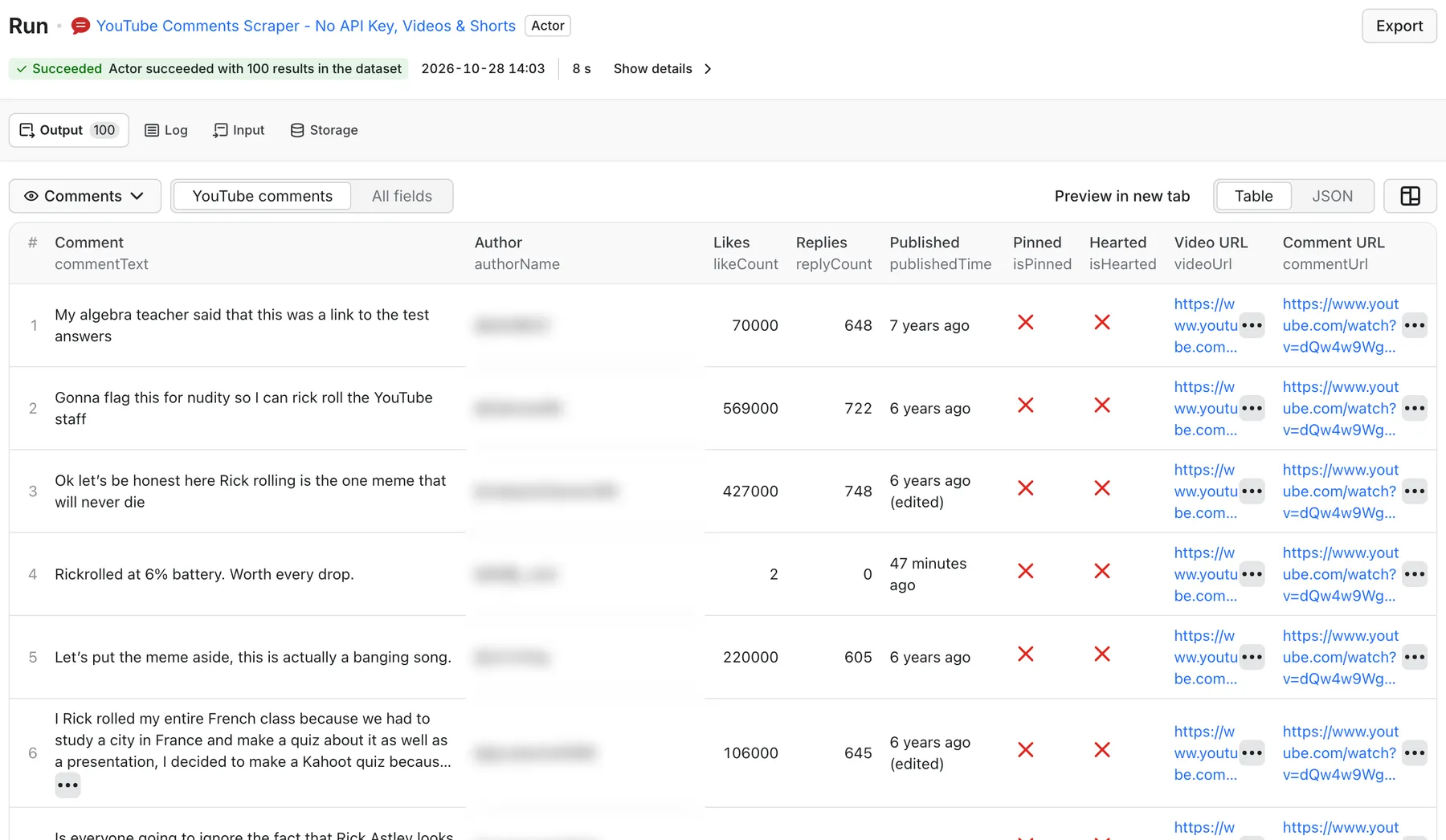
Real output from a default run of YouTube Comments Scraper in Apify Console.
What can YouTube Comments Scraper do?
- Scrape comments from many videos in one run: paste video URLs, Shorts URLs,
youtu.belinks, live URLs, or 11-character video IDs. - Sort by Top comments or Newest first, just like on YouTube.
- Flag the comments that matter: pinned comments, comments hearted by the creator, and comments written by the channel owner.
- Link back to every comment with a
commentUrlthat opens the exact comment on YouTube. - Control cost with a per-video cap and a total cap. Duplicates are removed automatically.
- Retry blocked requests through Apify Proxy automatically when YouTube returns 403, 429 or 5xx on the platform.
Use it for audience research, product and launch feedback, sentiment analysis, competitor monitoring, creator engagement audits, and training or grounding AI models on real viewer language.
What data can I extract from YouTube comments?
| Field | Description |
|---|---|
commentId, commentText | Comment ID and full text |
authorName, authorChannelId, authorChannelUrl, authorAvatarUrl | Public author details |
likeCount, likeCountText | Likes as a number and as shown on YouTube |
replyCount, replyCountText | Number of replies to the comment |
publishedTime | Relative time shown by YouTube, for example 2 days ago |
isPinned, isHearted, isChannelOwner | Pinned, creator-hearted, written by the channel owner |
videoId, videoUrl, commentUrl | Video and a direct link to the comment |
sortBy, scrapedAt | Sort mode used and collection time |
How much does it cost to scrape YouTube comments?
- $1.00 per 1,000 comments ($0.001 per comment saved)
- $0.00005 per Actor start (per GB of memory)
| Job | Comments | Approx. cost |
|---|---|---|
| Top 100 comments from 10 videos | 1,000 | $1.00 |
| 500 newest comments from 1 launch video | 500 | $0.50 |
| 5,000 comments from one viral video | 5,000 | $5.00 |
Videos with comments turned off produce no rows and no comment charges. You can also set a maximum charge per run in Apify. Check the Pricing tab for current rates.
How to scrape YouTube comments
- Paste one or more YouTube video or Shorts URLs into Video URLs.
- Choose Sort by:
TOP_COMMENTSfor the most-liked discussion,NEWEST_FIRSTfor fresh feedback. - Set
maxCommentsPerVideoandmaxTotalComments. - Click Start and download the comments as CSV, Excel or JSON, or read them through the API.
Input example
Output example
Input reference
| Field | Default | Notes |
|---|---|---|
videoUrls | [] | Video, Shorts, live or youtu.be URLs, or video IDs |
maxCommentsPerVideo | 100 | Up to 5,000 per video |
maxTotalComments | 100 | Up to 20,000 per run |
sortBy | TOP_COMMENTS | TOP_COMMENTS or NEWEST_FIRST |
language / country | en / US | Locale used for requests |
dedupe | true | Skip repeated comment IDs |
YouTube comments for sentiment analysis and AI
The dataset is ready for spreadsheets, BI tools and LLM pipelines: one row per comment, plain text, numeric likes. Common workflows:
- Launch feedback: run
NEWEST_FIRSTon your launch video daily and pipe new comments to a sentiment model. - Competitor research: scrape the top comments on competitors' reviews to find feature requests and complaints.
- Creator vetting: check engagement quality and how often a creator replies or hearts comments (
isHearted,isChannelOwner).
You can also call it from Make, Zapier or n8n through the Apify integration, or from AI agents through MCP: https://mcp.apify.com?tools=groupoject/youtube-comments-scraper-api.
Each run writes a SUMMARY record (videos, comments, failures) and an ERRORS record. If every requested video fails, the run is marked as failed instead of returning an empty success.
FAQ
Do I need a YouTube API key? No. There is no API key, no OAuth, and no daily quota.
Does it scrape YouTube Shorts comments? Yes. Paste the Shorts URL (youtube.com/shorts/...) like any other video.
Are replies included? This Actor exports top-level comments with their replyCount. The text of individual replies is not exported.
Why did a video return no comments? Comments may be disabled, the video may be private, age-restricted or removed, or YouTube may have limited the request. Check the ERRORS record.
Why is publishedTime relative? YouTube shows comment times as "3 days ago". The Actor keeps that value exactly as shown and adds scrapedAt so you can approximate the date.
Is it legal to scrape YouTube comments? Comments are public, but they contain personal data such as usernames. Use the data in line with YouTube's terms and privacy laws like GDPR.
Related Actors
- YouTube Scraper API - find video URLs by keyword or playlist, then scrape their comments here
- YouTube Channel Monitor - get new uploads from channels on a schedule
- YouTube Channel Scraper API - channel profiles, subscribers and emails in bio
- Reddit Lead Finder - buying-intent and pain-point posts from Reddit


