

YouTube Channel Scraper - Subscribers, Emails & Videos
Pricing
from $1.40 / 1,000 channel profiles
YouTube Channel Scraper - Subscribers, Emails & Videos
YouTube channel scraper for influencer lists. Paste URLs or @handles and get subscribers, video counts, descriptions, public emails from the About text, tags, avatars, banners and recent uploads. One row per channel. No API key. $2 per 1,000 channels.
Pricing
from $1.40 / 1,000 channel profiles
Rating
0.0
(0)
Developer

Group Oject
Maintained by CommunityActor stats
0
Bookmarked
4
Total users
0
Monthly active users
8 hours ago
Last modified
Categories
Share
YouTube Channel Scraper - Subscribers, Emails & Recent Videos
Turn a list of YouTube channels into a clean spreadsheet of creator profiles: name, handle, subscriber count, video count, description, public emails listed in the channel description, tags, avatar, banner, RSS feed and the latest uploads. Paste URLs, @handles or channel IDs. No YouTube API key, no login. $2 per 1,000 channels.
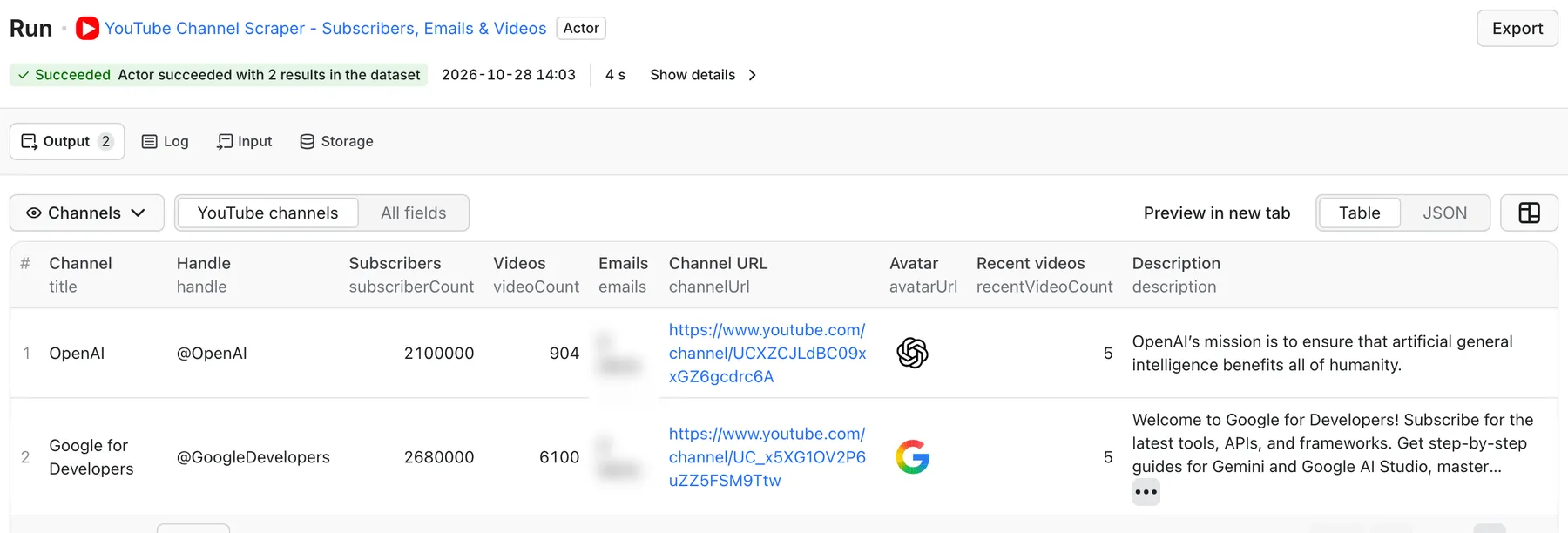
Real output from a default run of YouTube Channel Scraper in Apify Console.
What can YouTube Channel Scraper do?
- Scrape channel profiles in bulk: up to 5,000 channels per run from URLs,
@handles, orUC...IDs. Paste a list one per line. - Get audience size: subscriber count and video count as numbers, plus the text YouTube shows (for example
1.2M subscribers). - Find contact emails in the channel description: any email address written in the public "About" text is extracted into
emails. - Collect channel metadata: description, keywords, tags, avatar, banner, canonical and vanity URLs, family-safe flag.
- Attach recent uploads: up to 50 of the latest videos per channel from the public feed, with title, publish date, views and thumbnail.
- One row per channel, so the output drops straight into a CRM, Airtable or Google Sheets.
Built for influencer marketing lists, sponsorship and creator outreach research, competitor channel benchmarking, and enriching lists of YouTube handles you already have.
What data can I extract from YouTube channels?
| Field | Description |
|---|---|
channelId, title, handle | Channel ID, name and @handle |
channelUrl, vanityUrl, rssUrl | Canonical URL, custom URL and RSS feed |
subscriberCount, subscriberCountText | Subscribers as a number and as shown |
videoCount, videoCountText | Number of videos as a number and as shown |
description | Channel description ("About" text) |
emails | Email addresses found in the description |
tags, keywords | Channel tags and keywords |
avatarUrl, bannerUrl | Highest-resolution avatar and banner images |
isFamilySafe, isUnlisted | Channel flags |
recentVideos, recentVideoCount | Latest uploads: videoId, title, videoUrl, publishedAt, views, thumbnailUrl |
input, scrapedAt | The input you supplied and collection time |
How much does it cost to scrape YouTube channels?
- $2.00 per 1,000 channels ($0.002 per channel profile, recent videos included)
- $0.00005 per Actor start (per GB of memory)
100 channels cost about $0.20. 5,000 channels cost about $10. Failed or unresolvable channels are not charged. See the Pricing tab for current rates.
How to scrape YouTube channel data
- Paste channel URLs,
@handlesor channel IDs into Channel URLs, or one per line into the text box. - Keep Include recent videos on and choose how many (
maxRecentVideos, default 5), or turn it off for profiles only. - Set
maxChannelsas a safety cap. - Click Start. Download the results as CSV or Excel, or use the API.
Input example
Output example
Input reference
| Field | Default | Notes |
|---|---|---|
channelUrls | [] | Channel URLs, @handles, or UC... IDs |
channelUrlsText | "" | Same, one per line or comma-separated |
maxChannels | 50 | Up to 5,000 per run |
includeRecentVideos | true | Add the latest uploads to each row |
maxRecentVideos | 5 | 0 to 50 per channel (the public feed lists up to 15) |
language / country | en / US | Locale for requests |
Use cases: influencer lists, outreach and benchmarking
- Influencer shortlists: paste 500 candidate handles, sort by
subscriberCount, checkrecentVideosto see who is active. - Creator outreach: filter rows with a non-empty
emailsfield to find creators who publish a business contact. - Competitor benchmarking: schedule a weekly run on competitor channels and track subscriber and video counts over time.
- Lead enrichment: enrich YouTube handles from your CRM with audience size and channel description.
Works with Make, Zapier, n8n and Google Sheets through the Apify integration, and with AI agents through MCP: https://mcp.apify.com?tools=groupoject/youtube-channel-scraper-api.
FAQ
Do I need a YouTube API key? No. No API key, no quota, no login.
Does it get the hidden "business email" behind YouTube's "View email address" button? No. That email is only shown to signed-in users after a CAPTCHA. This Actor extracts emails that creators write publicly in their channel description, which many creators do.
Why is subscriberCount null for some channels? Some channels hide their subscriber count. In that case YouTube does not show it publicly.
Can I search for channels by keyword? Not in this Actor. Find channels first (for example with YouTube Scraper API search results), then paste their channel URLs here.
How many recent videos can I get? Up to 15 from the public channel feed, even if maxRecentVideos is set higher.
Is scraping YouTube channels legal? The Actor collects public channel information only. Emails and names are personal data in many jurisdictions, so make sure your outreach complies with GDPR, CAN-SPAM and YouTube's terms.
Related Actors
- YouTube Channel Monitor - scheduled alerts for new uploads
- YouTube Comments Scraper API - comments and engagement for any video
- YouTube Scraper API - videos by keyword, playlist or URL
- B2B Website Intelligence Scraper - enrich creators' websites with contact and company data


![[Fast & Cheap] Youtube Email, Socials & Urls Scraper avatar](https://images.apifyusercontent.com/rx0JCkzYfpu0Scg6D1br1HLEB0aSvfnhtPvFGYnvycI/rs:fill:76:76/cb:1/aHR0cHM6Ly9hcGlmeS1pbWFnZS11cGxvYWRzLXByb2QuczMudXMtZWFzdC0xLmFtYXpvbmF3cy5jb20vVTFNcFdtQ29zM1h5d0VRSlEtYWN0b3ItdmE0Tkkya2pQdmNTT0o1TksteEVvc0ZkRjV1Vy1hcGlmeV95dF9hcGlfbG9nby5wbmc.webp)


