
ChatGPT Ads Scraper
Pricing
from $15.00 / 1,000 ads
ChatGPT Ads Scraper
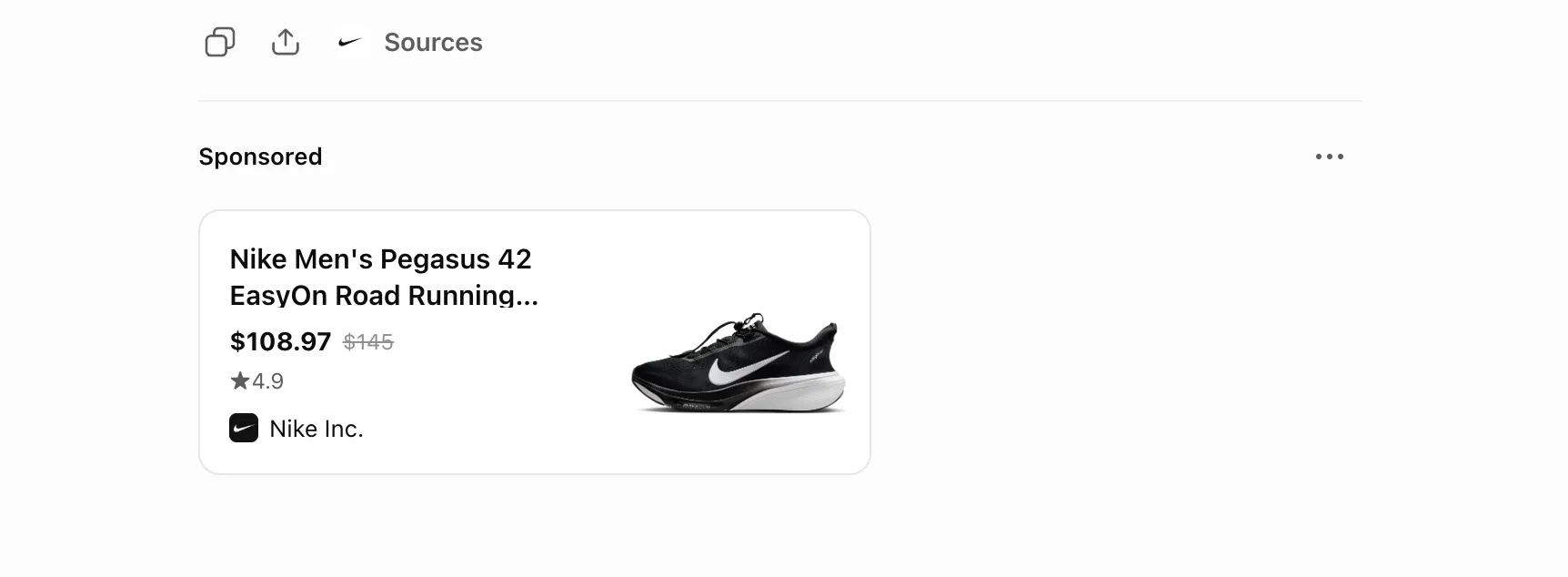
ChatGPT Ads Scraper collects the sponsored ads ChatGPT shows under its answers: advertiser, product, price, rating, image and landing page. Use it to see which brands advertise on your topics, check your own ads appear and match your Context Hints, or track ChatGPT ads over time.
Pricing
from $15.00 / 1,000 ads
Rating
5.0
(1)
Developer

Gytis Ščipokas
Maintained by CommunityActor stats
1
Bookmarked
12
Total users
7
Monthly active users
a day ago
Last modified
Categories
Share
What does ChatGPT Ads Scraper do?
ChatGPT Ads Scraper collects the sponsored ads ChatGPT shows under its answers. Use it as your own ChatGPT ad library and ChatGPT ads tracker: spy on ChatGPT ads from any brand, model or topic, check context hints, track competitors' ChatGPT ads, find brands advertising on ChatGPT.
Use cases
- Competitor monitoring. See which brands advertise for your keywords, which products they push, and at what price.
- Market research before buying ads. Find out how crowded a category is before you spend on ChatGPT ads.
- Ad verification. Check that your own ads show up, for which queries, and with the right details.
- Context Hints checking. See which conversations trigger your ads or a competitor's, to check if Context Hints match the queries you want.
- Trend tracking. Schedule daily runs over the same queries and build a history of the ChatGPT ad market.
- Ad creative research. Collect the headlines, ad copy, images, and prices competitors use, to inspire your own ChatGPT ads.
- Agency reporting. Show clients who advertises in their category on ChatGPT, and pitch ChatGPT ads with real examples.
How to use it
- Open the Input tab.
- Add queries to Queries: any topic advertisers pay for, like products, travel, software, or finance.
- Click Start.
- Open the Output tab when the run finishes.
Input
| Field | Description |
|---|---|
queries | What to ask ChatGPT. Every ad shown in the chat is saved. Name a brand or model ("best Nike running shoes", "Nike Pegasus 42") to steer the chat toward it. |
depth | How many chats each query gets: quick (8 chats, about $0.36 per query), standard (24, about $1.08, default), or deep (60, about $2.70). Plus $0.015 per ad. The run ends when every query has had its chats, so 3 queries at Standard means 72 chats. Deeper finds more ads and advertisers. |
country | Two-letter country code, like US, GB, or DE, picked from a list. Chats run from this country, so you see the ads shown there. Default US, where ChatGPT shows the most ads. Write your queries in English: follow-ups are in English too, whatever the country. |
saveScreenshots | Saves proof of each ad: a screenshot with the end of ChatGPT's answer above it, and the ad's HTML with all the data ChatGPT sent. Linked from screenshotUrl and htmlUrl. Default off. Adds a few seconds per ad, no extra charge. |
followUpQueries | Advanced. Sent in order after each query, the same for every query. Leave empty to use the defaults. Keep them about buying, like "Which one should I buy?". Up to 8. |
See which brands advertise for a topic
Find ads from one brand or model
Name the brand or model in your queries. A brand alone, like "monday.com", shows who advertises on its name: the brand itself, competitors, and stores. Ads from all advertisers are saved, so filter the results by advertiser.
Ask your own follow-ups
Write the follow-ups when you want to know exactly which messages bring ads, or when the defaults don't fit, like booking a trip. Every chat sends the same ones, so each ad's turn and message show which follow-up brought it.
Check that your own ads show up
Use the queries your customers ask about your product and turn on Save ad proof. Filter the results by landingDomain to find your ads, with a screenshot of each.
Compare countries
Run the same queries with a different country, like "country": "GB", and compare with the US run. Expect fewer ads outside the US.
Track ads over time
Save your input as a task and schedule it daily. Count unique ads by adId to see which ads are new and which keep running.
Output example
You get one dataset item per ad:
turn and message tell you which follow-up triggered the ad. screenshotUrl and htmlUrl are null unless Save ad proof is on.
adId: the same ad gets the same ID in every chat and run, so count unique ads byadId.openAiAdId,campaignId, andadGroupIdare OpenAI's own IDs, filled only when the advertiser's tracking link includes them.landingDomain: group by this rather thanadvertiser. The advertiser name doesn't always match the site (a Beautylish ad can link to goodmolecules.com).organicLinks: the links ChatGPT put in the same answer for free, usually the stores it recommends. Compare theirdomainwithlandingDomainto see who pays for the spot and who ChatGPT recommends anyway.price: brand and category ads (image_card_v2) usually link to a whole store or collection and have no price. When one names a single price in its text, like "now $69.99", that price is used andpriceSourceis"text". Discounts like "$20 off" and thresholds like "orders over $50" are never taken as the price.chatId: ads with the samechatIdwere shown in one chat. Use it with theCHATSrecord to get ads per chat.
You can download the dataset as JSON, CSV, Excel, or HTML, or get it through the Apify API.
Summary and chats
Chats without ads aren't in the dataset, so two more records in the Output tab show what happened:
- Summary: for each query, the chats run,
adRate(share of chats that showed at least one ad), ads found, and advertisers by ad count. UseadRateto compare queries. - Chats: one line per chat attempt, with how it ended:
| Status | Meaning |
|---|---|
done | Ran all its follow-ups. |
no-ads | No ad by turn 3, so it was stopped. If its query already showed ads, it runs once more in a new browser, charged once. |
blocked | ChatGPT didn't load. Retried, not charged. |
failed | Broke mid-chat. Retried, not charged. If it already found ads, they're kept and it isn't retried. |
cut | Stopped because the run timeout was near. |
skipped | Its query had no ads in 8 chats, so it didn't run. Not charged. |
Tips
- Pick topics advertisers pay for. The topic matters more than the wording. Products, travel, software, and services all get ads. ChatGPT shows no ads on health, mental health, or politics, and few on relationships or news.
- Expect empty results. Many chats show no ad, and the same query can return different ads on each run. Run the same queries repeatedly, e.g. on a daily schedule.
- Give it memory. More memory runs more chats at once. With the default 16 GB, a single query at Standard depth (24 chats) finishes in under 10 minutes. Add memory for more queries, but leave at least 1 GB of your account's memory limit free, or the run may find fewer ads.
Limitations
- Most ads are in the US. ChatGPT ads launched in the US. Other countries can be picked with Country, but may return few or no ads.
- Logged-out view. You see the ads ChatGPT shows to logged-out visitors.
- Sporadic ads. ChatGPT doesn't show an ad on every answer, so the scraper has to run many chats to find them. Each chat uses proxies and compute, so each one is charged. We're working on better pricing.
- Residential proxies only. ChatGPT only shows ads to residential IPs, so datacenter proxies don't work.
Pricing
Two things are charged:
| Event | Price |
|---|---|
| Chat | $0.045 for each chat with ChatGPT |
| Ad | $0.015 for each ad saved to the dataset |
Platform usage and residential proxies are included. You don't pay extra for:
- Retries. A chat that gets blocked is run again in a new browser, charged once. So is a chat that shows no ads, once its query has shown ads in another chat.
- Topics with no ads. A query with no ads in 8 chats stops early, and its other chats aren't charged.
Example: one query at Standard depth (24 chats) costs $1.08 for the chats, plus $0.015 per ad. Popular topics often get 2 to 3 ads per chat, so about $1.80 to $2.20 in total. Set Maximum cost per run to cap it. The run stops there and keeps everything found.
Related Actors
-
Bing Copilot Ads Scraper: collects the sponsored ads Microsoft Copilot shows in its answers. Run both to compare who advertises on ChatGPT and on Copilot.
-
Google AI Overview Ads Scraper: collects the sponsored ads Google shows in its AI Overviews. Run both to compare who advertises on ChatGPT and in Google's AI answers.
Feedback
This scraper is under active development. Found a bug, missing data, or have an idea? Open an issue in the Issues tab.


