
Google AI Overview Ads Scraper
Pricing
from $30.00 / 1,000 ads
Google AI Overview Ads Scraper
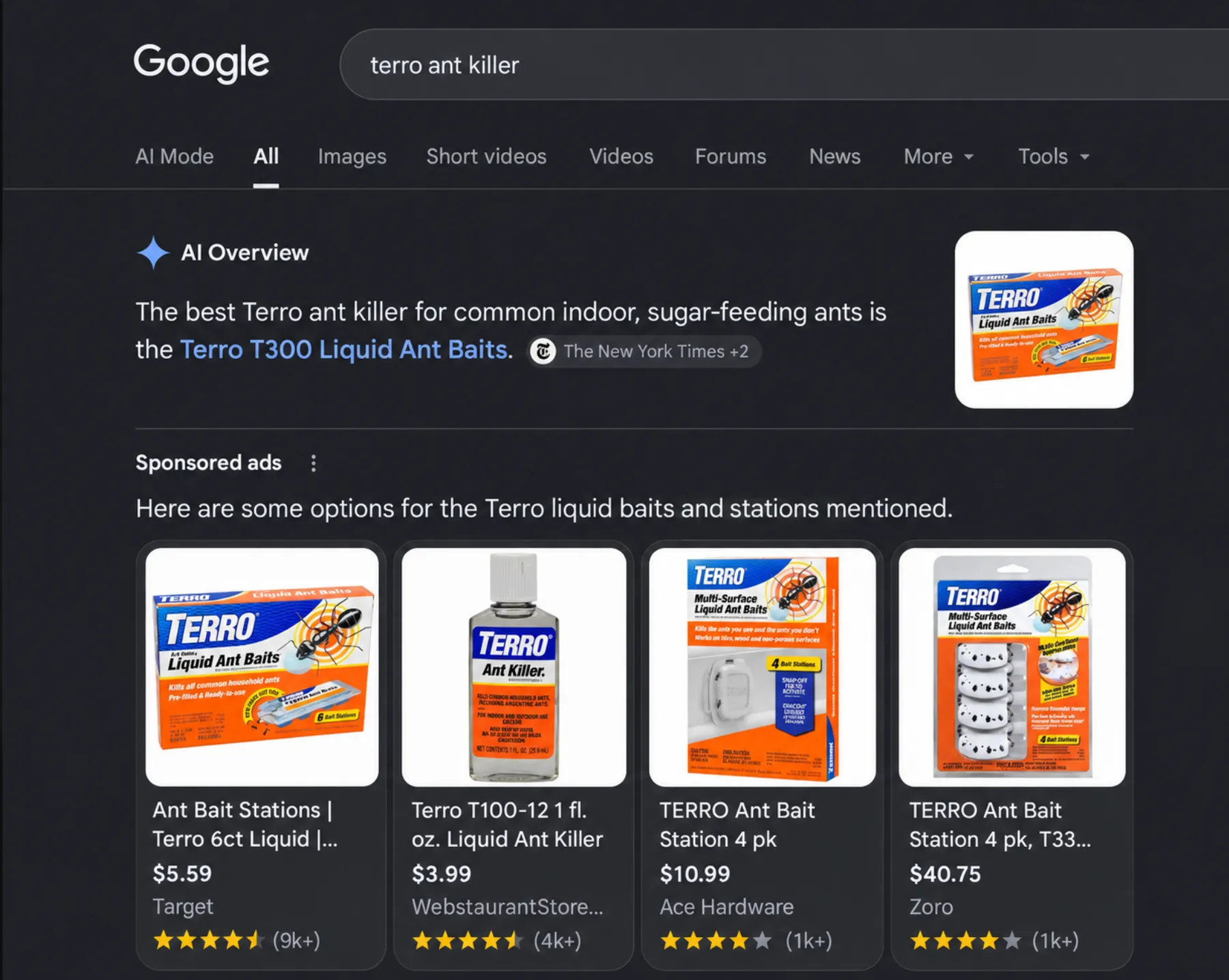
Google AI Overview Ads Scraper collects the sponsored ads Google shows inside AI Overviews, the AI answer at the top of Google Search. See which stores and brands pay to appear in Google's AI answers, which products they push, at what price, and for which questions.
Pricing
from $30.00 / 1,000 ads
Rating
0.0
(0)
Developer

Gytis Ščipokas
Maintained by CommunityActor stats
0
Bookmarked
2
Total users
1
Monthly active users
5 days ago
Last modified
Categories
Share
What does Google AI Overview Ads Scraper do?
Google AI Overview Ads Scraper collects the sponsored ads Google shows inside AI Overviews, the AI answer at the top of Google Search. See which stores and brands pay to appear in Google's AI answers, which products they push, at what price, and for which questions.
Use cases
- Competitor monitoring. See which advertisers show up in AI Overviews for your keywords, and with which products and prices.
- Market research before buying ads. Find out which questions bring ads into the AI Overview, and how crowded they are.
- Ad verification. Check that your Shopping and Performance Max ads reach AI Overviews, for which queries, and with the right details.
- Trend tracking. Schedule daily runs over the same queries and build a history of AI Overview ads.
- Paid vs. cited. Compare the advertisers with the sites the AI Overview cites for free.
How to use it
- Open the Input tab.
- Add queries to Queries: name the product that solves a problem, like "mole repellent" or "pool vacuum".
- Click Start.
- Open the Output tab when the run finishes.
Input
| Field | Description |
|---|---|
queries | Searched on Google as is. Every ad shown inside the AI Overview is saved. |
depth | How many times each query is searched: quick (3), standard (10, default), or deep (30). Google picks different ads each time, so deeper finds more ads and advertisers. |
country | Searches run from this country. Default US, where Google shows the most AI Overview ads. Write your queries in English. |
saveScreenshots | Saves screenshots of the ads, with the Sponsored label and Google's text above them. Product carousels are scrolled so every card is in a screenshot. Linked from screenshotUrls. Charged as an add-on for each search. Default off. |
includeSearchAds | Also saves the regular search ads above, below, and beside the results, marked by placement. Default off. |
See who advertises in AI Overviews for a topic
See which stores sell a brand, with screenshots
Add the product type to the brand name. The ads show the brand's products and the stores that sell them, and the screenshots show them as Google did.
Compare AI Overview ads with regular search ads
Output example
You get one dataset item per ad:
adType:shoppingis a product card with a price and store.textis a headline and copy, sometimes with an image.badgeandstoreLocation: a card's label, like "Sale", and the nearby store it offers pickup from.url: the landing page of text ads. Product cards and image ads have none: Google only reveals it when the ad is clicked, and the scraper never clicks ads.adId: the same ad gets the same ID in every search and run, so count unique ads byadId.unitText: Google's sentence above the ads, tying them to the answer.overviewSources: the sites the AI Overview cites for free. Compare them withadvertiserto see who pays for the spot and who Google cites anyway.
You can download the dataset as JSON, CSV, Excel, or HTML, or get it through the Apify API.
Summary and searches
Searches without ads aren't in the dataset, so two more records in the Output tab show what happened:
- Summary: for each query, the searches run,
overviewRate(share of searches with an AI Overview),adRate(share with an ad in it), ads found, and advertisers by ad count. - Searches: one line per search attempt, with how it ended:
| Status | Meaning |
|---|---|
done | Google showed an AI Overview. |
no-overview | Google showed no AI Overview, so no overview ads. |
blocked | Google showed a CAPTCHA. Retried from a new IP, not charged. |
failed | The page broke. Retried, not charged. |
skipped | Its query had no AI Overview ads in 5 searches, so it didn't run. Not charged. |
Tips
- Name the product that solves a problem. "mole repellent", "pool vacuum", and "mosquito repellent for yard" showed ads in the AI Overview on almost every search. Lawn and garden, pool, pest control, cleaning, automotive, and tools work best.
- Add the product type to a brand. "terro ant killer" gets ads, "terro" alone almost never does: Google answers a bare brand name without ads.
- Plain product names and how-to steps get few ads. "cordless drill", "non stick pan", and "how to fix a leaky faucet" got none in our tests.
- Avoid excluded topics. Google shows no ads in AI Overviews for finance, health, alcohol, gambling, or politics.
- Expect some empty searches. Not every AI Overview has an ad, and the same query shows different ads on each search. Run deeper, or on a daily schedule.
Limitations
- Mostly US. Google launched AI Overview ads in the US in English. Other countries may return few or no ads.
- Logged-out view. You see the ads Google shows to logged-out visitors on desktop.
- No landing page for product cards. See
urlabove. - Speed. Google often answers new IPs with a CAPTCHA, so a search can take a few tries. Each takes about 30 seconds.
- Price. Costs more than a regular Google scraper: Google blocks most automated searches, so each one runs in real Chrome on residential proxies.
Pricing
Two things are charged, plus one add-on:
| Event | Price |
|---|---|
| Search | for each Google search that loaded |
| Ad | for each ad saved to the dataset |
| Screenshots | for each search that loaded, only with Save ad screenshots on |
Platform usage and residential proxies are included. Searches blocked by Google's CAPTCHA are retried from a new IP and not charged. A query with no AI Overview ads in 5 searches stops early, and its other searches aren't charged. Set Maximum cost per run to cap the cost. The run stops there and keeps everything found.
What a run costs depends on whether Google shows ads for your queries:
| Run | Searches | About |
|---|---|---|
| 1 query, standard depth, with ads | 10 | $0.50 + $0.03 per ad, so ~$2.00 for 50 ads |
| 1 query, standard depth, no ads | 5–8, then it stops | $0.25–0.40 |
| 10 queries, quick depth | 30 | $1.50 + ads |
| 1 query, deep depth, with ads | 30 | $1.50 + ads |
Add $0.02 per search with Save ad screenshots on.
Related Actors
-
ChatGPT Ads Scraper: collects the sponsored ads ChatGPT shows in its answers. Run both to compare who advertises on Copilot and on ChatGPT.
-
Bing Copilot Ads Scraper: collects the sponsored ads Microsoft Copilot shows in its answers. Run both to compare who advertises on ChatGPT and on Copilot.
Feedback
This scraper is under active development. Found a bug, missing data, or have an idea? Open an issue in the Issues tab.


