
App Store & Google Play Scraper | Details, Updates, Ratings
Pricing
from $0.50 / 1,000 app records
App Store & Google Play Scraper | Details, Updates, Ratings
Scrape the store page of any app on the App Store and Google Play in one format: update date, release notes, ratings, installs, permissions, price per country. Only changed apps.
Pricing
from $0.50 / 1,000 app records
Rating
0.0
(0)
Developer

Happy Scrapper
Maintained by CommunityActor stats
0
Bookmarked
2
Total users
1
Monthly active users
9 days ago
Last modified
Categories
Share
What is App Store & Google Play Scraper?
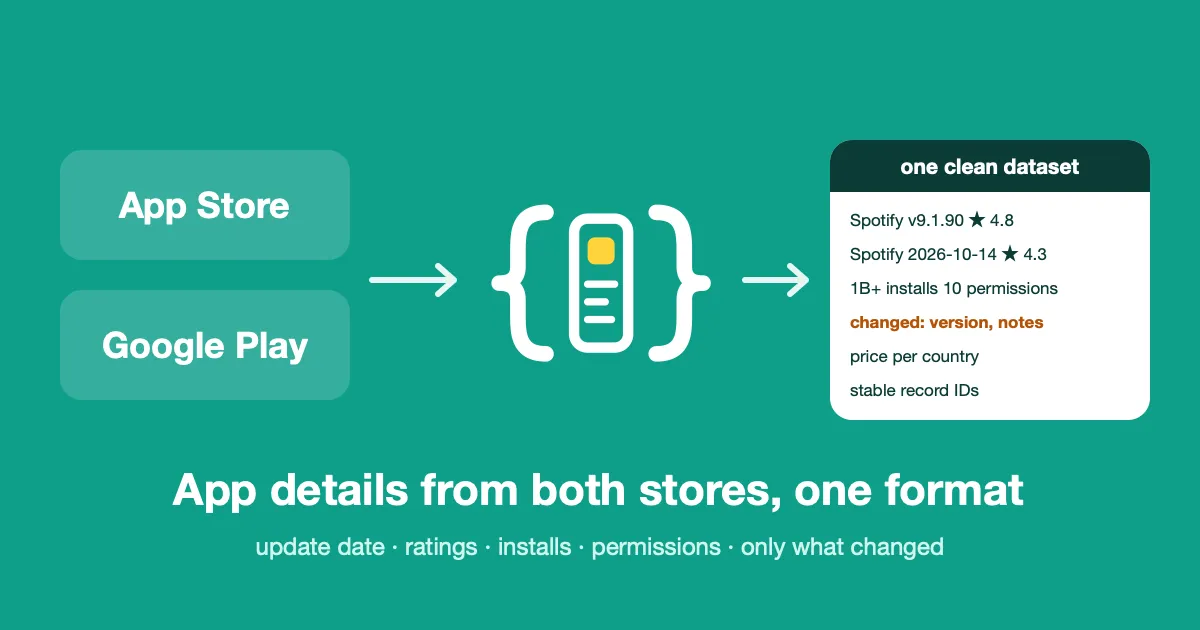
It reads the store page of any app on the Apple App Store and Google Play and returns it in one clean format for both stores: name, developer, category, price, update date, release notes, average rating and number of ratings, plus what each store adds (App Store version, minimum iOS, size and languages; Google Play star histogram, install bracket and permissions).
Don't have the list of apps yet? Read the top charts (Top Free, Top Paid, Top Grossing, by country and category), give a keyword (the Actor returns the apps the App Store and Google Play searches give, with their position) or a developer (it returns all their apps). And track where your apps rank on a keyword, country by country.
Schedule it with Only apps that changed, and it returns only the apps that shipped an update, changed price, release notes or rating since the last run. You pay only for the records you get.
👉 Paste an App Store link and a Google Play package, press Start, and get both records in seconds.
Why use it
| This Actor | A typical app scraper | |
|---|---|---|
| 🍏 + 🤖 Both stores | ✅ one run, one schema | one Actor per store, two formats |
| 🌍 Many countries per run | ✅ one record per app and country | one country per run |
| 🔎 Find apps by keyword or by developer | ✅ both stores | one mode per Actor, or search only |
| 📈 Keyword ranking of your apps, per country | ✅ both stores, alerts when a rank moves | separate rank trackers |
| 📊 Top charts, by country and category | ✅ Free, Paid, Grossing, both stores, alerts when a position moves | separate chart scrapers |
| 💡 Keyword suggestions (autocomplete) | ✅ both stores, one row per suggestion | separate keyword tools |
| 🔗 Same app on the other store (iOS and Android) | ✅ with a confidence level and the reasons | not offered |
| 🔔 Only what changed since the last run | ✅ built in, with the previous value | rarely built in |
| ⭐ Star histogram (1 to 5) | ✅ Google Play | varies |
| 🔐 Permissions the app asks for | ✅ Google Play, by group | varies |
| 🆔 Stable record IDs | ✅ store, app, country | not guaranteed |
| 🤖 LLM-ready compact mode | ✅ about 5 times lighter records, same fields | full records only, or raw store copies |
| 🛡️ Developer contact details | ❌ left out on purpose (personal data) | often included |
What data do you get?
| Field | Example | Notes |
|---|---|---|
record_id | apple:324684580:us | stable across runs |
store, app_id, country | apple, 324684580, us | |
name, developer, category | Spotify: Music and Podcasts, Spotify, Music | |
price, price_label, currency | 0, Free, USD | the price in that country |
version | 9.1.90 | App Store only |
updated_at, released_at | 2026-10-08T07:37:17Z | UTC, both stores |
release_notes | what's new, as the developer wrote it | |
rating_average, rating_count | 4.77, 42587623 | all versions |
rating_histogram | {"1": 3716447, … "5": 27296726} | Google Play |
rating_average_current_version | 4.7 | App Store |
installs_label, installs_min | 1,000,000,000+, 1000000000 | Google Play |
min_os, languages, size_bytes | 16.1, ["EN","FR"…], 308086784 | App Store |
permissions | [{"group": "Location", "items": […]}] | Google Play |
has_in_app_purchases, contains_ads | true, true | Google Play |
content_rating | 12+, Teen | as each store words it |
summary, description, icon_url, screenshots | up to 10 screenshots | |
bundle_id | com.spotify.client | App Store: the iOS bundle identifier |
counterpart | {"store": "google_play", "app_id": "com.spotify.music", "confidence": "high", "reasons": [...]} | with Find the same app on the other store: the matching app of the other store, null when nothing matches |
found_by | [{"type": "search", "term": "meditation", "country": "us", "position": 3}] | how the app was found: search term and position, developer ID, or chart, category and position. null for apps you listed |
keyword_ranks | {"us:meditation": 3, "us:sleep": null} | position of the app in the search results of each keyword and country, null = not in the results the store gives (App Store: 200, Google Play: first page, about 24) |
record_type | app | app, or keyword_suggestion for a suggestion row (the app fields are then empty) |
keyword, seed_keyword, suggestion_rank, suggestion_source | meditation timer, meditation, 3, app_store_autocomplete | suggestion rows only |
changed, changed_fields, previous | true, ["version"], {"version": "9.1.88"} | only with Only apps that changed |
scraped_at | 2026-10-15T15:13:38Z | UTC |
Google Play does not show a version number on the app page. The version field is null there: follow updated_at and release_notes to see an Android release. Fields a store does not give are always present and null.
A real record
| Store | App | Update | Rating | Ratings | Installs |
|---|---|---|---|---|---|
| App Store (US) | Spotify: Music and Podcasts, v9.1.90 | 2026-10-08 | 4.77 | 42,587,623 | n/a |
| Google Play (US) | Spotify: Music and Podcasts | 2026-10-14 | 4.35 | 36,486,803 | 1,000,000,000+ |
Who uses it
- Product and growth teams tracking competitor releases, prices and ratings.
- ASO and market research (app store optimization): category, ratings, installs and release notes at scale. It reads store pages, it does not track keyword rankings.
- Developers and AI agents who need app data as clean JSON.
How to use it
- Paste your apps, one per line: a store URL, an Apple numeric ID (
324684580) or an Android package (com.spotify.music). Mix both stores. - Pick the countries. You get one record per app and country.
- Optional: turn on Only apps that changed (and Compact output for AI agents) and schedule the Actor (daily is typical). Give each list of apps its own Tracking name.
- Press Start, then read the dataset as a table, JSON, CSV or Excel, or call it from the API.
Find apps and rank them
Input example
Find apps by keyword or by developer (App Store and Google Play)
- Search terms: one keyword per line. For each keyword and country you get the top apps of both stores (10 per store by default). App Store: up to 200 results. Google Play: the first page of results, about 24.
- Developers: App Store: the numeric Apple developer ID (
324684583) or the developer page URL. Google Play: the developer page URL (play.google.com/store/apps/developer?id=Spotify+AB) or the developer exactly as in that address, the name or the number afterdev?id=. You can mix both in one list. - Stores to search: both by default. Pick one store to get, and pay for, only its apps. Apps you list yourself are always read on their own store.
- You can mix these with your own list of apps. An app found twice appears once, with every way it was found.
- Each app returned is one record, billed like any other record.
Top charts (App Store and Google Play)
Pick Top charts (Top Free, Top Paid, Top Grossing) and Chart categories (overall, games, health_fitness, social, productivity, finance, entertainment, education, lifestyle, music, news, photo_video, shopping, travel, utilities, weather). For each chart, category, country and store you get the top apps (20 by default, up to 200), each with its full store page and its position in found_by.
- The same category name is mapped to the matching App Store genre and Google Play category.
- Turn on Only apps that changed and schedule the Actor daily: you only get the apps whose chart position moved, with the previous positions in
previous. An app that falls out of the chart is not reported. - Each app returned is one record, billed like any other record.
- The App Store charts come from Apple's chart feeds. The Google Play charts use an internal Google call that is not documented: if Google changes it, the Actor fails and says so.
Keyword suggestions (App Store and Google Play)
Fill Keywords to get suggestions for and you get the stores' own autocomplete suggestions, one row per suggestion: record_type is keyword_suggestion, the keyword is in keyword, the keyword you asked about in seed_keyword, and the app fields are empty. Each row is one record, billed like any other record.
- App Store suggestions follow the country's storefront (language and market). For the countries where the storefront is not known to the Actor (it knows the US, UK, France, Germany, Spain, Italy, the Netherlands, Brazil, Japan, Canada, Australia and Mexico), the US suggestions are returned and the run status says so.
- With Only apps that changed, you only get suggestions you have never received before.
- Suggestions are not a measure of search volume.
Track your keyword rankings (App Store and Google Play)
Add Keywords to rank your apps on and every app in the run gets keyword_ranks: its position in the search results for each keyword and country. Turn on Only apps that changed and schedule the Actor daily: you only get the apps whose rank moved, with the previous rank in previous.
- App Store: position in Apple's public search API, up to 200 results. Close to what the App Store app shows but not guaranteed identical, and results can differ between iPhone and iPad. Apple can also swap two neighbouring apps depending on how many results a request asks for (measured: at 50 results, places 4 and 5 swap compared to 10, 25 or 200). The Actor always asks for 200, so its ranks are consistent from one run to the next, but another tool can differ by one place.
- Google Play: position on the first page of Google Play search, about 24 results, in the language you pick.
nullmeans not on that first page.
Find the same app on the other store
Turn on Find the same app on the other store and every record gets a counterpart: the iOS app for an Android app, or the Android app for an iOS app, with a confidence level and the reasons.
There is no official link between the two. The Actor searches the other store with the app's name, then scores each candidate on checkable clues:
- high: the same package and bundle identifier, or the same developer website and the same app name.
- medium: the same developer website with a different or close name, or the same app name and the same developer name.
- low: only the name matches. Check by hand.
- Nothing credible:
counterpartisnull. A wrong match is worse than none.
When several candidates match equally (the phone and the TV version of an app, for example), the most rated one wins, ambiguous is true and alternatives lists the others. The match is a best effort, not a guarantee. It costs a few extra requests per app and no extra charge: you still pay one record per app.
LLM-ready JSON for AI agents and pipelines
Turn on Compact output and each record drops from about 5 to 6 KB to about 1.2 KB (measured on Spotify, WhatsApp and Instagram, both stores). The heavy text fields (description, summary, screenshots, languages, permissions, icon and developer links) come back empty, release notes are cut at 300 characters, and every field stays present, so your code and your agent's tool schema never change. Name, version, update date, ratings, installs, price and the change tracking are all kept.
How much does it cost?
$1.00 per 1,000 app records (one app in one country is one record), plus $0.00005 per run start. Paid Apify plans get volume discounts, down to $0.50 per 1,000. With Only apps that changed, apps without a change are not returned and not charged.
Good to know
- Where the data comes from. App Store: Apple's public Lookup API. Google Play: the public app page. Google Play has no official API for this, so a layout change on Google's side can break the Actor. It then fails and names the field it could not read, it never returns an empty record in its place.
- Countries. Price, rating counts and availability can differ per country. An app missing in a country is named in the run status, and the other apps are still returned.
- Apple limits. Apple allows about 20 requests per minute. The Actor sends up to 50 apps per request and paces itself.
- Personal data. Developer contact details (email, address, phone) are not collected.
- Google Play search, developer pages, charts and suggestions are not an official API. App Store suggestions and the older chart feeds are not documented either.
- Google Play search and developer pages are not an official API. If Google changes them the Actor fails and names the problem. A search with no result list is reported in the run status: either no app matches, or Google changed its page.
- Reviews are not included. For reviews, use the sister Actors below.
Related Actors
- App Store & Google Play Reviews Scraper API: reviews from both stores in one run.
- App Store Reviews Scraper API: App Store reviews, many countries.
- Google Play Reviews Scraper API: Google Play reviews, full history.
FAQ
Can I track a competitor's releases? Yes. List their apps, turn on Only apps that changed, schedule the Actor daily. Each returned record says which fields changed and what they were before.
Why is the number of ratings not a change? It moves every day for big apps and would flag every app on every run. The average rating is compared rounded to 0.1.
Can I use it from my code or an AI agent? Yes: the output format is stable, with a stable record_id. Call it through the Apify API or the client libraries.
Any restriction on use? The data is public and personal contact details are left out. You stay responsible for your own use and for the terms of the stores.


