
App Store & Google Play Reviews Scraper API | Multi-Country
Pricing
from $0.15 / 1,000 reviews
App Store & Google Play Reviews Scraper API | Multi-Country
Scrape App Store and Google Play reviews in one run: many countries, app version, detected language, developer replies, new reviews only. One clean JSON schema.
Pricing
from $0.15 / 1,000 reviews
Rating
0.0
(0)
Developer

Happy Scrapper
Maintained by CommunityActor stats
0
Bookmarked
2
Total users
1
Monthly active users
9 days ago
Last modified
Categories
Share
What is App Store & Google Play Reviews Scraper API?
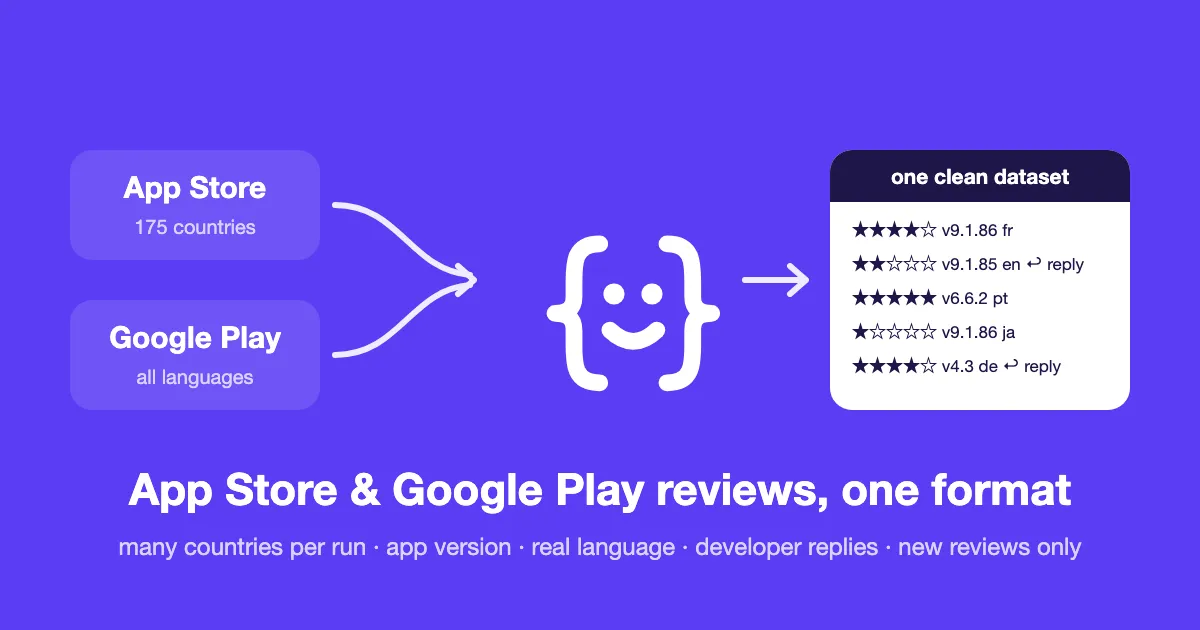
It collects user reviews from the Apple App Store and Google Play in a single run, for as many apps, countries and languages as you need, and returns them in one clean format for both stores.
Every review comes with the app version it was written on, the language it is actually written in, the developer reply on Google Play, and an anonymised author. Schedule it, and it returns only the reviews published since the last run.
👉 Paste an App Store link and a Google Play package, press Start, and get your first reviews in seconds.
Why use it
| This Actor | A typical review scraper | |
|---|---|---|
| 🍏 + 🤖 Both stores | ✅ one run, one schema | one Actor per store, two formats |
| 🌍 Many countries per run | ✅ merged and de-duplicated | one country per run |
| 📄 Apple depth | ✅ up to 1,000 reviews per country | often stops at 450 or 500 |
| 🔢 App version on each review | ✅ both stores | varies |
| 💬 Developer replies | ✅ Google Play (App Store: coming soon) | varies |
| 🗣️ Language of the text | ✅ detected, not guessed from the country | country only |
| 🔁 Only new reviews since the last run | ✅ built in | rarely built in |
| 🆔 Stable review IDs across runs | ✅ safe to de-duplicate and join | not guaranteed |
| 🔒 Authors anonymised by default | ✅ | usually names in clear |
| ⭐ Filter by stars, pay only for kept reviews | ✅ | varies |
Why Apple depth matters. Apple's public feed sometimes serves an empty page from its cache. Many scrapers read it as "no more reviews" and stop at 450 or 500. This Actor detects it and asks for a fresh page. Measured on Spotify across 5 countries: 4,995 reviews in about 30 seconds.
Why there is no country filter on Google Play. Google Play serves the same reviews for a given language, whatever the country. Asking for France and the US in French returns the same list. So you pick languages, and you don't pay twice for the same reviews.
What data do you get?
| Field | Example | Notes |
|---|---|---|
store | apple | apple or google_play |
app_id, app_name | 324684580, Spotify: Music and Podcasts | |
country | jp | App Store only |
language_requested | en | Google Play only |
language_detected, language_confidence | ja, 0.99 | from the text itself, empty under 25 letters |
rating | 1 | 1 to 5 stars |
title, text | title on App Store only | |
date | 2026-09-30T11:15:55Z | UTC |
app_version, version_confidence | 9.1.86, exact | as given by the store |
developer_reply, developer_reply_date | Google Play | |
helpful_count | 3 | |
review_id | apple:324684580:13470918234 | stable across runs |
author_hash | a1b2c3d4e5f60718 | stable anonymous ID |
author_name | null | only if you turn it on |
Real reviews from a test run
| Store | Where | Stars | Version | Language | Review |
|---|---|---|---|---|---|
| App Store | Japan | ★☆☆☆☆ | 9.1.86 | ja | プレイリスト作成して再生すると聞いたこともないアーティストのおすすめから再生される。 |
| App Store | Brazil | ★★★★★ | 9.1.86 | pt | Nao tem como viver nesse mundo sem musica, dito isso, me salvou da depressao! |
| App Store | Germany | ★☆☆☆☆ | 9.1.86 | en | Can't stream anymore… unbelievable |
| Google Play | English | ★☆☆☆☆ | 9.1.52 | en | Finally switched to Apple music. Thank you. (with developer reply) |
Notice the German storefront review written in English: that is why the language comes from the text, not from the country.
How to use it
- Apps: one per line. An App Store or Google Play URL, an Apple numeric ID (
324684580) or an Android package (com.spotify.music). Mix both stores freely. - App Store countries: pick as many as you need, out of 175.
- Google Play languages: pick the languages you want to read.
- Max reviews: per app and country (App Store) or per app and language (Google Play).
- Filter by stars (optional): for example 1 to 2 for negative reviews only. Max reviews and billing count kept reviews only.
- Scheduled tracking (optional): turn on Only new reviews since the last run, give it a tracking name, and schedule the Actor daily or weekly.
Input example
Don't have the app list? Find apps first
Fill Search terms or Developers instead of (or together with) Apps, and the Actor finds the apps first, then collects their reviews:
- Search terms: one keyword per line. For each keyword, the top apps of both stores (5 per store by default). App Store: by country, up to 200 results. Google Play: the first page of results, about 24, in the country set in Google Play search country.
- Developers: App Store: the numeric Apple developer ID (
324684583) or the developer page URL. Google Play: the developer page URL or the developer exactly as in its address (the name, or the number afterdev?id=). The Actor takes up to 20 apps per developer.
Reviews are collected for every app found, so set Max reviews per app too. Google Play search and developer pages are not an official API: if Google changes them, the Actor fails and says so.
Use cases
- 📦 Product managers: see what a release changed, version by version, on both platforms at once.
- 🔎 ASO and marketing: read how users talk about you and your competitors, country by country, in their own words.
- 🎧 Support and community teams: get today's 1 and 2-star reviews and see which ones have a developer reply (Google Play).
- 📊 Analysts and investors: compare apps of a category across markets with the same fields.
- 🤖 Data pipelines and AI agents: a stable schema, stable IDs and new reviews only, ready to feed a database or a model.
- 🎓 Researchers: multilingual labelled text (stars as labels), with authors anonymised.
Pricing
$0.30 per 1,000 reviews on the free plan, lower on paid Apify plans, down to $0.15 per 1,000 reviews. A run that finds no new review only costs the Actor start. The $5 of monthly credit on Apify's free plan covers about 16,000 reviews a month. Set a maximum cost per run in the run options if you want a hard cap.
Integrations
Run it from the Apify API, schedule it, send results to Google Sheets, Slack, Zapier, Make or a webhook, or call it from an AI agent through the Apify MCP server. Export to JSON, CSV, Excel or HTML.
Need one store only?
- App Store Reviews Scraper API: 175 countries in one run, same schema.
- Google Play Reviews Scraper API: full history, developer replies, same schema.
- App Store & Google Play Scraper: app details instead of reviews: update date, release notes, ratings, installs, permissions, price per country.
FAQ
Is it legal to scrape app reviews?
The Actor only reads reviews that the stores display publicly, at a moderate pace. Reviewer names are personal data: they are replaced by an anonymous hash by default, and you should only turn names on if you have a legal basis to process them. You remain responsible for how you use the data. If in doubt, ask a lawyer.
How many reviews can I get?
- App Store: up to about 1,000 per app and country per run (Apple's public feed gives 500 most recent and 500 most helpful). Schedule it with Only new reviews to build a longer history over time.
- Google Play: the full history is reachable. 30,000 reviews took under a minute in our tests.
Why is language_detected sometimes empty?
When a review has fewer than 25 letters ("Great app 👍"), the language can't be told reliably, so the field stays empty rather than wrong. On a 10,000-review test, that was about a third of the reviews, mostly very short Google Play ones.
Why is app_version sometimes empty?
Google Play gives the version for most reviews (about 80% in our tests), not all. On the App Store, the public feed gives it for every review.
Something is wrong or missing?
Open an issue on this page. Every report is read.
Is this Actor affiliated with Apple or Google?
No. App Store is a trademark of Apple Inc. Google Play is a trademark of Google LLC.


