

Review Insights: Google Maps, Trustpilot & App Review Analysis
Pricing
$5.00 / 1,000 results
Review Insights: Google Maps, Trustpilot & App Review Analysis
AI customer review analysis for a business, brand or app. Type one line and it finds the Google Maps, Trustpilot, Google Play or App Store pages, reads the reviews and groups them into complaint and praise themes with real quotes, next to up to 3 competitors. Pay per analyzed review.
Pricing
$5.00 / 1,000 results
Rating
0.0
(0)
Developer

Harsh Maur
Maintained by CommunityActor stats
0
Bookmarked
2
Total users
1
Monthly active users
a day ago
Last modified
Categories
Features
Share
Review Insights — Google Maps, Trustpilot and App Store Review Analysis With Real Quotes
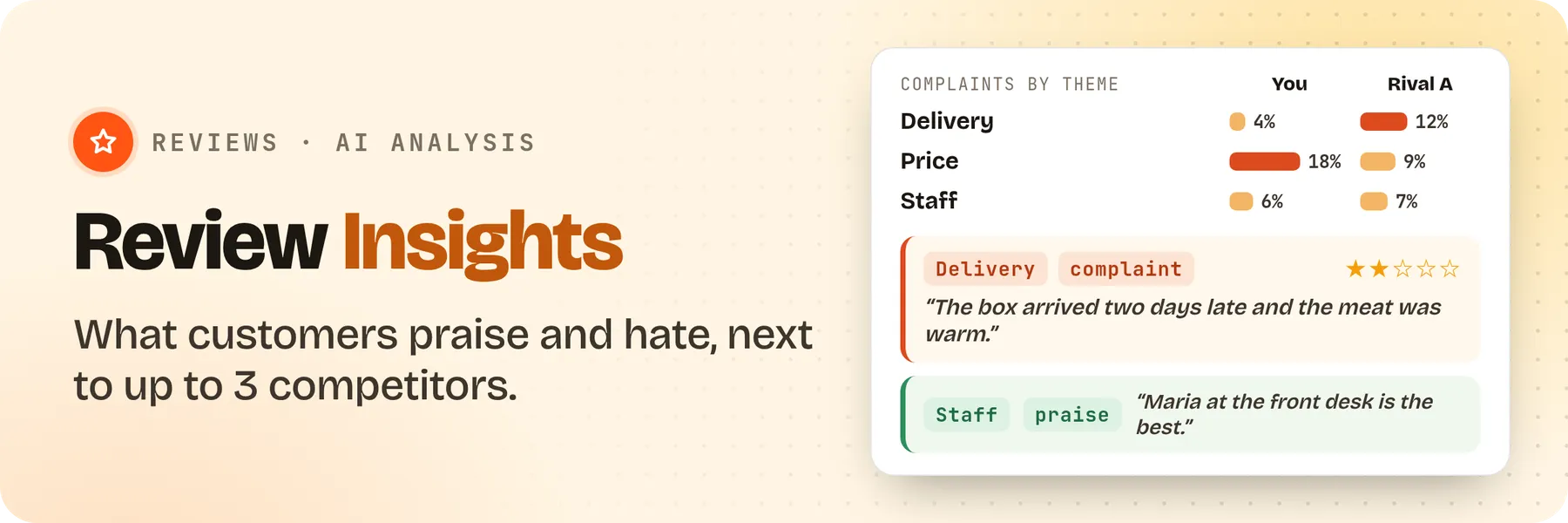



Name a business, a brand or an app in one line. Review Insights finds its review pages, reads up to 1,000 reviews per site, and sorts every review into themes such as price, delivery, staff or bugs. You see what customers complain about, what they praise, and how this compares with up to 3 competitors, with word-for-word quotes.
You do not need to find links, run a review scraper or read thousands of reviews yourself.
What is Review Insights?
It is a customer review analyzer that does the whole job in one run:
- Finds the review pages: Google Maps for shops, restaurants and other places, Trustpilot for online companies, Google Play and the App Store for apps.
- Reads the reviews of your business and of each competitor, for the same time window.
- Builds the themes: the AI makes 8 to 12 themes from the reviews, then tags each review with its theme and stance (complaint, praise, both or neither).
- Compares: a table shows complaints and praise per theme for each business, and the report names the clear differences, for example "Delivery complaints: 12% of Factor reviews, 4% of HelloFresh reviews."
Use it to find what to fix first, to write ads and landing pages in your customers' words, to check a competitor before you launch, or to track your reputation each month.
How to analyze customer reviews and competitor reviews
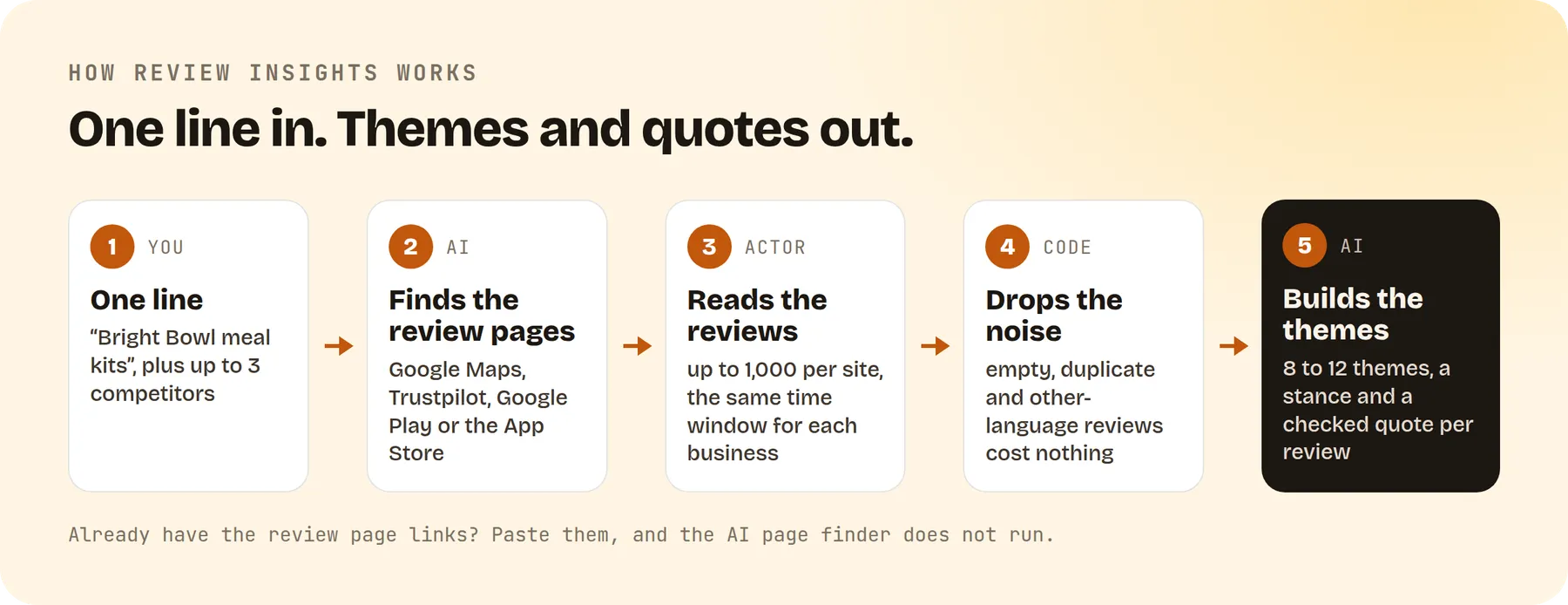
- Write one line in Business, brand or app, for example
Tartine Bakery in San Francisco,HelloFresh meal kitsorDuolingo app. For a place, add the city. - Optional: add up to 3 competitors.
- Optional: pick the review sites, or leave them empty and the AI picks.
- Pick a depth and a time range, then click Start. The form starts at Quick, so your first report is ready in a few minutes.
- Open the Report tab when the run ends.
What the Actor does in between:
Do you already have the links? Paste them in Review page links. Then the Actor reads exactly those pages.
Inputs at a glance
| Field | What it does | Default |
|---|---|---|
about | One line that names the business, brand or app. Required. | — |
competitors | Up to 3 names to compare with. | none |
links | Google Maps, Trustpilot, Google Play or App Store links. When set, the AI page finder does not run. | none |
platforms | google_maps, trustpilot, google_play, app_store. Empty lets the AI pick. | AI picks |
depth | quick reads up to 100 reviews per business and site, standard up to 300, deep up to 1,000. | standard |
timeRange | month, quarter or year. | year |
Input example
Output example
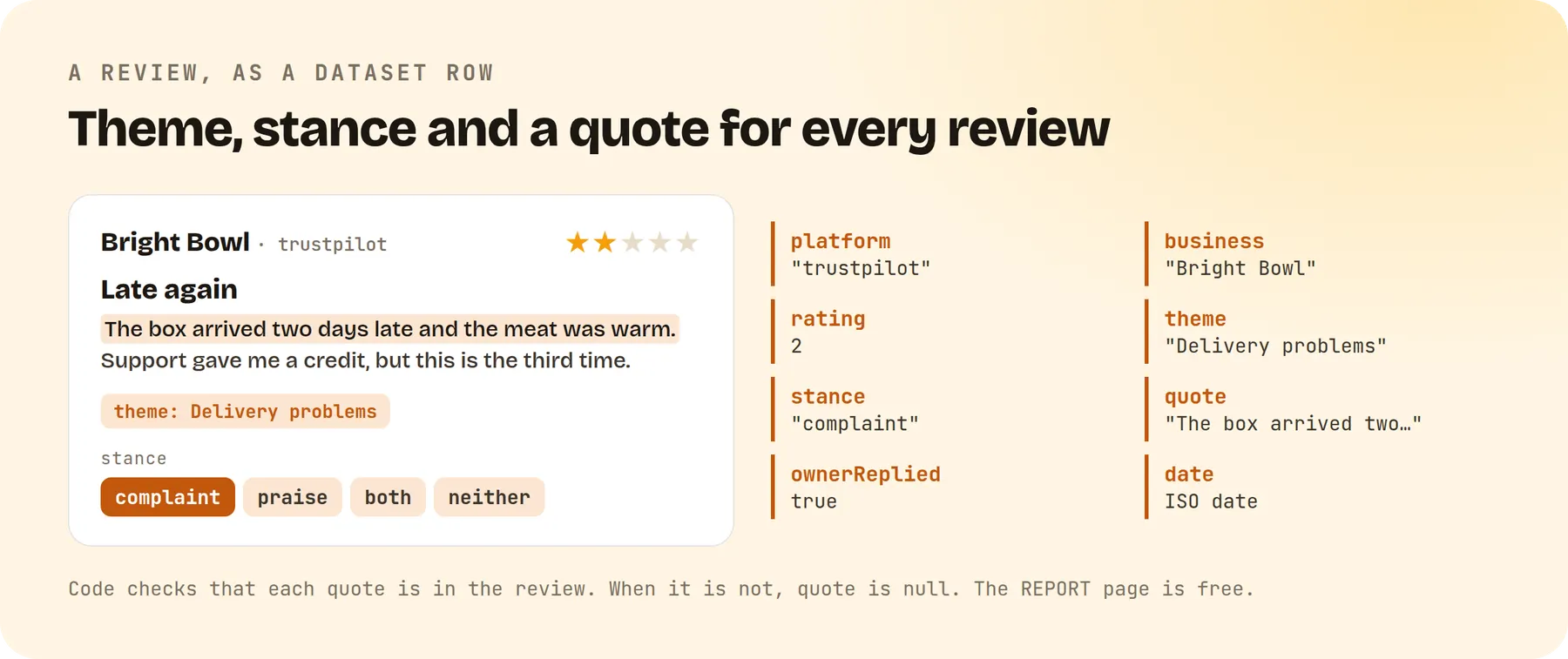
Each analyzed review is one row in the dataset:
The run also saves three records to its key-value store, at no charge. The Output tab links to each one:
- REPORT: a web page with the average rating of each business, the theme table, each theme with its comparison and quotes, a month-by-month count of complaints and praise, and the review pages it read.
- REPORT.md: the same report as Markdown. Paste it into Notion, a doc or a chat, or give it to an AI agent.
- SUMMARY: the same data as JSON, for automations and spreadsheets.
Are the quotes real?
Yes. The AI copies one sentence from each review. Then code checks that the sentence is in the review. When it is not, the quote is removed and the row shows null. A report never shows a quote that nobody wrote.
How much does Review Insights cost?
You pay per result. A result is one analyzed review. Reviews with no text, duplicates and reviews in other languages cost nothing, and the report is free. The price is on the Pricing tab.
Set Maximum cost per run to control the spend. The Actor then reads only as much as that budget can pay for, and shares it fairly between the businesses.
Export the results to CSV, Excel or Google Sheets
Open the Results tab and click Export. Pick CSV, Excel, JSON or HTML. You can also connect the dataset to Google Sheets, Zapier, Make or n8n with the Apify integrations.
FAQ
Which review sites does it read?
Google Maps, Trustpilot, Google Play and the App Store. The app store reviews come from the US store, in English.
What should I write in the "about" field?
The name that customers know, and the city for a place. "Blue Bottle Coffee, Hayes Valley, San Francisco" finds the right café. "Coffee shop" does not. When the AI cannot find a page, paste the link in Review page links.
Why are some reviews not in the results?
Reviews with only stars and no text, the same text posted twice, and reviews in other languages are dropped before the analysis. You do not pay for them.
How long does a run take?
Most runs take 1 to 6 minutes. A deep run with several competitors can take up to 20 minutes.
Can I run it every month?
Yes. Set the time range to month and add a schedule in Apify. Each run reads only its own time range.
Can I use it from an AI agent or my own code?
Yes. Start it with the Apify API, then read the dataset, the SUMMARY record (JSON) or the REPORT.md record (Markdown). The API tab shows code for Python, JavaScript and cURL.
Do I need an account on the review sites?
No. The Actor reads public review pages only.
More research tools
| Actor | Use it for |
|---|---|
| Reddit Pain Point Finder | What people say on Reddit about a problem or market, as themes with quotes. |
| Reddit Brand Sentiment Monitor | Reddit mentions of your brand and competitors, with sentiment and share of voice. |
| Reddit Lead Alerts | Recent Reddit posts that ask for what you sell, with a reply draft. |
| Reddit Scraper | Raw posts, comments, communities and users at scale. |


