

Instagram Reels Transcript Scraper - Video to Text, No Login
Pricing
from $8.00 / 1,000 reel transcripts
Instagram Reels Transcript Scraper - Video to Text, No Login
Turn Instagram Reels into text: the spoken words with timestamps and the opening hook, plus caption, owner, likes and comments. Paste reel links or profiles. No login. Export to JSON, CSV or Excel.
Pricing
from $8.00 / 1,000 reel transcripts
Rating
0.0
(0)
Developer

Mayowa Ogedengbe
Maintained by CommunityActor stats
0
Bookmarked
2
Total users
1
Monthly active users
a day ago
Last modified
Categories
Share
Turn any public Instagram Reel into text. Paste reel links (or just a creator's username) and get back what is said in each reel: the full transcript, every line with its timestamp, the opening hook, and the spoken language, together with the reel's caption, owner, posting date, likes and comments.
No Instagram account, no login, no cookies, no API key.
In short
| You give it | Reel links (instagram.com/reel/..., share links work too) and/or usernames |
| You get | One row per reel: transcript, timed lines, hook, language, caption, owner, date, likes, comments, views (for profile reels), sound/music, thumbnail |
| Languages | Detected automatically per reel (English, Spanish, Portuguese, French, German, Hindi and many more), or set one yourself |
| How often | Once, or on a schedule that picks up each creator's new reels only |
| What you need | A free Apify account. No Instagram login |
| What it costs | $0.010 per reel (down to $0.008 on higher plans), $0.003 for a reel with no speech (pricing) |
Who it's for
- Content creators and social media managers who study what top creators say in their reels: hooks, scripts, calls to action, and how long they take to get to the point.
- Marketing and brand teams who track what competitors and partner creators say about a product.
- Agencies that repurpose clients' reels into blog posts, newsletters, captions, quotes and subtitles.
- Researchers and journalists who need reels as searchable text.
- AI and automation builders who feed reel content into an LLM, a search index or a database (n8n, Make, Zapier, LangChain, your own code).
How to use it (step by step)
1. Open the Actor
Click Try for free (or Start) at the top of this page. You land on the input form. A sample reel is already filled in, so you can press Start right away to see what the output looks like.
2. Add the reels you want
In Reel URLs, add one link per line. Use Bulk edit to paste a whole list at once, then click Set.
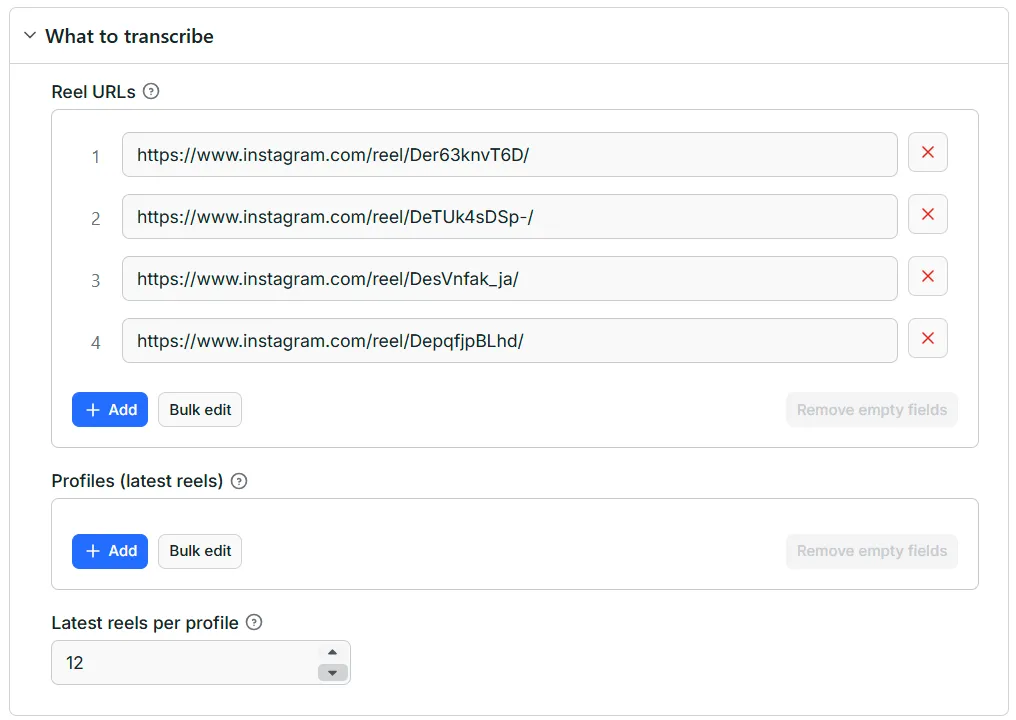
All of these work:
| You paste | What it is |
|---|---|
https://www.instagram.com/reel/Der63knvT6D/ | A reel |
https://www.instagram.com/reels/Der63knvT6D/ | The same reel from the Reels tab |
https://www.instagram.com/p/Der63knvT6D/ | A video post |
https://www.instagram.com/reel/Der63knvT6D/?igsh=... | A link copied from the app's Share button |
The same reel pasted twice is transcribed (and charged) once.
3. Or add creators instead
In Profiles (latest reels), add usernames (hubermanlab, @nasa) or profile links
(https://www.instagram.com/nasa/). The Actor transcribes each profile's latest reels, up to 12 per profile. Set
how many with Latest reels per profile. You can mix profiles and reel links in the same run.
4. Optional: set the language
Leave Spoken language empty and the language is detected for each reel. If you know all your reels are in one
language, type its two-letter code (en, es, pt, fr, de, hi...). That helps on short or noisy clips.
5. Press Start
Each reel takes a few seconds. In our tests, the 4 reels below took 18 seconds, and 56 reels took about 9 minutes. Rows appear in the Output tab while the run is going. The table shows the reel, owner, date, length, transcript, hook, language, likes, comments and caption:
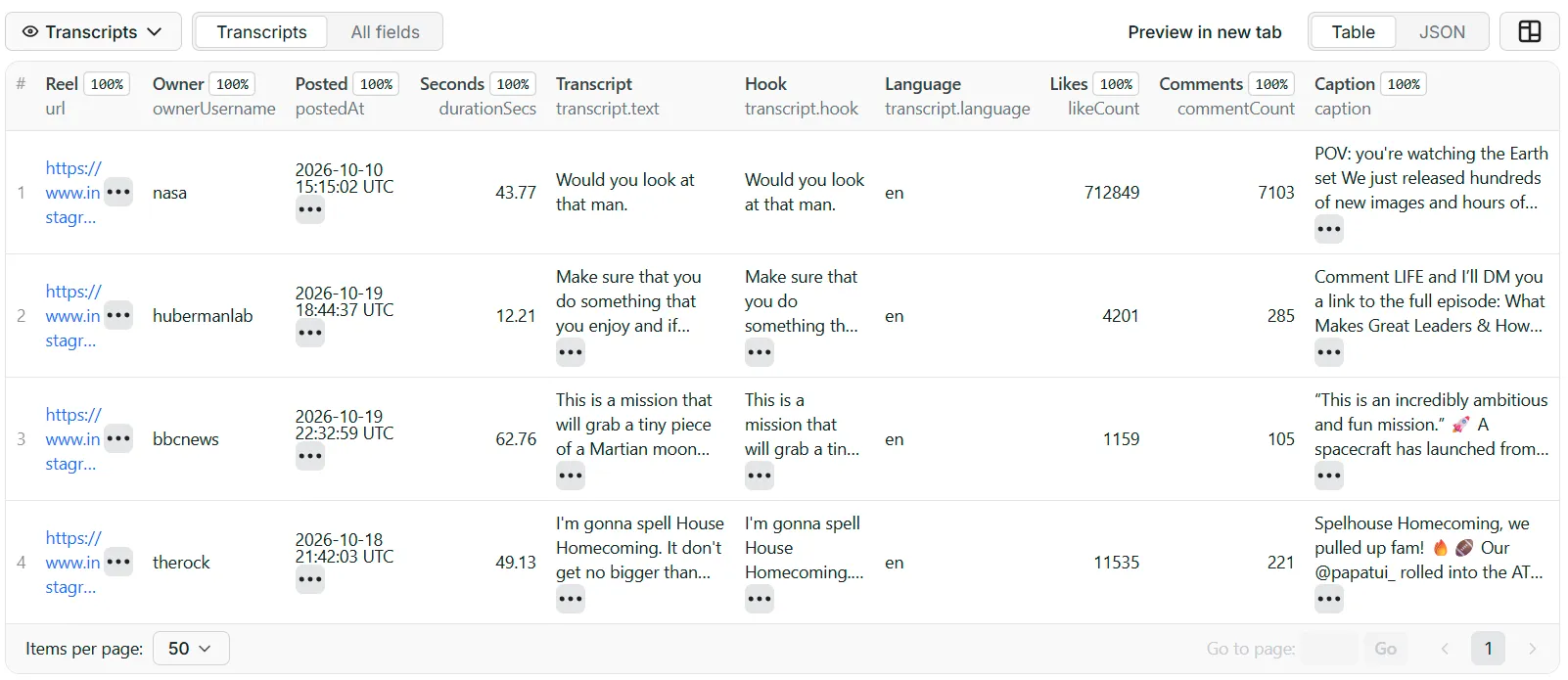
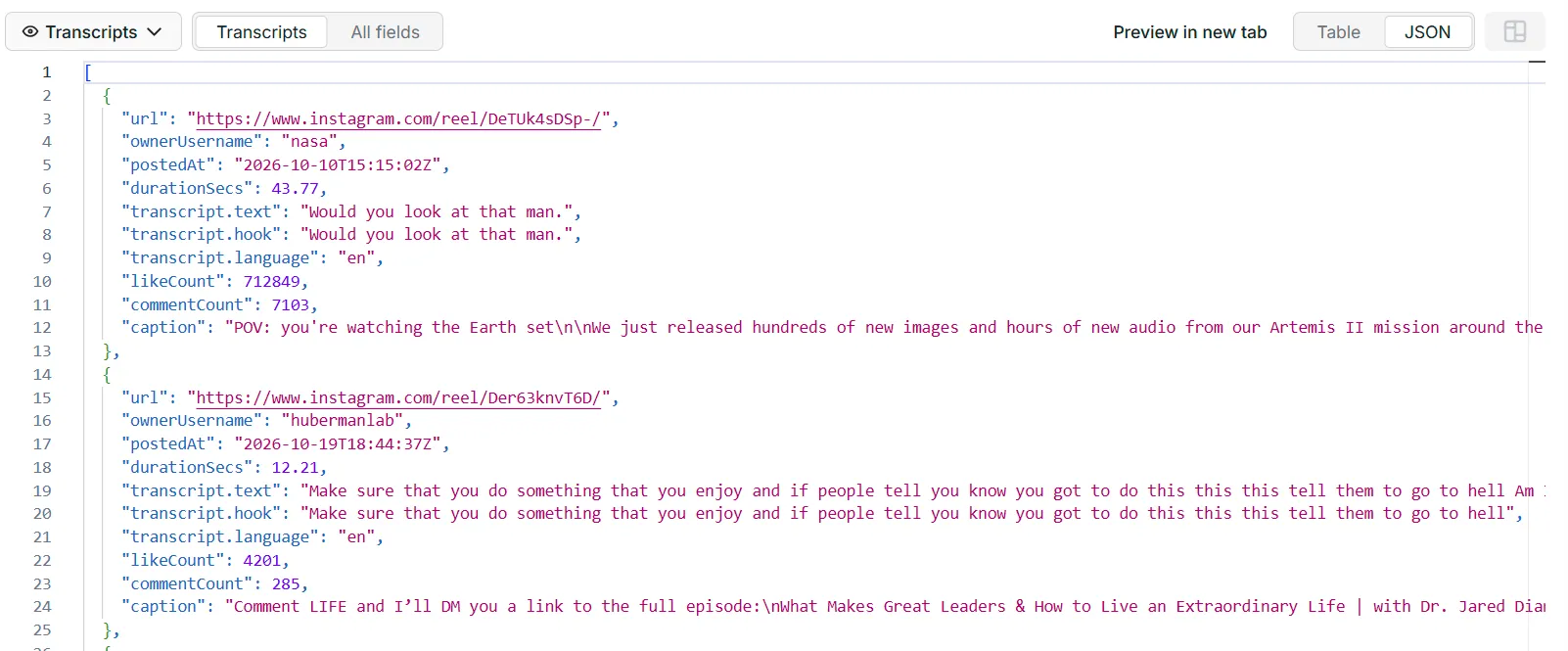
Click JSON (or All fields) to see every field, including the timed lines:
6. Download or connect
Use Export to download JSON, CSV, Excel, XML or HTML, or read the results through the API, n8n, Make or Zapier (below).
7. Put creators on a schedule: only new reels
Want every new reel from a list of creators, transcribed automatically?
-
Add the creators in Profiles (latest reels).
-
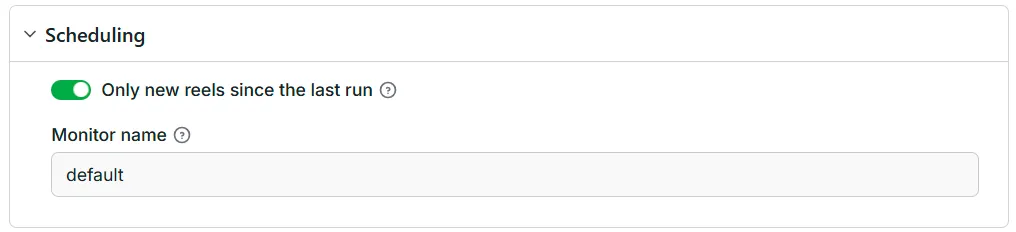
Open Scheduling and switch on Only new reels since the last run.
-
Click Save as a new task at the top, then open the task's ⋯ menu → Schedule and pick Daily (or hourly, or your own timing).
The first run brings the latest reels. Every run after that brings only reels you haven't received yet, so you never pay twice for the same reel. Use a different Monitor name for each schedule to keep separate lists.
What you get for each reel
A real row from our test run (one profile reel):
| Field | What it is |
|---|---|
transcript.text | Everything said in the reel, as one block of text |
transcript.segments | Each spoken line with start and end in seconds: ready for subtitles, quotes or jumping to a moment |
transcript.hook | The words spoken in the first 5 seconds (change it with Hook length) |
transcript.language | The spoken language (two-letter code) |
transcript.wordCount | Number of words spoken |
caption | The text the creator wrote under the reel |
ownerUsername, ownerFullName, ownerIsVerified, coauthors | Who posted it (and any collab partners) |
postedAt | When it was posted (UTC) |
durationSecs | Length of the reel in seconds |
viewCount | Plays, for reels found through Profiles (empty for reels pasted as links) |
likeCount, commentCount | Engagement at the time of the run (likeCount is empty if the creator hides likes) |
music, originalSound | The licensed track (title, artist) or the original sound used in the reel |
thumbnailUrl, width, height | The cover image and video size |
sourceProfile | The profile the reel came from, when you used Profiles |
note | no_speech_detected (music only or silent), no_audio_track, or skipped_longer_than_maxDurationSecs |
error | Why a reel or profile could not be delivered (see FAQ); these rows are never charged |
A run summary (reels done, transcribed, without speech, not found, and so on) is saved as SUMMARY in the run's key-value store.
Settings explained
| Setting | What it does | Tip |
|---|---|---|
| Reel URLs | The reels to transcribe, one per line | Share links from the app work as they are |
| Profiles (latest reels) | Usernames or profile links; transcribes each one's newest reels | Up to 12 per profile |
| Latest reels per profile | How many of each profile's newest reels to take (1–12, default 12) | Lower it to test cheaply |
| Only new reels since the last run | For profiles: skips reels an earlier run with the same monitor name already delivered | Turn on for anything scheduled |
| Monitor name | Keeps a separate "already delivered" list per name | One name per schedule, e.g. competitors, my-clients. Change it to start over |
| Spoken language | Two-letter language code, or empty to detect it per reel | Set it when every reel is in the same language |
| Skip reels longer than (seconds) | Longer reels come back with their details but no transcript, and are not charged (default 600 = 10 minutes) | Lower it to cap your cost per reel |
| Maximum reels per run | Stops after this many reels (0 = no limit) | Handy for a first test |
| Include timed segments | Each spoken line with its start and end time | Turn off if you only need the text |
| Hook length (seconds) | How many opening seconds go into hook (default 5) | 3 for very fast-paced reels |
Pricing
You pay only for reels you get. Prices drop on higher Apify plans.
| What | Price (Free plan → Gold and above) |
|---|---|
| Reel transcript (includes up to 2 minutes of audio) | $0.010 → $0.008 |
| Reel with no speech (music only or silent): you still get its details | $0.003 |
| Each extra started minute of audio beyond the first 2 minutes | $0.005 |
| Each run | $0.005 at the default memory (Apify's start fee: $0.00125 per GB of memory) |
Never charged: reels that are not found, private, removed or age-restricted, reels longer than your limit, reels that fail, and the same reel pasted twice.
What that looks like:
- 1,000 reels (most reels are under 2 minutes): about $10 on the Free plan, $8 on Gold.
- A 4-minute reel: $0.010 + 2 extra minutes × $0.005 = $0.020.
- 20 creators on a daily schedule, about one new reel each per day: 600 reels a month ≈ $6, plus 30 runs ≈ $0.15.
Apify's free monthly credit covers a good first batch. On the Free Apify plan each run returns up to 10 reels; any paid Apify plan removes that limit.
Connect it to your tools
- n8n: add the Apify node → Run an Actor and get dataset, pick this Actor, paste your input, and send each transcript to Google Sheets, Notion, Airtable, Slack or an AI step (summaries, hooks, blog drafts).
- Make / Zapier: use the Apify app's Run Actor action, then map
transcript.text,captionandurlto your next step. - API: start a run with one HTTP call and read the results as JSON. The API tab on this page has ready-made examples for cURL, Python and JavaScript. For example, in Python:
- AI agents: the output is plain JSON with stable field names, so it drops straight into an LLM prompt or a vector database.
FAQ
Do I need an Instagram account? No. You only need a free Apify account. There's no Instagram login, no cookies and no API key.
Which reels work?
Any reel or video post from a public account. Private accounts, removed reels and age-restricted reels can't be
read; they come back as a row with error and are not charged.
How accurate is the transcript? Clear speech in English, Spanish and Portuguese comes out very well in our tests. Other languages work too, with somewhat lower accuracy, especially on short clips with background noise. Setting Spoken language helps. Names, brands and slang can be misspelled, as with any automatic transcript.
What happens with reels that only have music?
They come back with their caption, owner and engagement, transcript: null and the note no_speech_detected, for
$0.003 instead of the full price. Song lyrics are usually not transcribed.
Does it read the text written on screen?
No, only what is spoken. The caption the creator wrote is included as caption.
How many reels can I get from a profile? The latest 12 per profile. For older reels, paste their links in Reel URLs (no limit there).
A profile came back with profile_unavailable or no_reels_found. Why?
Some profiles don't show their reels to visitors who aren't logged in, and Instagram sometimes refuses a request
for a moment. Try again later, or paste the reel links directly. These rows are never charged.
How long can a reel be? Up to 10 minutes by default (change it with Skip reels longer than). Up to 2 minutes is included in the reel price; each extra started minute is $0.005.
Can I get only new reels every day? Yes: add the creators in Profiles, switch on Only new reels since the last run, and schedule the task (step 7).
Does it download the videos?
No. You get the text and the details. The thumbnailUrl links to the cover image.
What data is collected? Only public information that anyone can see on Instagram without logging in. You are responsible for using the transcripts in line with Instagram's terms and copyright law; quoting with credit to the creator is the safe default.
More tools for creators and marketers
- Instagram Highlights Scraper: every story highlight of a profile, with links, stickers and sponsor tags.
- TikTok Transcript Scraper: the same idea for TikTok videos.
- YouTube Transcript Scraper: transcripts for YouTube videos and Shorts.
Questions, or a reel that doesn't work? Open the Issues tab and we'll take a look.


