

Google Hotels Prices — Every Booking Site, Any Dates
Pricing
$7.00 / 1,000 hotel-date prices
Google Hotels Prices — Every Booking Site, Any Dates
Unofficial Google Hotels scraper & Google Travel hotel prices API: type a city or paste hotel links and get every booking site's price for any check-in dates. Per night and total stay, with and without taxes, plus the official site's rate. Pay only for results with prices. Hotel price comparison.
Pricing
$7.00 / 1,000 hotel-date prices
Rating
0.0
(0)
Developer

yestrue
Maintained by CommunityActor stats
0
Bookmarked
2
Total users
1
Monthly active users
5 days ago
Last modified
Categories
Share
Try it in 1 minute: press Start — the prefilled input works as is (3 Paris hotels, 3 check-in dates). You get:
lowestPricePerNight,cheapestProvider,officialSitePricePerNightandpriceBadgefor every hotel and date, plus the price of every booking site inoffers. Price: $7.00 per 1,000 hotel-dates ($0.007 each); sold-out dates, wrong links and refused requests are free — that first run is at most about $0.06.
Use it to:
- Check rate parity: compare the hotel's own-site rate with Booking.com, Expedia, Agoda and every other site Google Hotels shows.
- Rate-shop a city: type a place and price the hotels Google lists for it, for any check-in dates.
- Build a price calendar: up to 180 check-in dates per hotel in one run, any length of stay.
- Time a trip or an event: see which dates are cheapest and which are flagged "23% less than usual".
- Find the cheapest site for each hotel and date, with and without taxes.
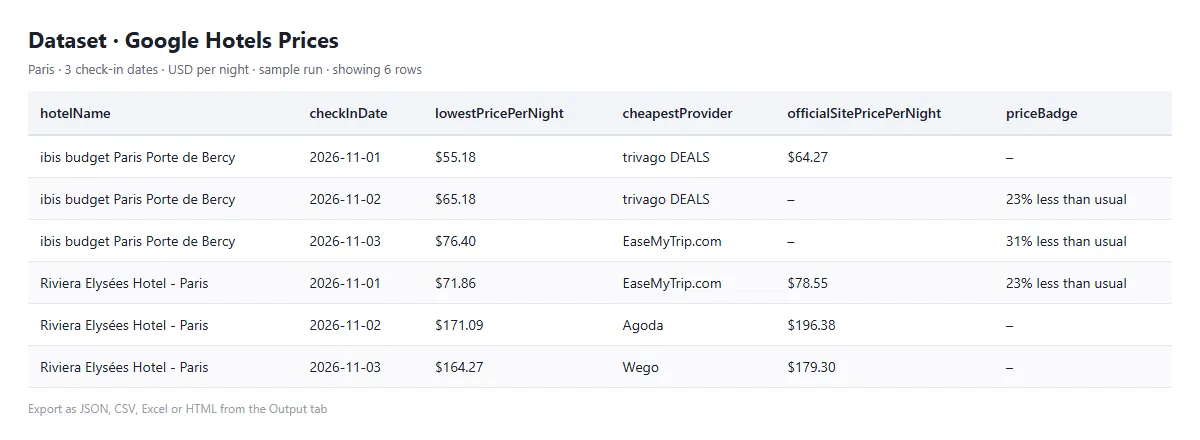
Get the price of every booking site Google Hotels shows for your hotels — Booking.com, Expedia, Hotels.com, Agoda, Trip.com, Priceline, the hotel's own website and many more — for any check-in dates. Type a city or place ("Paris", "Barcelona city center", "hotels near Times Square") and it prices the hotels Google lists there, or give it the hotels you want. You get one row per hotel and date with the price per night and for the whole stay, with and without taxes, the cheapest site, the official-site rate and free-cancellation dates.
Use it for rate shopping, rate-parity checks against the hotel's own website, price calendars, and tracking hotel prices for a trip or an event.
Why this one
- 🏙️ Search a city, get its hotels' prices. Type a place; the Actor takes the hotels Google lists for it, in Google's order, and prices each one. Tested 2026-10-05: Paris, New York and Tokyo, 20 hotels each × 2 check-in dates — 109 of 120 hotel-dates with prices (the rest sold out or not bookable), 45-89 seconds per city, 1-2 Google result pages per city.
- 🏨 Every booking site in one row. Typically 15-34 sites per hotel and date (median 28 in our tests), each with its price per night and for the stay, with and without taxes.
- 📅 A price calendar in one run. Up to 180 check-in dates per hotel, any length of stay, many hotels at once.
- ✅ Runs that finish. Two test runs on 2026-10-03, each 5 hotels in New York, Paris, London, Tokyo and Barcelona × 6 dates: all 60 hotel-dates answered — 55 with prices, 5 sold out or with a minimum stay — in 24-59 seconds per run.
- 🔗 Use the hotel link you already have. A Google Hotels link, a Google Maps link, the Google Hotels ID or a Google Maps CID — so a Google Maps export of hotels works as input.
- 💸 You pay only for hotel-dates with prices. Sold-out dates, wrong links and refused requests are free.
What it does not do
- It does not page through Google Hotels' own search. A place gives the hotels Google's ordinary search results list for it — in our tests 6-28 hotels on the first result page and 33-45 within five result pages (Paris, New York, Tokyo, Barcelona, 東京). For more hotels, add districts or landmarks as further places ("Paris 8th arrondissement", "hotels near the Louvre") — a hotel found twice is priced once. Or give the hotels themselves: Google Hotels links, Google Maps links or CIDs (a Google Maps export of hotels works as input).
- No filters on the place search yet (stars, price range, amenities).
- Adults only, one room (no children's ages yet).
- No reviews, photos or amenity lists.
What you get
One row per hotel and check-in date:
| Field | What it is |
|---|---|
status | OK (prices found), or why not: NO_PRICES, NOT_FOUND, BLOCKED, FAILED, INVALID_INPUT, INVALID_DATE |
place, placeRank | city search only: the place you typed and the hotel's position in Google's results for it (1 = first) |
hotelName, type | name, and hotel or vacation rental |
address, latitude, longitude | location |
hotelClass, starRating | e.g. "4-star hotel", 4 |
rating, reviewCount | Google rating (1-5) and number of reviews |
summary | Google's one-line description |
checkInDate, checkOutDate, nights, adults | the stay that was priced |
currency | currency of every price in the row |
lowestPricePerNight, lowestPricePerNightWithTaxes | the lowest price per night, before and after taxes and fees |
lowestTotalPrice, lowestTotalPriceWithTaxes | the lowest price for the whole stay |
cheapestProvider | the booking site with the lowest price (with taxes where shown) |
officialSitePricePerNight, officialSitePricePerNightWithTaxes | the hotel's own website's rate, when Google shows it |
priceBadge | Google's note on the price, e.g. "20% less than usual" |
offerCount | number of booking sites with a price |
offers | every booking site: provider, isOfficialSite, pricePerNight, pricePerNightWithTaxes, totalPrice, totalPriceWithTaxes, freeCancellation, freeCancellationUntil, memberDeal, bookingUrl |
hotelId, googleMapsCid, googlePlaceId | IDs to join with Google Maps data |
hotelUrl, pricesUrl | the hotel's Google Hotels page for these dates |
suggestedStay | for NO_PRICES: the stay Google offers instead, e.g. a 4-night minimum stay |
error | why a row has no prices |
The Every booking site view (and the "Every booking site (CSV)" link on the Output tab) gives one row per hotel, date and booking site — ready for a spreadsheet or a price chart.
Example
How to use it
- Places — one per line: a city, a district or a landmark ("Paris", "Barcelona city center", "hotels near Times Square"), and Max hotels per place (default 20). The Actor searches Google for "hotels in
- Dates — a first check-in date and how many consecutive dates to price (empty = 14 days from today), or a list of specific check-in dates; plus the number of nights.
- Adults and currency.
- Press Start, then download the results as JSON, CSV or Excel.
You can also run it on a schedule (for example every morning, to follow how prices move) or call it from the Apify API, Make, Zapier, n8n or an AI agent through the Apify MCP server.
Pricing
You are charged per hotel-date with prices — see the price on this page. A hotel-date is one hotel for one check-in date, with every booking site's offer in it. Dates without prices (sold out, a minimum stay, not bookable), links that are not hotels, past dates and requests Google refused are free. The city search itself is free: a place with 20 hotels and 2 check-in dates is at most 40 hotel-dates.
FAQ
Which market's prices are these? By default the run goes through a US residential connection, so you see the booking sites and prices Google Hotels shows to US visitors, converted into the currency you choose. Taxes and fees are shown separately (…WithTaxes).
Why does a date have no prices? The hotel is sold out, needs a longer stay, or is not bookable online for those dates. When Google suggests another stay (for example a 4-night minimum), it is in suggestedStay.
How does it treat Google? For the prices it reads google.com/robots.txt at the start of every run and opens only pages it allows — the hotels' own price pages; it never opens Google Hotels' search pages, which robots.txt disallows. For a place, it reads Google's ordinary web search results ("hotels in Paris") through Apify's Google SERP proxy, Apify's own service for Google search results — 1-2 result pages for 20 hotels. A refused request is tried once more after a 30-second wait on the same connection, never from another IP address; a captcha or cookie wall is not bypassed — the place is marked BLOCKED and the run goes on. The price pages stop after three refusals. Refused requests are not charged.
Which hotels does a place give? The ones Google's search results list for it, in their order: first Google's hotel box (its featured hotels and the hotels on its map), then the "Places" results page by page, until "Max hotels per place". Google's list can include vacation rentals (type: vacation rental). Each record has place and placeRank.
Are the prices final? They are the prices Google Hotels shows at the time of the run. The booking site can still differ at checkout (availability, fees, member prices). Some booking links are Google redirect links that expire after a while.
Like it? A short review on the Store page helps other people find this Actor. Something missing or broken? Tell us on the Issues tab — we read every one.
This Actor is not affiliated with Google.
Related Actors
- Eventbrite Events Scraper — Dates, Venues, Prices & Organizers — Eventbrite events by city, with venues, times, prices and organizers
- Meetup Scraper — Events by Keyword, City & Group, No Phones — Meetup events by keyword, city or group
- OpenStreetMap Places Scraper — POIs, Addresses, Opening Hours — OpenStreetMap places, addresses and opening hours across 62 categories
- Google Maps Email Extractor & Lead Scraper — Turn Maps listings into leads with emails from contact pages
- Google Trends Scraper — Interest Over Time, Regions & Queries — Interest over time, by region, and top and rising searches


