
Google Maps Email Extractor & Lead Scraper
Pricing
from $4.50 / 1,000 results
Google Maps Email Extractor & Lead Scraper
Google Maps email extractor API: business emails, graded deliverability and a 0-100 lead score for $7 per 1,000 leads. Finds contact pages under their native name (impressum, kapcsolat, contatti +44, ten languages); MX, SPF, DMARC, catch-all checks. Local business email finder for B2B leads.
Pricing
from $4.50 / 1,000 results
Rating
0.0
(0)
Developer

yestrue
Maintained by CommunityActor stats
2
Bookmarked
112
Total users
10
Monthly active users
2 days ago
Last modified
Categories
Share
Google Maps Email Extractor & Lead Scraper — Validated B2B Leads with Deliverability Grades
Turn a Google Maps search such as "dentists in Berlin" into B2B leads with graded business emails: details from the listing, the addresses found on each company's own website, a deliverability grade for every address and a 0-100 lead score.
Price: $7.00 per 1,000 leads on the Free plan, from $4.50 per 1,000 on higher Apify plans. You pay only for leads delivered; a run-start fee of $0.015 per GB of run memory comes on top (default 4 GB: $0.06).
Run it now — or start from a ready example: Dentist emails in Berlin, verified and deliverable.
| Business | Category | Email (masked) | Deliverability | Lead score |
|---|---|---|---|---|
| Fat Mama Restaurant | Restaurant | info@f•••.hu | high | 95 |
| Menza Étterem és Kávéház | Hungarian restaurant | info@m•••.hu | high | 95 |
| Aranybástya | Hungarian restaurant | info@a•••.com | high | 95 |
Sample rows from a live run on 20 October 2026 (business emails masked); every record has more fields.
Daily alerts in 2 minutes
Get the leads that appeared since yesterday, every morning, without running anything by hand.
- Turn on "Only new leads since last run" (Input tab, section Monitoring). The first run returns everything and marks every lead
isNew: true; every later run returns only the leads that no earlier run of the same search delivered. Seen leads are skipped and not charged. "Maximum Results Per Query" counts what is checked, new or not, so set it above the number you expect. - Put it on a timer. Save your input as a task, then open Schedules → Create new schedule, set the cron expression
0 7 * * *(every day at 07:00 UTC) and add the task. - Get the result where you work. In the task, open Integrations and send each run's new leads by e-mail (Gmail), to Slack or into Google Sheets (see the integration-ready Actors); all integrations.
What it costs: only the new leads are charged ($0.007 each on the Free plan), plus the run-start fee every run pays ($0.015 per GB of run memory, $0.06 at the default 4 GB). If 10 new leads turn up per day, that is 10 × $0.007 + $0.06 = $0.13 a day, about $3.90 a month on the Free plan (less on higher plans). A day with no new leads costs only the $0.06 start fee.
The list of seen leads is kept in a named key-value store (monitor-<actor name>) in your own account for 60 days. Use Watch list name to keep one list when you edit the search, or to keep several lists apart.
Google Maps email extractor that turns a search such as "dentists in Berlin" into B2B leads: business details from the Google Maps listing, the email addresses found on each company's own website, a deliverability grade for every address, and a 0-100 lead score. It finds the contact page under its native name — impressum, kapcsolat, contatti, contacto, contactez-nous and 42 more across ten languages — and grades each address with MX, SPF and DMARC checks plus a best-effort SMTP probe. Measured across 12 runs and 181 businesses: 71% of rows came back with an email. You pay only for leads delivered.
Who uses it:
- Cold-outreach agencies and freelancers who need a mailing list of local businesses where every address already has a deliverability grade, so you do not mail dead inboxes.
- Sales teams who sort a city's businesses by the 0-100 lead score and call the best ones first.
- Web-design and local-SEO sellers who look for companies with a weak website (HTTPS, mobile, page-size signals are in every row) and pitch the fix.
- Market researchers who map every dentist, gym or plumber in a metro area; the geo-grid goes past Google's ~120-result cap.
- Anyone who refreshes a list weekly: delta mode skips places you already have and charges nothing for them.
Quick start
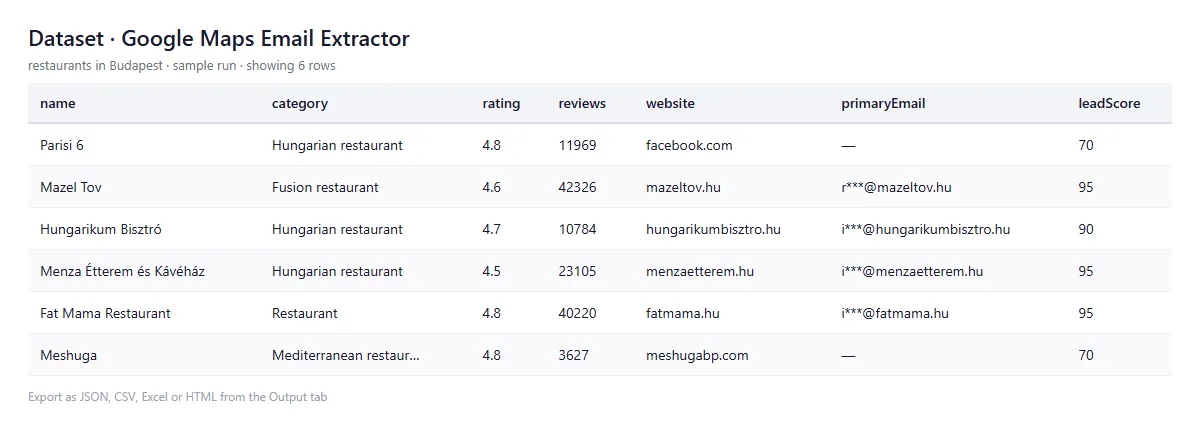
- Open the Input tab, type a search such as
restaurants in Budapestinto Search Queries, and press Start. - The default input (up to 25 leads, no time budget) takes about 3 minutes (189 and 191 seconds in the last two tests, 25 and 20 leads) and costs up to $0.24 on the Free plan.
- Download the leads from the Output tab as JSON, CSV or Excel, or read them through the API.
Video walkthrough (68 seconds, sample data): Google Maps leads with graded e-mails in 3 minutes
For a bigger run raise maxResults (roughly 70 s of startup plus 5-8 s per lead: about 15 minutes for 100 leads). If you want a hard stop, set maxRunSeconds: a run that reaches its time budget does not fail: it stops starting new places, finishes the ones in progress, saves everything collected and ends as SUCCEEDED with the message "Stopped at the time budget: N leads saved. Raise maxRunSeconds for more." If you abort a run by hand, the leads collected so far are kept too.
Input
| Field | Type | Description | Default |
|---|---|---|---|
searchQueries | Array of strings | Search terms like "plumbers in Chicago". Give this or startUrls. | ["restaurants in Budapest"] |
startUrls | Array of URLs | Direct Google Maps search or place URLs (alternative to searchQueries) | [] |
maxResults | Integer | Max leads per query (0 = unlimited) | 25 |
maxRunSeconds | Integer | Optional time budget in seconds (empty or 0 = none). When it is used up the run saves what it has and ends SUCCEEDED. | none |
geoGridTiles | Integer | Split each search into N×N map tiles to get past Google's ~120-result cap (1 = off, 3 = mid-size city, 5 = big city, 10 = mega-city) | 1 |
validateEmails | Boolean | MX / SPF / DMARC / SMTP deliverability grade on every primary email | true |
extractWebSignals | Boolean | HTTPS, mobile-responsive, page size, Open Graph, structured data | true |
enrichMetaAds | Boolean | Facebook page ID and Meta Ad Library URL per business | false |
sinceDatasetId | String | Delta mode: a previous run's dataset ID; places already in it are skipped and cost $0 | — |
scrapeEmails | Boolean | Visit websites to find emails and tech stack | true |
scrapeSocials | Boolean | Extract social media links | true |
autoExtend | Boolean | If the Apify run timeout is too short for maxResults, start a fresh run with a longer one | true |
maxConcurrency | Integer | Parallel browser pages | 5 |
language | String | Google Maps language code | en |
proxyConfiguration | Object | Datacenter by default (measured: same rows and email hit rate as residential, about 78% cheaper). Switch to RESIDENTIAL if Google shows its consent wall or returns nothing. | Apify datacenter |
Coming from compass/crawler-google-places? Paste your input as it is: searchStringsArray, maxCrawledPlacesPerSearch and scrapeContacts are accepted as aliases for searchQueries, maxResults and scrapeEmails. The other compass fields (locationQuery, countryCode, city, placeMinimumStars, skipClosedPlaces) are not supported and are ignored.
Example: whole-city coverage with geo-grid tiling
This splits Manhattan into a 5×5 grid (25 tiles, geocoded free via OpenStreetMap), searches each tile, removes overlaps by placeId and returns up to about 1,500 unique restaurants. Without tiling you top out near 120 results however high maxResults is. A large run also needs a longer Apify run timeout than the 4-hour default for 1,000+ leads (Start new run, Options, Timeout).
Output
One record per business. All fields below ship in every item; emails, primaryEmail and emailValidation are empty when no address was found (hasContactForm then tells you whether the site has a form).
| Field | Description |
|---|---|
primaryEmail, emails | The single best address (domain matches the website when possible; always emails[0]) and all addresses found, ranked |
emailValidation | mxRecords, hasSpf, hasDmarc, smtpValid, isCatchAll and a deliverability grade (high / medium / low). The SMTP and catch-all probe is best effort: Apify's cloud often blocks port 25, and the grade is then DNS-only. Filter on deliverability === "high" before a cold-email send. |
leadScore, leadReadiness | 0-100 aggregate quality and hot (70+) / warm (45-69) / cold (25-44) / dead. Points: +25 domain-matched email, +10 any email, +10 phone, +10 website, +15 claimed, +10 rating 4.0+, +10 reviews 20+, +10 social media, +5 contact form, +5 modern tech stack. |
aiLeadProfile, suggestedOpener | Ready-made outreach profile and opener built from review keywords, for LLM prompts |
ownerName | Owner or founder name when the website names one |
webQuality, webSignals, techStack | modern / dated / poor grade, HTTPS, mobile viewport, page size, Open Graph, structured data; 40+ detected technologies (WordPress, Wix, Shopify, GA, Pixel, …) |
industry, cuisine, category, priceLevel | 14 industry buckets, cuisine tag for restaurants, Google category and price level |
businessStatus, isClaimed, businessDescription | operational / temporarily_closed / permanently_closed, claimed listing, the owner's own description |
serviceOptions, reviewKeywords, openingHours | Delivery / Wi-Fi / accessibility tags (60+), what customers mention in reviews, opening hours |
bookingUrl, menuUrl | OpenTable, Resy, Tock, TheFork reservation link; menu link |
socialMedia, whatsapp, hasContactForm | Facebook, Instagram, LinkedIn, Twitter/X, YouTube, TikTok links; WhatsApp Business number; contact form flag |
facebookPageId, metaAdLibraryUrl | With enrichMetaAds: the page ID and a link to that page's active ads |
latitude, longitude, plusCode, googleMapsUrl | Location |
placeId, cid | Google feature ID (used by delta mode) and the stable decimal Customer ID, a cross-query join key (https://maps.google.com/?cid={cid}) |
Pricing
Pay per delivered lead. No subscription, no compute fee. Everything is included at every tier: Maps data, email extraction, deliverability grading, tech stack, web quality, lead score, AI profile, social links, Meta Ad Library URL.
| Apify plan | Per delivered lead | Per 1,000 leads |
|---|---|---|
| Free | $0.007 | $7.00 |
| Bronze | $0.006 | $6.00 |
| Silver | $0.005 | $5.00 |
| Gold, Platinum, Diamond | $0.0045 | $4.50 |
Plus a run-start fee of $0.015 per GB of run memory: $0.06 on the 4 GB default, the same on every plan. Total = leads × your per-lead rate + $0.06. The start fee covers browser launch and Maps warm-up, so bigger runs cost less per lead.
| Search (Free-plan prices) | Leads | Cost | $/lead |
|---|---|---|---|
| Coffee shops in Shoreditch, London | 20 | $0.20 | $0.0100 |
| Italian restaurants in Manhattan | 25 | $0.24 | $0.0094 |
| Dentists in Berlin | 50 | $0.41 | $0.0082 |
| Plumbers in Chicago | 100 | $0.76 | $0.0076 |
| Law firms in New York City | 300 | $2.16 | $0.0072 |
| 1,000 leads | 1,000 | $7.06 | $0.0071 |
On Gold, Platinum or Diamond the same 1,000 leads cost $4.56 and 1,500 leads cost $6.75 + $0.06 (a 5×5 geo-grid run). The same 1,500 leads cost $10.50 + $0.06 on the Free plan.
- Failures are free. You are charged only for records written to the dataset, never for timeouts, blocked requests or duplicates. A run that delivers nothing costs only the start fee.
- Delta mode (
sinceDatasetId): places already in the earlier dataset are skipped before any charge, so a weekly re-run pays only for new leads. - Maximum charge on the run is respected exactly: you receive as many leads as the budget covers, highest-scoring first, and the run says how many more were found. Raise the cap and re-run with
sinceDatasetIdto get only the missing ones. - Preflight check: if
maxResultscannot fit the Apify run timeout, the run refuses to start (no lead charged, only the start fee) or, withautoExtendon, restarts itself with a longer timeout. - Memory: the 4 GB default is what the crawler is tuned for; 2 GB made the Maps phase 5.4× slower in a measurement, to save $0.015.
How it works
- Google Maps search. A Playwright browser runs the search, scrolls the results and collects the place pages.
- Place data. Each place page gives name, address, phone, website, rating, category, hours, GPS, status, owner description, service options and review keywords.
- Website analysis. A fast Cheerio crawler reads each business website and extracts emails from five sources:
mailto:links, Cloudflare-obfuscated tags, JSON-LD, text deobfuscation (info [at] domain [dot] com, HTML entities, ROT13) and pattern matching on the HTML. If the homepage has no email, or only a third-party one, it follows contact, about and team pages under their native names. - Ranking and filtering. The address matching the business domain becomes
primaryEmail. Placeholder addresses, tracking pixels and font-author emails are removed. - Enrichment. Tech stack, web quality, owner name, lead score and the AI profile are added.
- Delivery in batches. Leads are checked and written to the Output tab in batches of 20, and the run's status line shows progress.
Tips
- Use specific queries: "Italian restaurants in Manhattan, NYC" beats "restaurants".
- Use
geoGridTilesfor big cities; useleadScoreandemailValidation.deliverabilityto prioritize. - If you see blocks or failures, lower
maxConcurrencyto 2-3 or switch the proxy to RESIDENTIAL. - Businesses with no published email are flagged
hasContactForm: truewhen the site has a form.
Email hit rates from real test runs (the rate depends on the market):
| Market | Sample | Email hit rate | High deliverability |
|---|---|---|---|
| Berlin Mitte dentists | 20 | 85% | 65% |
| Shoreditch coffee shops | 20 | 70% | 40% |
| Manhattan Italian restaurants | 25 | 64% | 32% |
| Austin TX dentists | 168 | 53% | 25% |
| Hungarian dentists (Budapest) | 15 | 53-67% | — |
Public demo datasets: 25 Manhattan Italian restaurants, 20 London coffee shops, 20 Berlin dentists, 168 Austin dentists.
How much does it cost to scrape one city?
Use the formula in the Pricing section: leads × your per-lead rate + $0.06. A city with 100 plumbers is $0.76 on the Free plan and $0.51 on Gold and above; a 5×5 geo-grid run that delivers 1,500 leads is $6.81 on Gold and above ($10.56 on Free). Delta mode makes every repeat run cost only the new leads.
Use it from Claude, ChatGPT or any MCP client
Add this URL as a custom connector / MCP server:
The assistant sees one tool, highbrow_fame--google-maps-email-extractor, with this Actor's input fields, so you can ask for "dentists in Szeged with email addresses". Runs are billed to your own Apify account at the normal per-lead rate. Other integrations: Zapier, Make, Google Sheets, webhooks, the Apify API, and direct LLM use of aiLeadProfile.
Legal and compliance
This is general information, not legal advice. You are the data controller for what you collect.
- Public business data (name, address, phone, website, hours, rating) needs no special legal basis. Generic addresses (
info@,sales@) are corporate contact data, usually covered by legitimate interest for B2B (GDPR Art. 6(1)(f)) with a clear opt-out. Personal addresses (firstname.lastname@) andownerNameare personal data: document a legitimate-interest assessment, or get consent. - Google's Terms of Service prohibit automated access. That is a contractual restriction, not criminal law (see hiQ Labs v. LinkedIn, 9th Cir.), but expect technical blocks; use proxies and sensible rates.
- Do not send spam without opt-out (GDPR, CAN-SPAM, PECR, CASL; some countries such as France, Germany and Italy require prior opt-in even for B2B), sell personal data without a lawful basis, or bypass opt-out signals. Honour suppression lists and delete data you no longer need.
- Apify and the actor author are processors at most; the per-event price covers infrastructure, not legal responsibility.
FAQ
The run returned nothing and exited at once. Why? With neither searchQueries nor startUrls there is nothing to search for. Only the run-start fee is charged. The status message shows a minimal valid input.
My run ended with "Stopped at the time budget". Is that an error? No. It ended SUCCEEDED and every lead collected is in the dataset. Raise maxRunSeconds (and maxResults) for more, and pass this run's dataset ID as sinceDatasetId to get only the new ones.
Does it work outside English-speaking markets? Yes. Any language and country works. Contact-page localization covers Hungarian, German, French, Italian, Spanish, Portuguese, Polish, Dutch and Czech URL names, so "Zahnarzt Berlin", "fogorvos Budapest" and "dentista Madrid" return the same schema. Best results: EU local services and healthcare (80%+ email hit rates seen in DACH and Iberia), tourist-city restaurants, and B2B services with claimed Google profiles.
Is it an email finder? Yes, in the narrow sense: it collects addresses already published on the company's website. It does not guess addresses from name patterns and does not query third-party contact databases.
Can it scrape reviews? It returns rating, reviewCount and reviewKeywords (what customers mention), not individual reviews.
How do I run a recurring scrape without paying for duplicates? Schedule a weekly run with sinceDatasetId set to the previous run's dataset ID. Places are matched by placeId and cid, so only new businesses are charged.
What does it not do? No phone validation; no social-engagement data (follower counts, posts); no phone scraping when a site hides numbers behind JS or images; no CAPTCHA bypass (if Google blocks, the actor backs off and you are not charged for blocked requests); not the cheapest way to collect millions of raw place records. Export to CSV, Excel, JSON, XML, RSS and HTML is built into the dataset page.
Is the actor open source? No. The source is hidden; the README, run history and dataset schema are public.
Which Google Maps scraper should you use?
| If your problem is… | Use | Why |
|---|---|---|
| The email column comes back empty outside English markets | this actor | Contact pages are found under their native names in ten languages. Measured: 71% of delivered rows carried an email. |
| You send cold email and bounces cost you | this actor | MX, SPF and DMARC grading (plus the best-effort SMTP/catch-all probe) is inside the per-lead price, not an add-on. |
| You re-scrape the same city weekly | this actor | Delta mode skips duplicates before any charge. |
| Millions of raw place records, no email work | compass/crawler-google-places | The established giant, built for volume. |
| Basic contact details in English markets | lukaskrivka/google-maps-with-contact-details | Mature, cheaper for the simple case. |
Competitor features and prices change; check their pages. Measurements on this page: 12 runs, 181 businesses, verified 28 August 2026; prices verified 13 October 2026.
Companion actor — track which AI engines mention your business. See whether the businesses you scrape (or your own brand) are cited in ChatGPT, Perplexity, Gemini and Google AI Overviews across 24 languages. No API key needed (12 calls per run on a free Apify plan, 200 on paid; $0.05 per citation record). → AI Search Visibility Tracker
70+ teams have run this actor. If it saved you a manual data-extraction job, a 30-second review goes a long way, and a bookmark lets you launch new runs in one click.
Integrate in 2 minutes: Python, n8n and LangChain
Copy-paste examples for Google Maps Email Extractor & Lead Scraper: a Python script (apify-client), an importable n8n workflow and a LangChain tool for AI agents. google-maps-email-extractor integration examples on GitHub
Related Actors
- Website Tech Stack Detector — CMS, Frameworks, Analytics & More — Detect the CMS, frameworks, analytics and hosting behind any website
- Domain Checker — WHOIS, DNS, SSL & Expiry Dates in Bulk — Bulk WHOIS, DNS, SSL and expiry checks for many domains
- OpenStreetMap Places Scraper — POIs, Addresses, Opening Hours — OpenStreetMap places, addresses and opening hours across 62 categories
- Sitemap Extractor & Scraper — URLs, Dates, Images & hreflang — Every URL from a site’s sitemaps, with dates, images and hreflang
- Domain Authority & Website Rank Checker API — Bulk Open Data — Bulk domain authority score and website rank on open data


