
Google Play Scraper — Apps, Ratings & Installs
Pricing
from $0.001 / app scraped
Google Play Scraper — Apps, Ratings & Installs
Search Google Play and scrape app details: title, developer, rating, rating count, installs, price, category, content rating, description and icon. For app market research and ASO.
Pricing
from $0.001 / app scraped
Rating
0.0
(0)
Developer

hiper soft
Maintained by CommunityActor stats
0
Bookmarked
1
Total users
1
Monthly active users
5 days ago
Last modified
Categories
Share
Google Play Scraper — Apps, Ratings, Installs & Pricing
Search Google Play by keyword or look up exact apps, and get back clean, structured JSON, CSV, Excel or XML — title, developer, rating, rating count, install count, price, currency, category, content rating, description and icon. No account, no API key — fast and reliable, built for app market research and ASO teams who need dependable store data.
What does the Google Play Scraper do?
The Google Play Scraper turns keyword searches or a list of package names into clean app records with ratings, installs, pricing and full metadata. Target any store country and language, then export the data for competitor tracking, ASO research and catalog enrichment.
Features
- 🔎 Keyword search or direct lookup — pass
searcheslike"weather", or exactappIdslikecom.spotify.music(package names or Play URLs). - ⭐ Ratings that matter —
ratingandratingCountstraight from the app listing. - 📥 Install counts — the
installsfield captures Google's downloads figure (e.g."1,000,000+"). - 💵 Price + free flag —
price,currencyand afreeboolean, parsed from the store offer. - 🌍 Country & language control — set
countryandlanguagefor localized rankings and metadata. - 🏷️ Rich metadata —
category,contentRating,operatingSystem, fulldescriptionandiconURL.
What you get
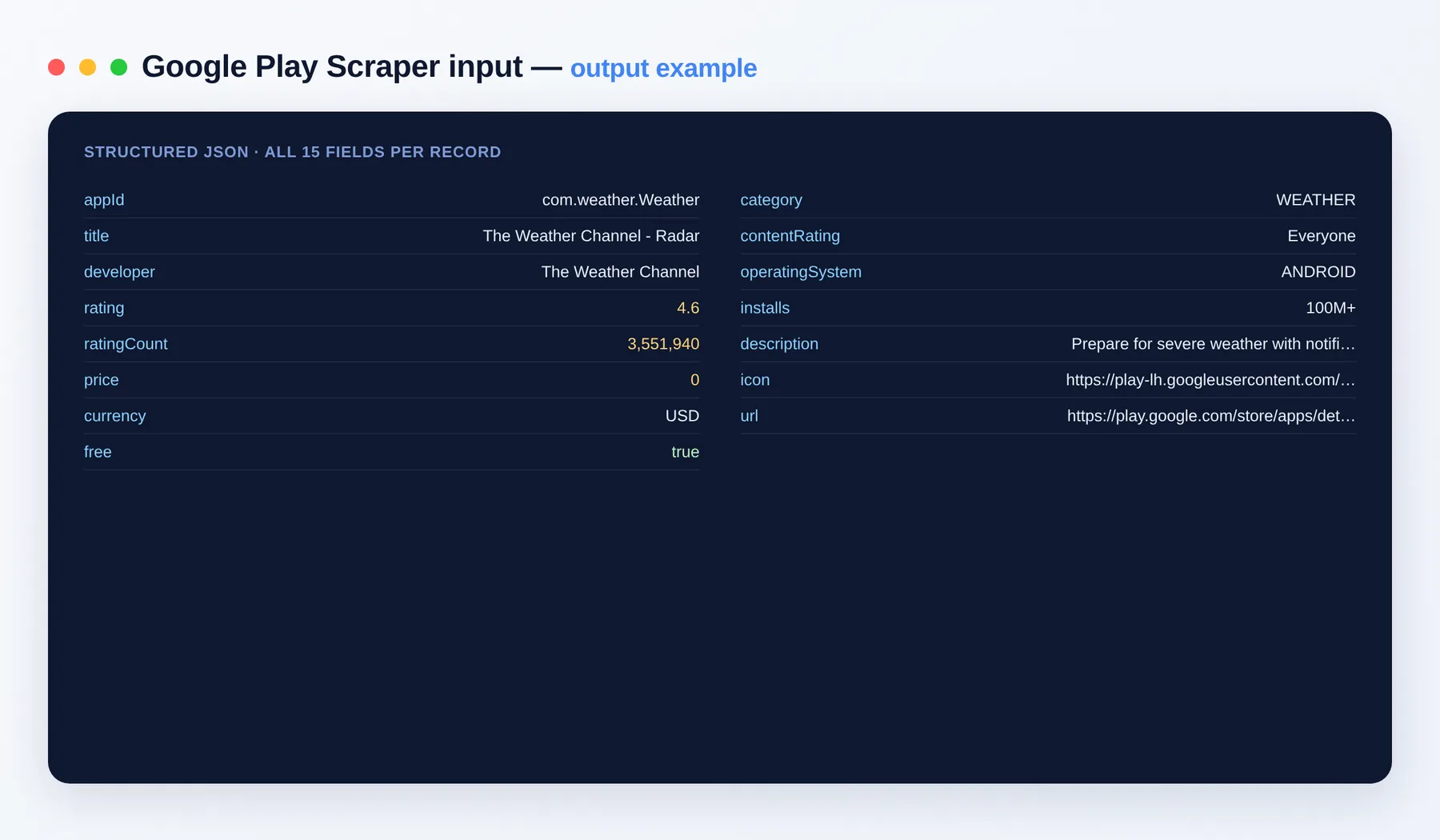
Every app becomes one clean JSON record:
Output schema
| Field | Type | Description |
|---|---|---|
appId | string | Android package name (unique app ID) |
title | string | App name as shown on the store |
developer | string | Developer / publisher name |
rating | number | Average star rating |
ratingCount | integer | Number of ratings |
price | integer | Price in the smallest currency unit (0 for free apps) |
currency | string | Currency code of the price |
free | boolean | Whether the app is free |
category | string | Store category, e.g. MUSIC_AND_AUDIO |
contentRating | string | Content/age rating, e.g. Teen |
operatingSystem | string | Target platform, e.g. ANDROID |
installs | string | Reported install count (e.g. 1,000,000,000+) |
description | string | Full app description |
icon | string (URL) | App icon image URL |
url | string (URL) | Link to the app's store page |
Input
| Field | Type | Description |
|---|---|---|
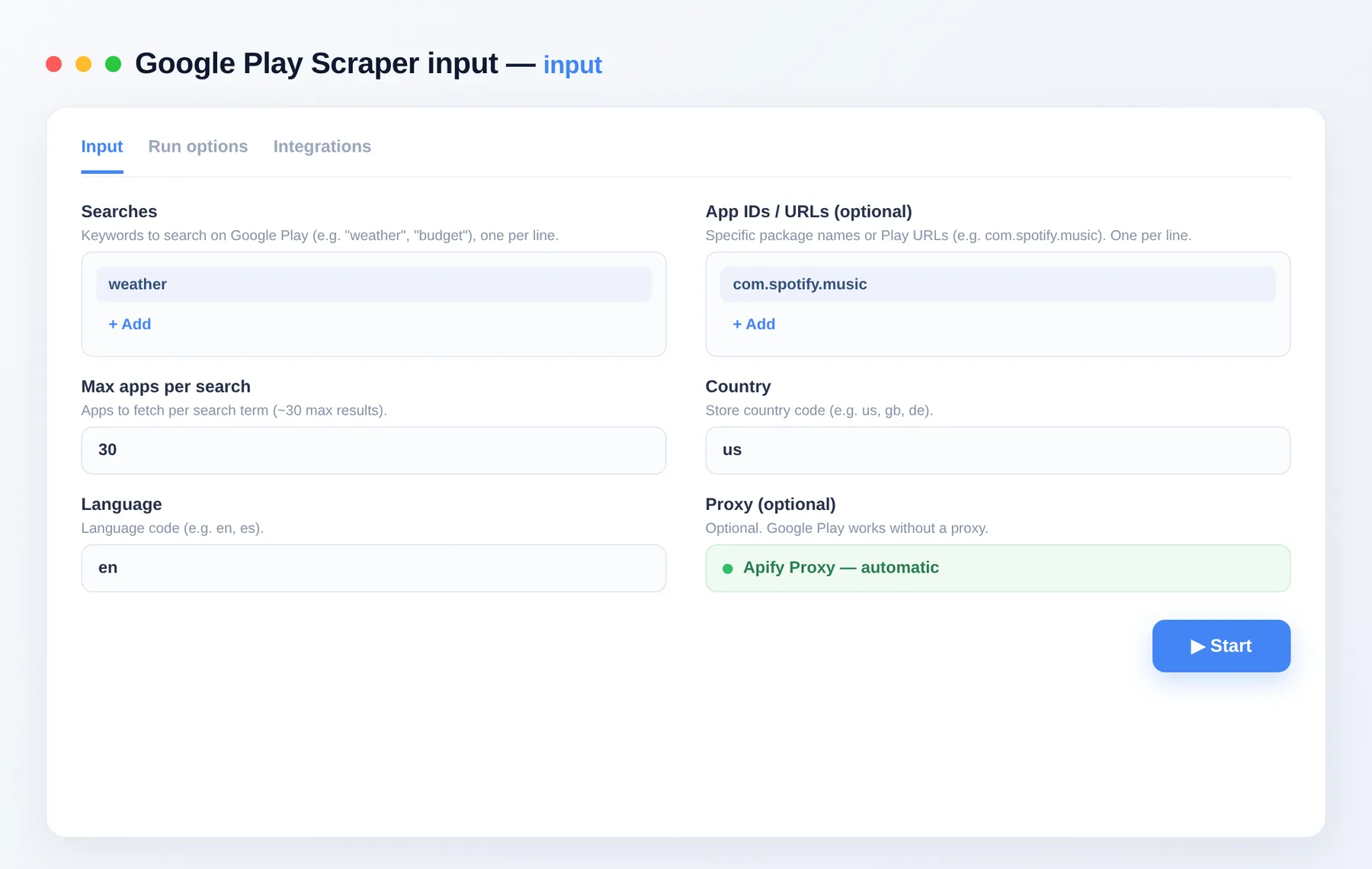
searches | array | Keywords to search on Google Play, one per line. |
appIds | array | Specific package names or Play URLs (e.g. com.spotify.music), one per line. |
maxAppsPerSearch | integer | Apps to fetch per search term (~30 max results). |
country | string | Store country code (e.g. us, gb, de). |
language | string | Language code (e.g. en, es). |
proxyConfiguration | object | Optional proxy settings. |
Use cases
- Run app market research on a keyword and rank competitors by rating and installs.
- Monitor your own app's rating, install count and store metadata over time.
- Build an ASO dataset of titles, categories and descriptions in a target country.
- Enrich a catalog of package names with live pricing and rating data.
- Track pricing and free/paid status across a competitor set.
How to scrape Google Play data
- Add the Google Play Scraper to your Apify account.
- Enter searches (keywords) and/or appIds (package names or Play URLs).
- Set maxAppsPerSearch, country and language.
- Click Run.
- Export the dataset as JSON, CSV, Excel or XML, or pull it via the Apify API.
Need more app-market data?
- Google Play Reviews Scraper — user reviews and ratings for any Android app.
- App Store Scraper — app metadata from Apple's App Store.
- App Store Reviews Scraper — reviews and ratings from Apple's App Store.
FAQ
Do I need a Google account or API key? No. There's no login or API key required — just add your searches or app IDs and run.
How many apps can I get per run?
Google Play returns roughly 30 results per search term; use maxAppsPerSearch to control that. You can also look up an unlimited list of exact apps by passing package names or Play URLs in appIds.
How does billing work? You pay only per app you get, so small runs stay cheap. See the Pricing tab for current rates.
What's the output format? Clean JSON — one record per app — exportable as JSON, CSV, Excel or XML. Each record includes appId, title, developer, rating, ratingCount, installs, price, currency, free, category, contentRating, description, icon and store URL.
Can I target a specific country or language?
Yes. Set country (e.g. us, gb, de) and language (e.g. en, es) to get localized rankings, pricing and metadata.
Is this only public data? Yes. It reads only public store data that Google Play shows to any visitor.
Can I connect this to other tools? The Google Play Scraper can be connected with almost any cloud service or web app thanks to integrations on the Apify platform. It works with Make, Zapier, Slack, Airbyte, GitHub, Google Drive and many more, plus the Apify API, JavaScript/Python clients and MCP. Or use webhooks to trigger an action whenever a run finishes.
Related Actors
Notes
Original clean-room implementation. Reads only Google Play's public search results and app detail pages; you are responsible for compliance with Google's terms. Not affiliated with, endorsed by, or sponsored by Google. "Google Play" is a trademark of Google LLC.


