

Greenhouse Job Board Scraper — All Company Jobs
Pricing
from $0.00085 / job scraped
Greenhouse Job Board Scraper — All Company Jobs
Scrape all open jobs from any company's Greenhouse job board: title, location, department, office, full description, apply link and dates. Bulk company input.
Pricing
from $0.00085 / job scraped
Rating
0.0
(0)
Developer

hiper soft
Maintained by CommunityActor stats
0
Bookmarked
2
Total users
2
Monthly active users
6 days ago
Last modified
Categories
Share
Greenhouse Job Board Scraper — Jobs, Departments & Apply Links
Scrape every open job from any company that hosts its careers page on Greenhouse — title, location, department, office, full description, apply link and dates — into clean JSON, CSV, Excel or XML. Give it one or many company boards and get a complete, deduplicated job feed. Fast and reliable.
What does Greenhouse Job Board Scraper do?
The Greenhouse Job Board Scraper collects all open roles from the companies you list and exports each job as a structured record. Pass one or many Greenhouse board tokens or board URLs, choose whether to include full descriptions, and it returns a clean, deduplicated feed of jobs with titles, locations, departments, offices, apply links and publish dates.
What data can you scrape from Greenhouse?
| Data | Fields |
|---|---|
| 🏢 Company | board token, company name |
| 📋 Job | job ID, title, location, department(s), office(s) |
| 🔗 Apply | direct apply URL, requisition ID |
| 🗓️ Dates | first published, last updated, application deadline |
| 📝 Content | full description (plain text) and original HTML |
Use cases
- Job aggregators — feed thousands of live roles from company career pages into your board.
- Recruiting intelligence — track who's hiring, for which teams, and where.
- Hiring-trend analysis — monitor headcount growth by department and office over time.
- Sales & lead lists — spot companies expanding into a function you sell to.
- ATS / market monitoring — watch competitor and target-account hiring in near real time.
- Talent sourcing — build role-specific feeds for candidates and recruiters.
How to scrape Greenhouse data
- Add the Greenhouse Job Board Scraper to your Apify account.
- Add one or many companies — a Greenhouse board token (the slug in
boards.greenhouse.io/<token>) or a full board URL. - Toggle includeContent and set maxJobsPerCompany to control depth.
- Click Run and watch jobs stream into the dataset.
- Export to JSON, CSV, Excel or XML, or pull them through the Apify API.
Input
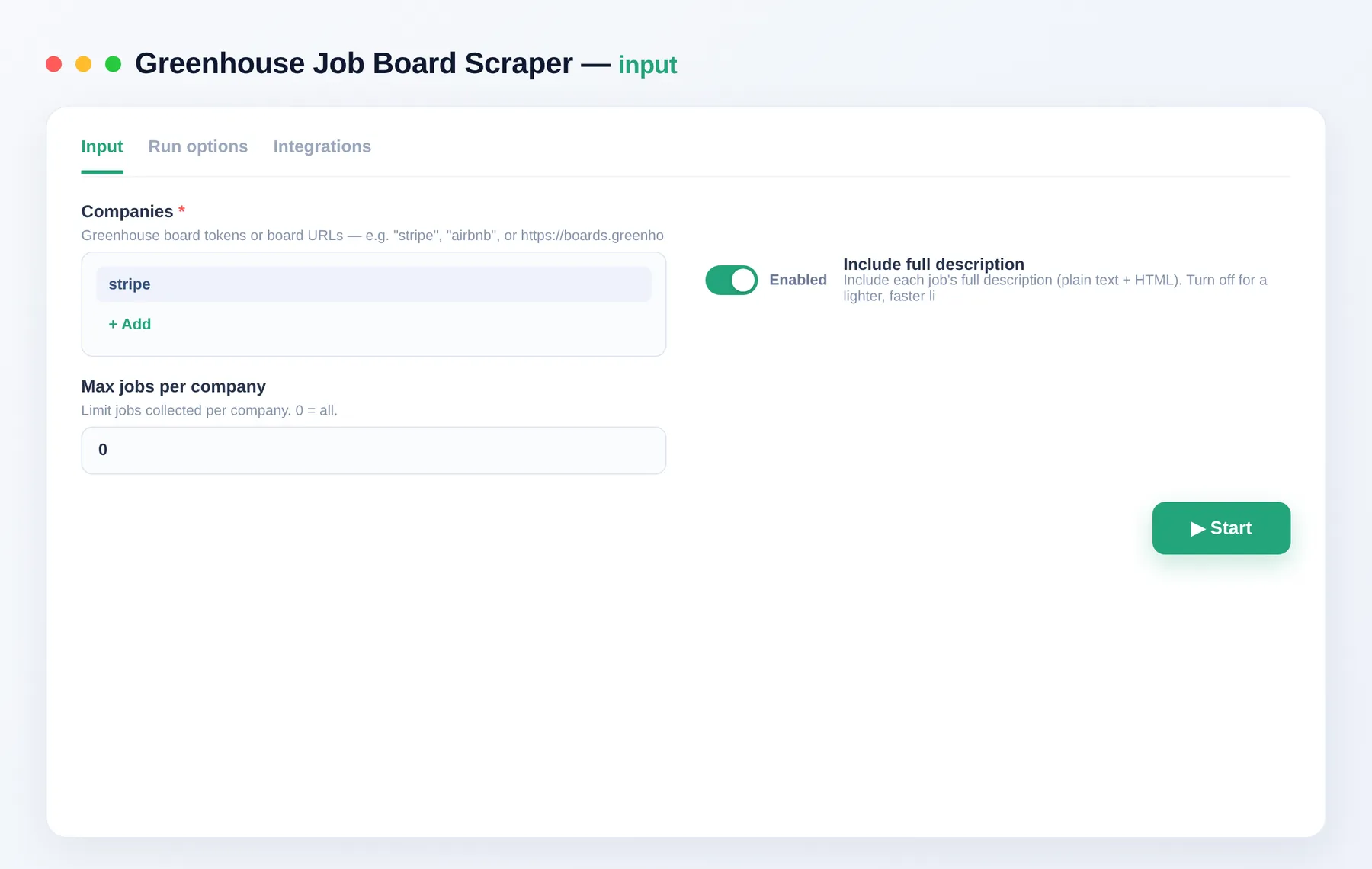
List the boards you want, choose whether to include full descriptions, and cap jobs per company if needed.
Example input
companies accepts a Greenhouse board token (the slug in boards.greenhouse.io/<token>) or a full board URL.
| Field | Description |
|---|---|
companies | Greenhouse board tokens or board URLs to scrape. |
includeContent | Include each job's full description (text + HTML). Default true. |
maxJobsPerCompany | Cap jobs per company. 0 = all. |
Output
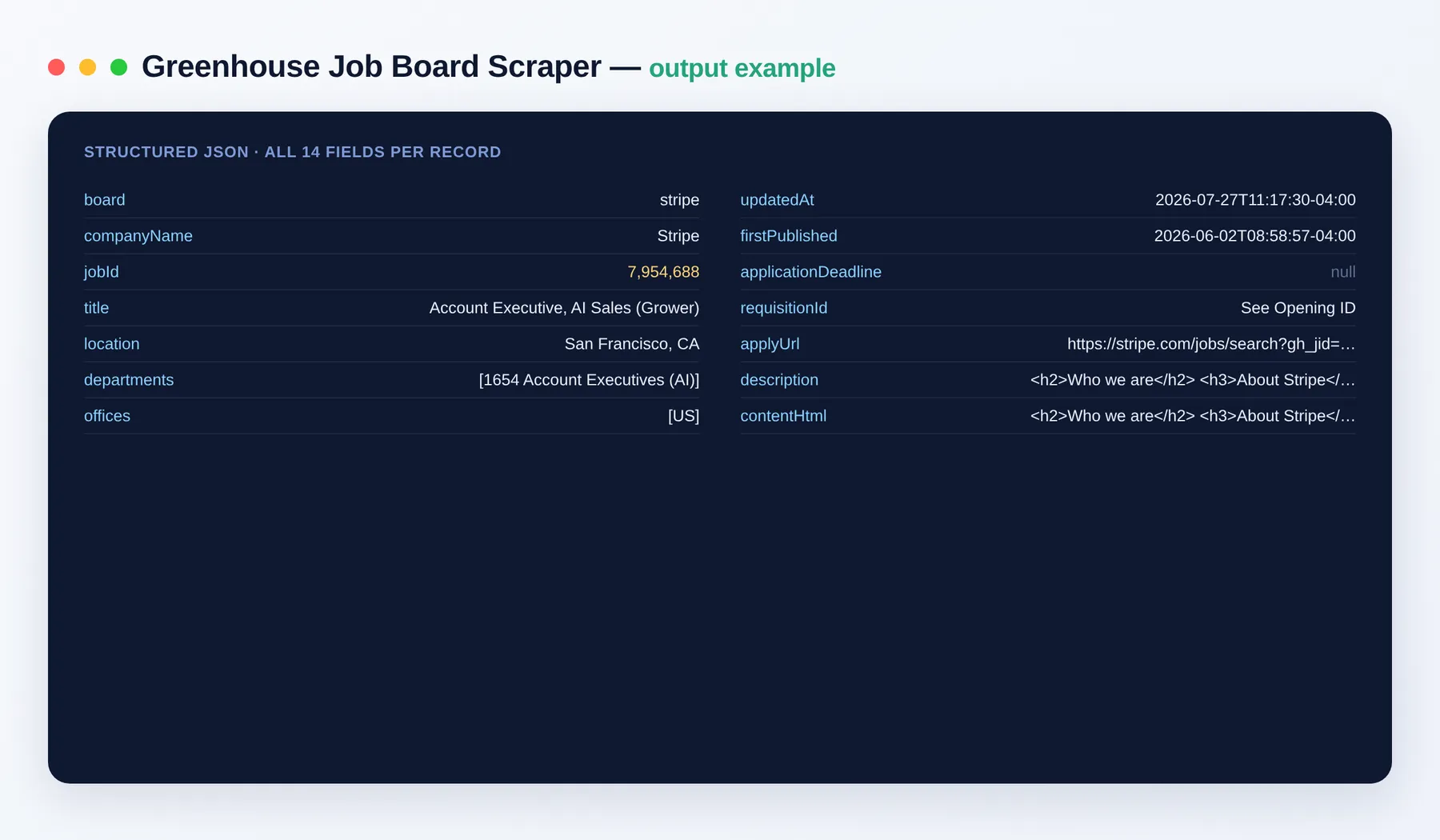
Each job is one clean record:
Output schema
| Field | Type | Description |
|---|---|---|
board | string | Greenhouse board token (slug) the job came from. |
companyName | string | Company name for the board. |
jobId | integer | Unique Greenhouse job posting ID. |
title | string | Job title. |
location | string | Job location as posted. |
departments | array | Department(s) the role belongs to. |
offices | array | Office(s) associated with the role. |
updatedAt | string (ISO date) | When the posting was last updated. |
firstPublished | string (ISO date) | When the posting was first published. |
applicationDeadline | string | Application deadline, when provided. |
requisitionId | string | Employer's internal requisition ID, when provided. |
applyUrl | string (URL) | Direct link to apply for the role. |
description | string | Full job description as plain text. |
contentHtml | string | Original job description HTML. |
Need more job data?
- Lever Job Board Scraper — jobs from Lever-hosted boards.
- Ashby Job Board Scraper — jobs from Ashby boards.
- RemoteOK Scraper — remote job listings.
- Indeed Scraper — jobs across employers.
FAQ
Where do I find a company's board token?
It's the slug in the careers URL — boards.greenhouse.io/stripe → stripe. You can paste the full URL too.
How many companies can I scrape?
As many as you like — add them all to companies and each is fetched in turn.
Do I need any setup or a login? No setup and no login. Just add the boards you want and run.
How does billing work? You pay only per job you get — no subscription. Our per-item price floors 20% below the cheapest comparable scraper.
What export formats are supported? JSON, CSV, Excel and XML, plus the Apify API for programmatic access.
Can I skip the long descriptions?
Yes — set includeContent to false for a lighter, faster run that omits the description text and HTML.
How fresh is the data?
Each run fetches live postings, so results reflect each board at the moment you run the actor. The updatedAt field timestamps every job.
Is it legal? The actor returns only publicly available job postings. You are responsible for how you use the data.
Can I connect it to my other tools? The Greenhouse Job Board Scraper can be connected with almost any cloud service or web app thanks to integrations on the Apify platform. It works with Make, Zapier, Slack, Airbyte, GitHub, Google Drive and many more, plus the Apify API, JavaScript/Python clients and MCP. Or use webhooks to trigger an action whenever a run finishes.
Related Actors
- Lever Job Board Scraper — jobs from Lever boards.
- RemoteOK Scraper — remote-first job listings.
- Indeed Scraper — jobs across many employers.
Notes
Original clean-room implementation. Returns only public job-posting data; you are responsible for how you use it. Not affiliated with or endorsed by Greenhouse.


