

Jobicy Scraper — Remote Jobs, Salaries & Categories by Keyword
Pricing
from $0.00075 / job scraped
Jobicy Scraper — Remote Jobs, Salaries & Categories by Keyword
Scrape remote job listings from Jobicy: job title, company, industry, type, level, location/region, salary, description and post date. Filter by keyword tag, region and industry. One row per job as JSON, CSV or Excel.

Jobicy Remote Jobs Scraper — Remote Job Listings, Salaries & Filters
Collect remote job listings from Jobicy with the Jobicy Remote Jobs Scraper. Filter by keyword, region and industry, and export each job's title, company, industry, type, level, location, salary range, description and publish date — one clean row per job. Results export as JSON, CSV, Excel or XML, or pull straight from the Apify API. Built for job boards, remote-work aggregators, recruiters and job-market research, it turns Jobicy's remote job feed into a structured, filterable dataset.
What is the Jobicy Remote Jobs Scraper?
The Jobicy Remote Jobs Scraper is a remote-jobs data extractor that turns Jobicy's worldwide remote job feed into clean, structured records. For each keyword tag you supply, it pulls the latest matching remote roles and returns a flat row per job with the company, industry, job type and level, location, salary range and a full description. Instead of copying listings by hand, you set your filters and get an export-ready dataset. It's built for teams that need a steady remote-jobs feed: job boards syndicating roles, aggregators blending sources, and recruiters and analysts tracking the remote market.
Features
- 🌍 Worldwide remote roles — remote jobs across many industries in one feed.
- 🔎 Filter by keyword, region & industry — target exactly the roles you want.
- 💰 Salary data — salary min, max, currency and period where the listing provides it.
- 🧾 Rich fields — title, company, logo, industry, job type, level, location and full description.
- 📅 Freshness — each job includes its publish date so you can track the newest roles.
- 🏷️ Multi-keyword runs — add several tags and the results are combined into one dataset.
- 📤 Clean exports — JSON, CSV, Excel or XML, or straight into a job board, sheet or dashboard.
What you get
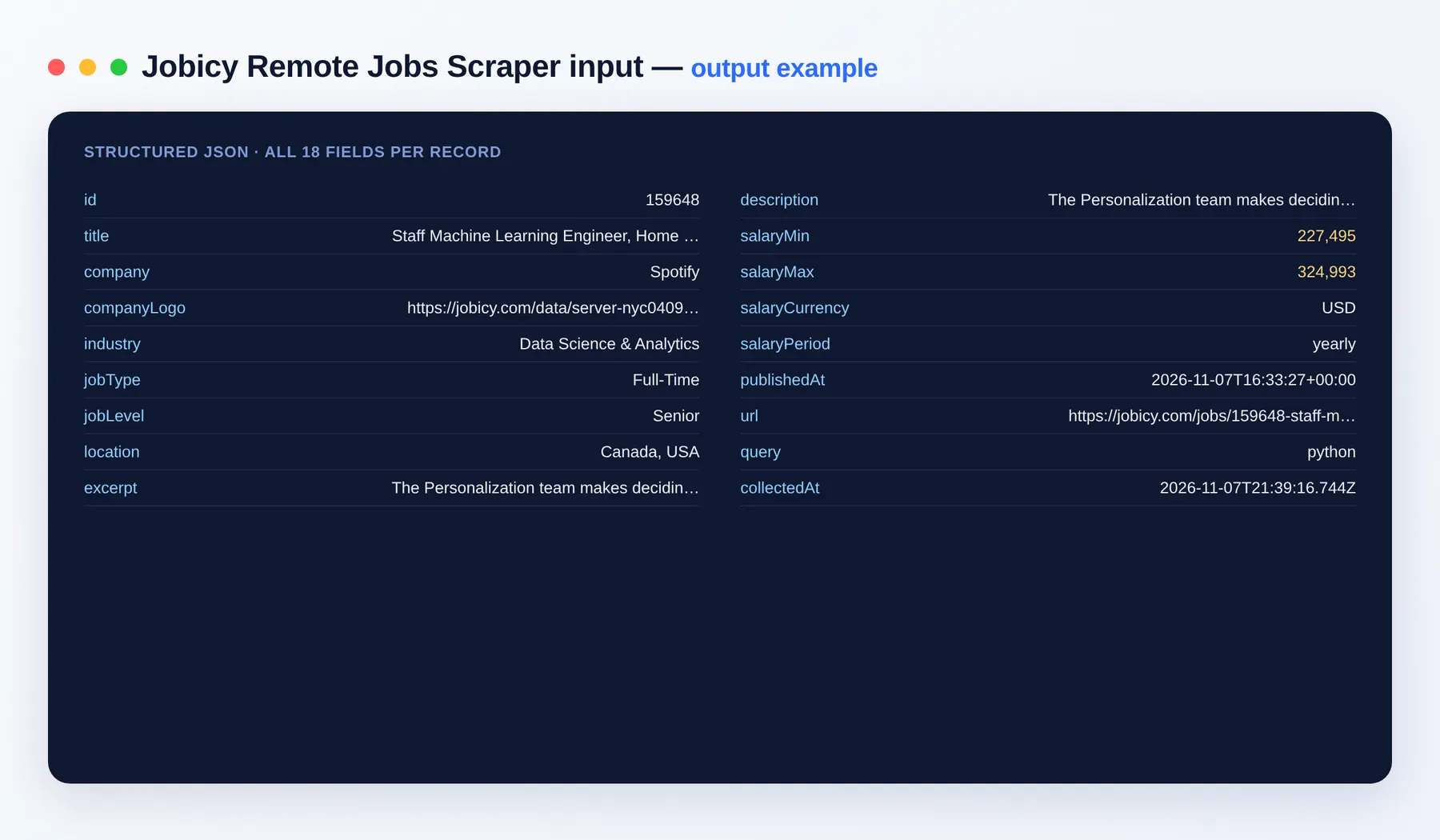
Each job becomes one structured JSON record:
Output schema
| Field | Type | Description |
|---|---|---|
id | string | Job ID. |
title | string | Job title. |
company | string | Hiring company. |
companyLogo | string (URL) | Company logo image. |
industry | string | Industry category. |
jobType | string | Employment type (Full-Time, Contract…). |
jobLevel | string | Seniority level. |
location | string | Location / region of the role. |
excerpt | string | Short job summary. |
description | string | Full job description. |
salaryMin | integer | Minimum salary where listed. |
salaryMax | integer | Maximum salary where listed. |
salaryCurrency | string | Salary currency. |
salaryPeriod | string | Salary period (year, month, hour). |
publishedAt | string (ISO date) | Publish date. |
url | string (URL) | Link to the job listing. |
How to scrape Jobicy remote jobs
- Open the Jobicy Remote Jobs Scraper and click Try for free.
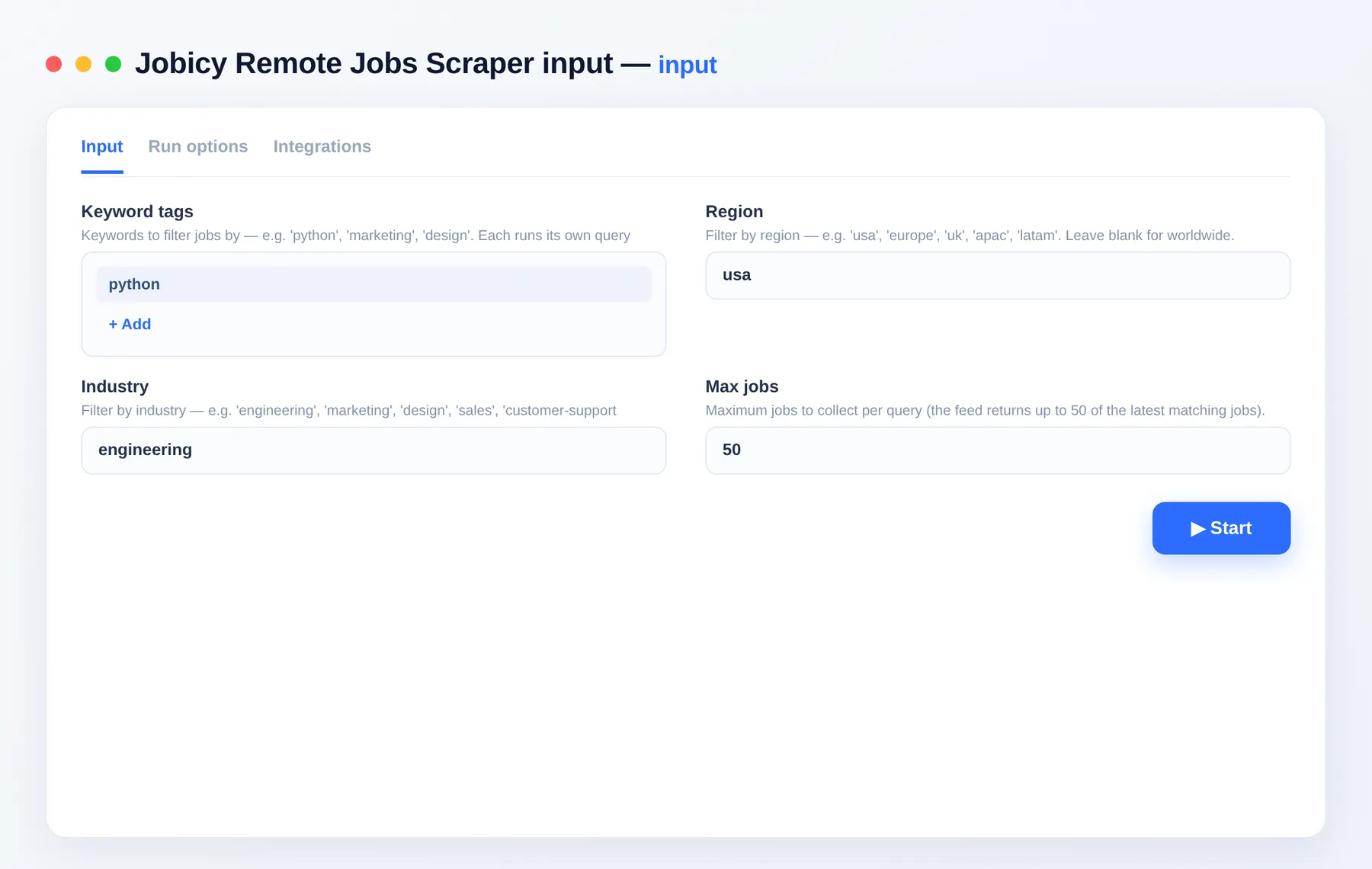
- Add one or more keyword tags to
searchTags(e.g.python,marketing) — each runs its own query. Leave empty for the latest jobs. - Optionally set a
georegion (usa, europe, uk, apac, latam…) and anindustry. - Set
maxItemsand click Run. - Export the results as JSON, CSV, Excel or XML, or read them from the Apify API.
Input
| Field | Type | Description |
|---|---|---|
searchTags | array | Keywords to filter jobs by; each runs its own query. |
geo | string | Region filter (usa, europe, uk, apac, latam…). |
industry | string | Industry filter (engineering, marketing, design…). |
maxItems | integer | Maximum jobs per query (the feed returns up to 50 latest matches). |
Use cases
- Remote job boards: feed fresh remote roles into your own site or niche board.
- Job aggregators: blend Jobicy with other job sources into a single unified feed.
- Recruiting & sourcing: track remote openings by keyword, region and industry.
- Salary & market research: analyze remote hiring trends, pay ranges and in-demand roles.
- Lead generation: identify companies actively hiring remotely in a target space.
- Newsletters & alerts: surface the latest remote roles for a specific niche on a schedule.
- Data pipelines: pull structured remote-job data into dashboards and automated reports.
Pricing
Pay-per-event: you're billed a small amount per job scraped — you only pay for the results you receive. See the Pricing tab for current rates.
FAQ
How do I scrape remote jobs from Jobicy?
Add your keyword tags to the searchTags field, optionally set a region and industry, and run the actor. You get one clean row per job with company, salary and description.
How many jobs can I get? The feed returns up to 50 of the latest matching jobs per query, so use several keyword tags to widen coverage across roles and niches.
Can I filter by region or industry?
Yes — set the geo and industry filters to narrow results to a specific market or sector.
Does it include salary data? Yes, when the listing provides it: salary min, max, currency and period are returned so you can analyze pay ranges.
Can I run several searches at once? Yes — add multiple keyword tags and the results are combined into one dataset, each row tagged with the query that produced it.
How fresh are the listings?
Each run pulls the latest matching jobs and includes a publishedAt date, so you can filter to the newest roles.
What export formats are supported? Structured JSON, CSV, Excel and XML — one row per job — plus programmatic access through the Apify API.
Can I connect this to other apps? The Jobicy Remote Jobs Scraper can be connected with almost any cloud service or web app thanks to integrations on the Apify platform. It works with Make, Zapier, Slack, Airbyte, GitHub, Google Drive and many more, plus the Apify API, JavaScript/Python clients and MCP. Or use webhooks to trigger an action whenever a run finishes.
Related Actors
Building a remote-jobs dataset? Combine the Jobicy Scraper with our other job-board actors:
- We Work Remotely Scraper — remote jobs from We Work Remotely.
- Arbeitnow Jobs Scraper — remote and EU jobs with filters.
- Jobs.cz Scraper — Czech job listings with salaries and companies.
- Karriere.at Scraper — Austrian job listings and employers.
- Instahyre Scraper — tech jobs with company and role data.
Notes
Original clean-room implementation. Returns publicly available remote job listings; you are responsible for complying with Jobicy's terms. Not affiliated with, endorsed by or sponsored by Jobicy.


