

Google Trends Scraper & API: pytrends Alternative
Pricing
from $1.33 / 1,000 search term results
Google Trends Scraper & API: pytrends Alternative
Google Trends API and pytrends alternative: interest over time, by region, city or US metro, rising related queries, keyword comparison, plus Trending Now searches by country with volume. Empty or refused terms are free. $1.90/1k terms, $0.80/1k trends. Unofficial.

Get Google Trends data for a whole list of search terms in one run: interest over time, interest by country, region, city or US metro area, and top and rising related queries. You can also pull Trending Now searches by country. Download it as JSON, CSV or Excel, or read it from Python or JavaScript through the Apify API.
$1.90 per 1,000 search terms on the free Apify plan, less on paid plans. Failed terms and terms with no data are free. Apify platform usage is covered by that price; Apify adds only its standard start event ($0.00005 per run at 1 GB).
Unofficial. Not affiliated with, endorsed by or sponsored by Google. Public data endpoints only; no login and no CAPTCHA solving.
Measured against the alternatives
Our board's Lab bench gives this Actor and the two most-used Google Trends Actors on the Apify Store the same two jobs, and checks each answer against facts read by hand on trends.google.com: python in the United States over 12 months (a timeline exists, Wyoming is in the state list, "python code" is among the top related queries), and python compared with java on YouTube search in the United Kingdom (a timeline exists, England is in the region list, the row says what it was compared with). Bench run 2026-10-09 21:40 UTC, build 0.1.16:
| This Actor | Popular fast alternative | Most-used Google Trends Actor | |
|---|---|---|---|
| Facts matched | 6 of 6 | 4 of 6 | 2 of 6 |
| Jobs finished with data | 2 of 2 | 2 of 2 | 1 of 2 (one run timed out at 300 s) |
| Fields filled | 88% | 75% | 50% |
| Run time per job | 11.1 to 14.9 s | 4.7 to 6.8 s | 103.7 s, and a 300 s timeout |
| Price per 1,000 terms in these runs | $1.74 | $21.00 (one term per run, start fee per run) | $1.00 |
The fast alternative is quicker, and the most-used Actor costs less per result when it finishes. Apify's public Store stats for the most-used Actor: 13,041 of its 22,909 runs in the last 30 days succeeded (57%), and 5,221 timed out (read 2026-10-10).
Google refuses some requests with HTTP 429. On 2026-10-09 it refused some of this Actor's too: the bench of 19:43 UTC (build 0.1.15) got data in 0 of 2 jobs. Build 0.1.16 waits out a 429 within a fixed time budget instead of stopping at the first one, and the board's daily health check of 2026-10-10 18:35 UTC returned data for all 3 test terms. The Actor never rotates IPs or cookies to get around a refusal, so expect refused terms on some runs; refused terms cost nothing.
Two jobs are a small sample, so read this as a measurement, not a guarantee. Later builds have not been benched again yet.
Coming from pytrends
The pytrends repository on GitHub is archived (read-only) and its last release, 4.9.2, dates from April 2023, so fixes for Google's changes and its HTTP 429 refusals no longer ship. This Actor returns the main pytrends outputs. It reuses one session and paces direct requests. Plain HTTP 429 responses permit bounded waits as described below; other explicit Google refusals stop source traffic. The Actor never rotates IPs or cookies to bypass them.
| pytrends | This Actor (input or output field) |
|---|---|
build_payload(kw_list, cat, timeframe, geo, gprop) | searchTerms, category, timeRange (same strings: today 12-m, now 7-d, today 5-y), geo, searchProperty |
| up to 5 terms on one shared scale | compareTerms: true |
interest_over_time() | interestOverTime (date, value, isPartial) |
interest_by_region(resolution=...) | interestByRegion, with regionResolution: COUNTRY, REGION, CITY or DMA |
related_queries() | relatedQueries.top and relatedQueries.rising (with growth and breakout) |
trending_searches(pn=...) | trendingGeos: Trending Now by country |
What you get
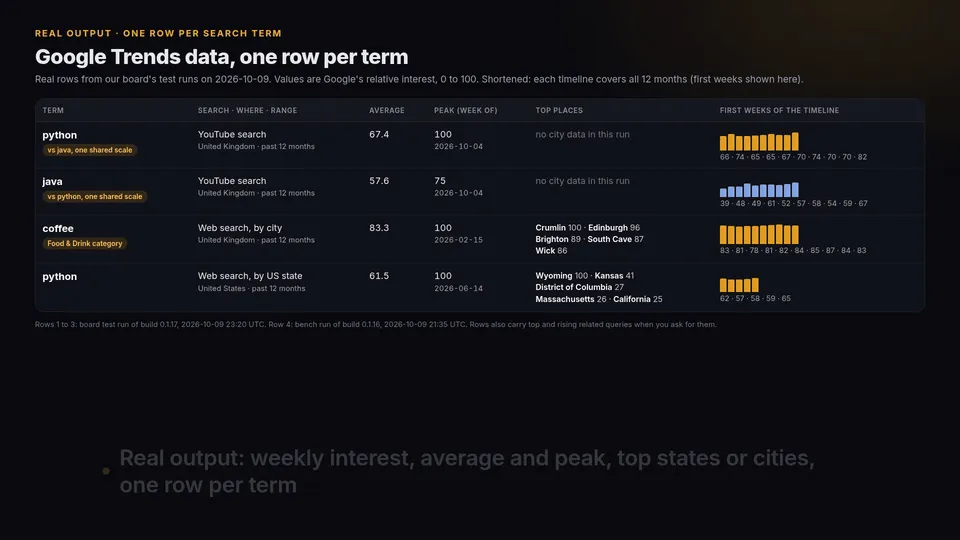
One item per search term, containing the outputs you select:
interestOverTime: UTC dates, relative values from 0 to 100,hasData,isPartial, plusaverageInterestandpeakInterest.interestByRegion: countries, regions, cities or US metro areas, highest interest first.relatedQueries: top and rising queries, with growth and breakout indicators.relatedTopics: top and rising topics when Google provides them. Google returned empty topic lists in all our cloud tests, so do not rely on this output. An empty answer is recorded inwarningsand is never filled with guesses.comparedWith: the other terms in the same comparison group (up to five).
One item per Trending Now search: country, start and end time, whether it is still trending, approximate search volume, increase, categories and related searches. Optional news links come from the public news request behind each trend's panel on Google's Trending Now page, not the RSS feed's ten newest trends.
Trending Now: trending searches by country
Put country codes in trendingGeos (US, GB, IN, or a region such as US-CA) and get Google Trends' Trending Now list as rows: one row per trending search, highest search volume first. Pick the window with trendingHours (4, 24, 48 hours or 7 days), keep only some categories with trendingCategories, cap each country with trendingMaxItemsPerCountry. You can run it alone (leave searchTerms empty) or in the same run as your terms. $0.80 per 1,000 trending searches on the free plan.
A row from a US run on 2026-10-12 (related searches shortened):
searchVolume is Google's rounded estimate. With trendingIncludeNews on (the default), the Actor asks for up to three news links for each selected output trend: news contains {title, url, source} objects, with the publisher URL as supplied by Google. Country/category filters and both row caps are applied before requesting news. News requests share serial batches of at most 25 trends and the same direct session and two-second pacing. If Google supplies no articles, a news request fails, or source traffic stops, news is an empty array; the collected trend still returns, with no extra news charge. Turning this option off skips news requests. Ready-made input: Trending searches today in the US and UK.
Example input
You can also paste Google Trends Explore URLs. The Actor reads their terms and filters and calls the data behind them without opening the page.
Reliability and diagnostics
No browser. Direct requests only, with one reused session, an honest hiver-google-trends/1.0 user agent, and a minimum two-second request gap. Terms run serially; an explicit comparison uses one shared timeline call for its group. maxConcurrency is accepted for compatibility but does not create parallel sessions. Network errors and server failures have at most three attempts on the same session.
On a plain HTTP 429 the Actor honours Retry-After (seconds or HTTP date), or waits 30 seconds then 60 seconds when it is missing or invalid. There are at most two such waits across the entire run, not per term. If Google's delay will not fit the 160-second source-traffic budget, the Actor stops rather than retrying early. That budget leaves time for result and summary writes within the 180-second health timeout; it also limits large batches, so split those into smaller runs. HTTP 403, redirects, CAPTCHA/consent responses, a missing bootstrap cookie, or an exhausted 429 budget stop further source traffic. No proxy or cookie rotation bypasses a refusal. Failed terms and Trending Now HTTP 400/parse failures become uncharged error rows with an explanatory final status; completed rows remain. Topics-only failures preserve the other outputs. This intentionally limits coverage on throttled IPs.
The run log and the RUN_SUMMARY key-value-store record report requests, estimated traffic, refusals, retries, rateLimitWaits, and waitSeconds. newsRequestedRows counts selected trends for which news was enabled, and newsRows counts trends with at least one returned news link. Terminal refusal metadata includes the endpoint and HTTP status, plus retryAfter when supplied; no tokens or cookies are recorded.
Board cloud test, 2026-10-08 (build 0.1.10, 1 GB): 11 terms and 40 Trending Now searches, 0 failed, 54.6 s, direct requests only (64 requests, 0 refused). This is a test run, not a production success rate.
Price
Free Apify plan: $1.90 per 1,000 search-term results and $0.80 per 1,000 Trending Now results. Higher Apify plans pay less, down to $1.33 and $0.56. Apify adds its standard start event ($0.00005 per run at 1 GB). A search-term result includes every part you selected. Failed terms and terms with no data are not charged. Selecting fewer parts makes runs faster but does not change the per-term price. maxItems caps the number of successful rows.
Apify platform usage is included in these prices. This build uses direct traffic only; the legacy proxy input is accepted but ignored.
Limits
- Trends values are relative (0-100) and sampled, not absolute search volumes. Repeated requests can differ slightly.
- Low-volume terms and narrow filters can return empty timelines, regions or related results. Read
warnings. - Related topics were empty in all our cloud tests (see above).
- Trending Now volumes are Google's rounded estimates.
- Cloud-verified on 2026-10-08, build 0.1.13:
compareTerms: truewith python + java,geo: GB,searchProperty: youtube; and coffee withgeo: GB,searchProperty: web,category: 71,regionResolution: CITY, all overtoday 12-m. The single board test returned 3 populated term rows, 0 failed terms, in 18.1 s at $0.0001 run cost, using direct requests only. Coffee returned city rows; the YouTube comparison returned timelines but empty city lists. This verifies these exact combinations, not every category, location or search property. News, Shopping, Images and DMA coverage remain unverified by this test. - Google can throttle or change these unofficial endpoints. A run can finish with partial results or error rows (not charged), and runtime depends on Google's limits.
- One direct session and serial jobs, regardless of the legacy
maxConcurrencyvalue. Large batches may hit the 160-second source budget and return partial results. - With
compareTerms, more than five terms are split into groups of five. Values are not comparable across groups.
FAQ
How many terms can I collect in one run?
As many as you list. Batch size and completion time depend on Google's limits. Start with a few terms, check warnings and RUN_SUMMARY, then scale up. Use maxItems to cap the number of rows.
Why are related topics empty?
Google returned empty topic lists in our tests even when timelines and related queries were populated. We keep Google's answer, add a warning, and never substitute guesses or change your filters.
Can I get YouTube, News or Shopping interest?
Yes. Set searchProperty to youtube, news, shopping, images or web. Availability varies by term and filters.
Can I compare keywords?
Turn on compareTerms. Up to five terms per group share Google's 0-100 scale, as when you type several terms into Google Trends.
Do I need a proxy?
No. This build uses direct requests only. It stops on source refusals rather than bypassing them with a proxy. The legacy proxy setting has no effect.
What if a run returns errors?
Check the input, warnings and RUN_SUMMARY. If that does not explain it, open an issue on this Actor's Issues tab with the input and the run link (never include tokens).


