
Google Trends Scraper & API — Fast, Pay Only for Data
Pricing
from $1.00 / 1,000 reports
Google Trends Scraper & API — Fast, Pay Only for Data
Google Trends API as JSON/CSV in seconds: interest over time, by country, region or city, related queries (top & rising) and Trending Now: today’s trending searches for any country. Compare 5 terms. No browser, a pytrends alternative. From $1.00 per 1,000 reports; failed searches free.
Pricing
from $1.00 / 1,000 reports
Rating
0.0
(0)
Developer

Data Fabrik
Maintained by CommunityActor stats
1
Bookmarked
14
Total users
8
Monthly active users
16 days ago
Last modified
Categories
Security
Limited permissionsShare
Get Google Trends data as clean JSON, CSV or Excel in seconds: interest over time, interest by country, region, metro or city, related queries (top & rising) and Trending Now (the daily trending searches of any country). Compare up to 5 terms on the same scale, filter by category and by Google property (Web, YouTube, News, Images, Shopping).
Google Trends has no official public API. This Actor works as a Google Trends API: it talks to the same endpoints as the Google Trends website, over plain HTTP — no headless browser — so a report takes a few seconds instead of minutes. Call it from the Apify API, Python, JavaScript, Make, Zapier, n8n or any MCP client, and get JSON back.
Price: from $1.00 per 1,000 reports ($2.50 on the Free plan; one report = up to 5 compared terms with all the data you selected) and from $0.20 per 1,000 trending searches ($0.30 on the Free plan). Empty and failed searches are free.
Why this scraper
- Fast: HTTP only, several searches in parallel; each starts on a direct connection and moves to its own residential IP if Google rate-limits it.
- Reliable: when Google rate-limits (HTTP 429), the Actor switches IP, refreshes its session and backs off automatically. If a search still runs out of time, the data already fetched is delivered (missing parts are listed in
errors) instead of being lost. - Fair billing: you pay per report that contains data. Searches that return nothing (too little search volume) or fail are saved in the dataset for transparency and not charged.
- Everything in one run: explore reports and Trending Now for several countries, in the same dataset. Open the Reports view for the reports and the Trending now view for the trending searches.
- Two output layouts: one nested report per search (for APIs and code), or flat rows (one row per date, region or query) ready for Excel, CSV and Google Sheets.
- Works with Google Trends URLs: paste any
trends.google.com/trends/exploreor/trendinglink. - AI-agent ready: usable from Claude, ChatGPT, Cursor and other MCP clients through the Apify MCP server.
How it works
On the Google Trends website, each chart (interest over time, interest by region, related queries) is loaded by a separate request, with a token given by the page. The Actor makes the same requests, over plain HTTP:
- It opens the "explore" page for your terms, place, period, category and search type, and gets the tokens of each chart.
- It fetches the charts you selected in
dataTypes, and turns them into clean JSON (dates in ISO format, one value per term). - When Google answers "too many requests" (HTTP 429), it waits, takes a new session and tries again; after 3 such errors on the direct connection it switches to a residential IP. If time runs out, the charts already fetched are delivered.
Trending Now uses the request behind the trends.google.com/trending page, for each country you list.
Quick start
- Click Try for free (or Start) on this page.
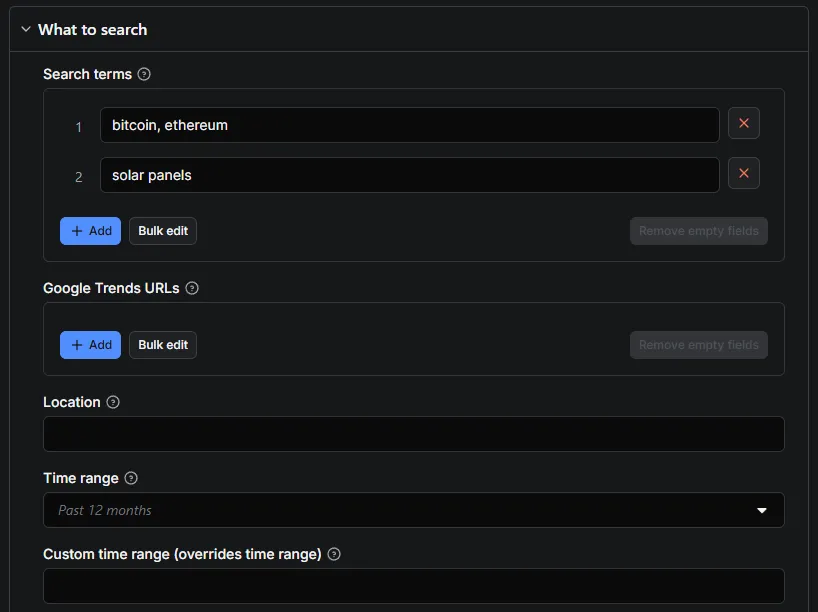
- In Search terms, type one term per line, or up to 5 terms separated by commas on one line to compare them.
- Pick a Location (empty = worldwide) and a Time range.
- Click Start. Reports appear in the Output tab in a few seconds and can be downloaded as JSON, CSV, Excel or HTML.
Already have a Google Trends link? Paste it in Google Trends URLs instead: the terms, place, period and category are read from it.
How it compares (public Apify Store data, October 2026)
| This Actor | Most-used Google Trends Actor | Typical alternatives | |
|---|---|---|---|
| Price for one keyword with interest over time, by region and related queries | from $0.0010 (Gold) to $0.0025 (Free) — one report | $0.001–$0.003 per dataset row (several rows per keyword) | $0.0004–$0.005 per row |
| Start fee per run | none | none | $0.005–$0.045 |
| Runs that fail or time out (last 30 days) | 5 %, none since the retry fix of 6 Oct | 43 % | 0–9 % |
| Browser | no (plain HTTP, 256 MB) | no | some use a headless browser (slower, 1–4 GB) |
| Failed or empty searches | free | — | varies |
| Trending Now | yes, from $0.20 per 1,000 | yes | separate Actor |
Figures come from the public Store API (stats.publicActorRunStats30Days) and each Actor's pricing page; they change, check before you decide.
What you can use it for
- Keyword research and SEO content planning (rising queries show what people start searching for).
- Product and market research: seasonality, regional demand, brand comparisons.
- News and social monitoring with Trending Now, every hour if you schedule it.
- Data science: long time series (2004 → today) for forecasting models.
- E-commerce: plan stock and promotions on seasonal peaks (
searchType: "shopping"), compare product names before a launch. - Local marketing: find the states, regions or US metro areas (DMA) where a product is searched most, to target ads.
- YouTube creators: compare video topics on YouTube search (
searchType: "youtube") rather than web search. - Finance and investing research: follow interest in a brand, a ticker or a crypto-asset as an alternative data signal.
- AI agents: give an assistant live search-interest data through the Apify MCP server.
Input
| Field | What it does |
|---|---|
Search terms · searchTerms | One report per line. Compare terms by putting up to 5 on one line, separated by commas: bitcoin, ethereum. Topic IDs such as /m/05p0rrx work too. |
Google Trends URLs · startUrls | Google Trends URLs. Terms, location, dates, category and search type are read from the URL. /trending URLs are also accepted. |
Location · geo | ISO country or region code (US, FR, US-CA). Empty = worldwide. |
Time range · timeRange | Past hour, 4 hours, day, 7 days, 30 days, 90 days, 12 months, 5 years, or since 2004. |
Custom time range (overrides time range) · customTimeRange | Exact period, 2025-01-01 2025-06-30 (or hourly 2026-09-01T00 2026-09-03T00). Overrides timeRange. |
Category ID · category | Google Trends category ID (0 = all), as in the cat= parameter of a Trends URL. |
Search type · searchType | web, images, news, shopping or youtube. |
Data to extract · dataTypes | Any of interestOverTime, interestByRegion, relatedQueries. |
Region detail · regionResolution | auto, COUNTRY, REGION, DMA (US metro areas) or CITY. |
Include low-search-volume regions · includeLowVolumeRegions | Also list regions with too little data (value null). |
Output layout · outputLayout | report (one item per search) or rows (flat, spreadsheet-friendly). Same price. |
Language · language | Google interface language (en-US, fr, de…) for labels and formatted dates. |
Time zone offset (minutes) · timezoneOffsetMinutes | Google's tz parameter (UTC+2 → -120). Default 0 = UTC. |
Countries · trendingGeos | Countries for Trending Now (US, GB, IN…). Empty = skip. |
Trending window · trendingHours | Trends started in the past 4, 24, 48 or 168 hours. |
Trending category · trendingCategory | Keep one category only (Sports, Technology, Politics…). |
Active trends only · trendingActiveOnly | Skip trends that have already ended. |
Max trending searches per country · trendingMaxItems | Max trending searches per country, sorted by search volume (0 = all). |
Proxy · proxy | Used when the direct connection is rate-limited. Residential proxies by default (included in the price). |
Try a direct connection first · directFirst | Try a direct connection first (default on): faster; switches to the proxy after 3 rate-limit errors. |
Parallel searches · maxConcurrency | Searches run in parallel (default 3). |
Max retries per request · maxRetries | Retries per request on rate limits (default 6). |
Example
Example: five brands, 5 years, by US state
Example: YouTube searches over an exact period
Example: from Google Trends links
Example: what a country searches right now
Schedule this one every hour for a near real-time feed of rising searches.
Time ranges, daily trends and resolution
Google picks the resolution from the length of the period:
timeRange | Period | One point per |
|---|---|---|
now 1-H / now 4-H | Past hour / 4 hours | minute |
now 1-d | Past day | 8 minutes |
now 7-d | Past 7 days | hour |
today 1-m / today 3-m | Past 30 / 90 days | day |
today 12-m / today 5-y | Past 12 months / 5 years | week |
all | Since 2004 | month |
customTimeRange follows the same rule: a few months give daily points, several years give weekly or monthly points.
Output

Report (one per search)
Values are Google's relative interest (0–100, where 100 is the peak for the chosen terms, place and period). When several terms are compared, regional values are the share of each term in that region (they add up to 100 %). The last point of a series can be isPartial: true (period still in progress).
Trending now (one item per trending search)
Flat rows (outputLayout: "rows")
One row per data point, ready for Excel, CSV and Google Sheets. Every row has recordType, searchTerm, geo, timeRange, category, searchType and term, then:
recordType | Other fields |
|---|---|
interestOverTime | date, formattedTime, value, isPartial |
interestByRegion | geoCode, geoName, lat, lng (city level), value |
relatedQuery | list (top or rising), rank, query, value, formattedValue, isBreakout, link |
The dataset has three ready-made views: Reports, Trending now and Flat rows.
Output fields
Report (type: "explore")
| Field | Meaning |
|---|---|
status, errors | ok when at least one chart has data; errors lists what is missing and why. |
searchTerm, searchTerms | Your line, and its terms. |
geo, timeRange, category, searchType | The search, as sent to Google. |
averages | Average interest of each term over the period. |
interestOverTime[] | date, timestamp, formattedTime, values (one value per term), isPartial. |
regionResolution, interestByRegion[] | Level of detail, then geoCode, geoName, values, leader (term with the highest share). |
relatedQueries | For each term, top and rising lists: query, value, formattedValue (Breakout for very fast growth), isBreakout, link. |
googleTrendsUrl, scrapedAt | The same search on Google Trends, and time of the run. |
regionResolutionFallback | boolean, only present when the requested regionResolution (CITY, DMA…) is not offered by Google for this place and the report used Google's default resolution instead |
notes | array of short human messages about the report (optional) |
Trending search (type: "trendingNow")
| Field | Meaning |
|---|---|
rank, title, geo | Position by search volume, the trend, the country. |
startedAt, endedAt, isActive | When the trend started, ended (or null), and whether it is still active. |
searchVolume, searchVolumeFormatted, increasePercentage | Approximate searches (200K+) and growth. |
relatedQueries, categories, categoryIds | Searches grouped in the trend, and its categories. |
exploreUrl, timeWindowHours | Link to explore the trend, and the window you asked for. |
status | ok, no-data (country has no trending list right now, free) or failed (free) |
Pricing
Pay per event, no subscription:
| Event | What you get | Free plan | Bronze | Silver | Gold+ |
|---|---|---|---|---|---|
keyword-report | One search line (single term or comparison of up to 5), with all the data types you selected | $2.50 | $1.50 | $1.20 | $1.00 |
trending-item | One trending search returned | $0.30 | $0.27 | $0.25 | $0.20 |
Prices are per 1,000 events.
Residential proxies and compute are included. Reports with no data and failed requests are free. Set a maximum cost per run in the Apify Console and the Actor stops cleanly when it is reached.
Good to know
- Related topics are not offered: Google withholds them from automated clients, so we would rather not sell something that comes back empty.
- Rate limits: Google Trends limits requests per IP. Keep
maxConcurrencyat 3–5 for large batches; the Actor handles retries for you. - Reports and trending searches in the same run share one dataset, and Apify views cannot filter rows: in the Console, the Reports view shows each trending search as a row of
undefined, and the Trending now view does the same with reports. Use the view that matches what you want, filter ontype(exploreortrendingNow) in your code or spreadsheet, or run them separately — Google Trends Trending Now Scraper does trending searches only. - Values are relative, not absolute search counts. Only Trending Now gives an approximate search volume.
- Legal: the Actor collects aggregated, public, non-personal statistics. You are responsible for using the data in line with Google's terms and the laws that apply to you.
Use it as an API
Run the Actor and get the results in one HTTP call (replace <YOUR_API_TOKEN> with your token from Apify Console → Settings → API & Integrations):
This endpoint waits up to 300 s; for more than ~15 keywords start the run asynchronously (/runs) and read the dataset when it finishes.
Python, with the official apify-client package:
JavaScript, with apify-client:
Use it from an AI agent (MCP)
Apify exposes every Store Actor through its MCP server. Add this URL to Claude, Cursor or any MCP client, then ask for "Google Trends interest for solar panels in Germany, last 12 months":
https://mcp.apify.com?tools=datafabrik/google-trends-scraper
The agent reads the input schema, runs the Actor and gets the dataset back. Billing is the same (per report, failed searches free). Use maxConcurrency: 1 and a small searchTerms list for interactive use so the first report lands in about 10 seconds.
Recipes
Seasonality chart (Python + pandas)
Compare more than 5 terms
Google scales each comparison on its own (100 = the peak of that comparison). To compare 12 terms, put the same anchor term in every line — iphone, galaxy, pixel, xiaomi, oneplus, then iphone, nokia, motorola, oppo, vivo… — and rescale each line by the anchor's values.
Rising searches to Slack every morning
- Save an input with your keywords and
dataTypes: ["relatedQueries"](ortrendingGeos) as a Task. - Add a daily Schedule.
- In the task's Integrations tab, send the results to Slack, a webhook, Make, Zapier or n8n, keeping the
risingqueries.
No code? Schedule the Actor in Apify Console (every hour, day or week) and send the dataset to Google Sheets, Slack, a webhook, Make, Zapier or n8n with the built-in integrations.
More ready-to-run scripts (Python and Node, CSV export, price tracking): github.com/data-fabrik/apify-examples.
Tips for large runs
- Group terms: one line of up to 5 terms is one report, charged once. It is also the only way to have several terms on the same scale.
- Parallel searches: keep
maxConcurrencyat 3–5. Higher values mostly make Google rate-limit sooner; the Actor slows down on its own. - Budget: set Maximum cost per run in the run options; the Actor stops cleanly when it is reached.
- Low-volume terms: widen the place (country instead of city) or the period, or use the topic id (
/m/…) of the term. - Run timeout: a keyword blocked by Google can take up to 150 s before it is given up (partial report kept). For 100+ keywords with
maxConcurrency: 3, raise the run timeout in Apify Console (Settings → Timeout) to at least 2 hours; Trending Now is fetched after the keyword reports.
FAQ
Is there an official Google Trends API? In 2025 Google announced an official Trends API in alpha, open to a limited number of testers. This Actor is available to anyone today and returns the same data as the website, as JSON, without a Google account.
Is it a pytrends alternative? Yes. pytrends runs from your own IP and often stops on HTTP 429 (too many requests). This Actor runs on Apify with rotating residential IPs and automatic retries, and needs no Python environment. Same data: interest over time, interest by region, related queries.
How many terms can I compare? Up to 5 per line, like on the website. Put any number of lines in searchTerms: each line is one report.
Can I get historical data since 2004? Yes: timeRange: "all", or any exact period with customTimeRange. Google picks the resolution from the length of the period, from minutes for the past hour to monthly points since 2004.
Why do I get null or no data for a term? The term has too little search volume for that place and period. Such reports are free. Try a wider region or a longer period.
Can I get search interest for a keyword by city? Yes: regionResolution: "CITY" (or DMA for US metro areas) gives interestByRegion per city, with coordinates. When Google offers no city level for that place, the report falls back to Google's default resolution and says so with regionResolutionFallback: true.
Can I scrape Google Trends for YouTube, News or Shopping? Yes, with searchType.
How do I monitor trends every day? Create a schedule in Apify Console with your input. Trending Now with trendingHours: "4" every hour gives a near real-time feed of what a country searches.
Does it work for any country and language? Any country or region code Google Trends accepts (US, FR, BR, US-CA…), and any interface language through language.
Why do the numbers change a little between two runs? Google Trends works on a sample of searches, so values can move by a few points from one request to the next, on the website too. Trends and peaks stay the same.
Can I get absolute search volumes? Explore reports give relative interest (0–100), like the website. Trending Now gives an approximate volume (200K+).
What does "Breakout" mean in rising queries? A query whose searches grew by more than 5,000 % over the period. It comes with isBreakout: true.
Can I export to Excel or Google Sheets? Yes: choose outputLayout: "rows" and download the dataset as CSV or Excel, or connect Google Sheets in the Integrations tab.
More from Data Fabrik
| Actor | What you get |
|---|---|
| Google Trends Trending Now Scraper | What a country is searching right now, with search volume and related queries |
| Google Flights Scraper & API | Every flight for a route and date, price insights and the cheapest dates |
| Google Hotels Scraper & API | Hotel prices, ratings and every booking site's offer for any city or hotel |
| YouTube Transcript Scraper | Full text and timed captions of videos, Shorts, playlists and whole channels |
| YouTube Search Scraper | YouTube search results by keyword, with views, channel, duration and filters |
| YouTube Channel Videos & Shorts Scraper | Every video, Short and live stream of a channel, newest or most popular first |
Support
Found a bug or need a field? Open an issue on the Actor's Issues tab — it is monitored daily and fixes ship fast.
If this Actor saves you time, a short review on its Store page helps other users find it. If something is not right, open an issue first so it can be fixed.


