

Audio & Video Transcriber: Speech to Text with Whisper
Pricing
from $5.10 / 1,000 audio minutes
Audio & Video Transcriber: Speech to Text with Whisper
Speech to text and audio transcription with Whisper: MP3, video and other files from URLs, plus podcast transcription from RSS feeds, into text, SRT subtitles and WebVTT captions. Auto-detects 99 languages, translates to English, returns only new episodes. Pay per audio minute; failed files free.
Pricing
from $5.10 / 1,000 audio minutes
Rating
0.0
(0)
Developer

Michael Costa
Maintained by CommunityActor stats
0
Bookmarked
5
Total users
1
Monthly active users
21 days ago
Last modified
Categories
Share
What does Audio & Video Transcriber do?
Audio & Video Transcriber is a speech to text tool: it transcribes audio and video to text. Give it file links, podcast feeds or another actor's dataset of links; you get the full text, timed segments, SRT subtitles, WebVTT captions and optional word timestamps. It runs Whisper inside the actor, so nothing is sent to a third-party transcription service.
It detects the language by itself (Whisper knows 99) or uses the one you pick, and can translate the speech into English. Its accuracy is measured and published. It is not a YouTube or TikTok downloader: it needs direct links to media files, or a podcast's feed.
Input fields · API · Use it from Claude, ChatGPT or Cursor (MCP)
Jump to: Monitor a podcast · Fields · Price · How to use · Accuracy · Input · Switching from another actor · Output · From a dataset · AI agents (MCP) · Limits · FAQ
Try it in one click: the input comes pre-filled with two short public-domain recordings from Wikimedia Commons (Neil Armstrong on the Moon, 24 seconds, and a reading of The New Colossus, 38 seconds). That's 2 audio minutes, or about $0.01 (2 × $0.006, plus $0.00005 for the run start). Then replace them with your own files or feeds.
Monitor a podcast: transcribe each new episode once, and send it to Slack, email or a webhook
With Only new episodes since the last run on, a scheduled run transcribes each new episode of your feeds once and skips everything it has already done. A run with no new episode costs only the $0.00005 start fee.
- Put the podcast's feed in Podcast feeds (
feeds: an RSS or Atom feed URL, or the podcast's website that links its feed), clear Audio and video file URLs (mediaUrls), set Episodes per feed (maxEpisodesPerFeed, the newest N to consider; default 1) and turn on Only new episodes since the last run ("onlyNewEpisodes": true). Click Start: this first run transcribes the newest episodes and remembers them. - Click Save as a new task (top right of the actor page). The memory is kept per feed and per speech model, language and output language, so the task keeps skipping what it has done. An episode that failed is tried again next time, not forgotten.
- In Apify Console, open Schedules, click Create new, set how often in Schedule setup (for example daily at 08:00, or hourly for a daily show), then Add your task.
- On the task, open the Integrations tab and pick where the transcripts go:
- Slack: click Configure, sign in, pick the workspace and channel, and the "run succeeded" event. A
useful message:
{{resource.statusMessage}}(how many files and audio minutes were transcribed, or "no new episodes") and a link,<https://console.apify.com/storage/datasets/{{resource.defaultDatasetId}}|new transcripts>. - Gmail: click Connect with Google, set the subject and body, and attach the dataset. It sends after each successful run.
- HTTP webhook: event
ACTOR.RUN.SUCCEEDED, your URL. Apify POSTs{"eventType": ..., "resource": {...}};resource.defaultDatasetIdis the run's dataset, andGET https://api.apify.com/v2/datasets/<defaultDatasetId>/items?format=json(with your API token) returns the new transcripts, withtext,srt,vttand the episode fields.
- Slack: click Configure, sign in, pick the workspace and channel, and the "run succeeded" event. A
useful message:
Apify's integrations fire after every successful run, including quiet ones: a quiet run's dataset is empty. Only feeds have this memory: links in Audio and video file URLs are transcribed (and charged) on every run.
What data does Audio & Video Transcriber return?
| Field | Example | Notes |
|---|---|---|
text | and I'll step off the land now. It's one small step for man. ... | A pause of 2 seconds or more starts a new paragraph. |
segments | [{"start": 3.47, "end": 5.47, "text": "and I'll step off the land now."}, ...] | Timed segments, in seconds. |
words | [{"start": 3.47, "end": 3.95, "word": "and", "probability": 0.378}, ...] | Every word, timed, with the model's confidence. Only with Include word timestamps on, else null. |
srt | 1\n00:00:03,470 --> 00:00:05,470\n... | SRT subtitles. |
vtt | WEBVTT\n\n00:00:03.470 --> ... | WebVTT captions. |
language, languageProbability | en, 0.772 | Detected (or the one you picked). |
durationSeconds, billedMinutes | 24.113, 1 | What the file cost: transcribed seconds rounded up to the minute. |
episodeTitle, published, feedTitle | null | Podcast episodes only; null for file links. |
source | url | url (Audio and video file URLs), podcast (a feed's episode) or dataset (a link from Audio links from a dataset). |
fileName, container, audioCodec, hasVideo | Armstrong_Small_Step.ogg, ogg, vorbis, false | What the file was. |
wordCount, segmentCount | 18, 3 | |
truncated, truncatedReasons | false, [] | Set when less than the whole file was transcribed, and why. |
One result per file. The full list is under Output.
How much does it cost to transcribe audio and video?
You pay per audio minute transcribed, rounded up per file (a 3 min 10 s episode is 4 minutes), plus $0.00005 each time a run starts:
- Base model: $6.00 per 1,000 audio minutes ($0.36 per hour of audio).
- Small model: $15.00 per 1,000 audio minutes ($0.90 per hour), for harder audio.
What that comes to:
- The example below: 2 files, each under a minute, so 2 billed minutes × $0.006 = $0.012, plus the start fee.
- A month, for example: one daily podcast with 60-minute episodes on the Base model: 30 × 60 = 1,800 minutes × $0.006 = $10.80 ($27.00 on Small); days with no new episode cost only the start fee.
- Caps: Max files per run and Max minutes per file in the input, and Maximum cost per run in the run options: a file that would go past it is transcribed only as far as the budget pays for, and no later file is downloaded. The run stops cleanly at whichever comes first.
Word timestamps cost nothing extra: the price per minute is the same with Include word timestamps on.
Never charged: the transcripts themselves (the dataset items), files it couldn't download or decode, files with no audio track, and recordings with no speech in them. A file cut short (by your limits, a damaged file, or the run's timeout) is charged only for the part that was transcribed.
How to transcribe audio or video to text
- Open Audio & Video Transcriber and click Try for free (or Start if you're signed in).
- Put direct links to your files in Audio and video file URLs, podcast feeds in Podcast feeds, or pick a dataset of links (e.g. another actor's output) in Audio links from a dataset.
- Optional: pick the Speech model (Base or Small), the Language, whether to translate into English (Output language), and turn on Include word timestamps if you need each word's time.
- Click Start, then open the Output tab and export as JSON, CSV or Excel.
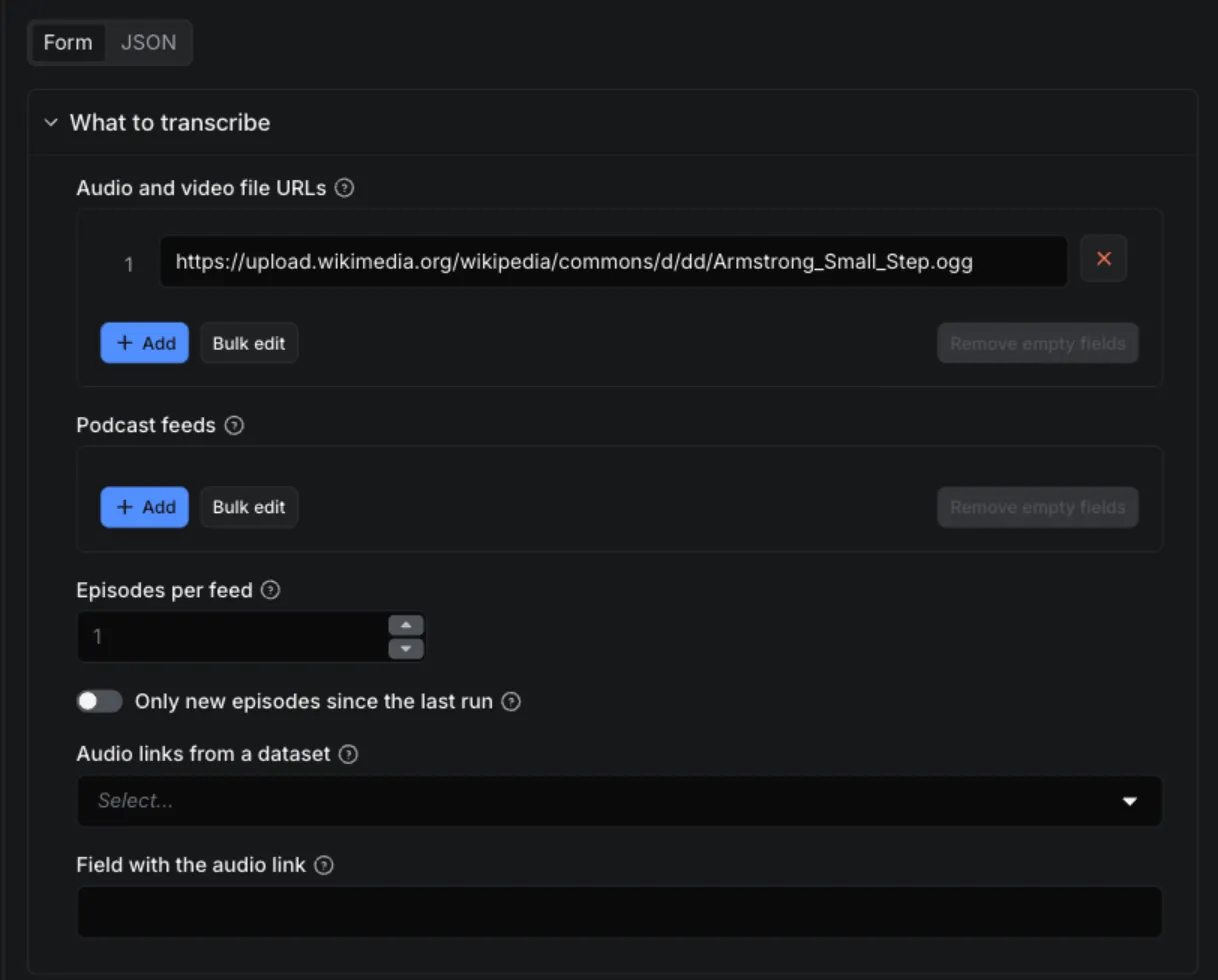
Example: two short public-domain recordings
The pre-filled input:
The first file's result (real output from a local run on 2026-09-25; srt, vtt and the podcast fields left out):
The transcript isn't perfect ("One giant leap for man." where Armstrong said "mankind"): the 1969 recording is noisy. For hard audio, try the Small model.
How accurate is Audio & Video Transcriber?
Measured on a fixed, openly licensed speech set, with the actor's own decoding and settings (int8, beam 5, voice-activity filter on, one CPU thread as on Apify), language set to English. Word error rate (WER) is the share of words wrong, missing or added; lower is better.
| Model | test-clean WER (clean read speech) | test-other WER (harder speakers) | Speed on one core of an Apple M1 Pro |
|---|---|---|---|
| Base | 4.2% | 9.8% | 7-8x real time |
| Small | 3.3% | 6.7% | about 3x real time |
Measured on 2026-09-26 (faster-whisper 1.2.1, CTranslate2 4.8.2). Word timestamps don't change the text: 4.3% and 9.8% on Base with them on. Speed on Apify's cores differs; the Base model transcribed a 16-minute chapter in 148 s there, start-up included.
The set: 200 utterances (30 minutes) of LibriSpeech test-clean and 165 (20 minutes) of test-other (the harder speakers), five from each speaker's first chapter. LibriSpeech is read audiobook speech from LibriVox, by V. Panayotov, G. Chen, D. Povey and S. Khudanpur (ICASSP 2015), released under CC BY 4.0 at openslr.org/12.
What it doesn't tell you: read audiobooks are easier than most real recordings. Podcasts with crosstalk, phone
calls, noisy rooms, strong accents and non-English speech will have more errors, and this set doesn't measure them.
Both sides are normalised the same way before scoring (lowercase, punctuation removed, numbers spelled out), more
simply than in OpenAI's Whisper paper, so spelling variants such as "counselled"/"counseled" count as errors: compare
these numbers with each other, and with published ones only roughly. The script, the list of files with their
checksums and every transcript are in the actor's benchmark/ folder, so the run can be repeated.
Input
| Field | What it does |
|---|---|
Audio and video file URLs (mediaUrls) | Direct links to the files, one per line (up to 1 GB each). |
Podcast feeds (feeds) | RSS or Atom feed URLs, or a podcast's website that links its feed. |
Episodes per feed (maxEpisodesPerFeed) | How many of the newest episodes to transcribe per feed (default 1). |
Only new episodes since the last run (onlyNewEpisodes) | Skip episodes already transcribed by an earlier run. |
Audio links from a dataset (datasetId) | One of your datasets, e.g. another actor's output: each item's media link is transcribed. First 10,000 items and 1,000 distinct links at most. |
Field with the audio link (datasetUrlField) | The item field (or dotted path, e.g. media.url) with the link. Empty: found automatically (see below). |
Speech model (model) | Base (fast, clear speech) or Small (more accurate on accents, noise and non-English). |
Language (language) | Detect automatically, or pick one of 46 languages. |
Output language (task) | Transcribe in the spoken language, or translate into English. |
Include timed segments / SRT / WebVTT (includeSegments, includeSrt, includeVtt) | Turn each output on or off (all on by default). |
Include word timestamps (includeWordTimestamps) | Add the words list: each word's start, end and confidence (off by default; same price, slower). |
Max minutes per file (maxMinutesPerFile) | Transcribe at most this much of each file, from the start (default 180, up to 300). |
Max files per run (maxResults) | Cap the number of files transcribed. |
Links to YouTube, TikTok, Instagram, Spotify, SoundCloud, Vimeo and other platforms' pages don't work, by design: they're pages, not files, and those platforms don't allow downloading the media behind them. The same goes for direct links to those platforms' media servers (googlevideo.com, tiktokcdn.com, fbcdn.net, video.twimg.com and the like). Use a direct link to the audio or video file where its owner publishes it.
Dropbox and Google Drive share links don't work either: those services' robots.txt doesn't allow automated downloads
from them. A dl.dropboxusercontent.com link to the file works, as does any public web host or an Apify key-value
store record. The input form refuses these links, and platform links, before a run starts. So it does streaming
playlists (.m3u8, .m3u: link the file itself), paths on your own computer (/Users/..., C:\...: upload the file
somewhere public first) and, in feeds, Apple Podcasts, Spotify and YouTube pages, which aren't feeds. A podcast feed
pasted into mediaUrls is read as a feed, as if you had put it in feeds.
Switching from another transcription actor?
Audio & Video Transcriber uses the input names other Whisper transcription actors use where it can, so most API calls and saved inputs carry over by changing only the actor id:
| If you used | In Audio & Video Transcriber | Notes |
|---|---|---|
mediaUrls | mediaUrls | Same: direct links to audio or video files. Platform pages (YouTube, TikTok and the like) are refused, see above. |
rssFeedUrls | feeds | rssFeedUrls is read too. A podcast's website that links its feed also works. |
maxEpisodesPerFeed, onlyNewEpisodes | Same names | Only-new needs no monitor name: what was transcribed is remembered per feed, in your own account. |
model: base or small | Same values | There's no medium; small is the most accurate model here (word error rates above). |
language, blank for automatic | language, auto by default | Blank works too. |
translate: true | task: translate | translate is read too. |
outputFormats (text, segments, SRT, WebVTT) | Text always; includeSegments, includeSrt, includeVtt | All on by default; turn off what you don't need. Markdown and RAG chunk formats aren't produced. |
wordTimestamps | includeWordTimestamps | Same price, about 10% slower on Base. |
| Skip files longer than N minutes | maxMinutesPerFile | Different: a longer file is transcribed up to N minutes and cut there (charged for what it covers), not skipped. |
| A cap on billed minutes per run | Maximum cost per run in the run options | The run stops cleanly when the next minute wouldn't fit. maxResults caps the number of files. |
| Price per audio minute | $0.006 (Base) or $0.015 (Small) per audio minute | Files that fail, have no speech or no sound aren't charged. See the price. |
Output
One result per file. Fields that don't apply are null (the podcast fields, for a file from Audio and video file
URLs).

-
text: segments joined by spaces; a pause of 2 seconds or more starts a new paragraph. -
words(with Include word timestamps on): every word in order, with punctuation attached as spoken in the text (a hyphenated word can come in two pieces, e.g.airand-bridged), itsstartandendin seconds andprobability, the model's confidence (0-1). The same file with word timestamps on (real output from a local run on 2026-09-26, first words):"words": [{"start": 3.47, "end": 3.95, "word": "and", "probability": 0.378},{"start": 3.95, "end": 4.11, "word": "I'll", "probability": 0.57},{"start": 4.11, "end": 4.29, "word": "step", "probability": 0.491},{"start": 4.29, "end": 4.51, "word": "off", "probability": 0.65},{"start": 4.51, "end": 4.75, "word": "the", "probability": 0.963},...] -
billedMinutes: what this file cost,transcribedSecondsrounded up to the minute. -
truncatedandtruncatedReasons: set when less than the whole file was transcribed (Max minutes per file, your maximum cost per run, the run's timeout, or a damaged file) or the file was damaged. -
idis stable across runs (the episode's for podcast episodes, else the file URL's), so you can deduplicate. -
The
RUN_STATSrecord (in the run's key-value store) lists every file's outcome, including the ones that gave no transcript and why, and the audio minutes charged.
Run it on a schedule, or from your own code
- Save your input as a task and add it to a schedule (Console → Schedules), as in Monitor a podcast above.
- Collect results: download the dataset as JSON, CSV or Excel; fetch the latest run's results from the
API
(
GET https://api.apify.com/v2/actor-tasks/<task id>/runs/last/dataset/items?status=SUCCEEDED&format=csv, with your API token); let a webhook tell your system when a run succeeds; or connect it to Make, Zapier or n8n through Apify's integrations.
Transcribe the links in another actor's dataset
Pick the dataset in Audio links from a dataset (datasetId), for example the output of
RSS & Atom Feed Reader after you've filtered a feed's episodes by
keyword, or of another actor that lists audio files. Each item's link is transcribed, in the dataset's order, once
(duplicates, and links already in Audio and video file URLs, are dropped); results have "source": "dataset".
- Which field: name it in Field with the audio link (
datasetUrlField), or a dotted path such asmedia.url. The value can be a URL, an object with aurl, or a list of them, like RSS & Atom Feed Reader'senclosures(the first audio or video one is used). Left empty, the first of these fields that has a link is used on each item:audioUrl,audio_url,audio,mediaUrl,media_url,enclosures,enclosure,enclosureUrl,enclosure_url,videoUrl,video_url,fileUrl,downloadUrl. A page link such asurlis never guessed. - Access: the run reads the dataset with your own account's access (the token Apify gives your run), read-only, and only the field it needs. It must be your dataset or one shared with you.
- Limits: the first 10,000 items and 1,000 distinct links per run.
RUN_STATS.datasetcounts the items read, links found, items without one, values that weren't web addresses, and duplicates. - In a pipeline: in the other actor's task, add an integration "run another actor" (or a webhook) on
ACTOR.RUN.SUCCEEDEDthat starts this one with{"datasetId": "{{resource.defaultDatasetId}}"}. - A dataset that can't be read, or has no links in the field, fails that input with the reason (it names the fields its first item has); your other inputs still run. Platform links in it are refused like any other (see Input).
Can I use Audio & Video Transcriber from an AI agent (MCP)?
Yes, through Apify's MCP server, from Claude, ChatGPT, Cursor or any other MCP client. Add this to your client's MCP configuration (or let the agent find it with the server's actor search); your client signs you in to Apify:
To use an Apify API token instead of signing in, add
"headers": {"Authorization": "Bearer <APIFY_TOKEN>"} next to url.
The agent passes direct file links, e.g.
{"mediaUrls": ["https://example.com/interview.mp3"], "includeSrt": false, "includeVtt": false}, to get just the
text and segments back. Transcription takes a while (see Limits), so allow for it.
Who it's for
Podcast producers and networks who need transcripts and captions for every episode, media-monitoring and research teams who search what was said on shows they follow, and anyone with recordings at public links.
Why this one?
- You only pay for audio it transcribed. Charged per started minute of audio, per file. Files it couldn't download or decode, files with no audio track, and recordings with no speech in them are free. A file cut short is charged only for the part that was transcribed, and the result says why it stopped.
- Podcast monitoring built in. Feed in, transcripts out, newest first; "only new episodes since the last run" remembers what it did in your own account. An episode that failed is tried again next time, not forgotten.
- Captions ready to use. SRT and WebVTT with correct timestamps, plus the timed segments as JSON and the plain text with paragraph breaks at pauses. Word-level timestamps on request, at no extra charge.
- Accuracy you can check. WER 4.2% (Base) and 3.3% (Small) on LibriSpeech test-clean, 9.8% and 6.7% on test-other, measured with the actor's own settings on 2026-09-26 (see How accurate is it?), with the script to repeat it.
- Chains with other actors. Point it at a dataset of links (
datasetId) and it transcribes each one. - Any common format. MP3, M4A/AAC, WAV, FLAC, OGG/Vorbis, Opus, WebM, MP4, MOV, MKV and most others ffmpeg reads. For video, only the sound is used.
- Your maximum cost per run is a hard cap. Minutes are reserved before a file is transcribed; when the budget covers only part of a file, only that part is transcribed. Nothing is transcribed that you'd not be billed for.
- Safe with untrusted files. Each file is decoded and transcribed in its own process with a time and memory limit. One bad file never stops the others.
- Polite. It identifies itself honestly (User-Agent
HumbleEchidnaApify), follows each site's robots.txt (read once per site per run), including opt-outs for AI crawlers (GPTBot, CCBot, ClaudeBot, Google-Extended and the like), and only requests public web addresses on the standard ports (80 and 443).
Limits
- Size and length: up to 1 GB per file and 8 GB of downloads per run; up to 300 minutes of each file.
- Time: transcription runs on one CPU core (runs use 4 GB of memory, which Apify pairs with one core; more cores barely speed Whisper up here). As a rough guide, allow a run timeout of at least a third of the audio's length for Base and about the audio's length for Small. If the run's timeout comes before the end of a file, you get the transcript up to that point, charged for what it covers.
- Accuracy depends on the recording. Clear speech is transcribed well by Base; for accents, background noise, overlapping speakers or non-English speech, use Small. There's no speaker labelling (who said what).
- Word timestamps come from Whisper's own alignment, not a separate aligner: good for highlighting, search and cutting clips at word boundaries, not frame-exact. They make transcription about 10% slower (same price).
- Automatic language detection listens to the start of the file. If a recording opens with music, or is only a few words long, pick the language.
FAQ
Why does the transcript have mistakes?
Try the Small model, and pick the language instead of detecting it. Music, crosstalk and poor microphones make any speech model guess; names and jargon are the most common errors.
How accurate is it?
On clean read English, Base makes about 4 errors per 100 words and Small about 3 (word error rate 4.2% and 3.3% on LibriSpeech test-clean, measured on 2026-09-26); on harder speakers (test-other), about 10 and 7 (9.8% and 6.7%). See How accurate is Audio & Video Transcriber? for the method and why real-world recordings usually score lower.
Does it give word-level timestamps?
Yes: turn on Include word timestamps ("includeWordTimestamps": true). Each result then has a words list with
every word's start and end in seconds and the model's confidence. The price per minute doesn't change; the run takes
longer (about 10% on the Base model).
Can I transcribe the output of another actor?
Yes: pick its dataset in Audio links from a dataset (datasetId). See
Transcribe the links in another actor's dataset.
Why did a file come back with nothing, and was it charged?
It wasn't charged. Look it up in RUN_STATS: noSpeech (silence, or sound without a voice), noAudio (a video
without sound), undecodable (not a media file, or corrupt), unsupportedLink (a web page or a platform link
instead of a file), blockedByRobots / optedOutOfAI (the site's robots.txt doesn't allow us), tooLarge, or
failed with the reason.
Can it transcribe YouTube videos?
No. It only downloads files at links you give it, and doesn't fetch media from video or social platforms.
Can I get only new podcast episodes since my last run?
Yes: turn on Only new episodes since the last run. See Monitor a podcast above.
Something that used to work now fails. Why?
The run log names the file and what went wrong, and every other file in the run is unaffected. Please open an issue with the input you used.
Is it legal to transcribe audio and podcasts?
You must have the right to transcribe what you submit: your own recordings, public-domain or openly licensed media, or content whose owner allows it. The actor downloads only the files and feeds you list, as a logged-out visitor, and honours each site's robots.txt, including its opt-outs for AI crawlers. Podcast feeds are published for machines to read; the episodes in them are still their owners' work. Transcripts can contain personal data if the recordings do. The actor keeps nothing: files are deleted as soon as they're transcribed, and the text goes only to your own dataset. Speech recognition is Whisper (MIT licence, OpenAI) run by faster-whisper and CTranslate2 (MIT); decoding is ffmpeg.
Related actors
| Actor | Use it when |
|---|---|
| RSS & Atom Feed Reader | You want to list a feed's episodes (titles, dates, audio links) and filter them by keyword before you pay to transcribe them; then pass its dataset in Audio links from a dataset. |
| Dataset Transformer | You want just the text and episode fields, as CSV. |
Feedback and support
Found a bug, or need a field or format that isn't here? Open an issue on the Issues tab with the input you used.
Versions
Current version: 1.2. See the Changelog tab for what changed in each version.


