

Adobe Stock Scraper: Contributor Downloads, Views & Keywords
Pricing
from $0.30 / 1,000 assets
Adobe Stock Scraper: Contributor Downloads, Views & Keywords
Scrape Adobe Stock by keyword, contributor, asset ID, similar image or pasted link, with the site's filters and sorts. Each asset: downloads, views, keywords, contributor, size, file type, category, AI flag, release, list price, previews. Past 10,000 results in disjoint parts. No login. Misses free.
Pricing
from $0.30 / 1,000 assets
Rating
0.0
(0)
Developer

Hyperbach
Maintained by CommunityActor stats
0
Bookmarked
9
Total users
3
Monthly active users
6 days ago
Last modified
Categories
Features
Share
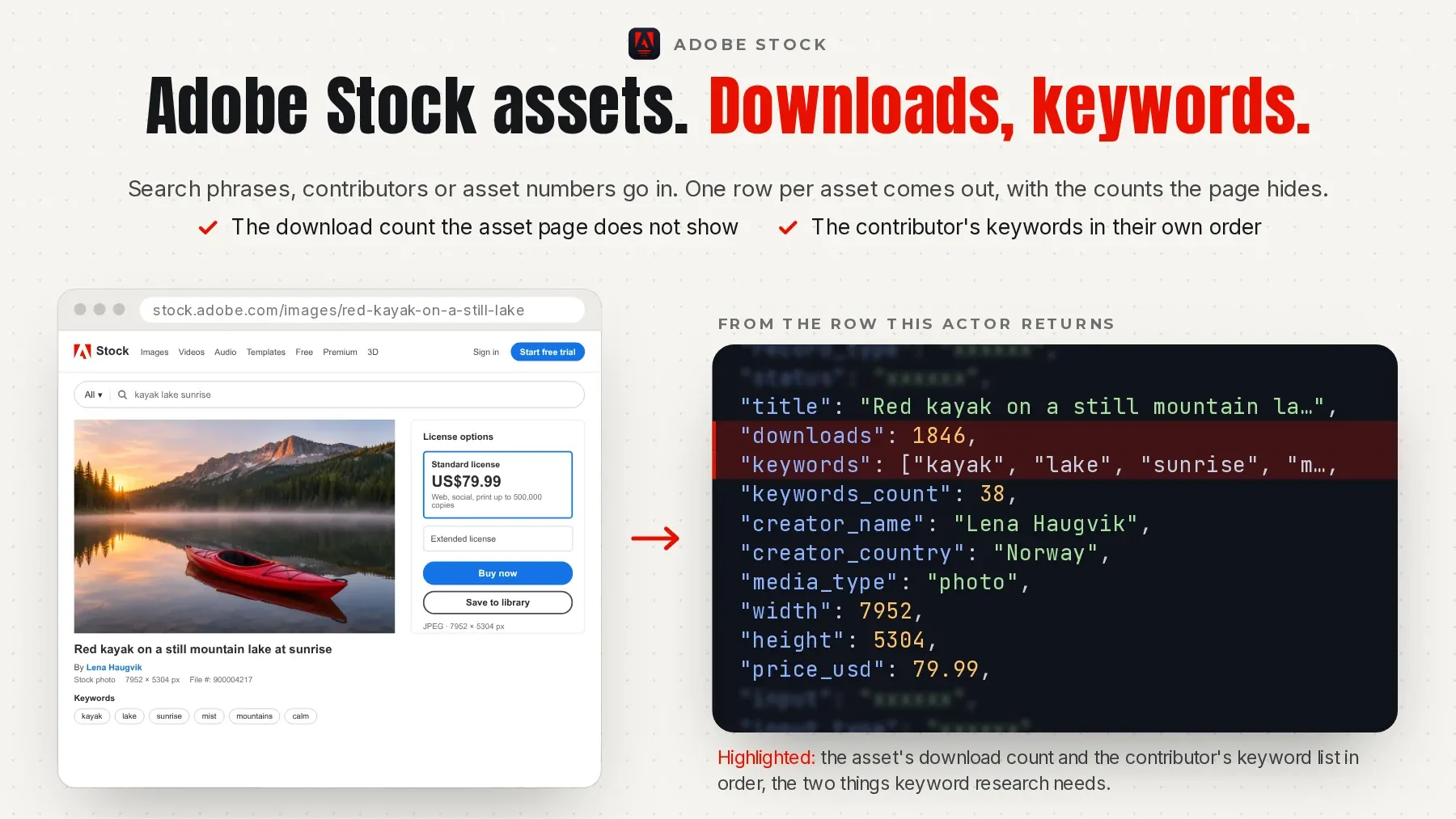
Adobe Stock assets with their download and view counts, logged out: search phrases with the site's filters and sorts, contributors' portfolios, asset numbers or links, assets similar to an asset or to any image link, or pasted stock.adobe.com links in, one row per asset out — title, contributor with country, downloads, views, the contributor's keywords in order, type, size in pixels and bytes, file type, category path, AI and transparency flags, release, the list price of its tier, every thumbnail and the video previews. One free row per input carries the source's own result count and a verdict: COMPLETE, CAPPED (your limit) or TRUNCATED. Past the 10,000 results the source serves a list, the search is read in disjoint parts. No login, no API key, no browser, proxies handled for you.
$0.60 per 1,000 result rows on the Free plan, $0.50 on Starter. A run start is $0.0018. The default input returns about 101 rows for about $0.0618. A value that names nothing is a free row that says why.
How it compares
- 4 times faster and 9 times cheaper than kawsar's Adobe Stock Scraper, with more data: 100 assets in 3.1 s, against 11 s; $0.44 per 1,000 assets, against $4.01; 58 fields per asset, against 25.
- 5 times faster and cheaper than clearpath's Adobe Stock Scraper & Analyzer: 100 assets in 3.1 s, against 14 s; $0.44 per 1,000 assets, against $0.81. It gives more data: 85 fields per asset, against our 58.
Measured on 2026-11-12. Each line compares one job, run by both scrapers at the same time. Prices are per 1,000 assets: Apify Actors at the Scale plan's prices.
Tested head-to-head on 2026-11-12
The job: the first 100 assets of one Adobe Stock search (summer, the input schema's example), every asset type, the source's own order. Every Actor ran on it the same day from the same harness; every run's cost is at the Scale plan's prices: a rival's charged events at its price for that plan, this Actor's at its list price. Fields counts the filled fields of a typical row. Every row here is an asset of the same search; the rivals charge their own start fee and rows at the Starter plan's prices. Re-measured monthly.
| Actor | Rows | First row | Run time | Cost | Fields | Failures |
|---|---|---|---|---|---|---|
| this Actor | 100 | 2.4 s | 3.1 s | $0.044 | 58 | none |
kawsar/adobe-stock-scraper | 100 | 9.8 s | 11 s | $0.40 | 25 | none |
clearpath/adobe-stock-scraper | 100 | 12 s | 14 s | $0.081 | 85 | none |
Why this Adobe Stock scraper
- Every way in. Search phrases (each its own search), contributors by number or link (with words to search inside their portfolios), asset numbers or links (110 a call, rows in your order), assets similar to an asset or to any image link, and pasted stock.adobe.com links with the language prefix (
/de/,/jp/…) and the site's filters kept. - The counts buyers ask for.
downloadsandviewson every row, withviews_status: the source's view count is a frozen 0 on most assets created since 2020 (59 of 62 zeros on a 100-asset search), so such a 0 sayssource_zero_unverifiedinstead of passing for a measured zero. - The contributor's keywords, in order. The keyword list as the contributor wrote it, repeats kept (41 keywords on the first summer photo,
treetwice), and aKEYWORDSreport that ranks the run's keywords by the downloads of the assets that carry them. - Past 10,000 results. Adobe Stock serves 10,000 results of one list; past that this actor splits the search into disjoint parts (type, orientation, AI, release, price tier or video length, then category) and reads each to its end: a 26,220-asset search read 26,209 distinct assets (measured 2026-11-12). An asset two parts share is delivered and charged once.
- The site's filters, honestly. Type, price tier (standard, premium, free), orientation, panoramic, isolated, transparent, copy space, generative AI, icons, aspect ratio, colours, size, age, category, release, video length, loops, the template's app, the 3D kind, the five sorts and 20 languages. A pasted link's filter the source does not take (people, editorial, frame rate …) is named on the input's row, never sent, so it cannot break the run.
- Honest runs. A search with no match, an unknown asset or contributor, an audio search and an unreadable image are free rows that say so; the leader's AI filter names (
only,exclude) are mapped to the source's, where a rival's run failed on them.
Who it's for
- Stock contributors — the keywords and downloads of the best-selling assets of a topic, and a competitor's whole portfolio with its downloads, to decide what to shoot and how to tag it.
- Designers, agencies and marketing teams — assets that match a brief (type, orientation, AI-free, transparent, copy space, colours), similar assets to a reference image, and the list price of each tier before buying.
- Market and trend analysts — the counts, ages and categories of a topic over time, and which contributors and keywords lead it.
Quick start
A search with the site's filters
A contributor's newest assets
Assets by number, and assets similar to one
A pasted search link
Switching from kawsar/adobe-stock-scraper?
Your input works as it is. Each name in the left column is read as this Actor's own field and the run log says so (read <theirs> as <ours>); a name marked not read is ignored with a note. A value in the other Actor's shape, an object list or its own date form, is read too.
| kawsar/adobe-stock-scraper | this Actor | what to know |
|---|---|---|
query | queries | One phrase, or several in queries; with creatorId the phrase is searched inside that portfolio. |
creatorId | creators | A number, or several numbers or contributor links in creators. |
maxItems | maxItems | The run's cap of assets, every input together; 0 = no cap beyond your charge limit. |
assetType | assetType | The same names, videos and templates read as video and template; audio gives each search a free not_served row (no audio search at the source), and audio ids are read. |
priceFilter | priceFilter | all, standard, premium, and free too. |
orientation | orientation | all, horizontal, vertical, square, and panoramic too. |
panoramic | panoramic | The same switch. |
isolated | isolated | The same switch. |
transparent | transparent | The same switch. |
copySpace | copySpace | The same switch. |
aiFilter | aiFilter | all, only, exclude: mapped to the source's own values. |
iconOption | iconOption | all, single_icon, icon_sheet. |
minWidth | minWidth | Pixels, checked on each asset's own width. |
minHeight | minHeight | Pixels, checked on each asset's own height. |
minMegapixels | minMegapixels | Megapixels, checked on each asset's own size. |
colors | colors | Hex colours without #, comma-separated. |
order | order | relevance, newest, downloads, featured (the source's relevance), undiscovered, and popularity too. |
timeoutSecs | not read | Not read: set the run's own timeout in the run options. |
requestTimeoutSecs | not read | Not read: the client sets its own deadlines and moves a slow call to a fresh connection. |
proxyConfiguration | not read | Not read: the Actor brings its own connections at no cost to you. |
What differs:
queryis one ofquerieshere: give several phrases in one run, each its own search. WithcreatorIdit is the phrase inside that portfolio, as the leader reads it.maxItemscaps the whole run (0 = no cap);maxItemsPerSearchcaps each search, portfolio, similar list or link. There is no 1,000-row hard cap: past 10,000 results the search is read in disjoint parts.assetTypetakesall,images,photo,illustration,vector,video,templateand3d; the leader'svideosandtemplatesarevideoandtemplatehere, andaudiogives each search a freenot_servedrow (the source's API has no audio search; audio ids are read).minWidth,minHeightandminMegapixelsare checked on each asset's own size: the source has no width or height filter, and its pixel-area filter drops the AI and price filters, so it is never sent.- Rows use snake_case names (
downloads,views,keywordsas a list of words,creator_name), with the derived links, the media type, the file extension, the tier's list price andviews_statusbeside the source's own fields.
Output
One row per asset (and one free row per input):
| field | meaning |
|---|---|
record_type | result on an asset row (charged); target on an input's free row. |
status | ok, or why an input gave no row: no_results, not_found, not_served, image_unreadable, invalid_input, failed, not_read. |
input | The value you gave that this row answers. |
input_type | What the input was read as: search, contributor, asset, similar (to an asset), similar_url (to an image link), link (a pasted search or category link), not_served, invalid. |
position | The asset's rank in its list, in the source's own order (the first 10,000; empty past them and on a lookup by number). |
id | The asset's number on Adobe Stock. |
title | The asset's title, as its contributor wrote it. |
url | The asset's page on stock.adobe.com. |
creator_id | The contributor's number. |
creator_name | The contributor's name as Adobe Stock shows it. |
creator_url | The contributor's page on stock.adobe.com. |
creator_country | The contributor's country. |
media_type | photo, illustration, vector, video, template, 3d, audio, animated_gif or express (an Adobe Express asset). |
media_type_id | The source's media type number (1 photo, 2 illustration, 3 vector, 4 video, 6 3D, 7 template, 13 Adobe Express). |
content_type | The file's MIME type (image/jpeg, video/quicktime, application/illustrator …). |
file_extension | The file extension of the MIME type (jpeg, ai, svg, mov, ait, psdt, zip …). |
vector_type | A vector's download form (zip or svg). |
width | The full-size width in pixels. |
height | The full-size height in pixels. |
megapixels | Width × height in megapixels. |
size_bytes | The full-size file's size in bytes. |
category_id | The asset's category number. |
category_name | The asset's category, in the run's language. |
category_path | The category path, top category first. |
keywords | The contributor's keywords in their own order, repeats kept, in the run's language. |
keywords_count | How many keywords the asset carries. |
description | The asset's description where the source has one (templates; empty on most photos). |
downloads | The source's download count at the run's minute. |
views | The source's view count at the run's minute (a frozen 0 on most assets created since 2020: see views_status). |
views_status | served, or source_zero_unverified on a 0 for an asset created in 2020 or later. |
created_at | When the asset was created on Adobe Stock, as the source gives it (no time zone named). |
premium_level_id | The source's price tier: 0 standard, 1 free, 3 and 4 the premium image tiers. |
is_premium | The source's premium flag. |
is_free | A free asset (tier 1). |
price_usd | The list price the asset page showed for this tier on 2026-11-11, in US dollars (a video: HD); empty for templates, 3D and free assets. |
price_high_usd | The tier's second list price (a premium tier's higher one; a 4K video's 4K price). |
licenses | The licences the source offers for the asset, with each one's size. |
has_releases | The asset has a model or property release. |
is_editorial | An editorial-use asset. |
is_gentech | Made with generative AI. |
is_transparent | A transparent background. |
is_illustrative | The source's illustrative flag. |
icon_option | A vector icon's kind: single_icon or icon_sheet. |
is_loop | A video the source marks as a loop. |
template_type_id | A template's app number (1 Photoshop, 2 Illustrator, 3 InDesign, 5 After Effects, 6 Premiere Pro). |
template_app | A template's app. |
template_category_ids | A template's category numbers. |
duration_ms | A video's (or motion template's) length in milliseconds. |
framerate | A video's frame rate. |
video_resolution | A video's class by its width: 4K (3,840 px or more), HD (1,280 or more) or SD. |
thumbnail_url | The watermarked thumbnail (500 px). |
thumbnail_width | The thumbnail's width. |
thumbnail_height | The thumbnail's height. |
thumbnail_110_url | The 110-px thumbnail. |
thumbnail_160_url | The 160-px thumbnail. |
thumbnail_220_url | The 220-px thumbnail. |
thumbnail_240_url | The 240-px thumbnail. |
thumbnail_500_url | The 500-px thumbnail. |
thumbnail_1000_url | The 1,000-px thumbnail. |
thumbnail_1000_width | The 1,000-px thumbnail's width. |
thumbnail_1000_height | The 1,000-px thumbnail's height. |
comp_url | The watermarked comp (preview) image. |
comp_width | The comp's width. |
comp_height | The comp's height. |
comps | Every comp the source offers (a video's HD comp, for example), with its link and size. |
video_preview_url | A video's watermarked preview. |
video_preview_width | The preview's width. |
video_preview_height | The preview's height. |
video_preview_bytes | The preview's size in bytes. |
video_small_preview_url | A video's small preview. |
video_small_preview_width | The small preview's width. |
video_small_preview_height | The small preview's height. |
video_small_preview_bytes | The small preview's size in bytes. |
details_url | The source's own link to the asset page. |
stock_id | The source's internal id of the asset's files. |
verdict | On an input's row: COMPLETE (read to the end), CAPPED (your limit stopped it), TRUNCATED (the source serves no more of it: the count is beside it), PARTIAL (the run was cut: note says why). |
rows_delivered | On an input's row: the asset rows it delivered. |
source_count | On an input's row: Adobe Stock's own result count for it, at the run's minute. |
request | On an input's row: what the input was asked as (the words, the contributor, the sort, the language, the source's filter names, the size checked on the rows). |
dropped_filters | On a pasted link's row: the link's filters the source does not take, named and not sent. |
facets | On an input's row with facetCounts: each filter value's exact count under the input's own filters. |
note | Why an input's row has the status or the verdict it has. |
scraped_at | When this row was read (UTC). |
Example record:
Pricing
Pay for the assets a run delivers, plus one run start; no platform usage is billed to you. The asset price falls with your Apify plan.
| event | unit | Free | Starter | Scale | Business |
|---|---|---|---|---|---|
Asset (result) | per 1,000 | $0.60 | $0.50 | $0.42 | $0.30 |
Run start (start) | per run | $0.0018 | $0.0018 | $0.0018 | $0.0018 |
An asset is $0.60 per 1,000 on the Free plan ($0.0006 an asset) with every field of its row included: there is no add-on and no detail fee. Each run that delivers a charged asset also pays the run start, $0.0018 once; a run that delivers no charged asset pays nothing at all. So one search of 100 assets costs $0.0618 on the Free plan and $0.0518 on Starter; 1,000 assets $0.6018 and $0.5018; several searches in one run share one start. The free row of every input, a value that names nothing (invalid_input), a search with no match (no_results), an unknown asset number or contributor (not_found), an audio search (not_served), an image the similar search cannot read (image_unreadable), an input left at your cap, the charge limit or the time limit (not_read) and a refusal the run could not pass (failed) are never charged; neither are the facet counts, the KEYWORDS and CONTRIBUTORS reports, an asset under your minimum size, or an asset another input of the run already delivered. A run that stops early (a timeout, an abort) is charged for the assets it delivered.
Before the first request the log names the price of an asset at your plan and the most the run can cost: maxItemsPerSearch for each search, portfolio, similar list or link, one row for each asset number, maxItems over the whole run, and never more than your charge limit. With neither cap a list is read to its end, and its row names the source's own result count: set maxItems or a charge limit for a maximum. A list that ends sooner delivers fewer rows and costs less. Enterprise plans have their own rates: the Actor's Pricing tab shows the price for your plan.
Usage patterns
- Inputs —
queriestakes phrases, one search each.creatorstakes contributor numbers or links (https://stock.adobe.com/contributor/203159280/...), andportfolioQuerysearches words inside them.assetIdstakes asset numbers or any asset link (image, video, template, 3D), read 110 a call, the rows in your order.similarTotakes an asset (number or link) or any image link (JPEG, PNG, GIF or WebP): when Adobe Stock cannot fetch an image link itself, the Actor downloads the image and uploads it.startUrlstakes stock.adobe.com links as your browser shows them: a search with its filters, a category, a contributor or an asset, with or without the language prefix. - Filters and sorts — The filters apply to every search, portfolio and similar list of the run; a pasted search link keeps its own.
orderis the site's sort (relevance,newest,downloads,popularity,undiscovered;featuredis the source's relevance).languagesets the language of the categories and keywords (20 languages; the title stays the contributor's own).facetCountsadds each filter value's exact count under the search's own filters to the search's row (about 31 small calls a search, free). - What a row is —
record_type=result: one asset, withinput(what found it),input_typeandposition(its rank in the source's own order, up to 10,000).record_type=target: the free row of one input —source_count(Adobe Stock's own result count for it),rows_delivered, theverdict, therequestthe input became, thedropped_filtersof a pasted link, thefacetsand thenotewith the reason. - How far a search goes —
maxItemsPerSearch(0 = every result) stops each list,maxItemsthe whole run. Adobe Stock serves 10,000 results of one list; past that the Actor counts and reads disjoint parts of the search (type, orientation, AI, release, price tier or video length, then the 21 top categories), each to its end, and the verdict is COMPLETE when the distinct assets reach the source's count (it moves by up to 1 % between two reads), TRUNCATED with the count when a part the splits cannot bring under 10,000 remains (a broad phrase such assummercounts 116 million assets). - The list price and the counts —
price_usdandprice_high_usdare the list prices Adobe Stock's asset page showed for the asset's tier on 2026-11-11 (a standard photo, illustration or vector US$79.99; premium tiers US$119.99 / US$249.99 and US$249.99 / US$499.99; a video US$79.99 in HD and US$199.99 in 4K; templates, 3D and free assets none): a sale or a regional price is the page's alone.downloadsandviewsare the source's counts at the run's minute.
Input configuration
| field | type | default | what it does |
|---|---|---|---|
queries | array | [] | Each phrase is its own search, e.g. summer or people working. A pasted stock.adobe.com link here is read as a link. |
creators | array | [] | A contributor's portfolio: the contributor's number (203159280) or link (https://stock.adobe.com/contributor/203159280/...). |
portfolioQuery | string | Only the contributors' assets that match these words (the leader's query with its creatorId is read this way). | |
assetIds | array | [] | Assets by number (342735989) or by link (https://stock.adobe.com/images/.../342735989, a video, template or 3D link too). Read in batches of 110, rows in your order; a number the source does not have is a free not_found row. |
similarTo | array | [] | Assets similar to an asset (its number or link) or to any image link (JPEG, PNG, GIF or WebP). When the source cannot fetch an image link, the Actor downloads the image and uploads it. |
startUrls | array | [] | Pasted stock.adobe.com links: a search with its filters (/search?k=..., /search/images, /search/video, /search/templates, /search/3d-assets, /search/premium), a category, a contributor or an asset, with or without the language prefix (/de/, /fr/, /jp/ ...). A filter the source's API does not take is named on the link's row, never sent. |
maxItems | integer | 0 | The most charged rows of the whole run; 0 = no cap beyond your charge limit. |
maxItemsPerSearch | integer | 0 | The most rows each search, portfolio, similar list or link gives; 0 = every result the source serves (past 10,000 the list is split into disjoint parts). |
assetType | all / images / photo / illustration / vector / video / template / 3d / videos / templates / audio | "all" | Images = photos, illustrations and vectors. Audio search is not served (the source's API has no audio search): with Audio each search gives a free row that says so; audio asset ids and links are read. |
priceFilter | all / standard / premium / free | "all" | Standard = not premium; premium = the premium image tiers, and every video (the source files every video under premium too); free = the free assets (templates and Adobe Express assets: the source has no free photo). |
orientation | all / horizontal / vertical / square / panoramic | "all" | The asset's orientation. |
panoramic | boolean | false | Only panoramic assets (twice as wide as high or more). |
isolated | boolean | false | Only isolated (cut-out) assets. |
transparent | boolean | false | Only assets with a transparent background. |
copySpace | boolean | false | Only assets the source marks as having copy space. |
aiFilter | all / only / exclude | "all" | All assets, only the ones made with generative AI, or none of them. |
iconOption | all / single_icon / icon_sheet | "all" | Only single icons or icon sheets (vectors). |
aspectRatio | all / 16:9 / 9:16 / 5:4 / 4:5 / 3:2 / 2:3 / 1.9:1 / 1:1.9 / 1:1 | "all" | The source's own aspect-ratio filter. |
colors | string | Hex colours without #, comma-separated, e.g. ff0000 or ff0000,00ff00. | |
minWidth | integer | Assets at least this wide. The source has no width filter: the Actor asks a minimum pixel area and leaves out (free) every row under your width. | |
minHeight | integer | Assets at least this high (as the minimum width). | |
minMegapixels | number | Assets of at least this many megapixels (the source's pixel-area filter). | |
addedWithin | all / 1w / 1m / 6m / 1y / 2y | "all" | Assets the source added to its collection within this time (its own date added, which can be weeks after an asset's created_at). Beside it the source drops the AI, transparent and loop filters, so the run checks those on each row and leaves the others out, free. |
category | string | A top category of Adobe Stock by name (Landscapes) or number (596); its sub-categories are included. | |
releases | all / with / without | "all" | Assets with a model or property release, or without one. |
videoDuration | all / 10 / 20 / 30 / 30- | "all" | Videos up to 10, 20 or 30 seconds, or longer than 30 seconds. |
loopsOnly | boolean | false | Only videos the source marks as loops. |
templateApp | all / photoshop / illustrator / indesign / after_effects / premiere_pro | "all" | Templates for one app. |
threeDType | all / models / lights / materials | "all" | 3D models, lights or materials. |
includeOffensive | boolean | false | Include the assets the source hides by default. |
order | relevance / newest / downloads / popularity / undiscovered / featured | "relevance" | The site's sorts. Featured is the source's relevance order. |
language | en_US / pt_BR / cs_CZ / da_DK / de_DE / es_ES / es_MX / fr_FR / it_IT / ja_JP / ko_KR / nb_NO / nl_NL / pl_PL / pt_PT / ru_RU / sv_SE / th_TH / uk_UA / zh_TW | "en_US" | The language of the categories and keywords (the title stays the contributor's own). A pasted link's language prefix wins. |
facetCounts | boolean | false | On each search's row, the exact count of every filter value (type, orientation, AI, price, releases, isolated, transparent, copy space, icons, aspect ratio) under the search's own filters: about 31 small calls a search, no extra charge. |
feedback | string | A note to the people who maintain this Actor: what you needed and did not get. For example a missing field, a wrong or empty result, or the Actor you switch from or to, and why. The run does not read it: the rows and the charges stay the same. A person reads every note. |
Errors
A run does not fail because of your input. When an input cannot be used — a date that is not a date, an id in the wrong form, two settings that contradict each other — the run ends Succeeded, charges nothing, and says what to change:
- the status message starts with
INPUT REJECTED; - the dataset holds one row,
{"error": true, "code": "…", "message": "…"}, and no results; - the key-value store record
ERRORholds the same object.
From code, check error on the first row before reading results.
A search Adobe Stock has no asset for, an asset number or a contributor it does not know, or a value that is not a phrase, a number or a stock.adobe.com link is not an error: each gets one free row with its status (no_results, not_found, invalid_input) and the reason, and the run goes on with the others. A run that ends Failed is a fault on our side, never your input; it charges nothing, and we are alerted.
FAQ
Which status is which?
An input's row has status ok (assets served; the verdict says how far), no_results (the source has no asset for the search under its filters), not_found (an asset number or a contributor the source does not know, read twice for an asset), not_served (an audio search: the source's API has no audio search), image_unreadable (a similar image that is not a JPEG, PNG, GIF or WebP), invalid_input (a value that names nothing, or a request the source refused, with its text), failed (the source refused every try; free) or not_read (left at your cap, the charge limit or the run's time limit). An asset row's status is ok.
Why is the view count 0?
Adobe Stock's API serves a view count of 0 for most assets created since 2020 (59 of 62 zeros on a 100-asset search were such assets). The row keeps the source's value and says views_status = source_zero_unverified; a non-zero count, or a 0 on an older asset, says served.
Does it give audio?
Audio assets by number or link, yes: Adobe Stock's API serves an audio record by id (media_type audio, the duration, the keywords, the downloads). An audio search, no: the API has no audio search, and the site's audio search page is behind a bot wall with no record a logged-out reader gets; an audio search (or assetType audio) is a free not_served row for each search.
Does it need an Adobe account or API key?
No. Everything is read from Adobe Stock's own public API with the site's public client id, logged out; no file is downloaded or licensed, and the rows link the watermarked previews only.
Do I need Apify Proxy or my own proxy?
No. The Actor uses its own connections, at no extra cost to you.
Integration
JavaScript
Python
CLI
REST
AI agents and MCP
Apify's MCP server offers this Actor as a tool to Claude, Cursor, VS Code and any other MCP client. Connect https://mcp.apify.com?tools=hyperbach/adobe-stock-scraper and ask, for example: "Get the 500 most downloaded Adobe Stock photos for summer with their keywords, downloads and contributors". The agent fills the input from the table above and reads the rows from the run's dataset. A field under the name another Actor gives it is read as this Actor's own: query, searchQueries, searchTerms, keywords as queries; creatorId, creatorIds, creator, contributor as creators; assetId, ids, mediaIds, imageIds as assetIds; similar, similarAssets, similarImages, imageUrl as similarTo (and more). An agent or a person can add feedback to any run and say what was needed and not delivered: a missing field, a wrong or empty result, the Actor switched from or to, and why. The run returns the same rows at the same price, and a person reads every note.
n8n, Make and Zapier
The Apify node in n8n, the Apify app in Make and the Apify integration in Zapier run this Actor on a schedule or from a trigger and read its dataset. A webhook on the run's end (Integrations on the Actor page) sends the rows on to your own endpoint. Nothing to install on our side.
Support
Disagree with a charge? Write to apify@hyperbach.com with the run ID. We will ask Apify to compensate you, and the charge comes back to your Apify account as platform credit.
Did it do the job? A short review on the Store, at any rating, helps the next buyer choose.
This page is generated from the Actor's schemas and a live sample — it cannot describe a field the Actor does not have.


