

Facebook Photos Scraper: Pages, Albums, Groups, No Login
Pricing
from $0.42 / 1,000 photos
Facebook Photos Scraper: Pages, Albums, Groups, No Login
Facebook photos scraper and photo downloader, no login: Page, profile, album, post, photo or group links in, one row per photo out. Full-size image, alt text, date, caption, reactions by type, comments, shares, post and album. Albums and tagged photos too. Each list read to its end. Misses free.
Pricing
from $0.42 / 1,000 photos
Rating
0.0
(0)
Developer

Hyperbach
Maintained by CommunityActor stats
0
Bookmarked
2
Total users
1
Monthly active users
2 days ago
Last modified
Categories
Features
Share
Every photo of a public Facebook Page, profile, album, post or group, one row per photo in Facebook's own order: the photo id and link, the full-size image with its size and expiry, Facebook's alt text and, on the same row at no extra price, the upload date, caption, reactions by type, comments, shares, post and album. Give Page links, handles, ids or album, post, photo and group links; cap each list or read it to its end. Each target ends with a free row that says where Facebook's list ended against Facebook's own count. No login, no cookies, proxies handled for you.
From $0.8415 per 1,000 rows (photo) on the Free plan, $0.715275 on Starter; every row and add-on is priced under Pricing below. A run start is $0.0017. The default input returns about 21 rows for about $0.01853. A Page or profile that does not exist, a photo, album or post that is gone, a private group and a link that names nothing cost nothing: each gets one free row that says why.
How it compares
- 2 times cheaper than Apify's own Facebook Photos Scraper, with more data: $0.67 per 1,000 photos, against $1.65; 35 fields per photo, against 9. It is 3 times faster: 20 photos in 5.5 s, against our 16 s.
- 3 times cheaper than topapi's Facebook Photos Scraper: $0.67 per 1,000 photos, against $1.80. It is 4 times faster, with more data: 20 photos in 4.1 s, against our 16 s; 45 fields per photo, against our 35.
- 7 times faster and cheaper than memo23's Facebook Page Posts Scraper, with more data: 20 photos in 16 s, against 101 s; $0.67 per 1,000 photos, against $1.24; 35 fields per photo, against 15.
- Faster and cheaper than memo23's Facebook Photos Scraper, with more data: 20 photos in 16 s, against 26 s; $0.67 per 1,000 photos, against $1.24; 35 fields per photo, against 15.
- 4 times cheaper than alpha-scraper's Facebook Photos scraper From profile, with more data: $0.67 per 1,000 photos, against $2.62; 35 fields per photo, against 12.
Measured on 2026-11-18. Each line compares one job, run by both scrapers at the same time. Prices are per 1,000 photos: Apify Actors at the Scale plan's prices.
Tested head-to-head on 2026-11-18
The job: The newest 20 photos of one Page with their details (the input schema's example: Humans of New York, T1 of the lane study). Every Actor ran on it the same day from the same harness; every run's cost is at the Scale plan's prices: a rival's charged events at its price for that plan, this Actor's at its list price. Fields counts the filled fields of a typical row. Each rival reads the same Page's newest 20 photos: apify/facebook-photos-scraper is the most used, memo23's two actors the next photo sellers, topapi the one that sells the details on the row, alpha-scraper another photo-list seller. Re-measured monthly.
| Actor | Rows | First row | Run time | Cost | Fields | Failures |
|---|---|---|---|---|---|---|
| this Actor | 20 | 4.4 s | 16 s | $0.013 | 35 | none |
apify/facebook-photos-scraper | 20 | 5.5 s | 5.5 s | $0.033 | 9 | none |
memo23/facebook-page-posts-scraper | 20 | 90 s | 101 s | $0.025 | 15 | none |
memo23/facebook-photos-scraper | 20 | 16 s | 26 s | $0.025 | 15 | none |
topapi/facebook-photos-scraper | 20 | 4.2 s | 4.1 s | $0.036 | 45 | none |
alpha-scraper/facebook-photos-scraper-from-profile | 20 | 10 s | 16 s | $0.052 | 12 | none |
Why this scraper, not the other Facebook photo actors
- To the end of the list, and said so. A Page's photo list is read to Facebook's own end, not stopped at the first 8 or 25: Porto's Bakery's 3,464 photos to the last one, the end read a second time on a fresh connection, against the 3,465 its 9 albums count. Each target's free row says how its list ended —
COMPLETE,LIST_ENDwith both figures,LIMIT(your cap) orPARTIALwith the reason. - Past the point where Facebook's list repeats itself. Deep in a famous Page's photo list, Facebook serves one new photo per page of eight; the Actor notices and reads the rest album by album (an ordinary Page's albums hold exactly its photo list), each photo once.
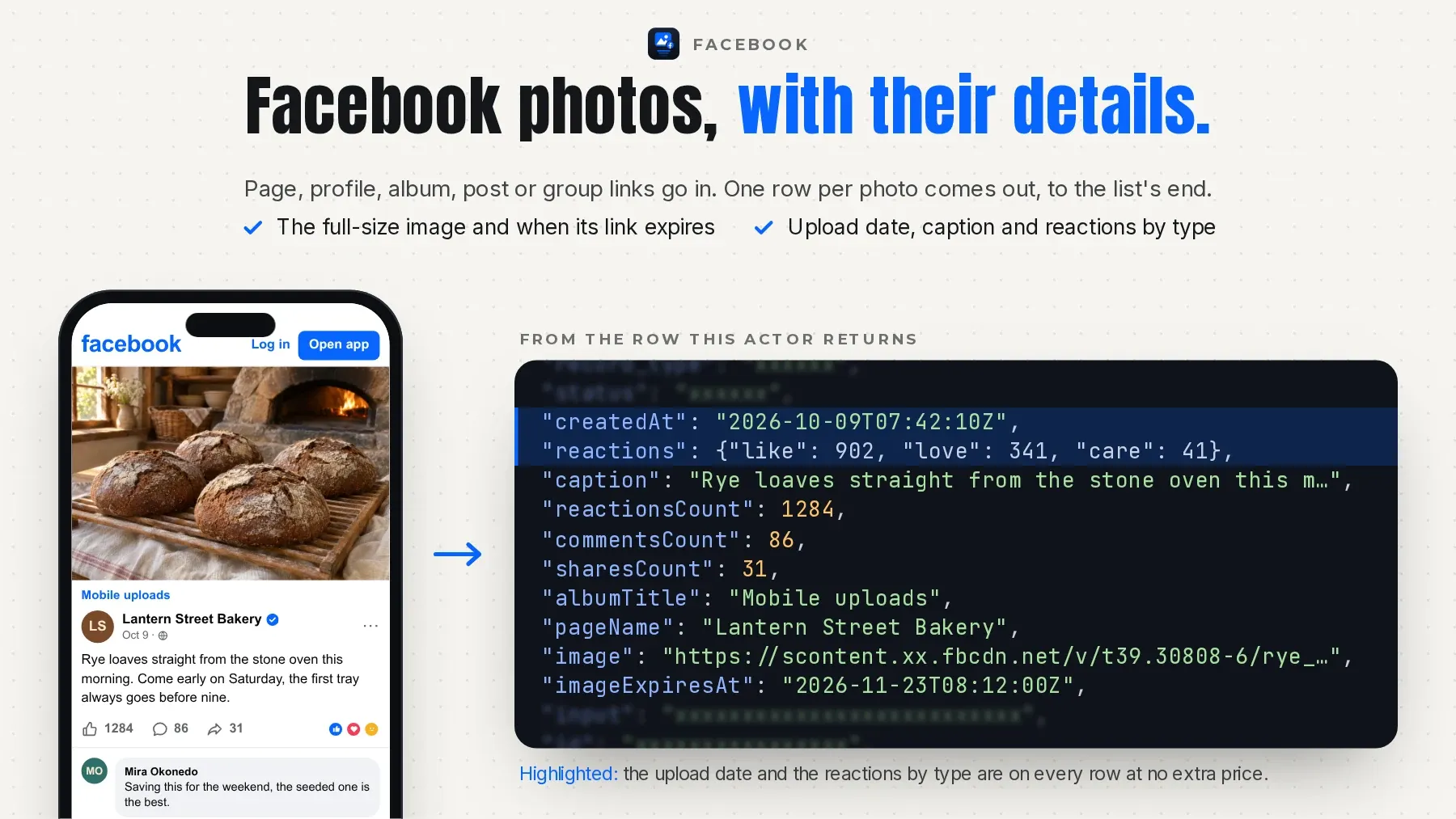
- The details on every row, at no extra price. The upload date, the caption, the reactions total and by type (like, love, care, haha, wow, sad, angry), the comments and shares counts, the post link, id and type, the album id and title, the people tagged and the first comments Facebook shows — where other actors give an image link and an alt text, or sell the details as a second product.
- Never a silent empty run, never a charged error. A Page that does not exist, a gone photo, album or post and a private group each get one free row with Facebook's own answer, written only after a second connection agrees; the lane leader charged its photo event on error rows in our run.
- Every kind of link. Pages and person profiles, numeric ids,
profile.php?id=links, albums, posts (every photo of a 10-photo post), single photos, public groups and a Page's tagged photos (photoType), with the album list itself as free rows (includeAlbums) and each album's photos (includeAlbumPhotos). - Links that stay. Facebook's image links expire after about four days: each row says when (
imageExpiresAt), andstoreImageskeeps a copy of the full-size file in the run's storage with a link that does not expire.
Who it's for
- Marketing teams and agencies — collect a brand's, a competitor's or a creator's photos with their dates, captions and reaction counts to see what lands, and keep the image files for a report.
- Researchers and archivists — archive a public Page's whole photo catalogue, an event album or a public group's photos, with Facebook's own alt text and the upload dates, and a row per target that says whether the list was read to its end.
- AI and data teams — build image datasets with Facebook's alt text, the full-size image, its size and its reactions, filtered by date, words, width or reactions.
Quick start
The newest 20 photos of a Page, with their details
A Page's whole photo list, the list's own fields only (faster)
An album, a post's photos, a single photo and a public group
A Page's album list and the photos it is tagged in
Photos of a date window with a word in the caption, the files kept
Switching from apify/facebook-photos-scraper?
Your input works as it is. Each name in the left column is read as this Actor's own field and the run log says so (read <theirs> as <ours>); a name marked not read is ignored with a note. A value in the other Actor's shape, an object list or its own date form, is read too.
| apify/facebook-photos-scraper | this Actor | what to know |
|---|---|---|
startUrls | startUrls | Read as it is: request-list objects ({url}) or plain strings: Page and profile links in any form, handles, numeric ids, and album, post, photo and group links. |
resultsLimit | resultsLimit | The same name: the most photos of each target's list (0 = every photo). maxItems caps the whole run. |
What differs:
- resultsLimit is read as the most photos of each target's list; leave it at 0 to read every photo Facebook lists, to the end of the list.
- Each row carries the photo's numeric id (id) and keeps the leader's base64 item id as collectionItemId; the Page's numeric profile id is profileId (the leader's facebookId is a base64 collection id), its page id pageId, its link pageUrl.
- The upload date, caption, reactions, comments, shares, post and album are on every row by default (includeDetails); turn them off for a lighter, faster run with the leader's own fields.
- A target that gives no photo gets one free row with the reason instead of a charged error row.
Output
One row per photo (record_type photo), one free row per album on request (record_type album), and one free summary row per input (record_type target):
| field | meaning |
|---|---|
record_type | photo on a photo row (charged); album on an album row (free, includeAlbums); target on a target's free summary row. |
status | ok, or why a target gave no row: not_found (Facebook shows nothing there to a logged-out visitor; two connections agreed), empty (a list with no photo), invalid_input (the value names nothing), failed (Facebook did not serve it), not_read (the run stopped first), duplicate (the same Page, list, album, post or group as an earlier input: read once, never charged twice). |
input | The value you gave that this row answers. |
id | The photo's own numeric id (fbid); the album's id on an album row. |
url | The photo's page on Facebook (or the album's). |
image | The full-size image (up to 2,048 px on the long side), as Facebook signs it; null on an album, group or post photo when includeDetails is off (those lists carry only the grid image). |
width | The full-size image's width in pixels. |
height | The full-size image's height in pixels. |
thumbnail | The list's grid image (smaller); the album's cover on an album row. |
ocrText | Facebook's own alt text for the photo ("May be an image of …", the owner's text, or Facebook's "No photo description available."), as Facebook writes it. |
mediaType | photo, or video for a playable item in an album or a group (its cover image). |
photoType | The list the photo came from: photos_by (the Page's own photos), photos_of (photos it is tagged in), album, post, group or photo (a photo link). |
position | The photo's place in its list, 1 = the first Facebook lists (the newest on a Page's photo list). |
createdAt | When the photo was uploaded (UTC), with the details. |
caption | The photo's own caption, where it has one (with the details). |
reactionsCount | All reactions on the photo, as Facebook counts them (with the details). |
reactions | The reactions by type: like, love, care, haha, wow, sad, angry (with the details). |
commentsCount | The comments on the photo (with the details). |
sharesCount | The times the photo was shared (with the details). |
postId | The id of the post the photo belongs to (with the details; on every row of a post link). |
postUrl | The link of the post the photo belongs to (with the details). |
postType | Facebook's type for the photo's post, such as SINGLE_IMAGE or MULTI_IMAGE (with the details). |
albumId | The id of the album the photo belongs to. |
albumTitle | The album's title: on an album's rows, and on a Page's photo rows for the albums of its album list's first page. |
taggedPeople | The people and Pages tagged in the photo: id, name, link (with the details). |
topComments | The first comments Facebook shows under the photo (up to 10): id, text, author, date, reactions, replies, link (with the details). A full comment walk is a job for a comments scraper. |
detailsStatus | served (the details are on the row), missing (the photo is gone; two connections agreed), failed (Facebook did not serve them), not_asked (includeDetails off). |
imageExpiresAt | When Facebook's signed image link stops working (UTC), read from the link itself. |
storedImage | With storeImages: the link of the image's copy in this run's storage, which does not expire. |
collectionItemId | Facebook's own id of the photo in the Page's list (base64), the id the lane leader returns. |
itemsCount | On an album row: the photos in the album, as Facebook counts them. |
itemsCountText | On an album row: Facebook's text for the count ("10,975 Items"). |
pageName | The Page's or profile's name. |
pageId | The Page's id (a Page with a page id). |
profileId | The Page's or profile's profile id (the id Facebook's photo list is keyed by). |
pageUrl | The Page's, profile's or group's link. |
pageVerified | Whether the Page carries Facebook's verified badge. |
pageCategory | The Page's category, as Facebook names it ("Arts & Humanities Website", "Public figure"). |
pageFollowersText | The Page's follower count as Facebook's Page plugin shows it, rounded ("17M followers"). |
groupId | The group's numeric id, on a group's rows. |
verdict | On a target row: COMPLETE (Facebook served at least its own count), LIST_END (Facebook's list ended under its count, or with no count; note gives both figures), LIMIT (your resultsLimit), PARTIAL (stopped early: note says why). |
photosListed | On a target row: the distinct photos Facebook's lists served for it (delivered or left out by your filters). |
sourceCount | On a target row: Facebook's own count the list is measured against (the sum of a Page's album counts, the tagged list's count, an album's count). |
sourceCountWhat | On a target row: which count sourceCount is. |
rows_delivered | On a target row: the photo rows it delivered. |
note | Why a target row has the status or the verdict it has, in words. |
scraped_at | When this row was read (UTC). |
Example record:
Pricing
Pay for the photos a run delivers, plus one run start. No platform usage is billed to you, and the price falls with your Apify plan.
| event | unit | Free | Starter | Scale | Business |
|---|---|---|---|---|---|
Photo (photo), its details included | per 1,000 | $0.8415 | $0.715275 | $0.58905 | $0.42075 |
Stored image (image, with storeImages) | per 1,000 | $0.765 | $0.65025 | $0.5355 | $0.456 |
Run start (start) | per run | $0.0017 | $0.0017 | $0.0017 | $0.0017 |
A photo is $0.8415 per 1,000 on the Free plan ($0.0008415 a photo) and $0.715275 on Starter, with everything its row carries: the upload date, caption, reactions, comments, shares, post and album are on the row at no extra price. With storeImages, each photo whose full-size image the run stored adds $0.000765 on the Free plan; a photo whose image could not be stored adds nothing. Each run that delivers a charged photo pays the run start, $0.0017 once.
So the example (the newest 20 photos of a Page with their details, 2026-11-18) costs $0.01853 on the Free plan and $0.0160055 on Starter; 100 photos $0.08585 and $0.0732275; 100 photos with their images stored $0.16235 and $0.1382525. Free: every target row (the verdict, the photos listed and Facebook's own count), every album row (includeAlbums), a Page, profile, photo, album, post or group that is gone or private, a value that names nothing, a target given twice (duplicate), a photo your filters leave out, a photo the run already delivered (one row, one charge), and a run that delivered no charged photo (no run start either). A run that stops early (a timeout, an abort, the charge limit) is charged for the photos it delivered.
Before the first request the log names the prices at your plan and what the run can cost: "at most" under the caps the run holds (resultsLimit a list, maxPhotosPerAlbum an album, maxItems the run) and your charge limit; a list with no cap is read to Facebook's own end, so its cost is the photos delivered. Enterprise plans have their own rates: the Actor's Pricing tab shows the price for your plan.
Usage patterns
- A Page's newest photos with their details — Give the Page link or handle in startUrls and a resultsLimit (20, 100, …). Each photo row carries its id, link, full-size image and size, Facebook's alt text, the upload date, caption, reactions by type, comments, shares, post and album.
- A whole catalogue — Leave resultsLimit at 0: the list is read to Facebook's own end, and the target row compares the photos listed with the sum of the Page's album counts. Turn includeDetails off for a faster run of the list's own fields.
- Albums, posts, single photos and groups — Give an album link (media/set/?set=a.…), a post link (every photo of the post), a photo link or a public group link; or set includeAlbums for the album list and includeAlbumPhotos for each album's photos.
- Filters and files — onlyPhotosNewerThan / onlyPhotosOlderThan (a date or a period such as 30 days), keywords and excludeKeywords on the alt text and caption, minWidth and minReactions keep only the photos you want; photos left out are not charged. storeImages keeps a copy of each delivered image.
Input configuration
| field | type | default | what it does |
|---|---|---|---|
startUrls | array | [] | Pages and profiles (https://www.facebook.com/humansofnewyork, humansofnewyork, a numeric id, profile.php?id=…), albums (https://www.facebook.com/media/set/?set=a.…), posts (…/posts/… or permalink.php?story_fbid=…: every photo of the post), single photos (photo/?fbid=…, photo.php?fbid=…) and public groups (https://www.facebook.com/groups/…). A Page's or profile's link reads its own photos newest first (Photos type picks its tagged photos instead). A value that names nothing gets a free row that says why. |
resultsLimit | integer | 0 | The most photos read from each target's list (a Page's photos, its tagged photos, an album, a group, a post); 0 = every photo Facebook lists, to the end of the list. Set it when you call the Actor over the API: a famous Page holds over 10,000 photos. |
photoType | photos_by / photos_of / both | "photos_by" | For a Page or profile: its own photos (photos_by), the photos it is tagged in (photos_of), or both lists one after the other. |
includeDetails | boolean | true | Each photo's own details on its row, at no extra price: the upload date, the caption, the reactions by type, the comments and shares counts, the post and album it belongs to, the people tagged and the first comments Facebook shows. Off: a lighter, faster run with the list's own fields (the id, the link, Facebook's alt text, the image and its size); an album or group photo then carries only Facebook's grid image. |
includeAlbums | boolean | false | For a Page or profile: one free row per album (its title, its photo count and Facebook's text for it, its cover and link) before the photos. |
includeAlbumPhotos | boolean | false | For a Page or profile: after its photo list, walk its albums one by one (Profile pictures, Cover photos, Mobile uploads and every album it made); each row names its album. A photo already delivered from the photo list is not delivered or charged twice. |
maxAlbums | integer | 0 | With 'Photos of each album': how many albums to walk, in Facebook's order; 0 = every album. |
maxPhotosPerAlbum | integer | 0 | With 'Photos of each album': the most photos read from each album; 0 = every photo. |
onlyPhotosNewerThan | string | "" | An absolute date (2024-05-01), a date and time (2024-05-01T10:00:00Z) or a time back from now (7 days, 3 weeks, 2 months, 1 year). On a Page's photo list Facebook applies the window itself; on an album, a group or a post each photo's own upload date is checked (it needs Photo details). Leave empty for no lower bound. |
onlyPhotosOlderThan | string | "" | An absolute date or a time back from now. A date includes its whole UTC day. Leave empty for up to now. |
keywords | array | [] | Keep only photos whose Facebook alt text or caption holds one of these words (any case). Photos left out are not charged. |
excludeKeywords | array | [] | Leave out photos whose alt text or caption holds one of these words. Photos left out are not charged. |
minWidth | integer | 0 | Keep only photos at least this wide at full size; 0 = any. |
minReactions | integer | 0 | Keep only photos with at least this many reactions (reads each photo's details); 0 = any. |
storeImages | boolean | false | Keep a copy of each delivered photo's full-size image (≈ 250–400 KB) in the run's key-value store, with its link on the row (storedImage): Facebook's own image links expire after a few days. A stored image is charged as its own event. |
maxItems | integer | 0 | The most charged photo rows of the whole run; 0 = no cap beyond your charge limit. |
feedback | string | A note to the people who maintain this Actor: what you needed and did not get. For example a missing field, a wrong or empty result, or the Actor you switch from or to, and why. The run does not read it: the rows and the charges stay the same. A person reads every note. |
Errors
A run does not fail because of your input. When an input cannot be used — a date that is not a date, an id in the wrong form, two settings that contradict each other — the run ends Succeeded, charges nothing, and says what to change:
- the status message starts with
INPUT REJECTED; - the dataset holds one row,
{"error": true, "code": "…", "message": "…"}, and no results; - the key-value store record
ERRORholds the same object.
From code, check error on the first row before reading results.
A link that names no Page, profile, album, post, photo or public group is not an error: it gets one free target row with the reason, and the run goes on with the others. A run that ends Failed is a fault on our side, never your input; it charges nothing, and we are alerted.
FAQ
Do I need a Facebook account or cookies?
No. The Actor reads what Facebook shows a logged-out visitor, over its own connections.
Why does a target row say LIST_END and not COMPLETE?
Facebook's logged-out list ended under the count Facebook itself shows (the sum of the Page's album counts, the tagged list's count or an album's count): an ordinary Page's list ended at 3,464 photos against a count of 3,465, and an album's at 15 of 21. The end is read a second time on a fresh connection before it is written.
How long do the image links work?
Facebook signs them for about four days; imageExpiresAt on each row says until when. Turn on storeImages to keep the files with links that do not expire.
Can I read a private profile or a private group?
No. Only what a logged-out visitor sees: a private group or a hidden photo gets a free row that says so.
Do I need Apify Proxy or my own proxy?
No. The Actor uses its own connections, at no extra cost to you.
Integration
JavaScript
Python
CLI
REST
AI agents and MCP
Apify's MCP server offers this Actor as a tool to Claude, Cursor, VS Code and any other MCP client. Connect https://mcp.apify.com?tools=hyperbach/facebook-photos-scraper and ask, for example: "Get the newest 50 photos of the Facebook page humansofnewyork with their upload date, caption and reaction counts". The agent fills the input from the table above and reads the rows from the run's dataset. A field under the name another Actor gives it is read as this Actor's own: urls, url, links, pageUrls as startUrls; maxPhotos, maxResults, photos_count, maxPhotosPerPage as resultsLimit; photo_type as photoType; startDate, uploadedAfter, dateFrom, fromDate as onlyPhotosNewerThan (and more). An agent or a person can add feedback to any run and say what was needed and not delivered: a missing field, a wrong or empty result, the Actor switched from or to, and why. The run returns the same rows at the same price, and a person reads every note.
n8n, Make and Zapier
The Apify node in n8n, the Apify app in Make and the Apify integration in Zapier run this Actor on a schedule or from a trigger and read its dataset. A webhook on the run's end (Integrations on the Actor page) sends the rows on to your own endpoint. Nothing to install on our side.
Support
Disagree with a charge? Write to apify@hyperbach.com with the run ID. We will ask Apify to compensate you, and the charge comes back to your Apify account as platform credit.
Did it do the job? A short review on the Store, at any rating, helps the next buyer choose.
See also
- Meta Ad Library Scraper — every ad a page runs on Facebook, Instagram, Messenger, WhatsApp and Threads, with the landing URL, media, run dates and EU reach.
- Threads Scraper — Threads profiles with the exact follower count, their posts and replies with view counts, and keyword and tag search, without a login.
- Instagram Reels Transcript Scraper — the spoken words of Instagram reels, by reel link or creator, with the exact posting time.
- Instagram Posts Scraper — the posts and reels of Instagram profiles, with the whole caption, the exact publish time, likes, comments and plays.
- Instagram Hashtag Scraper — Instagram's own ranked list of top reels for a hashtag or a search keyword.
- Facebook Pages Scraper — Facebook pages by URL, id, name or search words: the exact follower count, categories, address, phone, e-mail and websites, and the page transparency facts.
This page is generated from the Actor's schemas and a live sample — it cannot describe a field the Actor does not have.


