

Immobiliare.it Scraper: Real Estate Listings & Property Data
Pricing
from $0.35 / 1,000 listings
Immobiliare.it Scraper: Real Estate Listings & Property Data
Scrape Immobiliare.it, Italy's property portal: homes for sale and for rent by search URL with every filter, by city or zone name, or by listing URL. Listing id, title, price, surface, rooms, bathrooms, floor, address, zone, coordinates, agency, features, photos. No login.
Pricing
from $0.35 / 1,000 listings
Rating
0.0
(0)
Developer

Hyperbach
Maintained by CommunityActor stats
0
Bookmarked
1
Total users
0
Monthly active users
2 days ago
Last modified
Categories
Features
Share
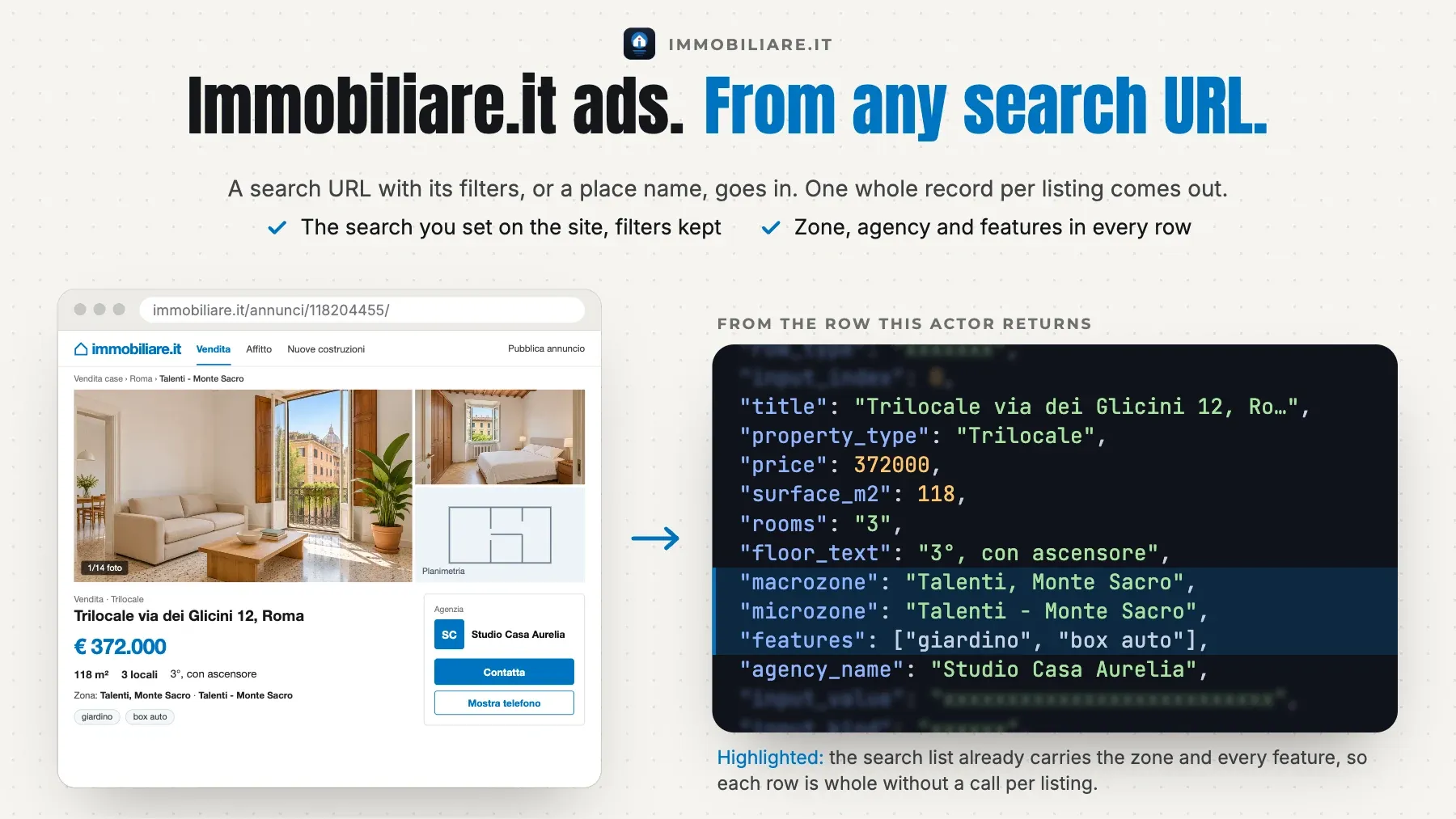
Immobiliare.it listings, logged out: Immobiliare.it search URLs (a city, a province or a zone, for sale or for rent, with every filter you set on the site), places by name, or listing URLs in, one row per listing out — the listing id and URL, the title, the contract, the property type, the price in euros, the surface, rooms, bedrooms, bathrooms and floor, the address, macrozone, microzone and coordinates, the agency's name and phone, the features and every photo URL — several searches in one run, a max per search. One free search row per input carries a completeness verdict: COMPLETE (the search's end), CAPPED (your limit), TRUNCATED (the site's own limit of 2,000 listings a search, with its count) or PARTIAL. No login, no API key, no browser, proxies handled for you.
$0.70 per 1,000 listing rows on the Free plan, $0.595 on Starter. A run start is $0.005. The default input returns about 50 rows for about $0.04. A value that names nothing is a free row that says why.
Why this Immobiliare.it scraper
- Your search, as you set it on the site. Paste the URL of a search from your browser: a city, a province, a zone or a microzone, for sale or for rent, with every filter you set there (price band, surface, rooms, bathrooms, property type, the sort). The actor reads the site's own search keys from that page, so the rows are the ones the site lists for it. Or give places by name (
Milano,Roma 70) withcontractsale or rent. - Whole records from the search itself. The site's list carries 25 listings a page with the price, the surface, rooms, bedrooms, bathrooms, floor, elevator, condition and heating, the address, macrozone, microzone and coordinates, the agency's name, page and phone, the features and every photo. No extra call per listing, so a search of 1,000 listings is read in about 40 calls.
- Listing URLs for the whole record. A listing URL (or its id) reads the listing's own page: the whole description, the street number, the price per m², the energy class, the year built and the dates created and updated.
- Every listing of a search, checked. The site's own order, page after page, until the search's end: the free
searchrow says COMPLETE with the site's count. The site shows 80 pages (2,000 listings) of a search, whatever its count (measured 2026-11-01); a run that reaches that end says TRUNCATED with the count. A listing met twice (on another page, in another search of the run) is delivered and charged once. - Agents and private advertisers stay private. An agency's or a firm's public name and phone are delivered; an agent's name and a private advertiser are never named. Every input gets a row.
Who it's for
- Real estate investors and analysts — the flats and houses of a city or a zone for sale or for rent, with the price, the surface and the coordinates, to compare prices per m² by quarter.
- Agencies and property managers — the competition of a zone: which agencies list what, at what price, with how many photos and which visibility tier.
- Relocation and rental services — the rentals of a city with your filters (rooms, price band, furnished), read again every day to see what is new.
Quick start
The first 50 listings of a search URL
Rentals of two places by name
A search URL with its filters, and two listings
Output
One row per listing (and one free search row per input):
| field | meaning |
|---|---|
row_type | listing (one listing, charged) or search (the input's row with the walk's verdict; free). |
input_index | The 1-based position of the input this row answers: startUrls first, then locations. |
input_value | The input as you gave it (the URL, the listing id or the place name). |
input_kind | Which input it came from: url (startUrls) or place (locations). |
search_url | The search on immobiliare.it this row comes from (your URL without the map view, or the site's own /search-list/ URL of a place), or the listing's page for a listing URL, as a URL you can open. |
status | A search row: ok, no_results, not_found, invalid, duplicate, failed or not_read (see the FAQ). A listing row: ok. |
status_detail | Why a search row has its status, in a sentence (null when ok). |
scraped_at | When the row was read (UTC, ISO 8601). |
position | A listing row: its place among this input's delivered listings, in the site's order. |
page | A listing row: the list page of the search it was on (25 listings a page; null for a listing URL). |
listing_id | The site's listing id (the number in /annunci/<id>/). Deduplicate across runs and join to your own data on this. |
url | The listing's page on immobiliare.it. |
title | The listing's title as the site writes it (type, street, zone, city). |
contract | sale, rent or auction, as the site gives it. |
property_type | The site's property type (Appartamento, Villa, Attico - Mansarda …). |
category | The site's category (Residenziale …). |
price | The price in euros (a rent: a month); null when the advertiser hides it. |
price_text | The price as the site shows it (€ 405.000, € 1.200/mese, da € 250.000). |
currency | EUR when a price is given. |
surface_m2 | The surface in m², read from the site's text. |
surface_text | The surface as the site shows it (140 m²). |
rooms | Rooms (locali) as the site writes them (3, 5+). |
bedrooms | Bedrooms as the site writes them. |
bathrooms | Bathrooms as the site writes them (2, 3+). |
floor | The floor's short form (R raised ground floor, T ground floor, 1, 5 …). |
floor_text | The floor as the site writes it (Piano rialzato, con ascensore). |
elevator | Whether the building has an elevator (null when the site does not say). |
condition | The condition as the site gives it (Nuovo / In costruzione, Ottimo / Ristrutturato, Buono / Abitabile, Da ristrutturare). |
heating | The heating as the site gives it (Autonomo, Centralizzato). |
features | The features the site lists (balcone, cantina, terrazzo, armadio a muro …). |
address | The street as the advertiser shows it (some show only the zone). |
street_number | The street number (a listing URL's row; null on search rows). |
city | The comune. |
province | The province. |
region | The region. |
macrozone | The site's macrozone of the city (a group of quarters). |
microzone | The site's microzone (the quarter). |
latitude | Latitude of the point the listing shows (exact or approximate, as the advertiser chose). |
longitude | Longitude of the same point. |
advertiser_type | agency, builder (an Impresa Edile), pro (another professional, such as an auction firm) or private. |
agency_name | The agency's or the firm's public name (null for a private advertiser). |
agency_id | The site's id of the agency or firm. |
agency_url | The agency's page on immobiliare.it. |
agency_phone | The agency's public phone number as the site shows it (never a private advertiser's, never an agent's own). |
visibility | The listing's paid visibility tier on the site (supervetrina, vetrina, premium, star, top). |
is_new_build | Whether the site marks the listing as new. |
luxury | Whether the site marks the listing as luxury. |
headline | The advertiser's headline for the listing. |
description | The description: on a search row where the site's list carries it (its first 600 characters; mostly the top supervetrina tier), whole on a listing URL's row. |
description_complete | true when description is the whole text (a listing URL's row), false when it is the list's first 600 characters; null without a description. |
price_per_m2 | The site's price per m² (a listing URL's row). |
energy_class | The energy class (a listing URL's row). |
building_year | The year the building was built (a listing URL's row). |
created_at | When the listing was created (a listing URL's row; UTC). |
updated_at | When the listing was last updated (a listing URL's row; UTC). |
photo_urls | The photos, large size, in the site's order. |
photos_count | How many photos the listing has. |
place | A search row: the place the site resolved (a zone with its city, a city with its region). |
listings_count | A search row: the site's own count of listings for the search. |
listings_delivered | A search row: listing rows delivered for this input. |
pages_read | A search row: list pages read (25 listings a page). |
repeats_skipped | A search row: listings met again (on a later page, or delivered by another input of the run), skipped and not charged. |
verdict | A search row: COMPLETE (the search's end), CAPPED (your limit), TRUNCATED (the site's limit of 2,000 listings, or an end under its count) or PARTIAL (stopped by a refusal or the time limit). |
verdict_detail | A search row: the verdict's reason in a sentence (the site's count, the end met, the cap). |
Example record:
Pricing
Pay for the listings a run delivers, plus one run start; no platform usage is billed to you. The listing price falls with your Apify plan.
| event | unit | Free | Starter | Scale | Business |
|---|---|---|---|---|---|
Listing (listing) | per 1,000 | $0.70 | $0.595 | $0.49 | $0.35 |
Run start (start) | per run | $0.005 | $0.005 | $0.005 | $0.005 |
A listing is $0.70 per 1,000 on the Free plan ($0.0007 a listing), with the place, the agency, the features and every photo included. Each run that delivers a charged listing also pays the run start, $0.005 once; a run that delivers no charged listing pays nothing at all. So one search of 100 listings costs $0.075 on the Free plan, and several searches in one run share one start. The free search row of every input, a value that is not an immobiliare.it search or listing URL or a place the site does not know (invalid), a listing the site does not have (not_found), a search with no match (no_results), a repeated input (duplicate), an input left at the cap or the time limit (not_read) and a refusal the run could not pass (failed) are never charged. A listing is charged once a run, also when several searches list it. A run that stops early (a timeout, an abort) is charged for the listings it delivered. maxItems counts the charged rows; before the first request the log names the price of each row at your plan and the most the run can cost. Enterprise plans have their own rates: the Actor's Pricing tab shows the price for your plan.
Usage patterns
- Searches, places and listings —
startUrlstakes search URLs as your browser shows them (https://www.immobiliare.it/vendita-case/milano/,/affitto-case/torino/,/vendita-ville/firenze/, a zone such as/vendita-case/roma/roma-70/; every filter in them is kept: price, surface, rooms, bathrooms, property type, the sortcriterio/ordine), the site's/search-list/?…URLs, and listing URLs (https://www.immobiliare.it/annunci/<id>/) or bare listing ids. The map view of a URL (mapCenter,zoom) is not read: the search is the URL's place and filters.locationstakes places by name, one a line, searched as homes for sale or for rent (contract); the free search row names the place the site took. immobiliare.it only. - What a row is —
row_type=listing: one listing, in the site's order (position, and the listpageit was on).row_type=search: the free row of one input value —place(the place the site resolved),listings_count(the site's own count),listings_delivered,pages_read,repeats_skipped, theverdictwith itsverdict_detail, and thestatuswith its reason. - How far a search goes —
maxItemsPerSearch(default 0 = every listing the site shows; the form suggests 50) stops each search after that many new listings. The site shows 80 pages (2,000 listings) of a search, whatever its count; a run that reaches that end says TRUNCATED with the count, and a zone, a price band or a property type in the URL reads more of it.maxItemscaps the charged rows of the whole run. A run started over the API takes the defaults, not the form's suggestion: setmaxItemsPerSearchthere too.
Input configuration
| field | type | default | what it does |
|---|---|---|---|
startUrls | array | Immobiliare.it pages to read, one a line: a search URL as your browser shows it (https://www.immobiliare.it/vendita-case/milano/, https://www.immobiliare.it/affitto-case/roma/roma-70/, with every filter you set there: price, surface, rooms, bathrooms, property type, sort), a https://www.immobiliare.it/search-list/?… URL, or a listing URL (https://www.immobiliare.it/annunci/126582415/, or the id alone). The map view (mapCenter, zoom) is not read: the search is the URL's place and filters. A URL that is not an immobiliare.it search or listing gets a free invalid row; a URL given twice a free duplicate row. | |
locations | array | Places by name, one a line: a city (Milano), a province (Roma provincia) or a zone (Roma 70). Each is the site's own place search's first answer, searched as homes for sale or for rent (contract); the free search row names the place the site took. A name the site does not know gets a free invalid row. | |
contract | sale / rent | "sale" | The contract of the locations searches: homes for sale or for rent. URLs in startUrls keep their own. |
maxItemsPerSearch | integer | 0 | Stop each search after this many new listings. 0 = every listing the site shows of it: 80 pages, 2,000 listings, whatever its count says. Listing URLs are not counted here. |
maxItems | integer | 0 | Stop the whole run after this many listing rows (the charged rows). 0 = no run cap; each search still stops at its own limit above. |
feedback | string | A note to the people who maintain this Actor: what you needed and did not get. For example a missing field, a wrong or empty result, or the Actor you switch from or to, and why. The run does not read it: the rows and the charges stay the same. A person reads every note. |
Errors
A run does not fail because of your input. When an input cannot be used — a date that is not a date, an id in the wrong form, two settings that contradict each other — the run ends Succeeded, charges nothing, and says what to change:
- the status message starts with
INPUT REJECTED; - the dataset holds one row,
{"error": true, "code": "…", "message": "…"}, and no results; - the key-value store record
ERRORholds the same object.
From code, check error on the first row before reading results.
A URL that is not an immobiliare.it search or listing URL (an agency page, the home page, another site) is not an error: it gets one free search row with status invalid that says why, and the run goes on with the others. A run that ends Failed is a fault on our side, never your input; it charges nothing, and we are alerted.
FAQ
Which status is which?
A search row's status is ok (listings served), no_results (the site lists nothing for it; read on two connections), not_found (the site does not have the listing, HTTP 404; checked on two connections), invalid (an empty value, a URL that is not an immobiliare.it search or listing URL, a page the site does not have, a map area, or a place name the site does not know), duplicate (the same search or listing again in the input: read once; or a listing another input already delivered), failed (the site refused every try; free) or not_read (left at maxItems, the charge limit or the run's time limit). A listing row's status is ok.
Why is the description empty on most search rows?
The site's list carries the description (its first 600 characters) only for listings in its top paid tier (supervetrina). A listing URL or id in startUrls reads the listing's own page, and its row carries the whole description with the energy class, the year built and the price per m².
Does it give the agent's name or a private advertiser's phone?
No. An agency's or a firm's public name, page and phone are delivered; an agent is a person and is never named, and a private advertiser is named by type only (the site's list gives neither a private name nor a phone).
Does it need an Immobiliare.it account or API key?
No. Everything is read from immobiliare.it's public pages, logged out.
Integration
JavaScript
Python
CLI
REST
AI agents and MCP
Apify's MCP server offers this Actor as a tool to Claude, Cursor, VS Code and any other MCP client. Connect https://mcp.apify.com?tools=hyperbach/immobiliare-scraper and ask, for example: "Get 50 homes for sale in Rome from Immobiliare.it with the price, surface, rooms and agency". The agent fills the input from the table above and reads the rows from the run's dataset. The input names are the ones in the table above. An agent or a person can add feedback to any run and say what was needed and not delivered: a missing field, a wrong or empty result, the Actor switched from or to, and why. The run returns the same rows at the same price, and a person reads every note.
n8n, Make and Zapier
The Apify node in n8n, the Apify app in Make and the Apify integration in Zapier run this Actor on a schedule or from a trigger and read its dataset. A webhook on the run's end (Integrations on the Actor page) sends the rows on to your own endpoint. Nothing to install on our side.
Support
Disagree with a charge? Write to apify@hyperbach.com with the run ID. We will ask Apify to compensate you, and the charge comes back to your Apify account as platform credit.
Did it do the job? A short review on the Store, at any rating, helps the next buyer choose.
See also
- Zillow Scraper — Zillow listings for sale, for rent and sold, by ZIP, city or search URL, with the Zestimate, and a property's price history.
- Redfin Scraper — Redfin homes for sale, sold and for rent by search URL, city or ZIP code, with the price, beds, baths, square feet, days on market and the MLS id.
- Fotocasa Scraper — Fotocasa.es homes for sale and for rent in Spain by place name or search URL, with the price, surface, rooms, the coordinates and the agency.
- StreetEasy Scraper — StreetEasy NYC rentals and sales by search link, listing link or neighborhood, with the price, net effective rent, beds, baths, square feet, days on market, the building and the agents.
- Rightmove Scraper — Rightmove UK homes to buy or to rent by search link, listing link or place name, with the price, beds, baths, type, tenure, size, key features, floorplans and the agent branch.
This page is generated from the Actor's schemas and a live sample — it cannot describe a field the Actor does not have.


