

LinkedIn Profile Scraper & LinkedIn People Search, No Login
Pricing
from $2.92 / 1,000 profile (page read)s
LinkedIn Profile Scraper & LinkedIn People Search, No Login
LinkedIn profile scraper and people search API, no login: profile details by URL (name, headline, location, about, followers, connections, photo, companies, schools, posts) and LinkedIn people search by keywords, job title, company, place, school or name. Private profiles free.
Pricing
from $2.92 / 1,000 profile (page read)s
Rating
0.0
(0)
Developer

Hyperbach
Maintained by CommunityActor stats
0
Bookmarked
4
Total users
2
Monthly active users
6 days ago
Last modified
Categories
Features
Share
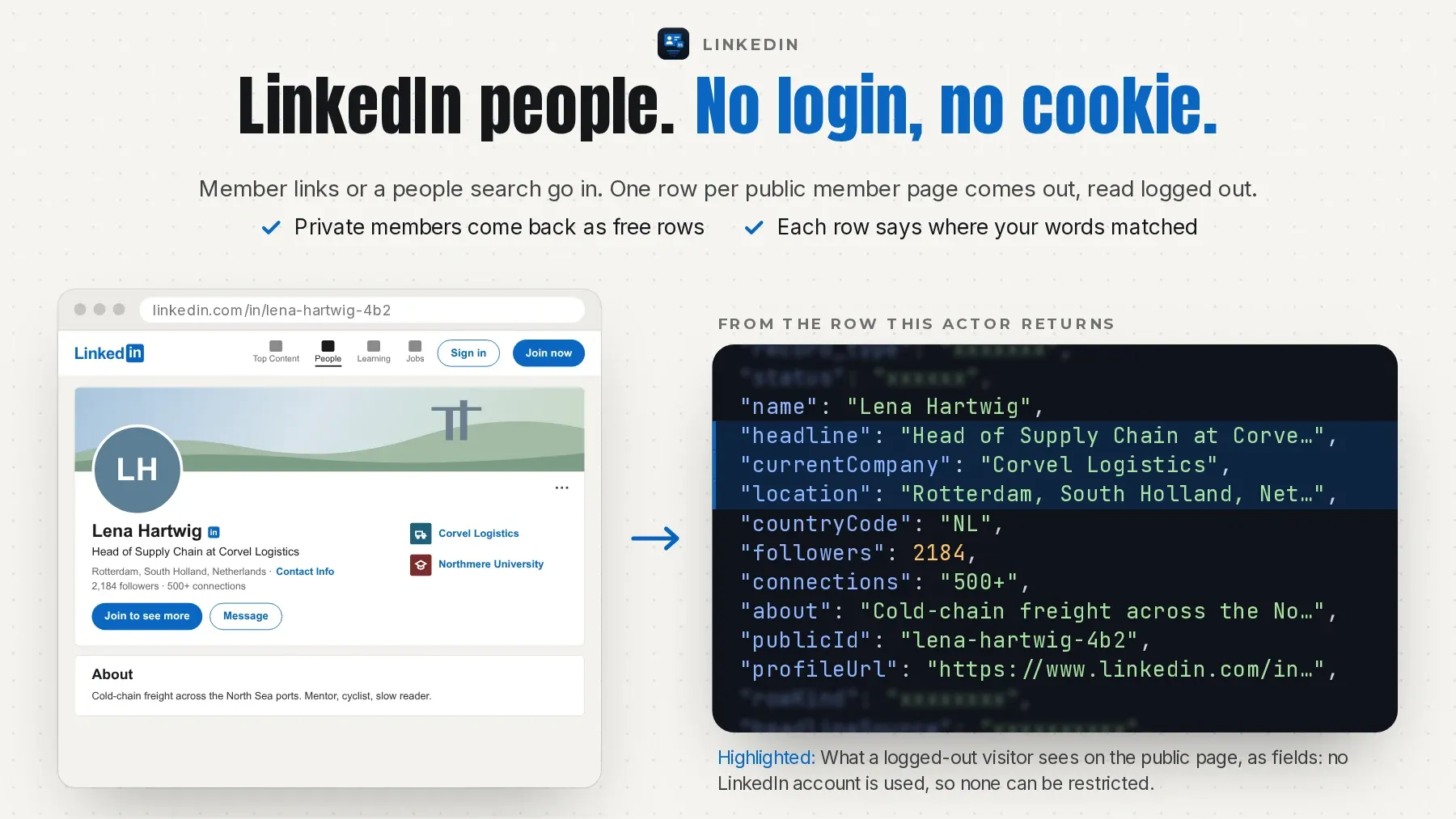
LinkedIn profiles as data, logged out: profile links or a people search in (keywords, job title, company, place, school or a name), one row per profile out — name, the headline where LinkedIn shows it, location and country code, about, followers, connections, photo, current and past companies with their LinkedIn URLs and the years LinkedIn gives, schools with years, the job titles LinkedIn shows, languages, recent posts and articles with their likes, and the websites on request — plus the search's evidence on every row (title, snippet, where each of your words matched, whether the name matches). A free summary row per search says how many profiles the search engine listed and why the list ended. A profile LinkedIn shows nobody logged out (private, restricted or deleted) is a free row, never charged. No login, no LinkedIn account, no cookie, no API key, proxies handled for you.
From $4.00 per 1,000 rows (profile) on the Free plan, $3.40 on Starter; every row and add-on is priced under Pricing below. A run start is $0.001238. The default input returns about 50 rows for about $0.201238. A profile LinkedIn shows no logged-out reader (private, restricted or deleted) is a free row.
How it compares
- automly's LinkedIn People Search Scraper is faster and cheaper: 50 profiles in 30 s, against our 46 s; $1.82 per 1,000 profiles, against our $2.94. We give more data: 31 fields per profile, against 16.
- 3 times cheaper than harvestapi's LinkedIn Profile Search Scraper Find all people: $2.94 per 1,000 profiles, against $8.60. It gives more data: 42 fields per profile, against our 31.
- 2 times cheaper than memo23's LinkedIn People Search, with more data: $2.94 per 1,000 profiles, against $6.22; 31 fields per profile, against 20.
Measured on 2026-11-15. Each line compares one job, run by both scrapers at the same time. Prices are per 1,000 profiles: Apify Actors at the Scale plan's prices.
Tested head-to-head on 2026-11-15
The job: a people search for one keyword (Founder), the first 50 profiles with their profile details (the input schema's example). Every Actor ran on it the same day from the same harness; every run's cost is at the Scale plan's prices: a rival's charged events at its price for that plan, this Actor's at its list price. Fields counts the filled fields of a typical row. harvestapi's search is LinkedIn's own people search on a login it holds; ours and the other two read logged out through a search engine and the public profile page. Re-measured monthly.
| Actor | Rows | First row | Run time | Cost | Fields | Failures |
|---|---|---|---|---|---|---|
| this Actor | 50 | 12 s | 46 s | $0.15 | 31 | none |
harvestapi/linkedin-profile-search | 48 | 6.1 s | 50 s | $0.41 | 42 | none |
memo23/linkedin-people-search | 23 | 61 s | 98 s | $0.14 | 20 | none |
automly/linkedin-people-search-scraper | 50 | 14 s | 30 s | $0.091 | 16 | none |
Why this LinkedIn profile scraper
- No login, ever. Every profile is read from LinkedIn's public page as a logged-out visitor sees it, and every search goes through a search engine's index of public profiles: nothing of yours is sent to LinkedIn, no cookie, no account to lose (the lane's reviews name cookie expiry and restricted accounts 32 times).
- Only what the page shows, never a guess. LinkedIn hides the job titles and most past company names of private members from logged-out readers (13 of 13 titles masked on our study): those fields are null with the reason (
jobTitlesNote,companyMasked), never filled from somewhere else. The headline is the page's when LinkedIn shows the titles, else the search engine's title, and the row says which (headlineSource). - Free when there is nothing to sell. A profile LinkedIn shows nobody logged out answers the same refusal as an address LinkedIn walls; the Actor tells them apart by reading the next profile on the same connection (or one profile it read before), and reads a refused profile on three connections, the last one later in the run, before it writes a free
not_publicrow; a walled connection is replaced, never charged. On non-founder searches up to 13 of 20 results were private. - Only rows inside your request are charged. Keywords, job titles, companies, places, schools and names are search words, not LinkedIn's member filters (those need a login), and a search engine can drop a word it cannot match. So each row says where each of your words was found (
matchedIn: title, snippet or page), whether its location holds your place word, and on a name search whether the name is the row's own; a row that does not show one of your filter or quoted words, a name search's row of another person, and a row whose whole address is another place are dropped free, and a search whose results stop showing your words stops there and says so. - Depth with a proof. The search engine lists up to about 1,000 profiles a query (the last page repeats at 1,001, read again on two fresh connections); the Actor then reads the query on 18 LinkedIn country hosts (uk, in, ca, au …: 166 of 180 results new on our study), every profile once. The free summary row states the profiles listed and delivered, the private ones, the duplicates and the verdict (TRUNCATED, CAPPED, NO_RESULTS or PARTIAL), never a LinkedIn total it does not show.
- Fast, paced by measurement. The profile page's record sits in the first 13 KB of a 64 KB page, so the read stops there; 6 connections in parallel read 20 profiles with their pages in 16.4 seconds, the first at 5.6 s, and the example's 50 by 43.9 s; the search rows alone came 30 in 4.9 seconds (the gate runs of build 0.1.11, 2026-11-15, at 256 MB; the card's run of the same build: 50 rows in 46 s). A private result never holds the run: the Actor reads ahead past it and stops at your limit.
Who it's for
- Recruiters and sourcers — people by job title, company, place and school words, each with location, current and past companies, schools with years and the photo, the private ones flagged free; a name search that says whether each result is the person.
- Sales and lead-generation teams — decision makers by role and company words, with their LinkedIn URL, headline, company with its LinkedIn URL, location and followers; the optional role tags add seniority, department and a decision-maker flag.
- Researchers and analysts — a list of public profiles from a query with the evidence of each match, the followers and connections as LinkedIn shows them, recent posts with their likes, a summary row per search to reconcile against.
- Developers and data teams — profile links in, typed rows out keyed by the public id, a free row for every link LinkedIn does not show, the leader's input names read as they are, a run summary to check a pipeline against.
Quick start
Profiles by link: the full row for each
Founders in Berlin, 50 profiles with their pages
A fast list: 200 search rows without the pages
A person by name, with the name check on every row
Switching from harvestapi/linkedin-profile-search?
Your input works as it is. Each name in the left column is read as this Actor's own field and the run log says so (read <theirs> as <ours>); a name marked not read is ignored with a note. A value in the other Actor's shape, an object list or its own date form, is read too.
| harvestapi/linkedin-profile-search | this Actor | what to know |
|---|---|---|
profileScraperMode | enrich | Short = enrich off (the search row alone); any other mode = enrich on. No e-mail search. |
searchQuery | searchQueries | The words, as one search; searchQueries takes several, one a line. |
maxItems | maxItems | The same name: the charged rows of the run. |
locations | locations | The same name; each a quoted search word, checked on the row's own location. |
currentCompanies | companies | Each a quoted search word (company names; a company URL's slug works). |
pastCompanies | companies | Each a quoted search word: the engine does not tell a current company from a past one. |
schools | schools | The same name; each a quoted search word. |
currentJobTitles | jobTitles | Each a quoted search word. |
pastJobTitles | jobTitles | Each a quoted search word: the engine does not tell a current title from a past one. |
firstNames | firstName | With lastNames: each first name with each last name, a quoted name search. |
lastNames | lastName | With firstNames. |
excludeLocations | excludeWords | Each a -word, and a row that still shows it is dropped free. |
excludeCurrentCompanies | excludeWords | Each a -word. |
excludePastCompanies | excludeWords | Each a -word. |
excludeSchools | excludeWords | Each a -word. |
excludeCurrentJobTitles | excludeWords | Each a -word. |
excludePastJobTitles | excludeWords | Each a -word. |
takePages | maxItemsPerSearch | Pages × 25 (the leader's page) rows a search. |
yearsOfExperienceIds | not read | A LinkedIn member filter: logged in only. Not read. |
yearsAtCurrentCompanyIds | not read | A LinkedIn member filter: logged in only. Not read. |
seniorityLevelIds | not read | A LinkedIn member filter: logged in only. Not read; tagRoles adds a seniority read from the headline. |
functionIds | not read | A LinkedIn member filter: logged in only. Not read; tagRoles adds a department read from the headline. |
industryIds | not read | A LinkedIn member filter by id: logged in only. Not read; an industry word in searchQueries is a search word. |
profileLanguages | not read | A LinkedIn member filter: logged in only. Not read. |
companyHeadcount | not read | A LinkedIn member filter: logged in only. Not read. |
companyHeadquarterLocations | not read | A LinkedIn member filter: logged in only. Not read; use locations for the member's own place. |
recentlyChangedJobs | not read | A LinkedIn member filter: logged in only. Not read. |
recentlyPostedOnLinkedIn | not read | A LinkedIn member filter: logged in only. Not read; each row carries the recent posts with their dates. |
excludeIndustryIds | not read | A LinkedIn member filter by id: logged in only. Not read. |
excludeSeniorityLevelIds | not read | A LinkedIn member filter: logged in only. Not read. |
excludeFunctionIds | not read | A LinkedIn member filter: logged in only. Not read. |
excludeCompanyHeadquarterLocations | not read | A LinkedIn member filter: logged in only. Not read. |
startPage | not read | Not read: a search is walked from its first page and every profile is delivered once. |
autoQuerySegmentation | not read | Not needed: past the engine's 1,000 a query the walk reads the query on 18 LinkedIn country hosts by itself. |
autoQuerySegmentationLevels | not read | Not read: the country-host slices are always on past the engine's cap. |
autoQuerySegmentationTargetCountries | not read | Not read: the 18 country hosts are taken in the order of their share of the engine's results. |
profileDeduplicationMode | not read | Not read: every profile is delivered once a run; a memory across runs is not offered. |
mongoDbConnectionString | not read | Not read: no external database; use the dataset or an integration. |
mongoDbDatabaseName | not read | Not read: no external database. |
postFilteringMongoDbQuery | not read | Not read: use strict and excludeWords, or filter the dataset. |
postFilteringMongoDbAggregation | not read | Not read: no external database. |
searchCoverage | not read | Not read: every search walks to the engine's end, then the country hosts. |
What differs:
- The leader logs in to LinkedIn; this Actor never does. LinkedIn's member filters (seniority, function, industry, headcount, years of experience, language, recently changed jobs, recently posted), its result totals and Sales Navigator need a login, so they are not offered; job titles, companies, places and schools are search words, and each row says where they matched.
- The leader's
profileScraperModeShort isenrichoff here (the search row alone), its Full modesenrichon; no e-mail is searched in any mode. - A search lists up to about 1,000 profiles a query from the engine, then the same query on 18 LinkedIn country hosts; the leader pages LinkedIn's own search.
- Job titles of private members are masked by LinkedIn for logged-out readers, so they are null here with the reason; the leader reads them logged in.
Output
One row per profile (and one free summary row per search):
| field | meaning |
|---|---|
record_type | profile on a profile row (charged when status is ok); search on a search's free summary row. |
status | ok, or why a row is free: not_public (LinkedIn shows the profile to no logged-out reader), invalid_input, failed, not_read, duplicate. |
rowKind | On a charged row: enriched (the profile's public page read) or search (the search engine's result alone, enrich off). |
profileUrl | The profile's LinkedIn URL (www host). |
publicId | The profile's public id (the part after /in/): the row's key. |
name | The member's name: the page's on an enriched row, the engine title's on a search row. |
headline | The headline: the page's when LinkedIn shows the member's titles, else the search engine's title or snippet line; null when neither shows one (headlineNote). |
headlineSource | Where the headline comes from: page_title, search_title or search_snippet. |
headlineCut | True when the engine cut the title ("…"): the headline is its start. |
headlineNote | Why the headline is null. |
location | The member's place as LinkedIn shows it (the page's; on a search row the engine's fact or snippet). |
countryCode | The two-letter country code of the member's location (enriched rows). |
locationSource | Where location comes from: page, engine_fact, engine_snippet or engine_title (LinkedIn's " |
currentCompany | The first current company LinkedIn names (on a search row the engine's Works For fact or the snippet's Experience). |
currentCompanies | Every current company: name, LinkedIn URL, location, start year and the title where LinkedIn shows them. |
experience | Current and past companies from the page's record: company (null when LinkedIn masks it, with companyMasked), its LinkedIn URL, location, current, start and end year, title where shown. |
experienceNote | Why experience is empty. |
education | Schools: name, LinkedIn URL, start and end year as the page's record gives them. |
jobTitles | The job titles LinkedIn shows logged out; null when it masks them (jobTitlesNote). |
jobTitlesNote | Why jobTitles is null (masked by LinkedIn for logged-out readers, or none listed). |
about | The profile's about text as the page's record gives it (LinkedIn may cut it with …). |
followers | The follower count from the page's record (enriched rows). |
followersText | The follower count as the search engine shows it (often rounded, "25K"). |
connections | The connections text LinkedIn shows ("500+"). |
photoUrl | The profile photo (LinkedIn's signed media URL, which expires after some weeks). |
languages | Languages the record lists. |
awards | Honors and awards the record lists. |
memberOf | Organizations the record lists. |
recentPosts | Recent posts on the page: URL, text start, date, likes and comments where shown. |
articles | Articles on the page: URL, headline, date, likes. |
websites | With fullProfile: the websites the profile lists (label and URL, LinkedIn's redirect unwrapped). |
websitesStatus | served with fullProfile, else not_asked. |
seniority | With tagRoles: LinkedIn's seniority level read from the headline (Internship, Entry level, Associate, Mid-Senior level, Director, Executive, Unknown). |
department | With tagRoles: LinkedIn's job function read from the headline, or Unknown. |
decisionMaker | With tagRoles: true when the headline names an owner, founder, chief officer, vice president, director or head of a function. |
roleTagsConfidence | With tagRoles: the model's confidence of each tag (0–1). |
snippet | The search engine's snippet for the result. |
engineFacts | The labelled facts the engine shows for the result, as shown (followers, works for, connections, location, occupation, education). |
position | The result's place in its search, from 1. |
query | The engine query that found the row (with the country host on a slice). |
searchId | The search's id: joins a profile row to its search's summary row. |
host | The LinkedIn host the engine listed (www, uk, in …). |
matchedIn | For each of your filter words: where the row shows it (title, snippet, page or none). |
locationMatched | With a place word: whether the row's own location holds it. |
nameMatched | On a name search: whether the row's name holds the first and last name; on an enriched search row: whether the page is the person the engine named. |
input | The value you gave that this row answers (a profile link, or the search's words). |
statusNote | Why a row is free, or how a search ended. |
verdict | On a search row: TRUNCATED (the engine's list ended), CAPPED (your limit), NO_RESULTS, PARTIAL (stopped early). |
resultsServed | On a search row: distinct profiles the engine listed. |
rowsDelivered | On a search row: charged rows it delivered. |
notPublic | On a search row: results LinkedIn shows to no logged-out reader (free rows). |
duplicates | On a search row: results another input of the run already gave. |
dropped | On a search row: rows dropped free, outside the request (a filter or quoted word not shown, another person's name, another place) or by excludeWords. |
notRead | On a search row: results taken and left unread by a cut (each has a free not_read row). |
slicesRead | On a search row: LinkedIn country hosts read past the engine's cap. |
pagesRead | On a search row: the engine's result pages read. |
wordsMissing | On a search row: your words that no result's title or snippet showed (the engine may have dropped them). |
readAt | When this row was read (UTC). |
Example record:
Pricing
Pay for the profile rows a run delivers, plus a run start of $0.0012383 charged once with the first charged row; no platform usage is billed to you, and a run that charges no row pays nothing.
| event | unit | Free | Starter | Scale | Business |
|---|---|---|---|---|---|
Profile, page read (profile) | per 1,000 | $4.00 | $3.40 | $2.92 | $2.92 |
Search row, no page read (search-result) | per 1,000 | $4.00 | $3.40 | $2.80 | $2.00 |
Role tags (role-tags, with tagRoles) | per 1,000 | $0.50 | $0.50 | $0.50 | $0.50 |
Run start (start, once a run) | per run | $0.0012383 | $0.0012383 | $0.0012383 | $0.0012383 |
The Scale and Business price of a profile row is $2.9175 per 1,000 ($0.0029175 a row). Free: a profile LinkedIn shows no logged-out reader (not_public), a value that names no profile, a page that could not be read, a row outside your request (it does not show one of your filter or quoted words, a name search's row of another person, a whole address of another place; excludeWords and strict), a profile another input of the run already gave, and every search summary row. A profile is charged once a run whatever searches overlap; a run that stops early is charged for the rows it delivered. maxItems counts the charged rows. Enterprise plans have their own rates — the Actor's Pricing tab shows the price for your plan.
Usage patterns
- Profile links —
profileUrlstakes LinkedIn profile links in any form (www or a country host, with or without parameters or a locale part, a link wrapped in a redirect) and bare public ids. Each gives one enriched row (charged), or a free row:not_publicwhen LinkedIn shows the profile to no logged-out reader (private, restricted or deleted: LinkedIn answers the three the same way),invalid_inputfor a value that names no profile (a company page, a post),duplicatefor a profile another input of the run already gave (another link form of the same profile included). An old/pub/<name>/…link names no public id and is a freeinvalid_inputrow: give the profile's/in/link. A pasted LinkedIn people-search link is read for its words (keywords, first and last name, title, company, school); its LinkedIn filters (geoUrn, industry, …) cannot be applied logged out and its search row and the run's notes say so. - People search —
searchQueries(one search a line) goes to the search engine as written, insidesite:linkedin.com/in: quotes keep a phrase, OR and -word work.jobTitles,companies,locationsandschoolsadd quoted words, andfirstNamewithlastNamethe quoted name; with several word inputs every combination is one search (at most 200 a run), and a profile is delivered once a run however many searches list it.excludeWordsgo to the engine as -word, and a row that still shows the word is dropped free. These are words, not LinkedIn's member filters: the engine finds the word anywhere on the profile's indexed text, so each row says where it matched (matchedIn), and a row that does not show one of your filter words or quoted phrases is dropped free (quoted phrases joined by OR: one of them); a name search delivers only rows whose own name holds the first and the last name; a place word must be in the row's own address when the row shows a whole one (withstrictalso a short one, and a row with no location is dropped). A country's short form (UK, US, USA, UAE) is searched as its name. When a page of results shows one of your words on none of its results (the engine dropped the word), or the profile pages read stop showing your words (more than 3 pages read and dropped for each delivered row), the search stops there and its summary row says why. A LinkedIn people-search link pasted intosearchQueriesis read as inprofileUrls. - What a row is —
record_type=profile,status=ok: one profile (charged).rowKind=enriched(the default: the profile's public page read — its location, about, followers, connections, photo, companies, schools, posts) orsearch(enrichoff: the engine's result alone — name, headline, snippet, and the facts the engine shows on about a third of results: followers rounded as shown, current company, connections, location). A freeprofilerow with anotherstatus(not_public,invalid_input,failed,not_read,duplicate) says why instatusNote.record_type=search: the free summary of a search — the engine query,resultsServed,rowsDelivered,notPublic,duplicates,dropped,pagesRead,slicesRead, the words the engine's results did not show (wordsMissing), and theverdict. - How far a search goes — The engine lists 10 results a page and stops near 1,000 a query (its last page repeats): the walk reads to that end, reads the last page again on two fresh connections, and when the list reached the engine's cap, reads the same query on 18 LinkedIn country hosts in turn (in, uk, ca, au, ch, sg, de, es, fr, nl, ae, se, ie, br, it, mx, za, ng), every profile once.
maxItemsPerSearchcaps one search,maxItemsthe whole run; a private result takes no slot: the Actor reads ahead past private results and stops at your limit, and the results it was still checking then get no row and no charge. The verdict: TRUNCATED (the engine's list ended), CAPPED (your limit), NO_RESULTS (no result on two connections), PARTIAL (the run's time limit, an abort or a refusal). - Options —
fullProfilereads each profile's whole page instead of its first part, forwebsites(about 4 times the data; the experience comes from the same record either way, because the page's own experience list carries no years logged out).tagRolesaddsseniority(LinkedIn's six levels),department(LinkedIn's 26 job functions) anddecisionMaker, read from the headline by a classification model withroleTagsConfidence, on rows whose headline is shown, charged per tagged row.maxConcurrencysets the profiles read at once (6 by default).
Input configuration
| field | type | default | what it does |
|---|---|---|---|
profileUrls | array | [] | LinkedIn profile links in any form (www or a country host such as uk.linkedin.com, with or without parameters, a link wrapped in a redirect) or bare public ids such as williamhgates. A pasted LinkedIn people-search link is read for its words. A value that names no profile gives a free row that says why. |
searchQueries | array | [] | One people search per line, sent to the search engine as written: quotes keep a phrase, OR and -word work; a row that does not show a quoted phrase (with OR: one of the phrases) is dropped free. A pasted LinkedIn people-search link is read for its words. Each search lists up to about 1,000 profiles from the engine, then continues on 18 country hosts. These are words, not LinkedIn's own filters: LinkedIn's people search with its filters and totals needs a login and is not offered. |
jobTitles | array | [] | Each value is added to the search as a quoted word, for example Software Engineer. With several word inputs, every combination is one search, and each profile is delivered once. The row's matchedIn says where the word was found; a row that does not show it is dropped free. |
companies | array | [] | Each value is added as a quoted word, for example Stripe. The engine matches the word anywhere on the profile, current or past company alike: this is not the company's employee list. |
locations | array | [] | Each value is added as a quoted word, for example Berlin; a country's short form (UK, US, USA, UAE) is searched as its name. A row whose own whole address is another place is dropped free, and the row's locationMatched says whether its location holds the word; use strict to also drop a row whose short or missing location cannot show it. |
schools | array | [] | Each value is added as a quoted word, for example Stanford University. |
firstName | string | With the last name: a search for the person's name as a quoted phrase. Only rows whose own name holds the first and the last name are delivered; the others are dropped free. | |
lastName | string | With the first name: a search for the person's name as a quoted phrase. | |
excludeWords | array | [] | Each value is sent to the engine as -word, and a row that still shows the word in its title, snippet or headline is dropped at no charge. |
enrich | boolean | true | On: every search result's public page is read for its full row (location, about, followers, connections, photo, companies, schools with years, posts). Off: the search rows alone, from the engine's results (name, headline, snippet and the facts the engine shows), faster and charged as a search row. Profile links are always read in full. |
fullProfile | boolean | false | Reads each profile's whole public page instead of its first part, to add the websites the profile lists. About 4 times the data per profile; the experience comes from the same record either way. |
tagRoles | boolean | false | Adds seniority (LinkedIn's six levels), department (LinkedIn's 26 job functions) and decisionMaker to each row whose headline is shown, read from the headline by a classification model, each with its confidence. Charged per tagged row. |
strict | boolean | false | Every row must already show each of your filter and quoted words, a name search's row the name, and a whole address the place word, or it is dropped free. Strict also drops a row whose short location ("London") does not hold the place word, and one with no location. |
maxItems | integer | 0 | The most charged profile rows of the whole run; 0 = no cap beyond your charge limit. Free rows (profiles LinkedIn shows nobody, values that name nothing, the search summary rows) do not count. |
maxItemsPerSearch | integer | 0 | The most charged rows one search delivers; 0 = no cap. A search lists up to about 1,000 profiles from the engine, then up to 18 country hosts. |
maxConcurrency | integer | 6 | Profile pages read in parallel, each on its own connection. About 25 to 40 profiles a minute each. |
feedback | string | A note to the people who maintain this Actor: what you needed and did not get. For example a missing field, a wrong or empty result, or the Actor you switch from or to, and why. The run does not read it: the rows and the charges stay the same. A person reads every note. |
Errors
A run does not fail because of your input. When an input cannot be used — a date that is not a date, an id in the wrong form, two settings that contradict each other — the run ends Succeeded, charges nothing, and says what to change:
- the status message starts with
INPUT REJECTED; - the dataset holds one row,
{"error": true, "code": "…", "message": "…"}, and no results; - the key-value store record
ERRORholds the same object.
From code, check error on the first row before reading results.
A search that matches nothing is not an error: the dataset holds its free summary row (verdict NO_RESULTS, or TRUNCATED with the reason) and nothing is charged. A run that ends Failed is a fault on our side, never your input; it charges nothing, and we are alerted.
FAQ
Why are job titles empty on many profiles?
LinkedIn shows a private member's job titles to logged-out readers as asterisks (13 of 13 on our study), and many past company names too. The row carries null with jobTitlesNote and companyMasked rather than a guess. The headline then comes from the search engine's title when the search found the profile (headlineSource search_title), else it is null with headlineNote. Public figures and members who show their titles get the titles and the page's headline.
Does it use LinkedIn's own people search with its filters and totals, or Sales Navigator?
No. LinkedIn's people search, with its seniority, function, industry and headcount filters and its result totals, and Sales Navigator are for logged-in members only; this Actor never logs in. The search goes through a search engine's index of public LinkedIn profiles, and your words are search words. The summary row states what the engine listed, never a LinkedIn total.
What is a not_public row?
A profile LinkedIn shows no logged-out reader: private, restricted, or not there at all — LinkedIn answers the three with the same page, and at some hours it also holds back a public profile for a while. The Actor checks that the refusal is the profile's and not the connection's (the same connection serves the next profile, or one it served before), reads the profile on three connections, the third one later in the run, and only then writes the free row. It is never charged and does not count against maxItems. When your limit is reached first, the results still being checked are left with no row.
Is every profile read fresh?
A profile page this Actor read in the last 24 hours, for any run, is kept by its public id and served from that read without reading LinkedIn again (charged the same: it is the profile's row); a profile LinkedIn showed nobody in the last 3 days is a free not_public row whose note names the day it was read. Nothing of your input is kept: no search, no words, no list of yours. With fullProfile every page is read fresh.
Are e-mails, phone numbers, skills or the full experience included?
No. None of them is on the logged-out page: e-mails and phones are not LinkedIn's data, skills and the dated experience list are for members only. The row carries the current and past companies and the schools with the years the page's record gives, and the websites with fullProfile.
Does it need a LinkedIn account, cookies or an API key?
No. Everything is read logged out with a plain HTTP client; no member cookie is accepted and none is used.
Which status is which?
A profile row: ok (charged), not_public (LinkedIn shows it to nobody logged out), invalid_input (a value that names no profile), failed (the page could not be read on several connections), not_read (left at maxItems, the charge limit or the run's time limit), duplicate (another input of the run gave it). A search row: ok with its verdict, failed (the engine refused the run's connections; free), not_read (never started).
Do I need Apify Proxy or my own proxy?
No. The Actor uses its own connections, at no extra cost to you.
Integration
JavaScript
Python
CLI
REST
AI agents and MCP
Apify's MCP server offers this Actor as a tool to Claude, Cursor, VS Code and any other MCP client. Connect https://mcp.apify.com?tools=hyperbach/linkedin-profile-scraper and ask, for example: "Find 50 LinkedIn profiles of startup founders in Berlin with their companies, schools, followers and photos". The agent fills the input from the table above and reads the rows from the run's dataset. A field under the name another Actor gives it is read as this Actor's own: queries, urls, profiles, profileUrl as profileUrls; searchQuery, search, query, keywords as searchQueries; currentJobTitles, pastJobTitles, titles, jobTitle as jobTitles; currentCompanies, pastCompanies, company as companies (and more). An agent or a person can add feedback to any run and say what was needed and not delivered: a missing field, a wrong or empty result, the Actor switched from or to, and why. The run returns the same rows at the same price, and a person reads every note.
n8n, Make and Zapier
The Apify node in n8n, the Apify app in Make and the Apify integration in Zapier run this Actor on a schedule or from a trigger and read its dataset. A webhook on the run's end (Integrations on the Actor page) sends the rows on to your own endpoint. Nothing to install on our side.
Support
Disagree with a charge? Write to apify@hyperbach.com with the run ID. We will ask Apify to compensate you, and the charge comes back to your Apify account as platform credit.
Did it do the job? A short review on the Store, at any rating, helps the next buyer choose.
See also
- LinkedIn Jobs Scraper — LinkedIn job listings for keywords and a location, with the applicants count, the salary block and the company's facts.
- LinkedIn Ad Library Scraper — every ad a company runs on LinkedIn, with the full detail page: payer, impressions by country and the targeting the advertiser chose.
- LinkedIn Posts Scraper — LinkedIn posts logged out, by profile, company or post link or by search words: text, author, date, reactions, comments and media.
- Telegram Profile Scraper — Telegram channels, groups, bots and users by username or link, with the exact subscriber or member count.
- YouTube Channel Search Scraper — the YouTube channels a keyword finds, with subscribers, the exact video and view counts and the country.
- Threads Scraper — Threads profiles with the exact follower count, their posts and replies with view counts, and keyword and tag search, without a login.
This page is generated from the Actor's schemas and a live sample — it cannot describe a field the Actor does not have.


