

Loom Transcript Scraper: Video Transcript Extractor, SRT, VTT
Pricing
from $0.85 / 1,000 transcripts
Loom Transcript Scraper: Video Transcript Extractor, SRT, VTT
Loom transcript extractor for public share or embed links: one row per video with the video transcript as text, timed segments, SRT and WebVTT, plus title, owner, date, duration, views and language. No login, no API key. Misses free.
Pricing
from $0.85 / 1,000 transcripts
Rating
0.0
(0)
Developer

Hyperbach
Maintained by CommunityActor stats
0
Bookmarked
2
Total users
1
Monthly active users
4 days ago
Last modified
Categories
Features
Share
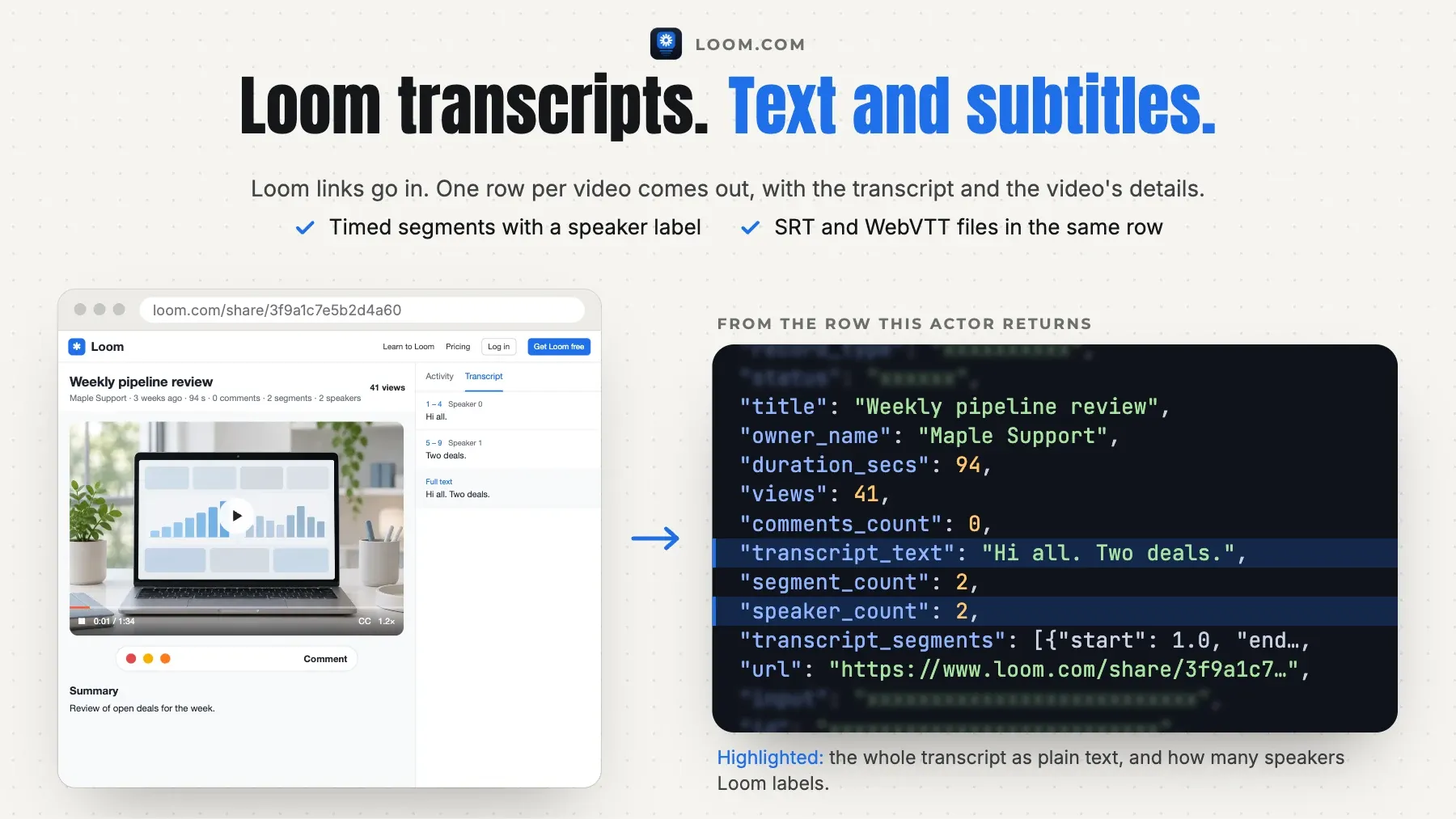
Loom transcripts from public share or embed links: one row per video with the transcript as plain text, as timed segments (start, end, speaker), as SRT and as WebVTT, plus the title, the owner as Loom shows it, the date, the duration, the views where the owner shows them and the language where Loom sets it. A video with no transcript, a password or a permission gate, or a link Loom shows no video for gets a free row that says why. No login, no API key, no browser, proxies handled for you.
$1.70 per 1,000 transcript rows on the Free plan, $1.445 on Starter. A run start is $0.0015. The default input returns about 2 rows for about $0.0049. A value that names nothing is a free row that says why.
Why this Loom transcript scraper
- Four formats in one row, no extra charge. The plain text for search and AI tools, the timed segments (
start,end,text,speaker) for your own processing, and ready SRT and WebVTT subtitle files. Turn ongroupBySpeakerto merge consecutive lines of one speaker. - The video's context on the same row. Title, the owner as Loom shows it, the creation date, the duration in seconds, the views and unique views where the owner shows them (null where the owner hides them, never a fake 0), the comment count, the description, the language where Loom sets it, and the thumbnail.
- No charge for a video without a transcript. A video with no transcript, a hidden transcript, a password, a permission gate or a link Loom shows no video for gets a free row that says which, with the video's title and owner where Loom shows them. A missing video is checked a second time before the row says so.
- Paste links the way you have them. Share links (with a title in front of the id or
?sid=), embed links, iframe snippets, Google-redirect links and bare 32-character ids; the same video given twice is read and charged once. - Fast. Two plain requests a video: six transcripts were read in 1.9 s in our test, and a run reads four videos at a time.
Who it's for
- Customer education and support teams — turn public Loom walkthroughs into searchable help-centre text and subtitles.
- AI and automation builders — feed Loom transcripts with timings into summaries, notes and knowledge bases from n8n, Make or the API.
- Researchers and content teams — collect what a set of Loom videos says, with the owner, date, duration and views beside it.
Quick start
Basic — newest postings
Switching from matthewjames/loom-transcript-scraper-and-formatter or louisdeconinck/loom-transcript-scraper or getascraper/loom-transcript-scraper?
Your input works as it is. Each name in the left column is read as this Actor's own field and the run log says so (read <theirs> as <ours>); a name marked not read is ignored with a note. A value in the other Actor's shape, an object list or its own date form, is read too.
| matthewjames/loom-transcript-scraper-and-formatter / louisdeconinck/loom-transcript-scraper / getascraper/loom-transcript-scraper | this Actor | what to know |
|---|---|---|
loomUrls | loomUrls | matthewjames's and louisdeconinck's list: plain links, ids or [{"url": …}] items, the same name. |
speakerSegmentGrouping | groupBySpeaker | matthewjames's switch: consecutive segments of one speaker merged. |
startUrls | loomUrls | getascraper's link list (share or embed links, iframe snippets). |
urls | loomUrls | getascraper's extra links or ids, one a line. |
videoUrls | loomUrls | getascraper's extra links or ids, one a line. |
maxVideos | maxItems | getascraper's cap on the videos of a run: here the cap on the transcript rows (free rows do not count). |
transcriptFormats | not read | Not needed: text, segments, SRT and WebVTT are on every row. |
skipVideosWithoutTranscript | not read | Not read: a video with no transcript is a free row; filter the dataset by record_type transcript. |
includeEngagementStats | not read | Not needed: views, unique views and the comment count are on every row where the owner shows them. |
includeVideoDownloadUrl | not read | Not served: this Actor reads transcripts, not video files. |
discoverFromPages | not read | Not served: give the video links themselves. |
monitorMode | not read | Not served: a transcript is read once per video. |
monitorName | not read | Not served (see monitorMode). |
requestConcurrency | not read | Not needed: the Actor reads four videos at a time by itself. |
proxyConfiguration | not read | Not needed: the Actor brings its own connections at no cost to you. |
What differs:
- A video with no transcript or one Loom does not show is a free row here; matthewjames charges a row for it too.
- Every format is on every row (text, segments, SRT, WebVTT); there is no format switch to set.
- Loom labels speakers by number only (
0,1); no actor can give their names from the public page. - Folder links, MP4 download links and comments are not read: give the video links, one per line.
Output
One row per video (a transcript row, or a free row that says why there is none):
| field | meaning |
|---|---|
record_type | transcript on a video whose transcript was read (charged); target on a free row (no transcript, not available, a repeat, a value that is not a Loom video). |
status | ok, or why there is no transcript: no_transcript, transcript_hidden, transcript_not_ready, not_available, password_protected, permission_required, duplicate, invalid_input, failed, not_read (all free). |
input | The value you gave that this row answers. |
id | Loom's 32-character video id. |
url | The video's share link. |
title | The video's title. |
owner_name | The owner's name as Loom shows it on the video. |
created_at | When the video was recorded or uploaded (UTC). |
duration_secs | The video's length in seconds. |
views | Views; null where the owner hides the counts. |
unique_views | Distinct viewers; null where the owner hides the counts. |
comments_count | Comments on the video. |
language | The transcript's language where Loom sets it (en); null otherwise. |
transcript_text | The whole transcript as plain text. |
transcript_segments | The transcript in timed segments: start and end in seconds, text, and Loom's speaker label (a number). |
segment_count | The number of segments. |
speaker_count | The number of speaker labels in the transcript. |
transcript_srt | The transcript as an SRT subtitle file. |
transcript_vtt | The transcript as a WebVTT subtitle file. |
description | The video's description, where the owner wrote one. |
chapters | The chapters the owner added, as Loom publishes them; null where there are none. |
thumbnail_url | The video's thumbnail image. |
note | On a free row: why there is no transcript, in Loom's own words where it gives them. |
scraped_at | When this row was read (UTC). |
Example record:
Pricing
Pay only for the transcripts a run delivers, plus one run start; no platform usage is billed to you. The transcript price falls with your Apify plan.
| event | unit | Free | Starter | Scale | Business |
|---|---|---|---|---|---|
Transcript (transcript) | per 1,000 | $1.70 | $1.445 | $1.19 | $0.85 |
Run start (start) | per run | $0.0015 | $0.0015 | $0.0015 | $0.0015 |
A transcript row is $1.70 per 1,000 on the Free plan ($0.0017 a video) and $1.445 on Starter, with every format included (text, segments, SRT, WebVTT): there is no add-on. Each run that delivers a transcript also pays the run start, $0.0015 once; a run that delivers no transcript pays nothing at all. So 10 videos cost $0.0185 on the Free plan and $0.01595 on Starter; 100 videos $0.1715 and $0.146. A video with no transcript (no_transcript), a hidden transcript, a password or a permission gate, a link Loom shows no video for (not_available), a repeated video (duplicate), a value that is not a Loom video link (invalid_input) and a video left at the cap or the time limit (not_read) are free rows, never charged. A video is charged once a run, also when you give it twice. A run that stops early (a timeout, an abort) is charged for the transcripts it delivered.
Before the first request the log names the price of a transcript at your plan, the run start and your charge limit; maxItems caps the transcripts of the whole run. Enterprise plans have their own rates — the Actor's Pricing tab shows the price for your plan.
Usage patterns
- A list of links from a document — Paste every Loom link of a page or a sheet into
loomUrls; each video gets one row, and a link that is not a Loom video gets a free row that says so. - Subtitles — Take
transcript_srtortranscript_vttstraight into a video player or an editor. - Readable speaker turns — Turn on
groupBySpeakerto get one segment per speaker turn instead of Loom's short caption lines.
Input configuration
| field | type | default | what it does |
|---|---|---|---|
loomUrls | array | [] | Public Loom videos, one per line: a share link (https://www.loom.com/share/ |
groupBySpeaker | boolean | false | On: consecutive segments of the same speaker become one segment (easier to read). Off: Loom's own caption segments, each with its exact start and end time. |
maxItems | integer | 0 | The most transcript rows of the whole run (one per video); 0 = no cap beyond your charge limit. Free rows (no transcript, not available) do not count. |
feedback | string | A note to the people who maintain this Actor: what you needed and did not get. For example a missing field, a wrong or empty result, or the Actor you switch from or to, and why. The run does not read it: the rows and the charges stay the same. A person reads every note. |
Errors
A run does not fail because of your input. When an input cannot be used — a date that is not a date, an id in the wrong form, two settings that contradict each other — the run ends Succeeded, charges nothing, and says what to change:
- the status message starts with
INPUT REJECTED; - the dataset holds one row,
{"error": true, "code": "…", "message": "…"}, and no results; - the key-value store record
ERRORholds the same object.
From code, check error on the first row before reading results.
A value that is not a Loom video link is not an error: it gets one free row with status invalid_input that says why, and the run goes on with the others. A run that ends Failed is a fault on our side, never your input; it charges nothing, and we are alerted.
FAQ
Does it make a transcript for a video that has none?
No. It reads the transcript Loom already publishes for the video. A video with none gets a free no_transcript row with its title, owner and duration, and costs nothing.
Can it read private or password-protected videos?
No. It reads only what Loom shows to a viewer who is not logged in. A password video gets a free password_protected row, a video limited to chosen viewers a permission_required row, and a link Loom shows no video for (deleted, private to a workspace, or a wrong id) a not_available row; nothing is bypassed.
Why are the views empty on some videos?
The owner can hide the counts from viewers; Loom then shows none, and the row says null rather than a made-up 0.
Does it name the speakers?
Loom labels speakers by number in its captions (0, 1, …), and the row keeps that label. Names are not published on the public page.
Is the language always set?
Only where Loom sets it on the transcript (en on some videos); otherwise language is null.
Do I need Apify Proxy or my own proxy?
No. The Actor uses its own connections, at no extra cost to you.
Integration
JavaScript
Python
CLI
REST
AI agents and MCP
Apify's MCP server offers this Actor as a tool to Claude, Cursor, VS Code and any other MCP client. Connect https://mcp.apify.com?tools=hyperbach/loom-transcript-scraper and ask, for example: "Get the transcripts of these Loom videos as text and timed segments: https://www.loom.com/share/73071f693b9c4c7b8a43a7b3cbe2d8ea". The agent fills the input from the table above and reads the rows from the run's dataset. A field under the name another Actor gives it is read as this Actor's own: startUrls, urls, videoUrls, url as loomUrls; speakerSegmentGrouping as groupBySpeaker; maxVideos, maxResults, limit as maxItems. An agent or a person can add feedback to any run and say what was needed and not delivered: a missing field, a wrong or empty result, the Actor switched from or to, and why. The run returns the same rows at the same price, and a person reads every note.
n8n, Make and Zapier
The Apify node in n8n, the Apify app in Make and the Apify integration in Zapier run this Actor on a schedule or from a trigger and read its dataset. A webhook on the run's end (Integrations on the Actor page) sends the rows on to your own endpoint. Nothing to install on our side.
Support
Disagree with a charge? Write to apify@hyperbach.com with the run ID. We will ask Apify to compensate you, and the charge comes back to your Apify account as platform credit.
Did it do the job? A short review on the Store, at any rating, helps the next buyer choose.
See also
- YouTube Transcript Scraper — the transcript of any video, channel, playlist or search, each row saying which caption track it is.
- Instagram Reels Transcript Scraper — the spoken words of Instagram reels, by reel link or creator, with the exact posting time.
- TikTok Transcript Scraper — the spoken words of TikTok videos, by video link or creator: TikTok's own captions first, speech-to-text where there are none.
- Facebook Video Transcript — the spoken words of public Facebook videos and reels by link: Facebook's own captions first, speech-to-text where there are none, with timed segments, SRT and WebVTT.
- Douyin Search Scraper — Douyin (抖音) posts by keyword search, video link, hashtag, related videos or the hot-search board, logged out: exact likes and the author's exact followers; transcripts and video files as add-ons.
This page is generated from the Actor's schemas and a live sample — it cannot describe a field the Actor does not have.


