
Meetup Events Scraper - Search by Keyword, City, Group or Link
Pricing
from $0.50 / 1,000 events
Meetup Events Scraper - Search by Keyword, City, Group or Link
Scrape Meetup events by keyword and city, group or event link: title, start and end with the time zone, venue, address and map point or online, the group with members and rating, fee, attendee count, waitlist, topics, description. No login. Misses free.
Pricing
from $0.50 / 1,000 events
Rating
0.0
(0)
Developer

Hyperbach
Maintained by CommunityActor stats
0
Bookmarked
2
Total users
1
Monthly active users
4 days ago
Last modified
Categories
Features
Share
Meetup Events Scraper
Meetup events, logged out: keywords near a place, a place alone, or event and group links in, one row per event out — the title, the start and end with the time zone, in person, online or hybrid, the venue with its address and map point, the group with its members and rating, the fee, the attendee count, the waitlist, the topics, the description and the cover photo. One free row per input says how its list ended. No login, no API key, no browser, proxies handled for you.
$1.00 per 1,000 event rows on the Free plan, $0.80 on Starter. A run start is $0.0013. The default input returns about 50 rows for about $0.0513. A value that names nothing is a free row that says why.
Why this Meetup scraper
- The leader's input runs as it is.
searchKeyword,city,country,eventType,startDateRange,endDateRangeandmaxResultsof the most-used Meetup scraper are read as this Actor's own fields, so a saved input or an API call moves over unchanged. - Searches, places, events and groups in one run. Give several keywords (one search each) near one place, a place alone for Meetup's own suggestions near it, event links (past and cancelled events too) and group links (upcoming events, or the past events page, newest first).
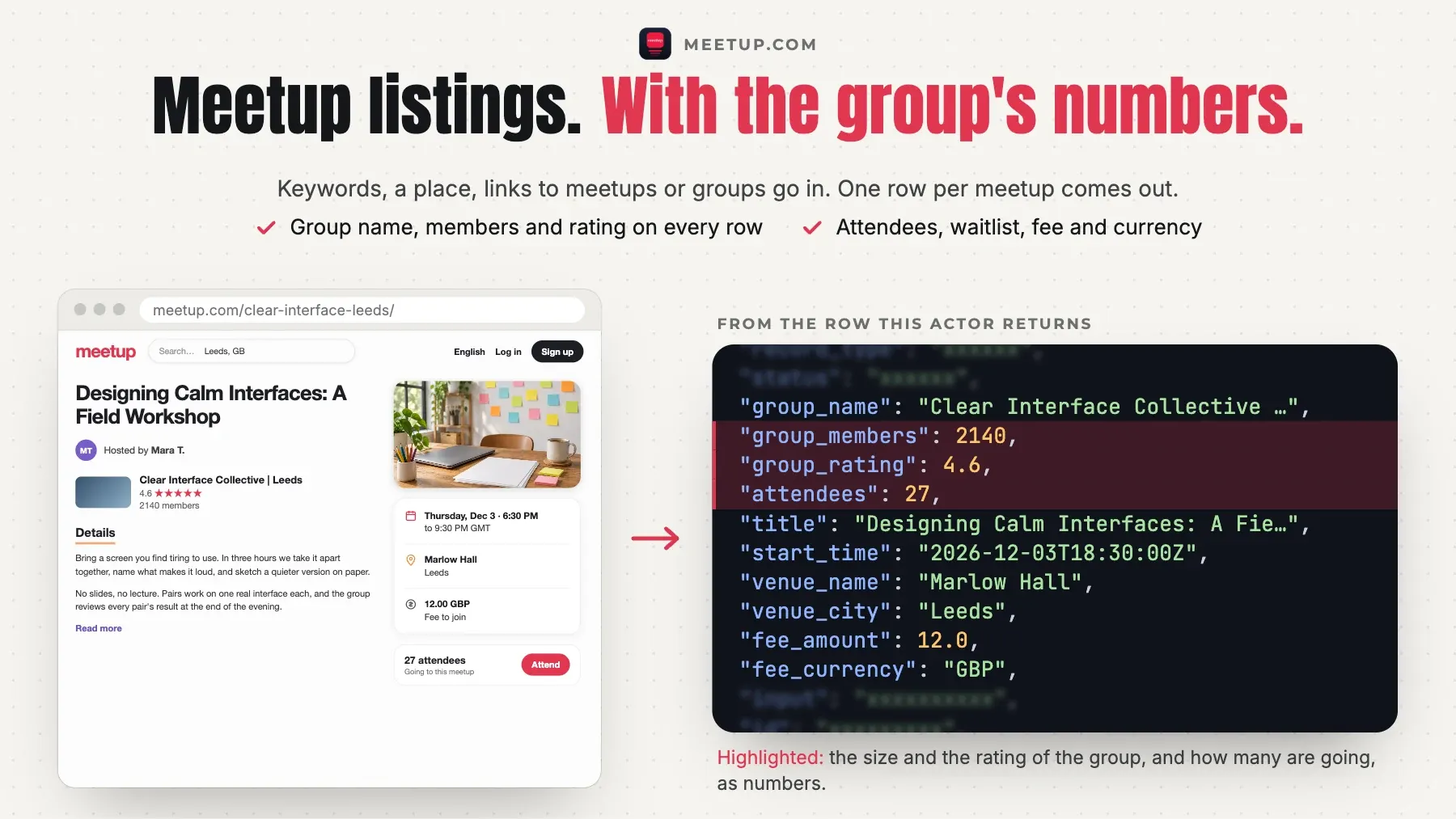
- Every row carries the group and the numbers. The group's name, link, member count and rating, the attendee count and the waitlist, the fee with its currency, the topics: from the same call as the event, so no row costs a second call.
- Every input ends with its own row. A search's free row says how many events Meetup listed and that its list ended (Meetup's search shows about 120 events a search, measured 2026-11-09); an unknown event or group is a free
not_foundrow, checked on two connections.
Who it's for
- Event aggregators and city guides — every upcoming event near a city on a theme (tech, yoga, running, language exchange) with its time, venue and fee, read again each day for what is new.
- Developer relations, community and sponsorship teams — the active groups of a topic in the cities you care about, ranked by members, rating and attendees, with each event's date and venue.
- Market researchers — how many events a topic has in a city, how full they are and what they cost, compared across cities and over time.
Quick start
Basic — newest postings
Switching from filip_cicvarek/meetup-scraper?
Your input works as it is. Each name in the left column is read as this Actor's own field and the run log says so (read <theirs> as <ours>); a name marked not read is ignored with a note. A value in the other Actor's shape, an object list or its own date form, is read too.
| filip_cicvarek/meetup-scraper | this Actor | what to know |
|---|---|---|
mode | not read | Not read: events are always read (the leader's default mode). Group profiles (its groups mode) are not served. |
searchKeyword | keywords | One keyword, read as a list of one; give several in keywords for one search each. Empty with a place: Meetup's own suggestions near it, as the leader's browse. |
city | location | A city name; with the leader's state and country it reads as 'Austin, TX, us'. Meetup's first match inside that country is used. |
state | not read | Read into location after the city ('Portland, OR, us'), not as a field of its own. |
country | not read | Read into location after the city as its two-letter code ('London, gb'; 'uk' is read as gb), not as a field of its own. |
lat | not read | With lon, read as location ' |
lon | not read | With lat, read as location ' |
eventType | eventType | The same values: PHYSICAL, ONLINE, HYBRID, or empty (any) for every event. |
radius | not read | Not read: the search area is Meetup's own around the place. |
startDateRange | startDate | An ISO date or date-time; its day is read, in the place's own time zone. |
endDateRange | endDate | An ISO date or date-time; its day is read, to the end of that day. |
minRsvpCount | not read | Not read: filter the rows on attendees. |
sortBy | not read | Not read: the rows come in Meetup's relevance order, with position and start_time on every row to sort by. |
maxResults | maxItems | The cap of the whole run; 0 = no cap. |
outputConnectors | not read | Not read: use Apify's own integrations (Make, Zapier, n8n, Slack, Google Sheets, webhooks) on the dataset. |
notionParentPageUrl | not read | Not read: no connector delivery; use Apify's Notion integration on the dataset. |
messageChannel | not read | Not read: no connector delivery; use Apify's Slack integration on the dataset. |
connectorDelivery | not read | Not read: no connector delivery. |
connectorTool | not read | Not read: no connector delivery. |
connectorArguments | not read | Not read: no connector delivery. |
What differs:
- Events only: the leader's groups mode (
modegroups: group profiles with organizer contacts) is not served; a group link here gives the group's events. citywithstateandcountryis read aslocation('London, gb');latandlonas a point when no city is given. Empty: London, gb, as there.maxResultsis read asmaxItems, the cap of the whole run; 0 = no cap, as there.minRsvpCount,radiusandsortByare not read: the rows carryattendeesto filter on, the place is Meetup's own search area, and the order is Meetup's relevance order.- No host or organizer names and no attendee list: the rows carry the group, its link and its numbers.
Output
One row per event (and one free row per input):
| field | meaning |
|---|---|
record_type | event on an event row (charged); target on an input's free summary row. |
status | ok, or why an input gave no row: not_found, invalid_input, failed, not_read. |
input | The value you gave that this row answers: a keyword, a place, or a link. |
id | Meetup's event id. |
url | The event's page. |
title | The event's title. |
event_status | Meetup's status of the event: ACTIVE (upcoming), PAST, CANCELLED, and the site's other states. |
event_type | PHYSICAL (in person), ONLINE or HYBRID. |
is_online | True when the event is held online. |
start_time | The start, local time with its offset (ISO 8601). |
end_time | The end, local time with its offset (ISO 8601). |
duration | The length as Meetup gives it (ISO 8601, PT2H). |
timezone | The group's time zone (IANA name). |
venue_name | The venue's name (Online event for an online event). |
venue_address | The venue's street address. |
venue_city | The venue's city. |
venue_state | The venue's state or region. |
venue_postal_code | The venue's postal code. |
venue_country | The venue's country, two letters. |
venue_lat | The venue's latitude (empty for an online event). |
venue_lon | The venue's longitude (empty for an online event). |
how_to_find_us | The host's directions to the venue. |
group_id | Meetup's id of the group that hosts the event. |
group_name | The group's name. |
group_urlname | The group's short name in its link. |
group_url | The group's page. |
group_city | The group's home city. |
group_country | The group's country, two letters. |
group_members | The group's member count. |
group_rating | The group's average event rating (out of 5); empty when it has no ratings. |
group_ratings_count | How many ratings the group's events have. |
is_free | True when the event has no fee. |
fee_amount | The fee, in fee_currency. |
fee_currency | The fee's currency (USD, GBP, EUR, …). |
fee_required | True when Meetup asks for the fee to RSVP; false when it is paid at the door or optional. |
attendees | The members going (RSVP yes). |
waitlist | The members on the waitlist. |
max_tickets | The event's attendee limit; empty when there is none. |
rsvp_state | Whether a visitor can RSVP now: JOIN_OPEN, RSVP, CLOSED, FULL, WAITLIST, PAST, … |
topics | The event's topics. |
image_url | The event's cover photo. |
is_series | True when the event is one of a recurring series. |
created_time | When the event was created (ISO 8601). |
description | The event's description, as the host wrote it (Markdown). |
position | The event's place in its input's list (1 = first). |
verdict | On an input row: COMPLETE (an event, or a group's list to its end), LIST_END (a search to Meetup's own end), TRUNCATED, PARTIAL (stopped: note says why). |
rows_delivered | On an input row: the event rows it delivered. |
note | Why an input row has the status or the verdict it has. |
scraped_at | When this row was read (UTC). |
Example record:
Pricing
Pay for the events a run delivers, plus one run start; no platform usage and no proxy traffic is billed to you. The event price falls with your Apify plan.
| event | unit | Free | Starter | Scale | Business |
|---|---|---|---|---|---|
Event (event) | per 1,000 | $1.00 | $0.80 | $0.70 | $0.50 |
Run start (start) | per run | $0.0013 | $0.0013 | $0.0013 | $0.0013 |
An event is $1.00 per 1,000 on the Free plan ($0.001 an event) and $0.80 on Starter, with its full record (the times, the venue or online, the group and its numbers, the fee, the attendee count, the topics, the description and the cover): there is no add-on. Each run that delivers a charged event also pays the run start, $0.0013 once; a run that delivers no charged event pays nothing at all. So the default input's 50 events cost $0.0513 on the Free plan and $0.0413 on Starter; 100 events $0.1013 and $0.0813; 1,000 events $1.0013 and $0.8013; every input of a run shares one start. The free input row of every keyword, place and link, an event or group Meetup does not have (not_found), a value that is not a Meetup event or group link (invalid_input), an input left at a cap or the time limit (not_read) and a refusal the run could not pass (failed) are never charged. An event is charged once a run, also when several inputs list it. A run that stops early (a timeout, an abort) is charged for the events it delivered.
Usage patterns
- Keywords, a place, events and groups —
keywordstakes words to search for, one search each, nearlocation: a city with its country code (London, gb,Berlin, de,New York, NY, us) or a point40.75,-73.99. Alocationwith no keywords and no links reads Meetup's own suggestions near it.startUrlstakes event links (https://www.meetup.com/<group>/events/<id>/, or the bare id) and group links (https://www.meetup.com/<group>/for its upcoming events,https://www.meetup.com/<group>/events/past/for its past events, newest first). - Filters —
eventType(PHYSICAL in person, ONLINE, HYBRID) and the datesstartDateandendDate(YYYY-MM-DD, in the place's time zone) are sent with every search and applied to every row, a group's and an event link's too. Meetup's search lists upcoming events only; a group's past events page reaches back to the group's first event. - How deep a search goes — Meetup's search shows about 120 events for one keyword and place (118 to 153 on the searches of 2026-11-09), then its list ends; the search's free row says LIST_END with the count read. For more, give more keywords, narrower dates, or several places in separate runs.
Input configuration
| field | type | default | what it does |
|---|---|---|---|
keywords | array | [] | Words to search Meetup events for, one search each (e.g. javascript, yoga, startup networking). Each search lists about 120 events at most, as Meetup's own search does. Leave empty and give only a location to read Meetup's own suggestions near that place. |
location | string | "" | The place every search is near: a city with its two-letter country code ('London, gb', 'Berlin, de', 'New York, NY, us'), or a point 'latitude,longitude' ('40.75,-73.99'). Empty: London, gb (as the most-used Meetup scraper does). |
startUrls | array | [] | Meetup links: an event (https://www.meetup.com/ |
eventType | `` / PHYSICAL / ONLINE / HYBRID | "" | Only events held this way. Empty: every event. |
startDate | string | "" | Only events that start on or after this day (YYYY-MM-DD), in the place's own time zone. Meetup's search lists upcoming events only; a group's past events page goes back further. |
endDate | string | "" | Only events that start on or before this day (YYYY-MM-DD). |
maxItems | integer | 0 | The most charged event rows of the whole run; 0 = no cap beyond your charge limit. |
feedback | string | A note to the people who maintain this Actor: what you needed and did not get. For example a missing field, a wrong or empty result, or the Actor you switch from or to, and why. The run does not read it: the rows and the charges stay the same. A person reads every note. |
Errors
A run does not fail because of your input. When an input cannot be used — a date that is not a date, an id in the wrong form, two settings that contradict each other — the run ends Succeeded, charges nothing, and says what to change:
- the status message starts with
INPUT REJECTED; - the dataset holds one row,
{"error": true, "code": "…", "message": "…"}, and no results; - the key-value store record
ERRORholds the same object.
From code, check error on the first row before reading results.
A value that is not a Meetup event or group link (a search link, a member page, another site) is not an error: it gets one free input row with status invalid_input that says why, and the run goes on with the others. A run that ends Failed is a fault on our side, never your input; it charges nothing, and we are alerted.
FAQ
Which status is which?
An input row's status is ok (events served; see verdict: COMPLETE for an event or a group's list to its end, LIST_END for a search to Meetup's own end, PARTIAL when the run stopped first), not_found (Meetup has no such event, group or place; checked on two connections), invalid_input (not a Meetup event or group link), failed (the site refused every try; free) or not_read (left at maxItems, the charge limit or the run's time limit). An event row's status is ok.
Does it log in, RSVP or read attendee lists?
No. It reads what a logged-out visitor sees: no account, no RSVP, no member or host names. The attendee count and the waitlist are numbers only.
Is a paid event free when is_free is false?
is_free is true when the event has no fee. fee_amount and fee_currency give the fee as Meetup states it, and fee_required says whether Meetup asks for it to RSVP (false: paid at the door or optional).
Why does an online event have no map point?
Meetup gives every online event the same placeholder point in the Pacific; this Actor leaves venue_lat and venue_lon empty instead.
Do I need Apify Proxy or my own proxy?
No. The Actor uses its own connections, at no extra cost to you.
Integration
JavaScript
Python
CLI
REST
AI agents and MCP
Apify's MCP server offers this Actor as a tool to Claude, Cursor, VS Code and any other MCP client. Connect https://mcp.apify.com?tools=hyperbach/meetup-scraper and ask, for example: "Find upcoming Meetup events about javascript in London with their date, venue, group, fee and number of attendees". The agent fills the input from the table above and reads the rows from the run's dataset. A field under the name another Actor gives it is read as this Actor's own: searchKeyword, searchQueries, searchKeywords, keyword as keywords; city, customCity, searchLocation, place as location; startUrl, urls, url, links as startUrls; type, format as eventType (and more). An agent or a person can add feedback to any run and say what was needed and not delivered: a missing field, a wrong or empty result, the Actor switched from or to, and why. The run returns the same rows at the same price, and a person reads every note.
n8n, Make and Zapier
The Apify node in n8n, the Apify app in Make and the Apify integration in Zapier run this Actor on a schedule or from a trigger and read its dataset. A webhook on the run's end (Integrations on the Actor page) sends the rows on to your own endpoint. Nothing to install on our side.
Support
Disagree with a charge? Write to apify@hyperbach.com with the run ID. We will ask Apify to compensate you, and the charge comes back to your Apify account as platform credit.
Did it do the job? A short review on the Store, at any rating, helps the next buyer choose.
See also
- Eventbrite Scraper — the events of a place on Eventbrite, with the dates, the venue, the price range and the organizer.
- Facebook Events Scraper — Facebook events by search words and a city, event link or page: the start and end time in the event's own zone, the place with its address and coordinates, the hosts, the going and interested counts and the ticket link.
- Skool Community Scraper — Skool communities by keyword, category or URL: member and online counts, posts and courses, the price and its tiers, and the owner's public links.
- Facebook Groups Scraper — the posts of public Facebook groups by link, id or name, logged out: the text, the time, reactions by type, comments and shares, the author, media and the group's exact member count.
- Skool Posts & Classroom Scraper — a Skool community's free classroom courses and lessons with their text, video and captions, and its feed posts with full text, author, likes, files and comments, without a login.
This page is generated from the Actor's schemas and a live sample — it cannot describe a field the Actor does not have.


