

Pinterest Search Scraper: Pins, Boards, Profiles & Comments
Pricing
from $1.71 / 1,000 pins
Pinterest Search Scraper: Pins, Boards, Profiles & Comments
Scrape Pinterest without a login: the pins of searches, search URLs, boards, sections and profiles, boards and people searches, pin URLs. Each pin's id, URL, title, description, image and size, video, link, date, reactions, saves, pinner and board; comments as an add-on. Misses free.
Pricing
from $1.71 / 1,000 pins
Rating
0.0
(0)
Developer

Hyperbach
Maintained by CommunityActor stats
0
Bookmarked
4
Total users
4
Monthly active users
3 days ago
Last modified
Categories
Features
Share
Pinterest Search Scraper: Pins, Images, Links & Pinners
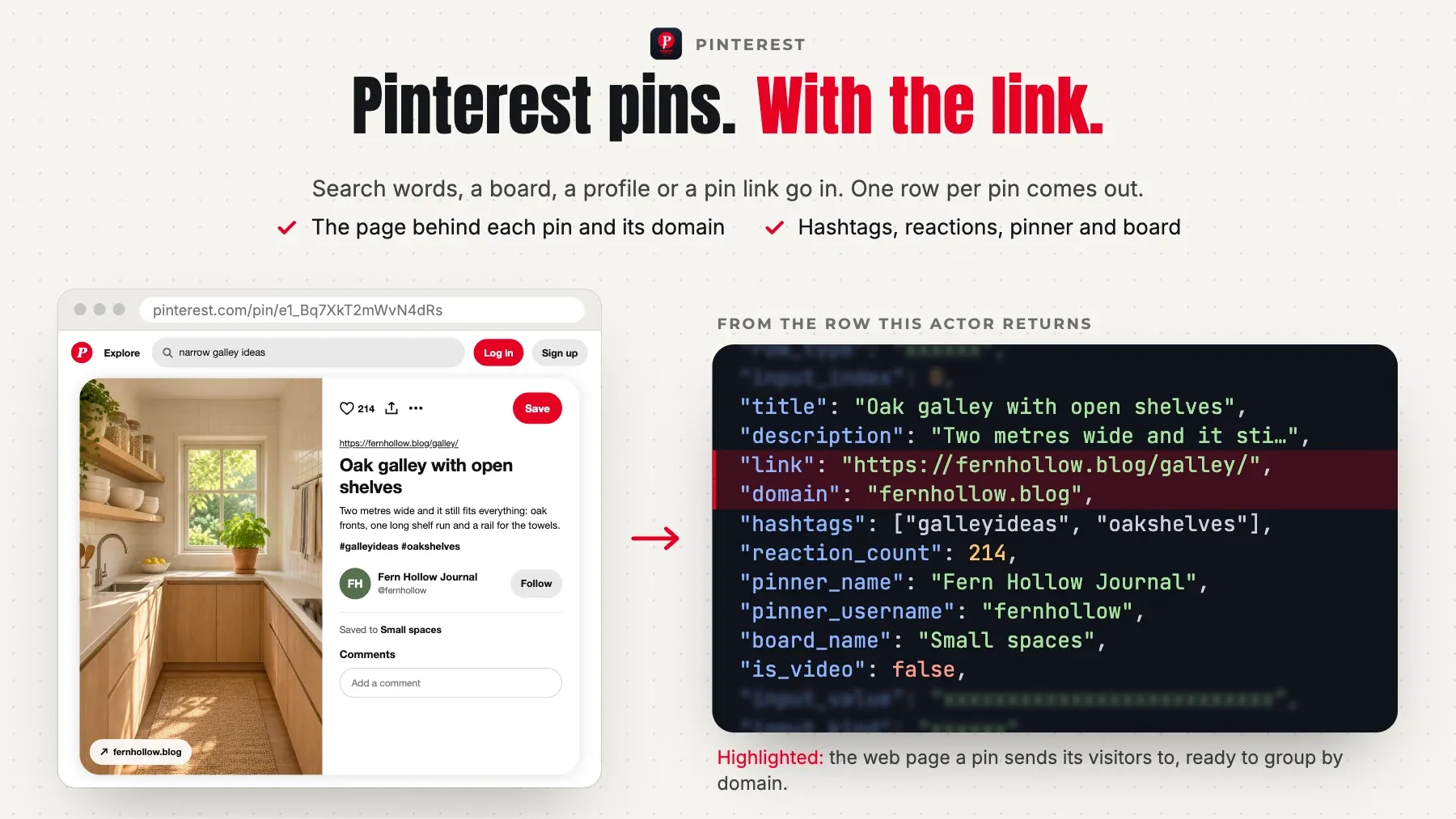
Pinterest without a login: the pins of searches (All Pins, Videos, Products with prices), of boards and board sections, of profiles and of pin URLs; boards and people searches; a pin's comments and a search pin's save count and numeric id as add-ons. One row per pin — the pin's id and URL, title, description and alt text, the link it points to, the image with its size, the video, the date, the reactions, and the saves, repins and comments where Pinterest shows them, the hashtags, the pinner and the board — and one free row per input with a completeness verdict: COMPLETE (Pinterest's own end), CAPPED (your limit), TRUNCATED or PARTIAL. No login, no API key, no browser, proxies handled for you.
From $3.27 per 1,000 rows (pin) on the Free plan, $2.85 on Starter; every row and add-on is priced under Pricing below. A run start is $0.0012. The default input returns about 50 rows for about $0.1647. Every input gets a free row with its verdict; a board, profile or pin that does not exist is a free not_found row.
Tested head-to-head on 2026-11-04
The job: the pins of one Pinterest search (minimalist kitchen design, the leader automation-lab's own default query), 50 pins. Every Actor ran on it the same day from the same harness; a rival's cost is what a buyer account paid, this Actor's is its list price on the Free plan. Fields counts the filled fields of a typical row. Re-measured monthly.
| Actor | Rows | First row | Run time | Cost | Fields | Failures |
|---|---|---|---|---|---|---|
| this Actor | 50 | 5.7 s | 6.5 s | $0.16 | 42 | none |
epctex/pinterest-scraper | 50 | 7.8 s | 7.9 s | $0.005 | 15 | none |
automation-lab/pinterest-scraper | 50 | 17 s | 18 s | $0.16 | 20 | none |
Why this Pinterest scraper
- Every logged-out Pinterest job in one Actor. Search queries and search URLs (All Pins, Videos, Products with prices, Boards, People), board URLs and board sections, profile URLs or usernames, pin URLs and pin.it links: give any mix in one run, each input with its own cap (
maxPins) and the run's cap on top (maxItems). - The fields Pinterest shows. The pin's id and URL, title, description and alt texts, the link and its domain, the full-size image with its width and height plus a 736-px and a 236-px copy, the dominant colour, the video (an HLS stream, the MP4 where Pinterest's answer lists one, its length), the date, the reactions, the hashtags, Pinterest's topics, the pinner and the board. Board, profile and pin-URL pins also carry the save and repin counts; a pin URL the comment and share counts; a Products pin its price, currency and stock.
- Boards to their own end. A board is read 50 pins a call to the pin count Pinterest gives for it, on one anonymous visitor's cookies (Pinterest serves some visitors a board's first page with no next page; the Actor asks again as a new visitor). Our test read IKEA USA's Kitchens board, 681 of 681 pins, in 14 calls (2026-11-04).
- Deep searches, checked. Pins come up to 100 on the first call and 25 a call after it, in Pinterest's own order, to Pinterest's own end of the list: our test read 876 distinct pins for
garden ideasin 44 pages (2026-10-22). About a fifth of a long search's results repeat earlier pins; each pin is delivered and charged once a run. - Add-ons when you need them. A pin's comments as their own rows (
includeComments), and for search pins the save count and the numeric pin id that Pinterest's logged-out search does not show (searchPinDetails: found for 8 of 10 pins of one search on our test, 2026-11-04; a pin on one of Pinterest's automatic preview boards has none). Each is charged only when you switch it on. For a video pin whose answer lists only the HLS stream,checkVideoMp4looks for the MP4 file Pinterest's CDN keeps beside it (one extra read per video pin, no charge). - Honest runs. Every input gets a free row that says what was read and why the walk stopped; a value that is not a Pinterest search, board, profile or pin is a free
invalidrow, a record that does not exist a freenot_foundrow. Filters (only pins with a link, a minimum of reactions, words to exclude, a minimum image width, a date, no AI-generated pins, a price band) drop pins for free.
Who it's for
- Marketers and content creators — what ranks for a keyword on Pinterest, which boards collect it and which profiles lead it: the titles, descriptions, hashtags and images of the top pins, and the sites they link to.
- E-commerce and SEO teams — a competitor's boards and created pins with their save counts, the products of a search with their prices, and which domains the pins point to, read again on a schedule to see what moved.
- Researchers and data teams — typed rows keyed by
pin_id, with the board and the pinner, comments joined bypin_id, a free row per input with the verdict, and a run summary to check a pipeline against.
Quick start
The first 50 pins of a search
A whole board and a profile's pins
Products with prices, and boards for a keyword
Pins with their comments
Switching from automation-lab/pinterest-scraper?
Your input works as it is. Each name in the left column is read as this Actor's own field and the run log says so (read <theirs> as <ours>); a name marked not read is ignored with a note. A value in the other Actor's shape, an object list or its own date form, is read too.
| automation-lab/pinterest-scraper | this Actor | what to know |
|---|---|---|
searchQueries | searchQueries | The same: keywords, one a line; searchScope picks pins, videos, products, boards or people. |
boardUrls | boardUrls | The same: a board URL, or a board section's URL for that section only; username/board works too. |
profileUrls | profileUrls | The same: a profile URL or a bare username; the profile row and the profile's created pins. |
pinUrls | pinUrls | The same: a pin URL (numeric or with a title), a pin.it link or the number. |
maxPins | maxPins | The same name; per input, 1 to 10,000. |
proxy | not read | Not an input: the Actor picks and rotates its own exits (Apify's datacenter proxy, residential as the fallback), so no proxy setting is needed. |
What differs:
- The leader's input names are this Actor's own:
searchQueries,boardUrls,profileUrls,pinUrlsandmaxPinsrun as they are. maxPinsis per input here (each search, board or profile), andmaxItemscaps the whole run.- The leader's
savesfield is the reaction count; here it isreaction_count, andsave_countis the real save count where Pinterest shows it (boards, profiles, pin URLs, and search pins with the details add-on). - Every input gets a free row with a verdict (how far the list was read and why it stopped).
Output
One row per pin, board, profile or comment (and one free row per input):
| field | meaning |
|---|---|
row_type | pin (one pin, charged), board (a board, charged), profile (a profile, charged), comment (one comment of a pin, the add-on, charged) or search (the free row of one input, with the walk's verdict; every input kind gets one). |
input_index | The 1-based position of the input this row answers, over every list in order: searchQueries, searchUrls, boardUrls, profileUrls, pinUrls. |
input_value | The input as you gave it (the query, the URL or the username). |
input_kind | What the input was read as: query (a search query), url (a search URL), board (a board or section), profile or pin. |
query | The search's words (a URL's q=). |
scope | A search's scope: pins (All Pins), videos, buyable_pins (Products), boards or users (People). Null for a board, profile or pin input. |
search_url | The search on Pinterest, as a URL you can open. |
status | A free row: ok, invalid, duplicate, not_found, failed or not_read (see the FAQ). A pin, board, profile or comment row: ok. |
status_detail | Why, in words, when the status is not ok. |
scraped_at | When the row was read (ISO 8601, UTC). |
position | The row's place among this input's delivered rows (pins of a search, a board or a profile; boards or profiles of a search), in Pinterest's order (1 = first); a comment's place under its pin. |
pin_id | Pinterest's id of the pin: an encrypted e1_… id for a search or board pin (the same in every run), the number for a profile's pin or a pin URL. |
pin_url | The pin's page on Pinterest. |
title | The pin's title (null when the pin has none). |
description | The pin's description, as the pinner wrote it. |
alt_text | The image's alt text (Pinterest's description of the picture). |
link | The web page the pin points to (null for a pin uploaded with no link). |
domain | The domain of the linked page (null when the pin has no link). |
image_url | The full-size image. |
image_width | The full-size image's width in pixels. |
image_height | The full-size image's height in pixels. |
image_736x_url | The image 736 pixels wide. |
thumbnail_url | The image 236 pixels wide (the grid's thumbnail). |
dominant_color | The image's dominant colour (#rrggbb). |
is_video | True for a video pin. |
video_url | A video pin's stream (an HLS .m3u8 URL). |
video_duration_s | A video pin's length in seconds. |
created_at | When the pin was created (ISO 8601, UTC). |
reaction_count | The pin's reactions, as Pinterest shows them (null when Pinterest gives no count). |
hashtags | The hashtags in the pin's title and description, without the #. |
topics | Pinterest's own topics for the pin (home decor …). |
is_promoted | True for a promoted pin (an ad). |
pinner_username | The pinner's Pinterest username. |
pinner_name | The pinner's display name. |
pinner_url | The pinner's profile on Pinterest. |
pinner_followers | The pinner's followers, where the answer gives it (a search pin; null on a board's or profile's pin). |
board_id | Pinterest's id of the board the pin is saved to. |
board_name | The board's name. |
board_url | The board's page on Pinterest. |
board_pin_count | The board's pin count, as Pinterest gives it. |
pins_delivered | A free row: the pin rows delivered for this input. |
pages_read | A free row: how many calls of the input's list were read (a search's last page twice; a board's or profile's record counts as one). |
repeats_skipped | A free row: results skipped because Pinterest had shown them on an earlier page, or another input of the run delivered them. |
verdict | A free row: COMPLETE (Pinterest's own end of the list on two reads, or a board's own pin count reached), CAPPED (your cap), TRUNCATED (the list only repeated itself, ended under Pinterest's own count, or the filters dropped every new pin for 10 pages) or PARTIAL (a refusal or the time limit). |
verdict_detail | A free row: the verdict in words — rows delivered, pages read, repeats, pins filtered, the source's own count, why the walk stopped. |
numeric_pin_id | The pin's numeric id: the pin id itself for a profile's pin or a pin URL; for a search pin, the one the details add-on found (null when not found). |
numeric_pin_url | The pin's page by its numeric id, which opens logged out. |
grid_title | The title Pinterest shows under the pin in a grid (a title Pinterest made when the pinner gave none). |
auto_alt_text | Pinterest's own description of the image. |
seo_alt_text | The image's alt text Pinterest writes for search engines. |
image_signature | The image's own signature (the file name of its i.pinimg.com URLs): the same image has the same signature in every pin. |
video_mp4_url | A video pin's MP4 file: the one Pinterest's answer lists; with checkVideoMp4 on, else the 720-px rendition Pinterest's CDN keeps beside the HLS stream, checked by one 1-byte read before it is written (kept for 12 of 20 videos in our tests); null where neither exists. |
video_thumbnail_url | A video pin's still image. |
is_idea_pin | True for an idea pin (a multi-page story pin), false for any other pin of a search; null when the answer does not say (a board's, section's or profile's feed). |
idea_pin_page_count | An idea pin's page count. |
save_count | How many times the pin was saved, where Pinterest shows it logged out: board, profile and pin-URL pins, Products pins, and search pins the details add-on found. |
repin_count | The pin's repin count, where Pinterest shows it (board, profile and pin-URL pins; search pins the details add-on found). |
comment_count | The pin's comment count from the pin's own record (pin URLs, and search pins the details add-on found by their record); null elsewhere, because a feed's count says 0 where the pin has comments. |
share_count | The pin's share count (pin URLs, and search pins the details add-on found by their record). |
is_repin | True when the pin is a repin of another pin (board, profile and pin-URL pins). |
annotations | Pinterest's visual annotations of the image (words for what it shows), where the answer gives them. |
price | A Products pin's price, as a number in currency. |
currency | The price's currency (ISO code). |
in_stock | A Products pin: true when the shop says it is in stock. |
product_name | A Products pin: the product's name. |
product_brand | A Products pin: the product's brand. |
product_country | A Products search: the country of the view Pinterest answered (US: the only view that prices products logged out). |
pinner_id | The pinner's Pinterest id. |
pinner_image_url | The pinner's profile picture. |
pinner_is_verified_merchant | True when the pinner is a verified merchant. |
pinner_is_verified | True when Pinterest shows the pinner's identity as verified. |
details_status | The details add-on on a search pin: found (a save count or a numeric id), not_found, cut (the run's time limit stopped the read; what it read is on the row, and it is not charged), or null when the add-on is off. |
details_note | Where the details add-on read the values, or why it found none. |
comments_status | The comments add-on on a pin: served, none (no comment), off (the pinner turned comments off), unavailable (Pinterest's answer names no comments list), failed, cut (the run's time limit stopped the read; the comments read before it are delivered); null when the add-on is off. |
board_description | The board's description. |
board_section_count | The board's section count. |
board_follower_count | The board's followers (a board URL's record; a boards search result does not carry it). |
board_collaborator_count | The board's collaborators. |
board_category | Pinterest's category of the board (a board URL's record). |
board_cover_image_url | The board's cover image. |
board_owner_username | The board owner's username. |
board_owner_name | The board owner's display name. |
board_owner_url | The board owner's profile on Pinterest. |
section_id | A board section's id (a section URL's board row). |
section_name | A board section's title. |
section_pin_count | A board section's pin count. |
profile_id | The profile's Pinterest id. |
profile_username | The profile's username. |
profile_name | The profile's display name. |
profile_url | The profile on Pinterest. |
profile_followers | The profile's followers. |
profile_following | The accounts the profile follows (a profile URL's record). |
profile_pin_count | The profile's pin count (its saves included), as Pinterest gives it. |
profile_board_count | The profile's board count. |
profile_about | The profile's about text (a profile URL's record). |
profile_website | The website the profile names (a profile URL's record). |
profile_image_url | The profile's picture. |
profile_is_verified_merchant | True for a verified merchant. |
profile_is_verified | True when Pinterest shows the profile's identity as verified. |
profile_created_at | When the profile joined Pinterest (a profile URL's record; ISO 8601, UTC). |
profile_last_pin_at | When the profile last saved a pin (ISO 8601, UTC). |
comment_id | The comment's id. |
comment_text | The comment's text. |
comment_created_at | When the comment was written (ISO 8601, UTC). |
commenter_username | The commenter's username. |
commenter_name | The commenter's display name. |
commenter_url | The commenter's profile on Pinterest. |
comment_reaction_count | The comment's reactions. |
comment_reply_count | The replies to the comment (counted, not read). |
comment_helpful_count | How many readers marked the comment helpful. |
comment_image_url | A picture the commenter attached, where there is one. |
boards_delivered | A free row: the board rows delivered for this input. |
profiles_delivered | A free row: the profile rows delivered for this input. |
comments_delivered | A free row: the comment rows delivered for this input's pins. |
filtered_out | A free row: the pins your filters dropped (free, not counted by the caps). |
top_domains | A search's free row: the domains its delivered pins link to most, with the pin count of each ({domain, pins}, up to 10). |
related_terms | A search's free row: Pinterest's guide terms for the query (the related searches it suggests). |
dropped_parameters | A search URL's free row: the URL's parameters Pinterest does not apply to the search (only the query and the scope are read). |
view_country | A Products search's free row: the country of the view Pinterest answered. |
standard_price | A Products pin's price before a sale, as a number in currency (the offer's own standard price; the same as price when there is no sale). |
percent_off | A Products pin's discount in percent, as the offer shows it (null when there is no sale). |
board_owner_followers | The board owner's followers (a boards search result carries it; a board URL's record does not). |
modules_skipped | A search's free row: the results of its pages that are not pins, boards or profiles (Pinterest's idea and story modules), counted and not delivered. |
Example record:
Pricing
Pay for the rows a run delivers, plus one run start; no platform usage is billed to you. The row and details prices fall with your Apify plan.
| event | unit | Free | Starter | Scale | Business |
|---|---|---|---|---|---|
Pin (pin) | per 1,000 | $3.27 | $2.85 | $2.22 | $1.71 |
Board (board) | per 1,000 | $3.99 | $3.39 | $2.59 | $1.99 |
Profile (profile) | per 1,000 | $3.10 | $2.64 | $2.17 | $1.55 |
Comment (comment, add-on) | per 1,000 | $1.00 | $1.00 | $1.00 | $1.00 |
Search pin details (pin_details, add-on) | per 1,000 | $3.00 | $2.55 | $2.10 | $1.50 |
Run start (start) | per run | $0.0012 | $0.0012 | $0.0012 | $0.0012 |
A pin is $3.27 per 1,000 on the Free plan ($0.00327 a pin). Each run that delivers a charged row also pays the run start, $0.0012 once; a run that delivers no charged row pays nothing at all. So one search of 50 pins costs $0.1647 on the Free plan and $0.1437 on Starter, and several inputs in one run share one start. A board row (a boards search result, or the record of a board URL) is $3.99 per 1,000 on the Free plan ($3.3915 on Starter), and a profile row (a people search result, or the record of a profile URL) $3.10 ($2.635 on Starter). The add-ons cost only when you switch them on: each comment row, and each search pin whose save count or numeric id the details add-on found (a pin it could not fill is free). The free row of every input, a value that is not a Pinterest search, board, profile or pin (invalid), a repeated input (duplicate), a record that does not exist (not_found), an input left at the cap or the time limit (not_read), a refusal the run could not pass (failed) and a pin your filters drop are never charged. A pin is charged once a run, also when several inputs list it, under either of its ids. A run that stops early (a timeout, an abort) is charged for the rows it delivered. maxItems counts the pin, board and profile rows; before the first request the log names the price of each row at your plan and the most the run can cost. Enterprise plans have their own rates: the Actor's Pricing tab shows the price for your plan.
Usage patterns
- What each input reads —
searchQueries: the words you would type in Pinterest's search box, read in the scopesearchScopenames (All Pins by default).searchUrls: a search URL as your browser shows it (/search/pins/,/search/videos/,/search/buyable_pins/,/search/boards/,/search/users/), on any Pinterest country domain; Pinterest applies only the query and the scope, and the free row lists the URL's other parameters as dropped.boardUrls: a board (oneboardrow and its pins) or a board section (that section's pins).profileUrls: a profile URL or username (oneprofilerow and the pins it created).pinUrls: a pin by its numeric URL or a pin.it link (onepinrow with its saves, comments, repins and shares). A Pinterest URL is read as what it is, whichever list it is in. - What a row is —
row_type=pin: one pin, in Pinterest's order (position).boardandprofile: a boards or people search result, or the record of a board or profile URL.comment: one comment of a delivered pin (the comments add-on), with the pin'spin_id.search: the free row of one input — the rows delivered,pages_read,repeats_skipped,filtered_out, theverdictwith itsverdict_detail, and thestatuswith its reason (the name is the original search Actor's; every input kind gets one). - How far an input goes —
maxPins(1 to 10,000, default 50) stops each input after that many rows: pins for a pin search, a board, a section or a profile; boards or profiles for those searches. A broad search ends at Pinterest's own end of the list, about 900 pins on our test; a board ends at its own pin count; a profile at the end of its created pins.maxItemscaps the pin, board and profile rows of the whole run. The free row'sverdictsays where the walk stopped and why. - The products view — Logged out, Pinterest prices products on its US view only (our test of 26 countries, 2026-11-04: the other 25 gave unpriced pins or no list), so a Products search is read on the US view and every product row says the country its answer named (
product_country). A page whose pins carry no price is never delivered as products: the Actor reads it again on a fresh connection, then on a US residential one. Pinterest's US view itself serves the Products search with no price at times; a search it serves so on every try ends with no product row and a freefailedrow that says so, to read again later.productDomainkeeps one shop's products (Pinterest's own merchant filter);minPriceandmaxPriceare applied by the Actor on the served price, because Pinterest's search does not apply them.
Input configuration
| field | type | default | what it does |
|---|---|---|---|
searchQueries | array | What to search for on Pinterest, one query a line (minimalist kitchen design), as you would type it in Pinterest's search box. Each query reads the results of searchScope (All Pins by default). Up to 200 inputs a run (every list together). An empty query gets a free invalid row, a query given twice a free duplicate row. | |
searchScope | pins / videos / products / boards / people | "pins" | The results each search query reads: pins (All Pins, the default), videos (video pins only), products (shopping pins with their price; read on Pinterest's US view, the only view that prices products), boards (board rows) or people (profile rows). A search URL keeps its own scope. |
searchUrls | array | Pinterest search URLs, as your browser shows them: https://www.pinterest.com/search/pins/?q=garden%20ideas (All Pins), /search/videos/?q=…, /search/buyable_pins/?q=… (Products), /search/boards/?q=… or /search/users/?q=…; any Pinterest country domain. The query and the scope are read; Pinterest applies no other URL parameter, and the row lists the ones it dropped. A board, profile or pin URL here is read as what it is. | |
boardUrls | array | Pinterest boards, one a line: https://www.pinterest.com/IKEAUSA/kitchens/ or IKEAUSA/kitchens; a board section's URL (…/kitchens/ikea-house-warming/) reads that section only. Each gives one board row and the board's pins, up to maxPins, with each pin's save and repin counts. A board that does not exist gets a free not_found row. | |
profileUrls | array | Pinterest profiles, one a line: https://www.pinterest.com/westelm/ or the username westelm. Each gives one profile row (followers, following, pins, boards, about, website) and the pins the profile created, up to maxPins, with their numeric ids, saves and repins. | |
pinUrls | array | Pins by their URL, one a line: https://www.pinterest.com/pin/1063131055810571289/, a /pin/<title>--<number>/ URL, a pin.it short link or the bare number. Each gives one pin row with its saves, comments, repins and shares. A pin URL from a logged-out search (/pin/e1_…/) opens for a logged-in viewer only and gets a free invalid row. | |
maxPins | integer | 50 | Stop each input after this many rows (1 to 10,000): pins for a pin search, a board, a section or a profile; boards for a boards search; profiles for a people search. A pin Pinterest repeats on a later page, or one an earlier input of the run already delivered, is skipped and not counted. A broad search ends at Pinterest's own end of the list, about 900 pins on our test; a board ends at its own pin count. |
maxItems | integer | 0 | Stop the run after this many pin, board and profile rows across every input (0 = no limit). Comment rows ride with their pins and are bounded by maxCommentsPerPin; the free rows are not counted. An input left unread at the cap gets a free not_read row. |
includeComments | boolean | false | Read the comments of every delivered pin (a search's, a board's, a profile's or a pin URL's) as comment rows after their pin: the text, the date, the commenter's public name and profile, the reactions and the reply count. Each comment row is its own charge. A pin whose comments are off says so in comments_status. Off by default. |
maxCommentsPerPin | integer | 20 | With includeComments: at most this many comment rows a pin (1 to 500), in Pinterest's order. |
searchPinDetails | boolean | false | Logged out, Pinterest's search shows no save count and an encrypted pin id. Switched on, each search pin is looked up in its board's feed (the save and repin counts) and in its pinner's public feeds (the numeric id and URL, and the counts of the pin's record). Our tests found the saves for about half of the pins and the numeric id for about a third; a pin on one of Pinterest's automatic preview boards or pinners has neither, and details_note says why. Charged only for a pin it fills. Off by default. |
checkVideoMp4 | boolean | false | Pinterest's answer gives most video pins only an HLS stream (video_url). Switched on, each such pin gets one extra 1-byte read of the 720-px MP4 file Pinterest's CDN keeps beside the stream, and video_mp4_url is written only when the CDN serves it (12 of 20 videos in our tests). The read holds each video pin's row until it ends, so a run with video pins takes a few seconds longer. No extra charge. Off by default. |
onlyWithLink | boolean | false | Skip pins that link to no website. A skipped pin is free and not counted. |
minReactions | integer | 0 | Skip pins with fewer reactions than this (the count Pinterest shows on the pin). 0 = no filter. |
excludeWords | array | Skip pins whose title, description, alt text or link holds any of these words as a whole word (any case: "art" skips "Art deco", not "smart"). | |
minImageWidth | integer | 0 | Skip pins whose full-size image is narrower than this. 0 = no filter. |
createdAfter | string | Skip pins created before this day (YYYY-MM-DD). Pinterest's lists are not in date order, so the walk reads on. | |
noAiPins | boolean | false | Ask Pinterest's search to leave out pins it marks as AI-generated (its own filter; pins, videos and products searches). |
productDomain | string | Products searches only: the shop's domain (wayfair.com); Pinterest's own merchant filter. | |
minPrice | number | Products searches: skip products cheaper than this, in the price's own currency (Pinterest's search does not apply a price filter itself, so the actor reads the served price). A product with no price is skipped when a price filter is set. | |
maxPrice | number | Products searches: skip products dearer than this, in the price's own currency. | |
feedback | string | A note to the people who maintain this Actor: what you needed and did not get. For example a missing field, a wrong or empty result, or the Actor you switch from or to, and why. The run does not read it: the rows and the charges stay the same. A person reads every note. |
Errors
A run does not fail because of your input. When an input cannot be used — a date that is not a date, an id in the wrong form, two settings that contradict each other — the run ends Succeeded, charges nothing, and says what to change:
- the status message starts with
INPUT REJECTED; - the dataset holds one row,
{"error": true, "code": "…", "message": "…"}, and no results; - the key-value store record
ERRORholds the same object.
From code, check error on the first row before reading results.
A board, profile or pin that does not exist is not an error: it gets one free row with status not_found (Pinterest said so on two exits), and the run goes on with the others. A run that ends Failed is a fault on our side, never your input; it charges nothing, and we are alerted.
FAQ
Which status is which?
A free row's status is ok (read), invalid (an empty query, or a value that is not a Pinterest search, board, profile or pin URL), duplicate (the same input again: read once), not_found (Pinterest answered that the board, profile, section or pin does not exist, on two exits), failed (a refusal or an error; free) or not_read (left at maxItems, the charge limit or the run's time limit). A pin, board, profile or comment row's status is ok.
Does it give the save count and the comments?
Yes, where Pinterest shows them logged out. Board, profile and pin-URL pins carry save_count and repin_count; a pin URL also carries the comment and share counts. Pinterest's logged-out search shows neither the save count nor a numeric pin id: the searchPinDetails add-on looks each search pin up in its board's feed and its pinner's public feeds (8 of 10 found on our test; details_note says why when not). A pin's comments come as their own rows with includeComments; comments_status says served, none, off (the pinner turned them off) or failed. Replies to a comment are counted (comment_reply_count), not read.
Why does a search pin's id start with e1_?
Logged out, Pinterest names most search pins by an encrypted id (e1_…) instead of the number you see when logged in. The id is the same in every run; the pin URL (pin_url) with it opens for a logged-in viewer only. Profile and pin-URL pins carry their numeric id; a board's feed names its pins by the e1_ id as a search does, and the searchPinDetails add-on finds the numeric id for many search pins (numeric_pin_id, numeric_pin_url). A pin met under both ids in one run (a board and one of its sections, a search and a pin URL) is delivered and charged once.
What about related pins, visual search and followers?
Not served: Pinterest answers them only to a logged-in viewer (our tests of 2026-11-04: related pins and the visual search answer "Login required" or an error to every logged-out call, followers lists "Authentication failed"), so they are not inputs of this Actor.
Does it need a Pinterest account or API key?
No. Everything is read from Pinterest's public pages, logged out.
Integration
JavaScript
Python
CLI
REST
AI agents and MCP
Apify's MCP server offers this Actor as a tool to Claude, Cursor, VS Code and any other MCP client. Connect https://mcp.apify.com?tools=hyperbach/pinterest-search-scraper and ask, for example: "Get the first 50 Pinterest pins for minimalist kitchen design with their images and links". The agent fills the input from the table above and reads the rows from the run's dataset. A field under the name another Actor gives it is read as this Actor's own: queries, keywords, searchTerms, searchQuery as searchQueries; startUrls, urls, url, searchUrl as searchUrls; boards, boardUrl, board as boardUrls; profiles, usernames, username, profileUrl as profileUrls (and more). An agent or a person can add feedback to any run and say what was needed and not delivered: a missing field, a wrong or empty result, the Actor switched from or to, and why. The run returns the same rows at the same price, and a person reads every note.
n8n, Make and Zapier
The Apify node in n8n, the Apify app in Make and the Apify integration in Zapier run this Actor on a schedule or from a trigger and read its dataset. A webhook on the run's end (Integrations on the Actor page) sends the rows on to your own endpoint. Nothing to install on our side.
Support
Disagree with a charge? Write to apify@hyperbach.com with the run ID. We will ask Apify to compensate you, and the charge comes back to your Apify account as platform credit.
Did it do the job? A short review on the Store, at any rating, helps the next buyer choose.
See also
- Telegram Profile Scraper — Telegram channels, groups, bots and users by username or link, with the exact subscriber or member count.
- YouTube Channel Search Scraper — the YouTube channels a keyword finds, with subscribers, the exact video and view counts and the country.
- Threads Scraper — Threads profiles with the exact follower count, their posts and replies with view counts, and keyword and tag search, without a login.
- Substack Scraper — the posts of a Substack newsletter with the full text of free posts, the date, the paywall flag and the likes.
- Weibo Scraper — Weibo posts, profiles, search, comments and the hot-search boards, without a login.
- Spotify Scraper — the tracks of a Spotify playlist or album and an artist's top tracks and releases, with play counts.
This page is generated from the Actor's schemas and a live sample — it cannot describe a field the Actor does not have.


